Read the statement by Michael Teeuw here.
Happy wife is a happy life!
-
My wife has a number of friends with the subscription-based touchscreen tools and hinted at being interested in getting one - I didn’t love the idea of (another) monthly cost - and the fact that if the company goes under, we have an expensive paperweight.
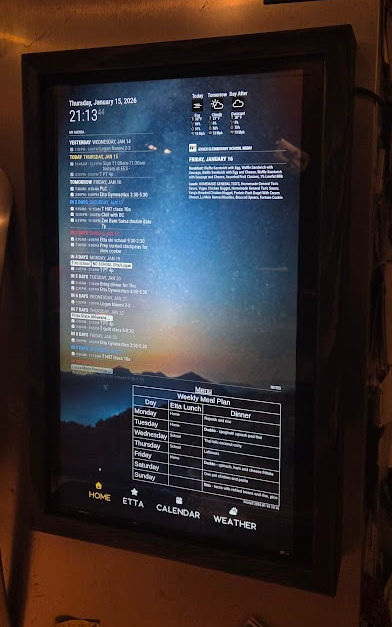
I tried a few different open source tools but discovered MagicMirror2 and fell in love! Currently have a home screen, an interactive chore chart running -MMM-Chores for my kiddo, a monthly calendar view and a weather tab (still under development).
Here’s a brief demo video: You_tube
The hardest part was definitely making the custom wood bezel - I was a woodworker, but matching the profile of the refrigerator, keeping weight down, minimizing the profile, and ensuring I only have one flexible cord having to make the corner from fridge side into the MM was definitely a challenge.
So far, my wife is really happy with it, and is eagerly submitting feature requests. Ok, sigh, that part might get a little tiring!!!
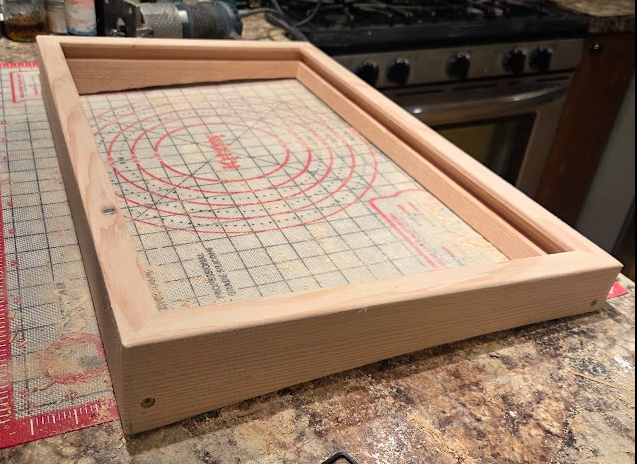
The bezel is Douglas fir, which is much lighter than my preferred maple, but also easier to mill:
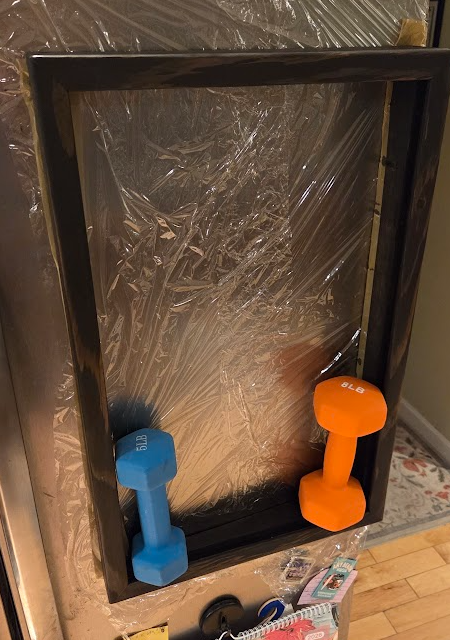
After countersinking and wet-setting the 16 N42 5/8" magnets, I attached the chassis to the refrigerator door with some seran wrap - this allowed the magnets to align with the door for the best contact surface, and I let it cure overnight. Testing with a few dumbells made me more confident that I’d used enough magnets!!
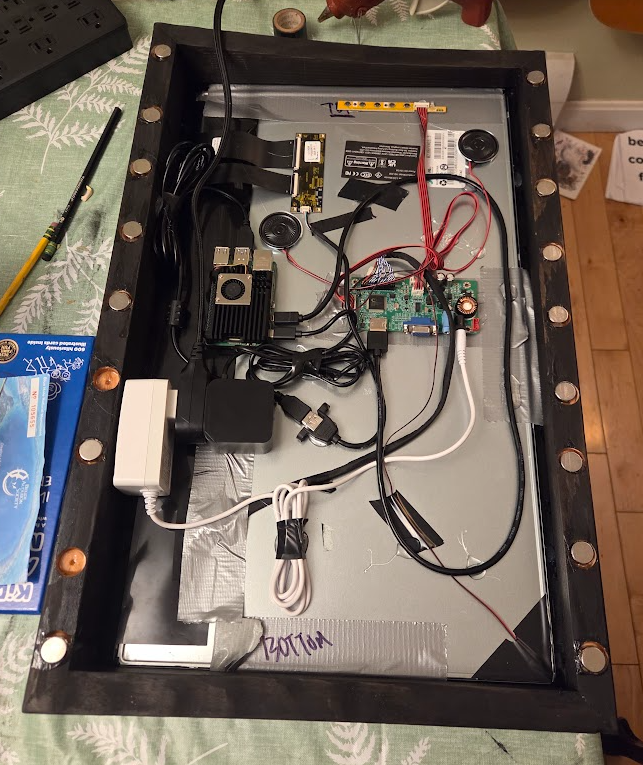
NO project would be complete without a late night final assembly, including duct tape and PLENTY of hot glue lol.
-
@ewingfox said in Happy wife is a happy life!:
So far, my wife is really happy with it, and is eagerly submitting feature requests. Ok, sigh, that part might get a little tiring!!!
No good deed goes unpunished !
Looks great :)
-
hi i’m videogame95 name James
I love your touch screen magic mirror could you send me all Modules or links to the modules you use as would to get some of the on my mirror I having difficulty get my modules to work any tips , I trying to get the bus and train timetable to work I’ve add api key in my config but its not showing up I have Romford
time table train coming in I think to Romford but it very small works with the same api key?any help please
-
@videogame95 remember MagicMirror is case sensitive
Apikey is not the same as apikey.
Look at each module doc (their readme.md) for how they spell each option. Nobody reviews for consistency
Use my MMM-Config module, it presents a form for all config, never misspell a config parm againTest ONE module at a time
Then you dont have 900 lines of output to work thruUse the manual startup during testing and config changes, not pm2
npm start
You can use separate config.js files using the environment variable
export MM_CONFIG_FILE=config/foo.js
Or whatever its name is. Notice NO leading slash -
@videogame95 - @sdetweil is 100% on point with their advice!
I also struggled with config overload at first- so I did a few things that made my life easier:
I downloaded vscode and installed the SSH connection extension so I could use a more functional editor than being stuck in ‘nano’
I commented out all of the module configs I’d dumped into config.js EXCEPT for the basic ones like weather, etc.
Starting the MM using npm start means you can watch the console messages slide by - this was a game changer for me because I was able to watch the console in my SSH session, anything red or yellow - might need to pay attention to it!
When sharing configs - make sure you scrub your api keys - usually you’ll sse people use or etc - which also means if you’ve copied anyone’s suggested configs, you may have inadvertently included text that needs to be replaced.
Screen locations - I’ve struggled with modules consuming more space than I thought they would, messing up the display and resulting in ‘missing’ modules - and with screen locales incorrectly spelled, formatted, etc -they just won’t show up, period. This will ‘pop’ in red when you use npm start (ask me how I know lol).
Once you get the basic mirror up and running, hit me up and I’ll be happy to share more configurations with you - but right now the advice is get the simple stuff working, THEN move to more complex configurations. getting MMM-Pages working was a humbling experience and forced me to really (really) take formatting and code quality more seriously lol. -
@ewingfox what was so hard about the pages module?
For windows users
You can also install Winscp
Or bitvise ssh clients.Both provide direct edit from pc of the pi files
Bitvise provides a file manager window over the connected system files, so it’s double click to edit (I use notepad++)
And they both provide an ssh windowYou don’t need to comment out a module
Just adddisabled:true,On a line after the module: line
If you use my Mmm-Config module, this is a checkbox on the form for that module -
@ewingfox Hey! Looks great. Exactly what I am looking to do instead of paying for one of the expensive off the shelf products.
What touchscreen did you use? I was looking to get a basic one off alibaba. Thanks for the help!
-
Hi do you know if a touch screen add rectangle bezel form Ali express would work under glass or over the glass?
as hopping to add one at later date using mirror glass if put it under the glass would it still work ? -
@videogame95 I’m not aware of any touchscreen that will work behind glass. This glass is not like stuff on phones
More times than not you have to put an IR frame in front of the glass and plug it into a usb port( it becomes a mouse, touch = click)
-
My wife has a number of friends with the subscription-based touchscreen tools and hinted at being interested in getting one - I didn’t love the idea of (another) monthly cost - and the fact that if the company goes under, we have an expensive paperweight.
I tried a few different open source tools but discovered MagicMirror2 and fell in love! Currently have a home screen, an interactive chore chart running -MMM-Chores for my kiddo, a monthly calendar view and a weather tab (still under development).
Here’s a brief demo video: You_tube
The hardest part was definitely making the custom wood bezel - I was a woodworker, but matching the profile of the refrigerator, keeping weight down, minimizing the profile, and ensuring I only have one flexible cord having to make the corner from fridge side into the MM was definitely a challenge.
So far, my wife is really happy with it, and is eagerly submitting feature requests. Ok, sigh, that part might get a little tiring!!!
This is an incredible MagicMirror setup, and building a custom wood bezel to match the refrigerator profile while managing a single flexible cord is truly impressive craftsmanship. Avoiding monthly subscription traps with an open-source build is a brilliant move, and navigating your wife’s ongoing feature requests can feel like guiding a journey step-by-step through the 22 Major Arcana cards. Great work on the interactive chore charts, calendar, and weather modules!
Hello! It looks like you're interested in this conversation, but you don't have an account yet.
Getting fed up of having to scroll through the same posts each visit? When you register for an account, you'll always come back to exactly where you were before, and choose to be notified of new replies (either via email, or push notification). You'll also be able to save bookmarks and upvote posts to show your appreciation to other community members.
With your input, this post could be even better 💗
Register Login