MagicMirror Forum
    • Recent
    • Tags
    • Unsolved
    • Solved
    • MagicMirror² Repository
    • Documentation
    • 3rd-Party-Modules
    • Donate
    • Discord
    • Register
    • Login
    A New Chapter for MagicMirror: The Community Takes the Lead
    Read the statement by Michael Teeuw here.

    Calendar events broadcasting, nothing showing...

    Scheduled Pinned Locked Moved Unsolved Troubleshooting
    9 Posts 3 Posters 114 Views 3 Watching
    Loading More Posts
    • Oldest to Newest
    • Newest to Oldest
    • Most Votes
    Reply
    • Reply as topic
    Log in to reply
    This topic has been deleted. Only users with topic management privileges can see it.
    • BKeyportB Offline
      BKeyport Module Developer
      last edited by

      0|run8080  | [2026-05-27 08:48:46.741] [DEBUG] [calendar] title: Winlink Wednesday Zoom class
      0|run8080  | [2026-05-27 08:48:46.741] [DEBUG] [calendar] Event: Winlink Wednesday Zoom class | start: Wed Sep 16 2020 20:30:00 GMT-0700 (Pacific Daylight Time) | end: Wed Sep 16 2020 21:30:00 GMT-0700 (Pacific Daylight Time) | recurring: true
      0|run8080  | [2026-05-27 08:48:46.743] [INFO]  [calendar] Broadcasting 165 events from https://calendar.google.com/calendar/ical/b7jirihj85d3klbcvja8im40fk%40group.calendar.google.com/public/basic.ics.
      

      Running newest Magic Mirror, installed April 27, using Sam’s scripts.

      I’m getting broadcasts as you can see, but default calendar and all modules that depend on it show nothing.

      any clue what’s going on?

      The "E" in "Javascript" stands for "Easy"

      S 2 Replies Last reply Reply Quote 0
      • S Offline
        sdetweil @BKeyport
        last edited by

        @BKeyport broadcasting is different than using

        Can you explain the setup and config you are running.

        Is this multiple systems to one server?

        We added a caching handler to reduce unnecessary sends to the same module

        Sam

        How to add modules

        learning how to use browser developers window for css changes

        1 Reply Last reply Reply Quote 0
        • S Offline
          sdetweil @BKeyport
          last edited by

          @BKeyport were you able to resolve this?? the 165 events could have been all in the past too

          Sam

          How to add modules

          learning how to use browser developers window for css changes

          BKeyportB 1 Reply Last reply Reply Quote 0
          • BKeyportB Offline
            BKeyport Module Developer @sdetweil
            last edited by

            @sdetweil Sorry, I’ve been away due to work issues. It is multiple systems to one server, and still unsolved. Worked fine before “upgrade” to current MM version.

            The "E" in "Javascript" stands for "Easy"

            S 1 Reply Last reply Reply Quote 0
            • S Offline
              sdetweil @BKeyport
              last edited by

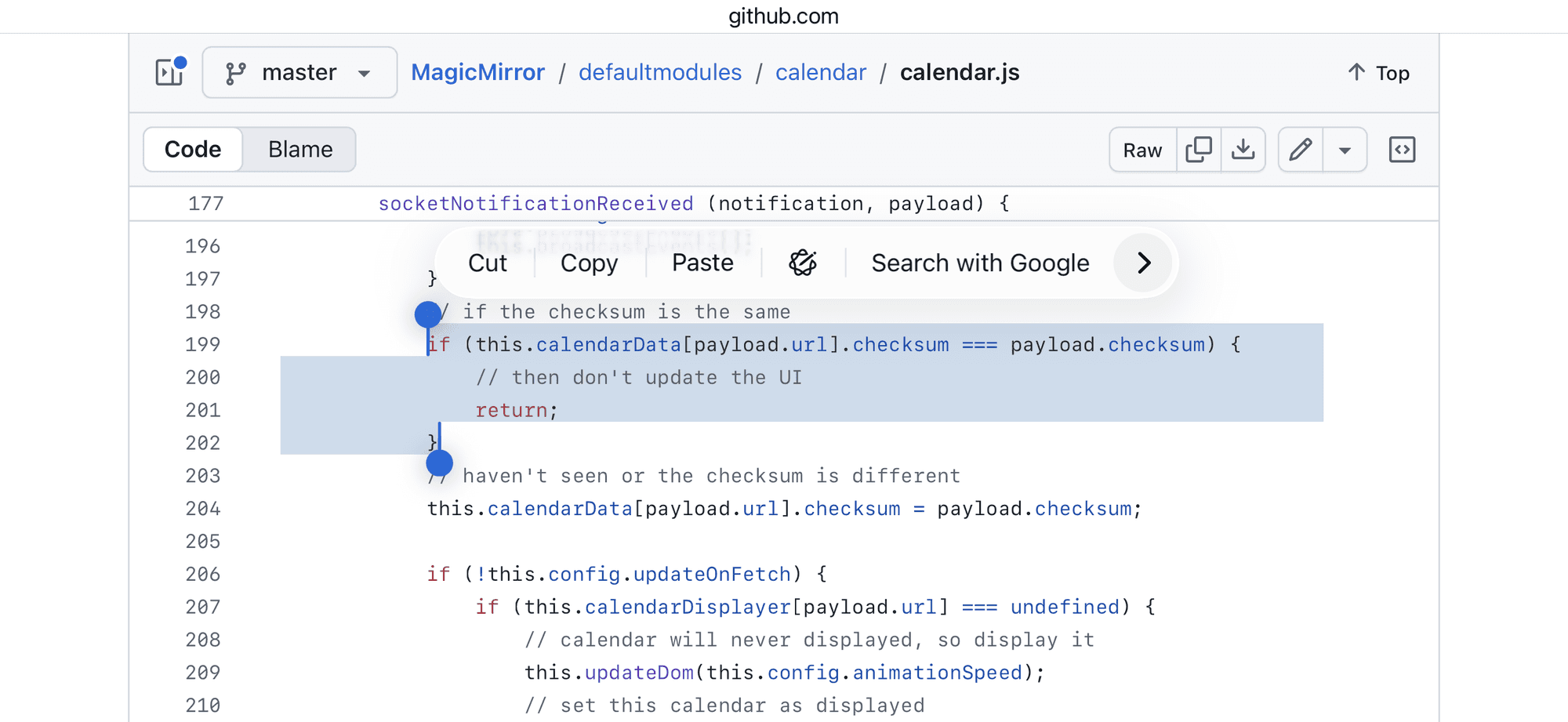
              @BKeyport hmmm. I think the caching might be affecting

              Comment out these lines in calendar.js

              IMG_5332.png

              Sam

              How to add modules

              learning how to use browser developers window for css changes

              KristjanESPERANTOK BKeyportB 2 Replies Last reply Reply Quote 0
              • KristjanESPERANTOK Offline
                KristjanESPERANTO Module Developer @sdetweil
                last edited by

                I tracked this down to a likely root cause: after the HTTPFetcher 304 change, some consumers were trying to process empty responses. In PR #4180, I fixed that for calendar and other consumers.

                1 Reply Last reply Reply Quote 0
                • BKeyportB Offline
                  BKeyport Module Developer @sdetweil
                  last edited by BKeyport

                  @sdetweil does not seem to affect anything.

                              if (notification === "CALENDAR_EVENTS") {
                                          // have we received events for this url
                                          if (!this.calendarData[payload.url]) {
                                                  // no, setup the structure to hold the info
                                                  this.calendarData[payload.url] = { events: null, checksum: null };
                                          }
                                          // save the event list
                                          this.calendarData[payload.url].events = payload.events;
                  
                                          this.error = null;
                                          this.loaded = true;
                  
                                          if (this.config.broadcastEvents) {
                                                  this.broadcastEvents();
                                          }
                                          // if the checksum is the same
                  /*
                                          if (this.calendarData[payload.url].checksum === payload.checksum) {
                                                  // then don't update the UI
                                                  return;
                                          }
                  */
                                          // haven't seen or the checksum is different
                                          this.calendarData[payload.url].checksum = payload.checksum;


                  The "E" in "Javascript" stands for "Easy"

                  S 1 Reply Last reply Reply Quote 0
                  • S Offline
                    sdetweil @BKeyport
                    last edited by sdetweil

                    @BKeyport thanks… I see an other change submitted today

                    https://github.com/MagicMirrorOrg/MagicMirror/pull/4180
                    which references this topic

                    if you want to try that do

                    cd ~/MagicMirror
                    # restore calendar.js 
                    git checkout defaultmodules/calendar/calendar.js
                    git fetch origin pull/4180/head:_fix_304
                    rm package-lock.json
                    git switch _fix_304
                    npm run install-mm
                    restart MM
                    

                    Sam

                    How to add modules

                    learning how to use browser developers window for css changes

                    BKeyportB 1 Reply Last reply Reply Quote 0
                    • BKeyportB Offline
                      BKeyport Module Developer @sdetweil
                      last edited by

                      @sdetweil That fixed it here.

                      The "E" in "Javascript" stands for "Easy"

                      1 Reply Last reply Reply Quote 0

                      Hello! It looks like you're interested in this conversation, but you don't have an account yet.

                      Getting fed up of having to scroll through the same posts each visit? When you register for an account, you'll always come back to exactly where you were before, and choose to be notified of new replies (either via email, or push notification). You'll also be able to save bookmarks and upvote posts to show your appreciation to other community members.

                      With your input, this post could be even better 💗

                      Register Login

                      • 1 / 1
                      • First post
                        Last post
                      Enjoying MagicMirror? Please consider a donation!
                      MagicMirror created by Michael Teeuw.
                      Forum managed by Sam, technical setup by Karsten.
                      This forum is using NodeBB as its core | Contributors
                      Contact | Privacy Policy