Read the statement by Michael Teeuw here.
CalEXT3 not showing events after adding a new page
-
I added a couple of ‘blank’ pages in between my pages with content and since doing that, none of my calendar events are displaying on the calEXT3 module.
Previously, I had two pages both with content and it was working fine.
I now have a blank page, content page, blank page again, and the final content page with calEXT3. Since adding those blank pages, the calEXT3 module is empty but all others are reporting ok. The default calendar module is still loading the event stream fine, but nothing makes it to the calendar display. I tried reducing to just a single calendar, no help. I also tried going back to the ‘old’ setup with only 2 pages and it still didnt display anything.
I followed these steps from another post, and it didn’t have an effect either:
https://forum.magicmirror.builders/topic/20189/default-calendar-not-loading-events-after-new-mm-update/10?page=1cd ~/MagicMirror # restore calendar.js git checkout defaultmodules/calendar/calendar.js git fetch origin pull/4180/head:_fix_304 rm package-lock.json git switch _fix_304 npm run install-mm restart MM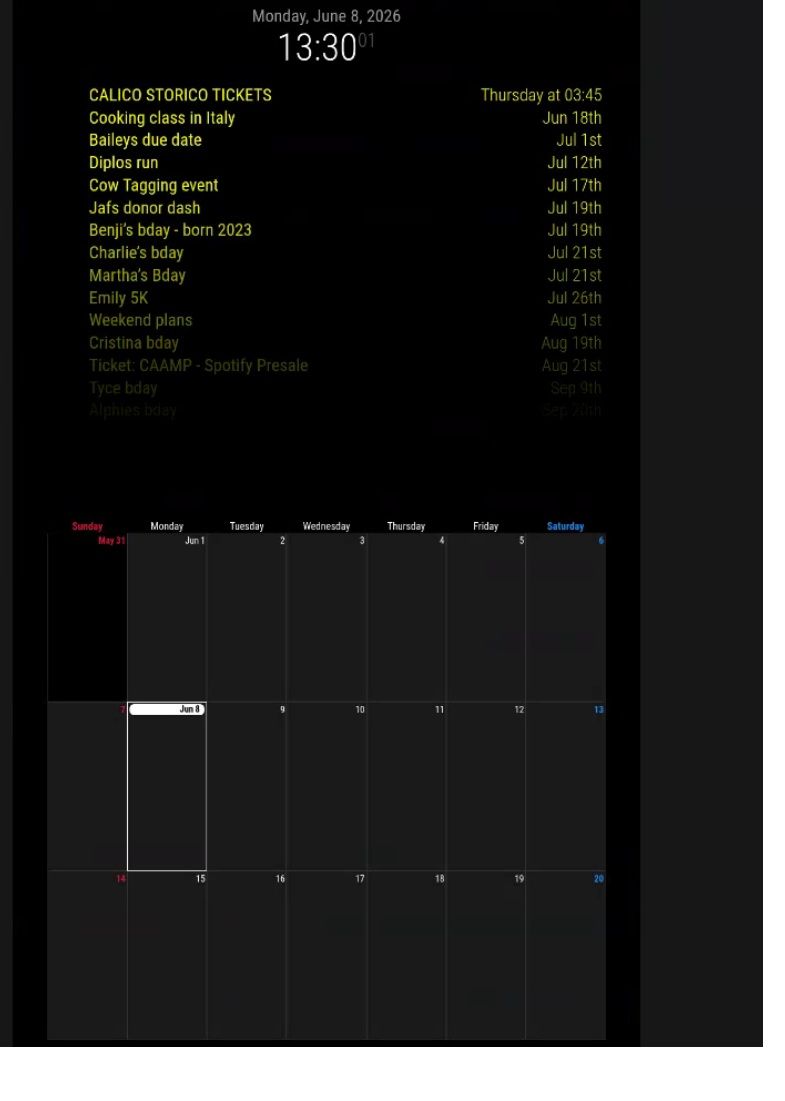
Here is my config:
modules: [ { module: "MMM-pages", disabled:false, config: { timings: { default: 20000, // rotate every 20 seconds //2: 30000, // page 2 rotates every 30 seconds "admin": 30000 // admin hidden page auto-returns after 30 seconds }, modules: [ ["page0"], // class name for page 0 ["page1"], // class name for page 1 ["page2"], // class name for page 2 ["page3"], ], fixed: ["clock","alert","MMM-GlobalPositioner","MMM-BurnIn","MMM-MySystem"], hiddenPages: { "screenSaver": ["screensaver_page"], "admin": ["admin_page"], } } }, { module: 'MMM-GoogleMapsTraffic', classes: "page0", position: 'middle_center', header: "Traffic", disabled: false, config: { key: '', lat: , lng: -, height: '450px', width: '960px', styledMapType: "night", disableDefaultUI: true, updateInterval: 300000, backgroundColor: 'hsla(0, 0%, 0%, 0)', markers: [ { lat: , lng: -, fillColor: '#9966ff' } ] } }, { module: "compliments", classes: "page0", position: "bottom_bar" }, { module: 'MMM-3Day-Forecast', classes: "page0", position: 'top_left', config: { api_key: '', lat: , lon: -, units: 'I', lang: 'en', interval: 300000 } }, { module: "calendar", disabled:false, classes: "page2", //header: "Our Calendar", position: "top_center", config: { coloredSymbol:true, coloredText:true, maximumEntries:15, showLocation:true, maxTitleLength:50, maxLocationTitleLength:50, fontSize:40, tableClass: "medium", //wrapEvents:true, calendars: [ { name: "Hh ", color: 'yellow', fetchInterval: 7 * 24 * 60 * 60 * 1000, symbol: "calendar-check-o", url: "webcal:/" }, ], } }, { module: "MMM-MoonPhase", position: "top_right", classes: "page0", config: { updateInterval: 4320000, hemisphere: "N", resolution: "detailed", basicColor: "white", title: true, phase: true, nextFull: true, size: 200, moonAlign: "center", textAlign: "center", alpha: 0.7, riseAndSet: { display: false, } } }, { module: "MMM-GlobalPositioner", config: { debug: false, delay: 1000, maxAttempts: 5, modules: [ { name: "MMM-MySystem", position: { bottom: -30, left: 15 } }, //add as much modules as you like ] } }, { module: "MMM-MySystem", position: "bottom_bar", header: "", disabled: false, config: { showHeader: false, showCpuUsage: true, showCpuTemp: true, showMemory: false, showDisk: false, showUptime: true, showIPeth: false, showIPwifi: false, tempUnit: "F", updateInterval: 10000 } }, { module: "MMM-BurnIn", position: "bottom_bar", // whatever, doesn't render anything config: { updateInterval: 15, // in Minutes invertDuration: 5 // in Seconds } }, { module: "MMM-CalendarExt3", disabled:false, //waitFetch:20000, classes: "page2", position: "bottom_bar", title: "", config: { mode: "week", instanceId: "main", showWeekNumber: false, waitFetch:5000, useSymbol: true, displayLegend: true, maxEventLines: 12, useWeather: true, firstDayOfWeek: 0, calendarSet: ['', 'Hh'], } }, { module: 'MMM-Screencast', position: 'bottom_right', // This position is for a hidden <div /> and not the screencast window config: { position: 'bottomRight', castName: 'MagicMirror', height: 300, width: 500, } }, ] }; -
I figured this out - I’m an idiot.
I forgot I added a space after my calendar name under the default calendar module so that the displayLegend option would look a little cleaner formatting wise. I never added that space after my calendar name where EXT3 calls for the calendars you want to display. Once I added that space back in, everything worked.
Thanks again @sdetweil for the quick responses!!!
-
@kkmirr04 ok, the design here is MM calendar module broadcasts events, fairly at random
CalExt3 (family) consumes those events, and draws new view…
but it doesn’t want to flash the screen on every event arrival,
refreshIntervalsort of like a train station stop, when the interval fires, all the events that have arrived til then are shown
miss the schedule, wait til next time
default 10 MINUTESbut you don’t want to wait at the start for 10 minutes, you want it to draw NOW…
so waitFetch controls a short wait at startup
but if you miss that window, then you wait the refreshIntervalI suspect that if the module is not shown on the 1st page, it doesn’t get its dom created signal til the page is shown. so you have 40 seconds (page 0/page1) til the first draw starts, which is after the waitfetch.
how long did you wait?? have to wait at least 10 minutes, til Ext3 will draw again
-
@sdetweil I had left it running for a few days after making the change last weekend. I’ll restart it again now and give it ~ 30 min before checking again
-
Its been running for the last ~ 3.5 hours and still no events have displayed on EXT3
-
I figured this out - I’m an idiot.
I forgot I added a space after my calendar name under the default calendar module so that the displayLegend option would look a little cleaner formatting wise. I never added that space after my calendar name where EXT3 calls for the calendars you want to display. Once I added that space back in, everything worked.
Thanks again @sdetweil for the quick responses!!!
-
@kkmirr04 ah, that’s why I dont use the calenderSet list in ext3 config. Show all
Glad you found it!! ( it is there in the config you posted)
Thx for the feedback
-
S sdetweil has marked this topic as solved on
Hello! It looks like you're interested in this conversation, but you don't have an account yet.
Getting fed up of having to scroll through the same posts each visit? When you register for an account, you'll always come back to exactly where you were before, and choose to be notified of new replies (either via email, or push notification). You'll also be able to save bookmarks and upvote posts to show your appreciation to other community members.
With your input, this post could be even better 💗
Register Login