Read the statement by Michael Teeuw here.
MMM-MessageCenter — a unified inbox for MagicMirror notifications
-
I’ve been working on MMM-MessageCenter, a module that gives notifications from different sources one consistent place on the mirror.
The idea came from a pretty simple problem: a notification appears, disappears, and nobody knows whether anyone actually saw it. Different modules and services also handle alerts differently, so important information can easily get lost.
MessageCenter adds a small notification history with clear unread, viewed, acknowledged, dismissed, and expired states.
What can send messages?
Everything:
- Other MagicMirror modules
- MagicMirror’s bundled Weather module
- MMM-Remote-Control
- Home Assistant
- REST webhooks
- MQTT
- Local Unix-socket scripts and system monitors
It intentionally doesn’t collect every internal MagicMirror event. Modules either use the MessageCenter API or an explicitly enabled adapter, which keeps refresh, navigation, and module-control traffic out of the inbox.
A few examples
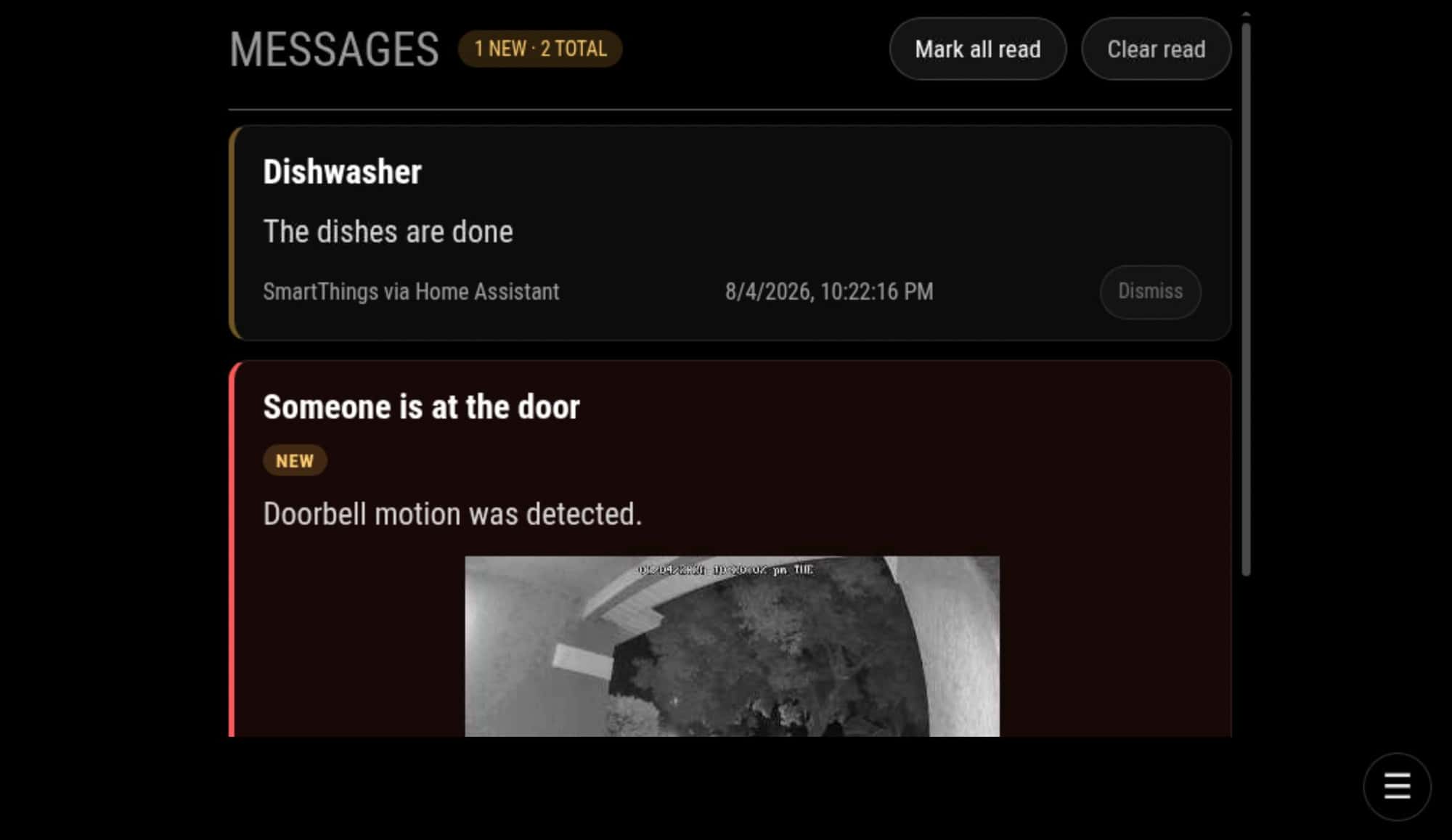
A dishwasher notification can briefly appear as an alert and then remain in history until someone views it.
A doorbell message can include a camera snapshot captured when the event happened, so the image doesn’t change before somebody checks it.
The standard MagicMirror Weather module can add a “Rain approaching” message without requiring a separate weather service.
A local monitoring script can report low disk space, high temperature, network trouble, or another condition that should be visible on the mirror.
Different ways to display it
MessageCenter can be used as:
- A compact list in a normal MagicMirror region
- A full-page message inbox
- A touch-friendly display with message controls
- A non-touch display that simply shows the newest messages
It can show temporary alerts, retain message history, expire old messages, update existing messages by ID, and publish attention events for other integrations. It only says that something needs attention, leaving other modules and integrations free to decide what that means.
0.3.0
The module now has a line mode for side regions. It uses a lightweight, transparent layout and can show just the title and time.
Other recent improvements:
- English, German, Spanish, and French interface translations
- MagicMirror language, locale, and 12/24-hour clock support
- More reliable synchronization after browser or socket reconnects
- Messages continue expiring while the module is hidden or suspended
- REST, MQTT, and Unix-socket messages are retained in the server-side in-memory
Configuration, payload examples, and documentation:
-
A quick MMM-MessageCenter update: version 0.5.0 is now available.
The big change is that MessageCenter can now collect SHOW_ALERT and SHOW_NOTIFICATION events from other MagicMirror modules automatically. Module authors generally shouldn’t need to add MessageCenter-specific support.
For richer integrations, there is also a standard message API with stable IDs, urgency, expiration, updates, and active-message synchronization. Enhanced integrations are now handled through small, independent adapters; the current examples include the standard Weather module, MMM-Remote-Control, and MMM-PublicTransportHub.
A special thanks to Kristjan ESPERANTO for adding service-alert notifications to MMM-PublicTransportHub and helping work through the integration.
-
@bwente cool… did you look at MMM-Config handling of your config setup
MMM-Config builds a web based config for MM and modules… via autodiscovery of the module defaults section
you have objects and things that could be dropdown selection lists…
so a customized layout could be needed -
@sdetweil Thanks! I tried using the editor in MMM-Remote-Control years ago and broke it, so I just used nano since.
The settings are now grouped into sections. Choices such as display, urgency, and retention are dropdowns.
Thanks for pointing me toward the custom layout, it makes a fairly large configuration much more approachable.
One unrelated thing I noticed while testing, my config did not have an explicit language setting because it was using the normal English default. After saving through MMM-Config, the language changed to Afrikaans, which appears to be the first item in the dropdown.
-
@bwente thanks I’ll look at that it should have used the default
-
@bwente thanks… fix pushed
a drop down, with no default set, when not present took the first entry… oops…
in the module folder
git pullfor the fix…
that means you didn’t use the config.js.sample as your base, and then didn’t use my installer script, which copies it…
Hello! It looks like you're interested in this conversation, but you don't have an account yet.
Getting fed up of having to scroll through the same posts each visit? When you register for an account, you'll always come back to exactly where you were before, and choose to be notified of new replies (either via email, or push notification). You'll also be able to save bookmarks and upvote posts to show your appreciation to other community members.
With your input, this post could be even better 💗
Register Login