Read the statement by Michael Teeuw here.
Docker MagicMirror + a separate "dumb" display Pi (remote kiosk over a reverse proxy)
-
Sharing a setup that’s been working well for me, in case it’s useful to anyone else juggling a physical MM display on aging/fragile hardware.
Background: I had MagicMirror running natively on a Raspberry Pi 3B with a monitor attached. I wanted to move to Docker, but didn’t want to run Docker on the same Pi that’s driving the display, that Pi is old, and I didn’t want display/GPU quirks tangled up with container management.What I ended up with instead:
- MagicMirror runs as a single Docker container on a separate, more capable Pi on the same home network , completely headless, no monitor attached.
- The Pi with the physical monitor doesn’t run MagicMirror at all anymore. It just runs a browser in kiosk mode, pointed at a small local reverse-proxy process running on that same Pi, which in turn proxies through to the Docker container’s web UI.
Why the proxy, instead of just pointing the browser straight atcontainerhost:8080?
Two reasons:
- MagicMirror sends
X-Frame-Options: SAMEORIGIN, which matters if you want to wrap the feed in your own page (see #2). - I wanted a couple of small custom status overlays on the display itself — e.g. a banner if the Docker host becomes unreachable, or if internet connectivity drops but the local container is still fine. To overlay anything on top of MM’s own page you need it loaded same-origin, so a tiny local Node reverse-proxy on the display Pi re-serves the container’s content from
localhost, strips that header, and the wrapper page around it handles the status banners.
Why this arrangement, generally:
One MagicMirror instance/config to maintain, no matter how many physical screens you eventually want — each display Pi is just “a browser + a small proxy,” nothing module- or backend-specific.
Any hardware-specific pain (GPU driver quirks, monitor power management, etc.) on the display Pi stays isolated from the actual MagicMirror process, a crash or leak in a module’s backend logic can’t take the display down, since they’re not sharing a process tree anymore.Honest caveat: this doesn’t make the display Pi itself lighter, it’s still a real browser doing real DOM/JS rendering and image decoding locally, so don’t expect a resource-usage miracle on the display side. What you get is architectural: single source of truth for MM itself, and a much smaller, simpler thing running on whatever hardware is stuck driving a screen
I’m pairing this with a Radar motion sensor for wake-on-motion, poll a GPIO pin and call dpms_control on on a HIGH reading, dpms_control off after N minutes of no motion. One thing worth knowing if you’re doing the same: Trixie’s kernel exposes the GPIO chip at a different base offset than older Raspberry Pi OS versions, so older libraries like onoff that write raw BCM pin numbers straight to sysfs (/sys/class/gpio/export) fail with EINVAL. Shelling out to gpioget/gpiomon from libgpiod-tools instead sidesteps that entirely: -
@Rags I might try that out. But use a Fully Kiosk Browser on an Android tablet for the display.
I could probably use the camera for motion detection. -
@bwente You gave me a great idea.
I decided o create a a tiny “launcher” page for switching between multiple displays on one kiosk device. A TV in my study.
I wanted the same Android TV to also show a security camera dashboard (Frigate NVR on my home network), not just MagicMirror. The kiosk browser only points at one URL at a time. Rather than build a full app switcher, I just added a tiny extra route to the small reverse-proxy Node server I already had running for the MM display one page, two big buttons:
!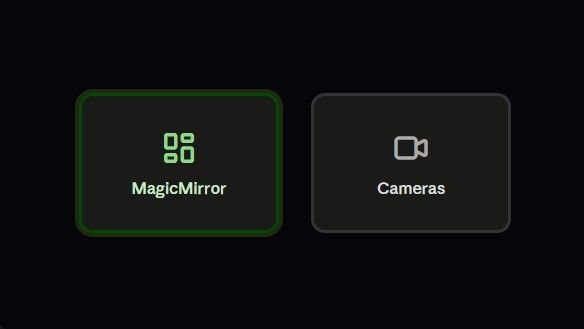
The two buttons just link out to http://192.168.0.16:8088 (MM-Docker) and http://192.168.x.x:5000 (Frigate NVR)
Point the kiosk browser’s start URL at 192.168.x.x:8080/launcher(MM- with Physical Monitor) instead of either destination directly, no JavaScript needed for the actual navigation, and they’re natively D-pad-focusable on a TV, so the remote just moves focus between them and select jumps straight there (the green focus ring makes the current selection obvious from across the room).
One thing worth flagging for anyone doing the same on an Android TV specifically: not every “kiosk browser” app renders a page like this correctly. I initially used one built more for single-photo slideshow display, and it auto-detected and fullscreened the first video element it found instead of showing the actual page layout, fine for MagicMirror (mostly text/widgets) but broke a multi-camera grid dashboard that uses video tags for live streaming. Swapping to a proper general-purpose kiosk browser (Fully Kiosk Browser) fixed it, worth checking that whatever app you use actually renders full webpages as-is, not just “the most interesting-looking media on the page.”
Thank you @bwente for the idea.
Hello! It looks like you're interested in this conversation, but you don't have an account yet.
Getting fed up of having to scroll through the same posts each visit? When you register for an account, you'll always come back to exactly where you were before, and choose to be notified of new replies (either via email, or push notification). You'll also be able to save bookmarks and upvote posts to show your appreciation to other community members.
With your input, this post could be even better 💗
Register Login