Read the statement by Michael Teeuw here.
MRX-Work-Traffic - Shows the time you need to get to work
-
Description:
Hey ho,
I wrote my first module wich is showing the current time to my workplace.
You can add more than one.
I think, its not the best code at all… but it works :)
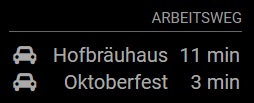
Uses google REST API to get the details…Screenshot
Download:
[card:domsen123/mrx-work-traffic]
-
@domsen123 Interesting how you get in 11mins from Berlin to Hofbräuhaus in Munich :rofl:
-
haha this screen is with an other config :D
Its from the Main Trainstation in Munich :)
-
@domsen123 bummer thought you are probably related to captain kirk with access to warp speed
-
@strawberry-3.141 thats the next module I will write (MMM-MagicBeam) with Alexa support…
Mirror, beam me up to Oktoberfest… -
For the life of me, I can’t get this to work… I don’t even get the header label. Here’s what I did:
-
Cloned the repo into my modules directory with
git clone https://github.com/domsen123/mrx-work-traffic.git -
In the new directory first I tried to run
npm installbut I got the error thatpackage.jsondidn’t exist. So I tried to install request directly by runningnpm install requestbut I got the same error. -
I tried creating
package.jsonby runningnpm init. then I was able to install Request by runningnpm install request. -
I requested a Google API key from here:
https://developers.google.com/maps/documentation/javascript/get-api-key -
My config looks like this:
    {
      module: 'mrx-work-traffic',
      position: 'top_left',
      header: 'Traffic',
      config: {
        apikey: '*** My API Key ***',
        origin: '135 Bellefair Ave, Toronto ON M4L 3V1',
        startTime: '00:00',
        endTime: '23:59',
        destinations: [
          {
            destination: '37 Holland Dr Bolton, ON L7E 5S4',
            label: 'Mars'
          }
        ]
      }
    },
I don’t see any errors in the console. All I get on my screen is the header’s underline, but not even the label text.
I suspect that the problem is either that Request is not installed properly, or that this won’t work with Canadian addresses. Any thoughts?
Thanks!
-Jeff -
-
Hey j.e.f.f…
- clone in modules directory (remove the npm files you created through npm install)
- go back to root…
- type “npm install”, if “request” not installed yet (should be installed by default)
- request api key (you have already, looks good)
your config looks good too…
just to be sure, plz use :
origin: 'Platz der Republik 1, 11011 Berlin',
destinations: [
			{
				destination: 'Platzl 9, 80331 München',
				label: 'Hofbräuhaus'
			}
		]
But it shouldn’t be a problem, using Canadian addresses…
-
@domsen123 I followed your instructions and I still can’t get it to work for me.
I did a little digging into your code, and it seems like this line is evaluating to false every time:
mrx-work-traffic.js: Line 43
if( now >= this.config.startTime && now < = this.config.endTime )(space between < and = added by me. Otherwise it broke markdown…)
I added a console.log at line 57:
else{
      console.log("====================== hiding...");
      this.hide(0);
}
and I see that in my console. It looks like
nowis not interpreted to be betweenconfig.startTimeandconfig.endTime.My config has them set as follows:
startTime: '00:00', endTime: '23:59', -
@domsen123 A bit more hacking on this and I got it to work. I changed how the date comparison is done:
    var now = moment();
    var startTimeSplit = this.config.startTime.split(":");
    var endTimeSplit = this.config.endTime.split(":");

    var startTime = moment().hour(startTimeSplit[0]).minute(startTimeSplit[1]);
    var endTime = moment().hour(endTimeSplit[0]).minute(endTimeSplit[1]);

    if( now.isSameOrAfter(startTime) && now.isSameOrBefore(endTime) ){
I had to do this in three places:
- in the
start()function - in the
getDom()function - in the
getHeader()function
I’m no seasoned programmer, so I’m sure there is a better way to do this, but this at least works for me, and I can verify that Canadian addresses seem to work fine.
Any chance you can add a configuration to each destination for the travel mode? i.e.: Driving, Transit, Biking, Walking. I have two destinations currently configured, my wife’s commute, which she drives, and mine, for which I take transit. I’d like mine to show transit time, not driving time.
- in the


Hello! It looks like you're interested in this conversation, but you don't have an account yet.
Getting fed up of having to scroll through the same posts each visit? When you register for an account, you'll always come back to exactly where you were before, and choose to be notified of new replies (either via email, or push notification). You'll also be able to save bookmarks and upvote posts to show your appreciation to other community members.
With your input, this post could be even better 💗
Register Login