MagicMirror Forum
    • Recent
    • Tags
    • Unsolved
    • Solved
    • MagicMirror² Repository
    • Documentation
    • 3rd-Party-Modules
    • Donate
    • Discord
    • Register
    • Login
    A New Chapter for MagicMirror: The Community Takes the Lead
    Read the statement by Michael Teeuw here.

    MMM-awesome-alexa

    Scheduled Pinned Locked Moved Utilities
    241 Posts 43 Posters 392.5k Views 47 Watching
    Loading More Posts
    • Oldest to Newest
    • Newest to Oldest
    • Most Votes
    Reply
    • Reply as topic
    Log in to reply
    This topic has been deleted. Only users with topic management privileges can see it.
    • U Offline
      uok825 @sdetweil
      last edited by

      @sdetweil I installed new module can you wait for a moment i configure my config file and install awesome alexa. I will reply.

      S 1 Reply Last reply Reply Quote 0
      • S Offline
        sdetweil @uok825
        last edited by

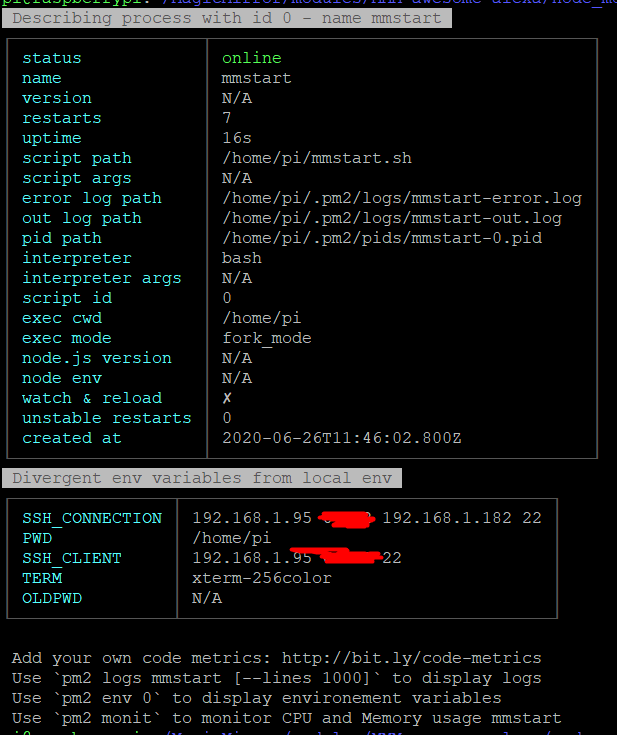
        @uok825 also show output of pm2 info 0

        Sam

        How to add modules

        learning how to use browser developers window for css changes

        U 1 Reply Last reply Reply Quote 0
        • U Offline
          uok825 @sdetweil
          last edited by

          @sdetweil 5e4ede04-ca7d-4ab2-a39e-6a0f9975d8fa-image.png

          S 1 Reply Last reply Reply Quote 0
          • S Offline
            sdetweil @uok825
            last edited by

            @uok825 and show /home/pi/mmstart.sh please

            Sam

            How to add modules

            learning how to use browser developers window for css changes

            U 1 Reply Last reply Reply Quote 0
            • U Offline
              uok825 @sdetweil
              last edited by

              @sdetweil
              mmstart

              #!/bin/bash
              cd ~/MagicMirror
              node serveronly &
              sleep 30
              xinit /home/pi/chromium_start.sh


              chromium_start

              #!/bin/sh
              xset -dpms # disable DPMS (Energy Star) features.
              xset s off # disable screen saver
              xset s noblank # don’t blank the video device
              matchbox-window-manager &
              #midori -e Fullscreen -a http://localhost:8080
              chromium-browser http://localhost:8080/ --window-size=1920,1080 --start-fullscreen --kiosk --incognito --noerrdialogs --disable-translate --no-first-run --fast --fast-start --disable-infobars --disable-features=TranslateUI --disk-cache-dir=/dev/null
              
              
              S 1 Reply Last reply Reply Quote 0
              • S Offline
                sdetweil @uok825
                last edited by

                @uok825 such a shame you rebuilt all this yourself… if u had used my install script it would have set it all up for you…

                just use raspian buster full and voila…

                Sam

                How to add modules

                learning how to use browser developers window for css changes

                U 1 Reply Last reply Reply Quote 0
                • U Offline
                  uok825 @sdetweil
                  last edited by

                  @sdetweil Sorry i saw this first http://emmanuelcontreras.com/how-to/how-to-create-a-magic-mirror-2-with-pi-zero-w/

                  S 1 Reply Last reply Reply Quote 0
                  • S Offline
                    sdetweil @uok825
                    last edited by

                    @uok825 yeh, old stuff…

                    Sam

                    How to add modules

                    learning how to use browser developers window for css changes

                    U 1 Reply Last reply Reply Quote 0
                    • U Offline
                      uok825 @sdetweil
                      last edited by

                      @sdetweil Can you share link your script i flash another sd card raspian and try yourse thx for the help

                      S 1 Reply Last reply Reply Quote 0
                      • S Offline
                        sdetweil @uok825
                        last edited by sdetweil

                        @uok825 all my scripts are here
                        https://github.com/sdetweil/MagicMirror_scripts
                        just copy/paste the command for install

                        use raspian buster
                        https://www.raspberrypi.org/downloads/raspberry-pi-os/

                        i test on my pi0w all the time

                        Sam

                        How to add modules

                        learning how to use browser developers window for css changes

                        U 1 Reply Last reply Reply Quote 0
                        • U Offline
                          uok825 @sdetweil
                          last edited by

                          @sdetweil okey thx the raspian is downloading

                          S 1 Reply Last reply Reply Quote 0
                          • S Offline
                            sdetweil @uok825
                            last edited by sdetweil

                            @uok825 not lite, right?

                            Sam

                            How to add modules

                            learning how to use browser developers window for css changes

                            U 1 Reply Last reply Reply Quote 0
                            • U Offline
                              uok825 @sdetweil
                              last edited by uok825

                              @sdetweil not lite but “Raspberry Pi OS (32-bit) with desktop” is it problem?

                              • not recommend software
                              S 1 Reply Last reply Reply Quote 0
                              • S Offline
                                sdetweil @uok825
                                last edited by

                                @uok825 thats the correct version, all good…

                                Sam

                                How to add modules

                                learning how to use browser developers window for css changes

                                U 1 Reply Last reply Reply Quote 0
                                • U Offline
                                  uok825 @sdetweil
                                  last edited by uok825

                                  @sdetweil

                                  pi@raspberrypi:~ $ pm2 logs --lines=100
                                  [TAILING] Tailing last 100 lines for [all] processes (change the value with --lines option)
                                  /home/pi/.pm2/pm2.log last 100 lines:
                                  PM2        | 2020-06-26T19:32:13: PM2 log: App [MagicMirror:0] starting in -fork mode-
                                  PM2        | 2020-06-26T19:32:14: PM2 log: App [MagicMirror:0] online
                                  
                                  /home/pi/.pm2/logs/MagicMirror-error.log last 100 lines:
                                  /home/pi/.pm2/logs/MagicMirror-out.log last 100 lines:
                                  0|MagicMir | 
                                  0|MagicMir | > magicmirror@2.11.0 start /home/pi/MagicMirror
                                  0|MagicMir | > ./run-start.sh $1
                                  0|MagicMir | 
                                  0|MagicMir | [2020-06-26 19:32:39.858] [LOG] Starting MagicMirror: v2.11.0
                                  0|MagicMir | [2020-06-26 19:32:40.063] [LOG] Loading config ...
                                  0|MagicMir | [2020-06-26 19:32:40.158] [LOG] Loading module helpers ...
                                  0|MagicMir | [2020-06-26 19:32:40.196] [LOG] No helper found for module: alert.
                                  0|MagicMir | [2020-06-26 19:32:41.395] [LOG] Initializing new module helper ...
                                  0|MagicMir | [2020-06-26 19:32:41.428] [LOG] Module helper loaded: updatenotification
                                  0|MagicMir | [2020-06-26 19:32:41.451] [LOG] No helper found for module: clock.
                                  
                                  0|MagicMirror  | [2020-06-26 19:32:48.510] [LOG] Initializing new module helper ...
                                  0|MagicMirror  | [2020-06-26 19:32:48.525] [LOG] Module helper loaded: calendar
                                  0|MagicMirror  | [2020-06-26 19:32:48.537] [LOG] No helper found for module: currentweather.
                                  0|MagicMirror  | [2020-06-26 19:32:48.551] [LOG] No helper found for module: weatherforecast.
                                  0|MagicMirror  | [2020-06-26 19:32:49.314] [LOG] Initializing new module helper ...
                                  0|MagicMirror  | [2020-06-26 19:32:49.334] [LOG] Module helper loaded: newsfeed
                                  0|MagicMirror  | [2020-06-26 19:32:53.427] [LOG] Initializing new module helper ...
                                  0|MagicMirror  | [2020-06-26 19:32:53.442] [LOG] Module helper loaded: MMM-Screencast
                                  0|MagicMirror  | [2020-06-26 19:32:53.478] [LOG] Initializing new module helper ...
                                  0|MagicMirror  | [2020-06-26 19:32:53.505] [LOG] Module helper loaded: MMM-LICE
                                  0|MagicMirror  | [2020-06-26 19:33:03.595] [LOG] Initializing new module helper ...
                                  0|MagicMirror  | [2020-06-26 19:33:03.605] [LOG] Module helper loaded: MMM-awesome-alexa
                                  0|MagicMirror  | [2020-06-26 19:33:03.624] [LOG] All module helpers loaded.
                                  0|MagicMirror  | [2020-06-26 19:33:05.811] [LOG] Starting server on port 8080 ...
                                  0|MagicMirror  | [2020-06-26 19:33:05.999] [LOG] Server started ...
                                  0|MagicMirror  | [2020-06-26 19:33:06.043] [LOG] Connecting socket for: updatenotification
                                  0|MagicMirror  | [2020-06-26 19:33:06.071] [LOG] Connecting socket for: calendar
                                  0|MagicMirror  | [2020-06-26 19:33:06.113] [LOG] Starting node helper for: calendar
                                  0|MagicMirror  | [2020-06-26 19:33:06.134] [LOG] Connecting socket for: newsfeed
                                  0|MagicMirror  | [2020-06-26 19:33:06.160] [LOG] Starting module: newsfeed
                                  0|MagicMirror  | [2020-06-26 19:33:06.165] [LOG] Connecting socket for: MMM-Screencast
                                  0|MagicMirror  | [2020-06-26 19:33:06.207] [LOG] Connecting socket for: MMM-LICE
                                  0|MagicMirror  | [2020-06-26 19:33:06.231] [LOG] Starting node_helper for: MMM-LICE
                                  0|MagicMirror  | [2020-06-26 19:33:06.265] [LOG] Connecting socket for: MMM-awesome-alexa
                                  0|MagicMirror  | [2020-06-26 19:33:06.293] [LOG] Sockets connected & modules started ...
                                  0|MagicMirror  | [2020-06-26 19:33:06.320] [LOG]
                                  0|MagicMirror  | Ready to go! Please point your browser to: http://0.0.0.0:8080
                                  0|MagicMirror  | Starting chromium browser now, have patience, it takes a minute
                                  0|MagicMirror  | [2020-06-26 19:33:06.989] [LOG]    
                                  0|MagicMirror  | Whoops! There was an uncaught exception...
                                  0|MagicMirror  | [2020-06-26 19:33:07.071] [ERROR]  
                                  0|MagicMirror  | { Error: listen EADDRINUSE: address already in use 0.0.0.0:8080
                                  0|MagicMirror  |     at Server.setupListenHandle [as _listen2] (net.js:1280:14)
                                  0|MagicMirror  |     at listenInCluster (net.js:1328:12)
                                  0|MagicMirror  |     at doListen (net.js:1461:7)
                                  0|MagicMirror  |     at process._tickCallback (internal/process/next_tick.js:63:19)
                                  0|MagicMirror  |     at Function.Module.runMain (internal/modules/cjs/loader.js:834:11)
                                  0|MagicMirror  |     at startup (internal/bootstrap/node.js:283:19)
                                  0|MagicMirror  |     at bootstrapNodeJSCore (internal/bootstrap/node.js:623:3)
                                  0|MagicMirror  |   code: 'EADDRINUSE',
                                  0|MagicMirror  |   errno: 'EADDRINUSE',
                                  0|MagicMirror  |   syscall: 'listen',
                                  0|MagicMirror  |   address: '0.0.0.0',
                                  0|MagicMirror  |   port: 8080 }
                                  0|MagicMirror  | [2020-06-26 19:33:07.445] [LOG]    
                                  0|MagicMirror  | MagicMirror will not quit, but it might be a good idea to check why this happened. Maybe no internet connection?
                                  0|MagicMirror  | [2020-06-26 19:33:07.470] [LOG]    If you think this really is an issue, please open an issue on GitHub: https://github.com/MichMich/MagicMirror/issues
                                  0|MagicMirror  | [2020-06-26 19:34:39.220] [LOG]    
                                  0|MagicMirror  | Use existing news fetcher for url: http://www.cumhuriyet.com.tr/rss/son_dakika.xml
                                  0|MagicMirror  | [2020-06-26 19:34:46.507] [LOG]    
                                  0|MagicMirror  | Use existing news fetcher for url: https://www.birgun.net/xml/rss.xml
                                  0|MagicMirror  | [2020-06-26 19:34:46.823] [LOG]    
                                  0|MagicMirror  | Use existing news fetcher for url: https://www.sozcu.com.tr/sitemap_google_news.xml
                                  PM2            | App [MagicMirror:0] exited with code [0] via signal [SIGINT]
                                  PM2            | App [MagicMirror:0] starting in -fork mode-
                                  PM2            | App [MagicMirror:0] online
                                  0|MagicMirror  | > magicmirror@2.11.0 start /home/pi/MagicMirror
                                  0|MagicMirror  | > ./run-start.sh $1
                                  0|MagicMirror  | [2020-06-26 19:35:35.559] [LOG] Starting MagicMirror: v2.11.0
                                  0|MagicMirror  | [2020-06-26 19:35:35.698] [LOG] Loading config ...
                                  0|MagicMirror  | [2020-06-26 19:35:35.787] [LOG] Loading module helpers ...
                                  0|MagicMirror  | [2020-06-26 19:35:35.832] [LOG] No helper found for module: alert.
                                  0|MagicMirror  | [2020-06-26 19:35:36.721] [LOG] Initializing new module helper ...
                                  0|MagicMirror  | [2020-06-26 19:35:36.746] [LOG] Module helper loaded: updatenotification
                                  0|MagicMirror  | [2020-06-26 19:35:36.775] [LOG] No helper found for module: clock.
                                  0|MagicMirror  | [2020-06-26 19:35:42.002] [LOG] Initializing new module helper ...
                                  0|MagicMirror  | [2020-06-26 19:35:42.018] [LOG] Module helper loaded: calendar
                                  0|MagicMirror  | [2020-06-26 19:35:42.042] [LOG] No helper found for module: currentweather.
                                  0|MagicMirror  | [2020-06-26 19:35:42.061] [LOG] No helper found for module: weatherforecast.
                                  0|MagicMirror  | [2020-06-26 19:35:42.609] [LOG] Initializing new module helper ...
                                  0|MagicMirror  | [2020-06-26 19:35:42.622] [LOG] Module helper loaded: newsfeed
                                  0|MagicMirror  | [2020-06-26 19:35:46.278] [LOG] Initializing new module helper ...
                                  0|MagicMirror  | [2020-06-26 19:35:46.292] [LOG] Module helper loaded: MMM-Screencast
                                  0|MagicMirror  | [2020-06-26 19:35:46.347] [LOG] Initializing new module helper ...
                                  0|MagicMirror  | [2020-06-26 19:35:46.355] [LOG] Module helper loaded: MMM-LICE
                                  0|MagicMirror  | [2020-06-26 19:35:58.302] [LOG] Initializing new module helper ...
                                  0|MagicMirror  | [2020-06-26 19:35:58.317] [LOG] Module helper loaded: MMM-awesome-alexa
                                  0|MagicMirror  | [2020-06-26 19:35:58.344] [LOG] All module helpers loaded.
                                  0|MagicMirror  | [2020-06-26 19:36:00.278] [LOG] Starting server on port 8080 ...
                                  0|MagicMirror  | [2020-06-26 19:36:00.469] [LOG] Server started ...
                                  0|MagicMirror  | [2020-06-26 19:36:00.497] [LOG] Connecting socket for: updatenotification
                                  0|MagicMirror  | [2020-06-26 19:36:00.543] [LOG] Connecting socket for: calendar
                                  0|MagicMirror  | [2020-06-26 19:36:00.571] [LOG] Starting node helper for: calendar
                                  0|MagicMirror  | [2020-06-26 19:36:00.605] [LOG] Connecting socket for: newsfeed
                                  0|MagicMirror  | [2020-06-26 19:36:00.621] [LOG] Starting module: newsfeed
                                  0|MagicMirror  | [2020-06-26 19:36:00.651] [LOG] Connecting socket for: MMM-Screencast
                                  0|MagicMirror  | [2020-06-26 19:36:00.694] [LOG] Connecting socket for: MMM-LICE
                                  0|MagicMirror  | [2020-06-26 19:36:00.725] [LOG] Starting node_helper for: MMM-LICE
                                  0|MagicMirror  | [2020-06-26 19:36:00.755] [LOG] Connecting socket for: MMM-awesome-alexa
                                  0|MagicMirror  | [2020-06-26 19:36:00.780] [LOG] Sockets connected & modules started ...
                                  0|MagicMirror  | [2020-06-26 19:36:00.815] [LOG]
                                  0|MagicMirror  | Ready to go! Please point your browser to: http://0.0.0.0:8080
                                  0|MagicMirror  | Starting chromium browser now, have patience, it takes a minute
                                  0|MagicMirror  | [2020-06-26 19:36:01.577] [LOG]    
                                  0|MagicMirror  | Whoops! There was an uncaught exception...
                                  0|MagicMirror  | [2020-06-26 19:36:01.640] [ERROR]  
                                  0|MagicMirror  | { Error: listen EADDRINUSE: address already in use 0.0.0.0:8080
                                  0|MagicMirror  |     at Server.setupListenHandle [as _listen2] (net.js:1280:14)
                                  0|MagicMirror  |     at listenInCluster (net.js:1328:12)
                                  0|MagicMirror  |     at doListen (net.js:1461:7)
                                  0|MagicMirror  |     at process._tickCallback (internal/process/next_tick.js:63:19)
                                  0|MagicMirror  |     at Function.Module.runMain (internal/modules/cjs/loader.js:834:11)
                                  0|MagicMirror  |     at startup (internal/bootstrap/node.js:283:19)
                                  0|MagicMirror  |     at bootstrapNodeJSCore (internal/bootstrap/node.js:623:3)
                                  0|MagicMirror  |   code: 'EADDRINUSE',
                                  0|MagicMirror  |   errno: 'EADDRINUSE',
                                  0|MagicMirror  |   syscall: 'listen',
                                  0|MagicMirror  |   address: '0.0.0.0',
                                  0|MagicMirror  |   port: 8080 }
                                  0|MagicMirror  | [2020-06-26 19:36:02.095] [LOG]    
                                  0|MagicMirror  | MagicMirror will not quit, but it might be a good idea to check why this happened. Maybe no internet connection?
                                  0|MagicMirror  | [2020-06-26 19:36:02.111] [LOG]    If you think this really is an issue, please open an issue on GitHub: https://github.com/MichMich/MagicMirror/issues
                                  

                                  She is not wake up with “Alexa”

                                  S U 2 Replies Last reply Reply Quote 0
                                  • S Offline
                                    sdetweil @uok825
                                    last edited by

                                    @uok825 u have it running already at boot…

                                    { Error: listen EADDRINUSE: address already in use 0.0.0.0:8080
                                    

                                    pm2 stop all

                                    Sam

                                    How to add modules

                                    learning how to use browser developers window for css changes

                                    1 Reply Last reply Reply Quote 0
                                    • U Offline
                                      uok825 @uok825
                                      last edited by

                                      @uok825 How can i fix the problem? Alexa don’t wake up.

                                      S 1 Reply Last reply Reply Quote 0
                                      • S Offline
                                        sdetweil @uok825
                                        last edited by

                                        @uok825 shut down all the magic Mirror servers…
                                        do

                                        pm2 status 
                                        

                                        show the results here

                                        then

                                        pm2 stop all
                                        

                                        check to make sure none are running

                                        ps -ef | grep MagicMirror
                                        

                                        once all are stopped, then

                                        pm2 start 0
                                        

                                        then test

                                        Sam

                                        How to add modules

                                        learning how to use browser developers window for css changes

                                        U 1 Reply Last reply Reply Quote 0
                                        • U Offline
                                          uok825 @sdetweil
                                          last edited by

                                          @sdetweil Still same, don’t wake up

                                          S 1 Reply Last reply Reply Quote 0
                                          • S Offline
                                            sdetweil @uok825
                                            last edited by

                                            @uok825 show me the logs

                                            Sam

                                            How to add modules

                                            learning how to use browser developers window for css changes

                                            U 1 Reply Last reply Reply Quote 0

                                            Hello! It looks like you're interested in this conversation, but you don't have an account yet.

                                            Getting fed up of having to scroll through the same posts each visit? When you register for an account, you'll always come back to exactly where you were before, and choose to be notified of new replies (either via email, or push notification). You'll also be able to save bookmarks and upvote posts to show your appreciation to other community members.

                                            With your input, this post could be even better 💗

                                            Register Login

                                            • 1
                                            • 2
                                            • 3
                                            • 4
                                            • 5
                                            • 12
                                            • 13
                                            • 1 / 13
                                            • First post
                                              Last post
                                            Enjoying MagicMirror? Please consider a donation!
                                            MagicMirror created by Michael Teeuw.
                                            Forum managed by Sam, technical setup by Karsten.
                                            This forum is using NodeBB as its core | Contributors
                                            Contact | Privacy Policy