MagicMirror Forum
    • Recent
    • Tags
    • Unsolved
    • Solved
    • MagicMirror² Repository
    • Documentation
    • 3rd-Party-Modules
    • Donate
    • Discord
    • Register
    • Login
    A New Chapter for MagicMirror: The Community Takes the Lead
    Read the statement by Michael Teeuw here.

    Analog + Digital Clock module

    Scheduled Pinned Locked Moved Solved Requests
    38 Posts 5 Posters 49.1k Views 5 Watching
    Loading More Posts
    • Oldest to Newest
    • Newest to Oldest
    • Most Votes
    Reply
    • Reply as topic
    Log in to reply
    This topic has been deleted. Only users with topic management privileges can see it.
    • KirAsh4K Offline
      KirAsh4 Moderator
      last edited by KirAsh4

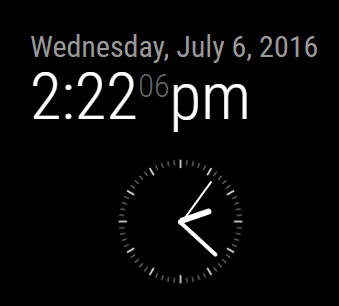
      0_1467836563318_analog.png

      a) what comes before ALPHA, or BETA? whatever it is, that’s the state of the code
      b) at the moment it’s a separate module, will see about merging it with the current (default) clock

      A Life? Cool! Where can I download one of those from?

      1 Reply Last reply Reply Quote 0
      • K Offline
        Kevin
        last edited by

        Cool, looking good.
        Hehe, right now it’s purely cosmetic with both analog and digital. Looking forward to the beta, delta, omega versions :)

        1 Reply Last reply Reply Quote 0
        • KirAsh4K Offline
          KirAsh4 Moderator
          last edited by

          Myah, found a few bugs in both the JS and CSS, which are now fixed. (Also found a conflict with same name CSS files across different modules.) Tomorrow I’ll start working on incorporating it with the default one, and see how to make it work so both can be displayed, or one of them while allowing for everything else to reflow gracefully. Adding some config features at the moment … which means I get to play a bit:
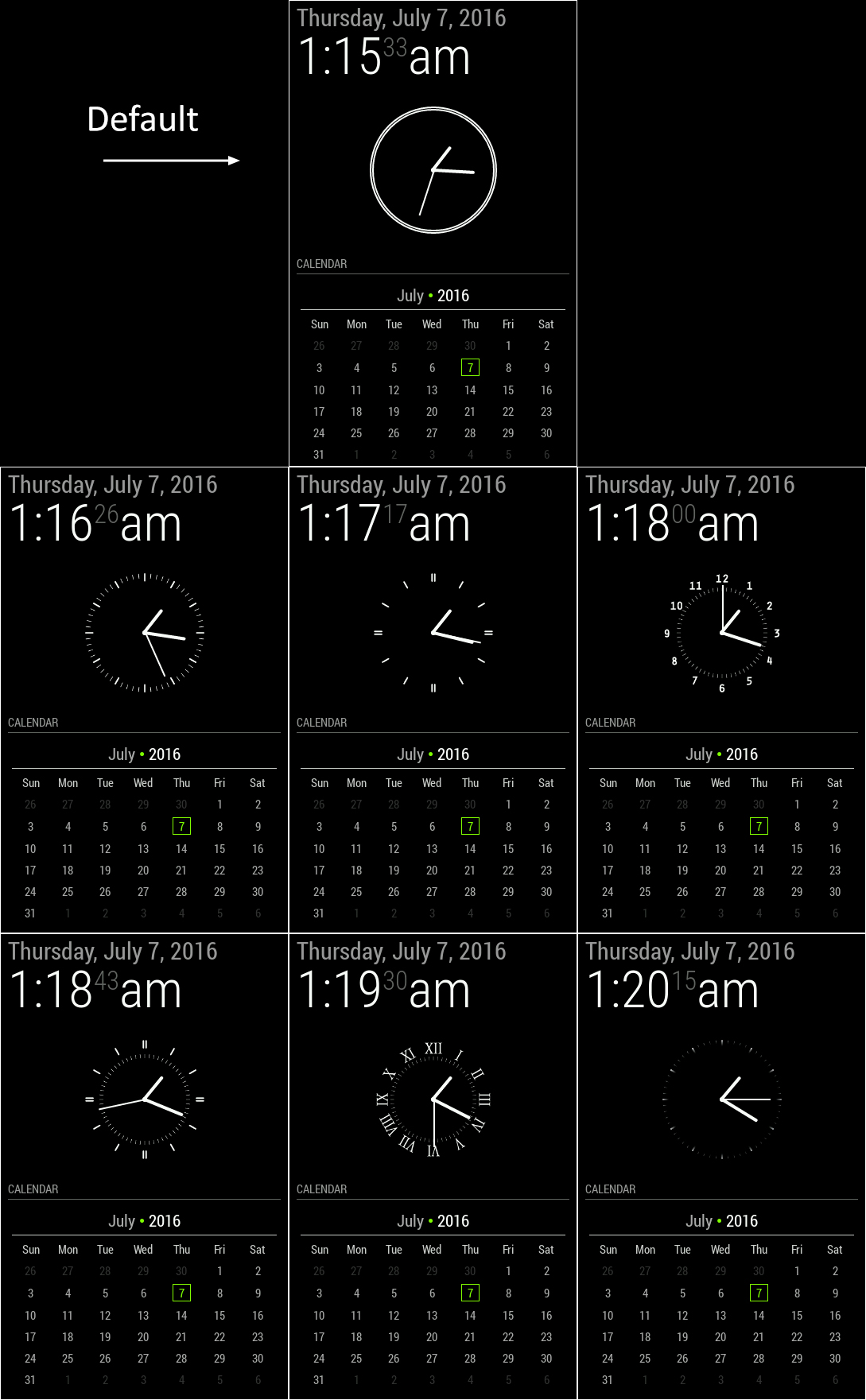
          0_1467876366653_faces.jpg

          A Life? Cool! Where can I download one of those from?

          1 Reply Last reply Reply Quote 2
          • K Offline
            Kevin
            last edited by

            Fantastic! Looks great. Would be nice if you can ajust the placement of the analog dail, if you manage to implement it to the original clock script.

            1 Reply Last reply Reply Quote 0
            • KirAsh4K Offline
              KirAsh4 Moderator
              last edited by

              Adjust placement?

              A Life? Cool! Where can I download one of those from?

              1 Reply Last reply Reply Quote 0
              • K Offline
                Kevin
                last edited by

                ex. right of, left of, over or under the digital time…

                1 Reply Last reply Reply Quote 0
                • KirAsh4K Offline
                  KirAsh4 Moderator
                  last edited by

                  Oh that … yeah that will need to be worked out once merged with the other. The current thought process is:

                  displayType: "analog" || "digital" || "both",
                  analogPlacement: "top" || "right" || " bottom" || "left",
                  analogFace: "face-001" || "face-N",
                  

                  There’s likely to be (more) changes/additions as well.

                  A Life? Cool! Where can I download one of those from?

                  1 Reply Last reply Reply Quote 0
                  • KirAsh4K Offline
                    KirAsh4 Moderator
                    last edited by KirAsh4

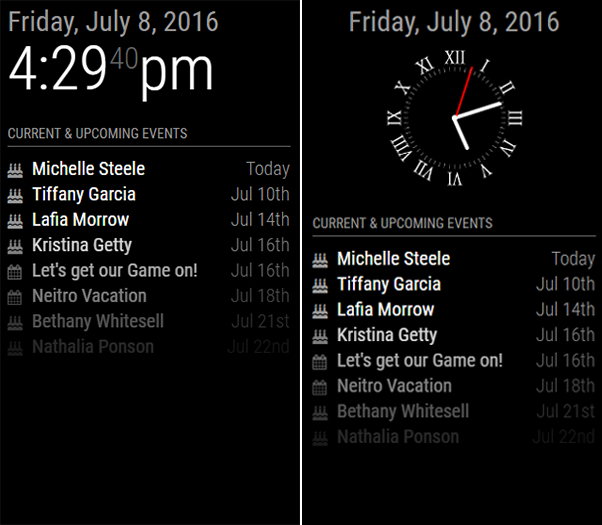
                    Digital or Analog

                    0_1468019740239_clockAD.png


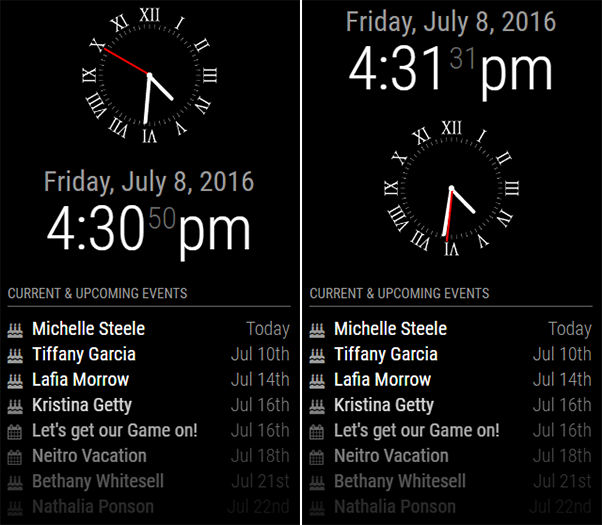
                    Both: Analog “top” or “bottom”

                    0_1468017937455_clockTB.png


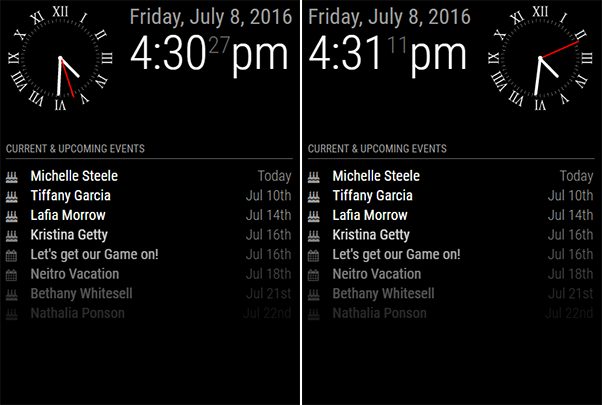
                    Both: Analog “left” or “right”

                    0_1468017972838_clockLR.png

                    Other options include:

                    • ability to change the face of the analog clock
                    • ability to change the size of the analog clock

                    Does that about cover it @Kevin? :)

                    A Life? Cool! Where can I download one of those from?

                    1 Reply Last reply Reply Quote 0
                    • KirAsh4K Offline
                      KirAsh4 Moderator
                      last edited by

                      By the way, there are a few more options being added, specific to the analog clock. While I like my “second” hand to be red, the default will be gray, but I’ll make a config option so people can change its color to something else.

                      I’m also going to have it take into account the 'config.displaySeconds' options.

                      A Life? Cool! Where can I download one of those from?

                      1 Reply Last reply Reply Quote 0
                      • KirAsh4K Offline
                        KirAsh4 Moderator
                        last edited by

                        Also, @MichMich, if you have other requests or comments before I create a PR, now’s the time.

                        A Life? Cool! Where can I download one of those from?

                        1 Reply Last reply Reply Quote 0
                        • MichMichM Offline
                          MichMich
                          last edited by

                          Is the red color default? I’d like all the default modules to be B/W…

                          KirAsh4K 1 Reply Last reply Reply Quote 0
                          • MichMichM Offline
                            MichMich
                            last edited by

                            Very Nice Work By the way! :)

                            1 Reply Last reply Reply Quote 0
                            • K Offline
                              Kevin
                              last edited by

                              Very nice work, you’re the best, thanks a million for the great work.
                              I think it covers my need right now.

                              1 Reply Last reply Reply Quote 0
                              • KirAsh4K Offline
                                KirAsh4 Moderator @MichMich
                                last edited by

                                @MichMich, read the post above yours … default is gray, not red. A config option will let the user set it to whatever color they want.

                                A Life? Cool! Where can I download one of those from?

                                1 Reply Last reply Reply Quote 0
                                • KirAsh4K Offline
                                  KirAsh4 Moderator
                                  last edited by

                                  Ok, I checked in a PR with the new addition. Current changed/added options in addition the ones already present are:

                                  displayType: 'digital',  // options are: 'digital', 'analog', or 'both'
                                  analogSize: '200px',     // This defines how large you want the analog clock to be
                                  analogFace: 'simple',    // options are: 'simple', 'none', or 'face-###' where ### is a value between
                                                           // 001 to 012, inclusive. The 'simple' options displays a simple border, 'none' is no border,
                                                           // and the 'face-###' ones are SVG images that can be used as the face for the clock
                                  analogPlacement: 'bottom', // options are: 'top', 'right', 'bottom', 'left' This option is applicable only
                                                             // when the displayType is set to 'both' and defined where you want the clock in relation
                                                             // to the digital one
                                  secondsColor: '#888888'. // this defines what color the seconds hand will be. I like mine red ... like wine.
                                  

                                  You can see the displays in a prior post.

                                  A Life? Cool! Where can I download one of those from?

                                  1 Reply Last reply Reply Quote 0
                                  • KirAsh4K Offline
                                    KirAsh4 Moderator
                                    last edited by

                                    I forgot to mention this: the clock faces are SVG files, so if you want to put a large analog clock in the middle of your mirror, you can, it will scale beautifully. This is a 600 pixels wide clock using the same SVG file as the smaller one in a previous post.
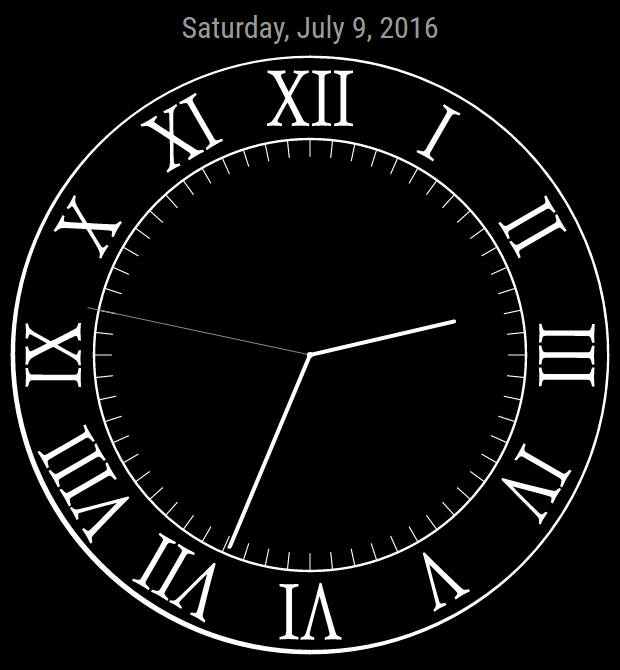
                                    0_1468167705597_clockLarge.png

                                    A Life? Cool! Where can I download one of those from?

                                    1 Reply Last reply Reply Quote 0
                                    • K Offline
                                      Kevin
                                      last edited by

                                      Great work, is this published somewhere already?
                                      How do i get it?

                                      1 Reply Last reply Reply Quote 0
                                      • KirAsh4K Offline
                                        KirAsh4 Moderator
                                        last edited by

                                        It’s checked into the develop branch. You can grab that and test it out.

                                        A Life? Cool! Where can I download one of those from?

                                        K 1 Reply Last reply Reply Quote 0
                                        • K Offline
                                          Kevin @KirAsh4
                                          last edited by

                                          Sorry, im quite new here, develop branch? Cannot find it. :(

                                          1 Reply Last reply Reply Quote 0
                                          • KirAsh4K Offline
                                            KirAsh4 Moderator
                                            last edited by KirAsh4

                                            I’m on the road at the moment so I can’t give you a detailed answer, but you can clone the develop branch instead of the master one:

                                            git clone - b develop http://github.com/MichMich/MagicMirror

                                            Warning: it will overwrite any changes you may have made to local files, just be aware of that.

                                            A Life? Cool! Where can I download one of those from?

                                            1 Reply Last reply Reply Quote 0

                                            Hello! It looks like you're interested in this conversation, but you don't have an account yet.

                                            Getting fed up of having to scroll through the same posts each visit? When you register for an account, you'll always come back to exactly where you were before, and choose to be notified of new replies (either via email, or push notification). You'll also be able to save bookmarks and upvote posts to show your appreciation to other community members.

                                            With your input, this post could be even better 💗

                                            Register Login

                                            • 1
                                            • 2
                                            • 1 / 2
                                            • First post
                                              Last post
                                            Enjoying MagicMirror? Please consider a donation!
                                            MagicMirror created by Michael Teeuw.
                                            Forum managed by Sam, technical setup by Karsten.
                                            This forum is using NodeBB as its core | Contributors
                                            Contact | Privacy Policy