MagicMirror Forum
    • 最新
    • 標籤
    • Unsolved
    • Solved
    • MagicMirror² Repository
    • Documentation
    • 3rd-Party-Modules
    • Donate
    • Discord
    • 註冊
    • 登入
    A New Chapter for MagicMirror: The Community Takes the Lead
    Read the statement by Michael Teeuw here.

    Complete Walkthrough - Install MagicMirror on a PC - Windows 7/10

    已排程 已置頂 已鎖定 已移動 Troubleshooting
    324 貼文 55 Posters 772.7k 瀏覽 59 Watching
    正在載入更多貼文
    • 從舊到新
    • 從新到舊
    • 最多點贊
    回覆
    • 在新貼文中回覆
    登入後回覆
    此主題已被刪除。只有擁有主題管理權限的使用者可以查看。
    • M 離線
      mounir @mounir
      最後由 編輯

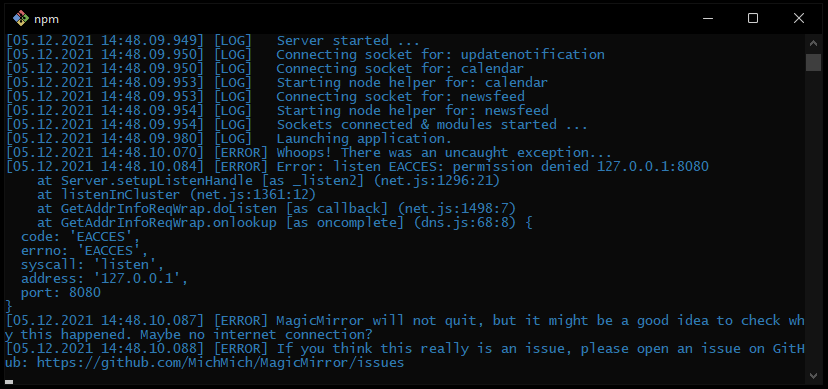
      @mounir yes in cmd Untitled22.png

      S 1 條回覆 最後回覆 回覆 引用 0
      • S 請勿打擾
        sdetweil @mounir
        最後由 sdetweil 編輯

        @mounir is this windows 10, or 11?

        never seen this. installed on windows 11 last week to test

        are u running any other web server apps?

        Sam

        How to add modules

        learning how to use browser developers window for css changes

        M 1 條回覆 最後回覆 回覆 引用 0
        • M 離線
          mounir @sdetweil
          最後由 編輯

          @sdetweil i’m in windows 11 but there is no webserver running

          S 1 條回覆 最後回覆 回覆 引用 0
          • S 請勿打擾
            sdetweil @mounir
            最後由 sdetweil 編輯

            @mounir read this
            https://superuser.com/questions/1437780/how-to-fix-listen-eacces-permission-denied-on-any-port/1568476

            u can change the port in MagicMirror\config\config.js

            Sam

            How to add modules

            learning how to use browser developers window for css changes

            M 1 條回覆 最後回覆 回覆 引用 0
            • M 離線
              mounir @sdetweil
              最後由 編輯

              @sdetweil thank you it works when i’m changing the port in the config.js

              1 條回覆 最後回覆 回覆 引用 0
              • S 請勿打擾
                sdetweil
                最後由 sdetweil 編輯

                Note for v ersion 2.18 a little twist
                do

                 npm install --only=prod
                

                otherwise the developer dependencies will be installed too, and fail, causing electron not to be installed.

                then
                the additional steps are the same

                cd fonts
                npm install
                cd ..\vendor
                npm install
                cd ..
                

                and edit package.json to change the start line as shown in prior posts

                new info for change of start line in package.json, with node 16
                should be like this (earlier worked with node 14,)

                "start": "node_modules\\.bin\\electron js\\electron.js",
                

                Sam

                How to add modules

                learning how to use browser developers window for css changes

                1 條回覆 最後回覆 回覆 引用 0
                • P 離線
                  Pearce
                  最後由 編輯

                  I went through the installation guide and got this error:

                  $ npm start

                  magicmirror@2.18.0 start

                  DISPLAY=“${DISPLAY:=:0}” ./node_modules/.bin/electron js/electron.js

                  ‘DISPLAY’ is not recognized as an internal or external command,

                  operable program or batch file.

                  S 1 條回覆 最後回覆 回覆 引用 0
                  • S 請勿打擾
                    sdetweil @Pearce
                    最後由 編輯

                    @pearce further up
                    https://forum.magicmirror.builders/topic/4089/complete-walkthrough-install-magicmirror-on-a-pc-windows-7-10/141?_=1638708846564

                    Sam

                    How to add modules

                    learning how to use browser developers window for css changes

                    1 條回覆 最後回覆 回覆 引用 0
                    • N6NGN 離線
                      N6NG
                      最後由 編輯

                      Hi all… Looks like a lot of people are trying this… I’m going for it myself but ran into this problem…
                      When I try to do the
                      git clone https://github.com/MichMich/MagicMirror.git

                      I get the following error.

                      N6NG@Main-Computer-in-Ham-Shack MINGW64 /
                      $ git clone https://github.com/MichMich/MagicMirror.git
                      fatal: could not create work tree dir ‘MagicMirror’: Permission denied
                      Anyone figured out how to change permissions… sudo isn’t recognized yet.
                      Dennis

                      S 1 條回覆 最後回覆 回覆 引用 0
                      • S 請勿打擾
                        sdetweil @N6NG
                        最後由 編輯

                        @n6ng no mingw,
                        just normal windows prompt

                        Sam

                        How to add modules

                        learning how to use browser developers window for css changes

                        1 條回覆 最後回覆 回覆 引用 0
                        • 1
                        • 2
                        • 21
                        • 22
                        • 23
                        • 24
                        • 25
                        • 32
                        • 33
                        • 23 / 33
                        • 第一個貼文
                          最後的貼文
                        Enjoying MagicMirror? Please consider a donation!
                        MagicMirror created by Michael Teeuw.
                        Forum managed by Sam, technical setup by Karsten.
                        This forum is using NodeBB as its core | Contributors
                        Contact | Privacy Policy