Read the statement by Michael Teeuw here.
MirrorMirrorOntheWall Alexa Skill trouble
-
Hello,
I’ve been trying to get this skill to work, but I’m stuck with a Lambda error that doesn’t really give me much to work on. My AWS IoT dashboard does show successful connections and I’ve followed every step in the readme to a T, but when I try to run a test on the Lambda function I get this error below. Thanks for the help in advance!
{
  "errorMessage": "Invalid connect options supplied.",
  "errorType": "Error",
  "stackTrace": []
}

Log output:

START RequestId: 4b366259-601e-11e7-899b-8dd5d86aa5dd Version: $LATEST
module initialization error: Error
    at Module.require (module.js:497:17)
END RequestId: 4b366259-601e-11e7-899b-8dd5d86aa5dd
REPORT RequestId: 4b366259-601e-11e7-899b-8dd5d86aa5dd	Duration: 0.37 ms	Billed Duration: 100 ms 	Memory Size: 128 MB	Max Memory Used: 33 MB
I copied and pasted the Lambda request from the Alexa Skill config simulator for the test: (I’ve redacted the id keys)
Request: { "session": { "sessionId": "SessionId.xxxx", "application": { "applicationId": "amzn1.ask.skill.xxxx" }, "attributes": {}, "user": { "userId": "amzn1.ask.account.xxxx" }, "new": true }, "request": { "type": "IntentRequest", "requestId": "EdwRequestId.xxxx", "locale": "en-US", "timestamp": "2017-07-03T18:55:38Z", "intent": { "name": "MirrorMirrorHelloIntent", "slots": {} } }, "version": "1.0" } Response: The remote endpoint could not be called, or the response it returned was invalid. -
I’m having the exact same issue. Let me know if you found a fix! I can’t seem to find any help anywhere.
-
Anything? This is driving me nuts. I feel like I’ve tried everything I can think of. I’ve removed and rebuilt the lambda functions, skills, even my whole raspberry pi build. I saw somewhere that the raspberry pi needs TCP port 8883 (something like that) open for public intrernet connections… could that be something? I’m grasping at staws here. Is there a certain way I should be installing Alexa? I have it working on the pi… man I’m pulling my hair out here. Anybody?
-
I found the problem.
In the MirrorMirror.js file you need to add an extra line to point to the aws-iot endpoint you created in the very first steps. You can find the string in the aws-iot dashboard and clicking on settings in the bottom left hand corner.
Mirrormirror.js:
app.setup = function() {
  app.device = awsIot.device({
    keyPath: __dirname + "/certs/MagicMirror.private.key",
    certPath: __dirname + "/certs/MagicMirror.cert.pem",
    caPath: __dirname + "/certs/root-CA.crt",
    clientId: "MirrorMirror" + (new Date().getTime()),
    region: "us-east-1",
    host: "your-custom-endpoint",
  });
The string should look something like this:
xxxxxxxxxxxx.iot.us-east-1.amazonaws.comAfter you add that in just save, re-zip, and upload to lambda and it should work if you did everything else correctly. Hope this helps!
-
THAT DID IT! The skill is working fine! Thanks SO much! I feel like it’s the last part here Im a little unclear on as well… do I put the whole MirrorMirroronthewall folder into the modules folder with certs, then add the module to config.json file? What are the last few steps to get this puppy in gear? Its a little fuzzy in the docs. THANK YOU A MILLION TIMES!!!
-
I’m SO close. Alexa does the “Yes my queen” intro, and says she is playing a video for me. But I don’t see a video, and I can’t make changes to the layout verbally either. I know I’m mucking up installing the actual module now that the skill is working.
-
Haven’t tried configuring the MM module yet but it says to just copy the cert folder from the Alexa skill to the module directory and make sure that the cert paths are correct in the modules mirrormirror.js file. I’ll try it out sometime next week.
-
Thank you for the reply. This is my first 3rd party module (I picked a doozy lol) do I have to place the module master folder in /modules as well? Thanks again my friend you’re a lifesaver.
-
@subminimal
In the modules mirrormirror.js file you need to add the same host line with the ios endpoint. If youve copied the certs to the module folder, added the module in config/config.js, and run npm install in the module folder to install dependencies then you should be all set. -
That did it nearly 100%!!! The videos play, everything is correct… the only thing is when I use MirrorMirrorOnTheWall to bring up an image… I’m getting the endpoint error again! So weird… Words and videos work just fine, but I can’t bring up images. I’ve checked the API key and CSE ID is correct in keys.json, but still the same. Weird. I mean, I suppose it’s not crazy important, just images… but you know, always striving for 100% functionality. Is there a place that host line needs to be added in google-images somewhere? Hmmm…
Anyway, torresfm THANKYOU SO MUCH for getting me as far as you have!!! I think the author should be made aware of the endpoint issue. If you stumble across a fix for the images portion of the module let me know!
-
I did’nt have this problem. You should check if the CSE ID and API key is correct and make sure the youtube and cse apis are in different projects.
-
@subminimal I ran into the same problem you did and for me it was simply because I forgot to enable image search in my CSE - did you ever get this working? That may be it.
-
I am also have an issue with this module, but my issue is getting it installed. The instructions say “copy all your credential files, then go to your local copy of this repo, and paste them inside the certs folder (which is inside the src folder)” but I can not find a certs folder inside the src folder. Can someone explain this to me
-
Thanks that fixed that error, I still get “RequestId: Process exited before completing request” error, any idea?
-
@torresfm Here is the issue i have now after the Mirror responds with hello my queen what can i do for you than when i ask about anything it says there is an error with your skills response and nothing happens
here is the error that i get on Lamda CloudWatch after that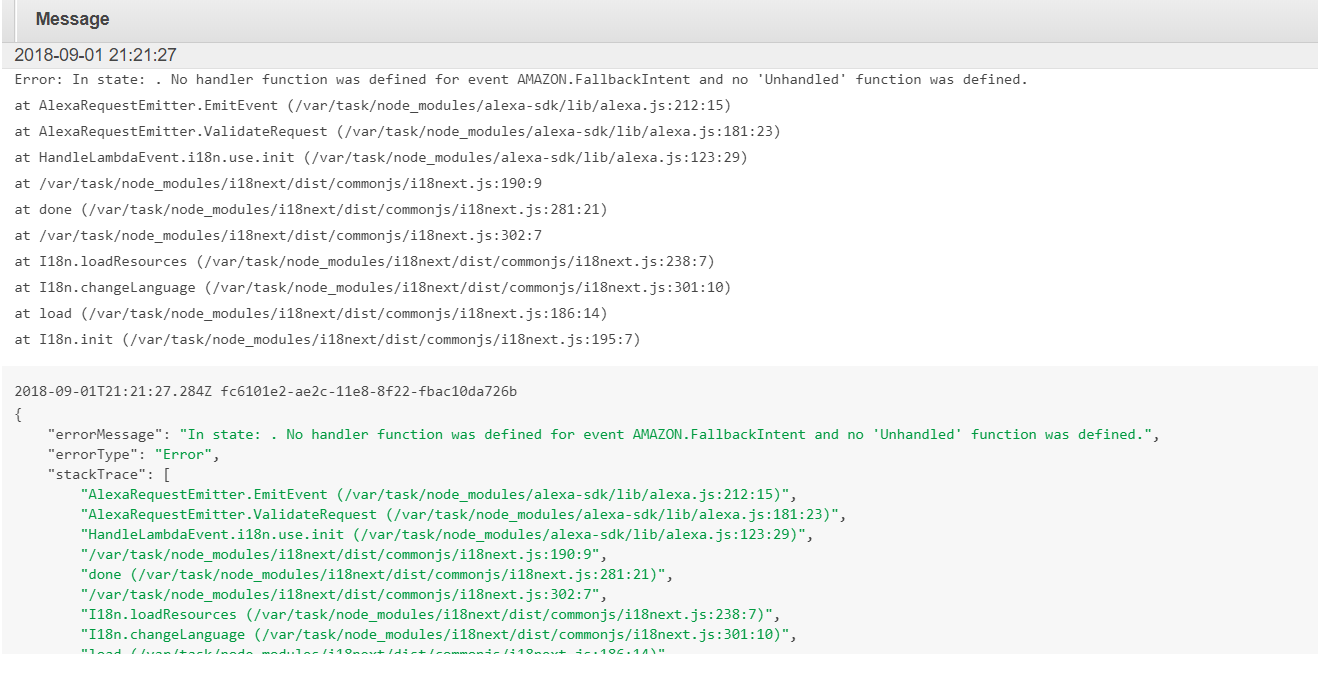
Any ideas on how to solve this
Denis -
@richland007 Did you have any luck on this?
-
@dcalix No nothing in addition to the above other errors have arisen… read here from the beginning for more details
https://forum.magicmirror.builders/topic/8569/mmm-mirrormirroronthewall-installation-issue/63?page=7

Hello! It looks like you're interested in this conversation, but you don't have an account yet.
Getting fed up of having to scroll through the same posts each visit? When you register for an account, you'll always come back to exactly where you were before, and choose to be notified of new replies (either via email, or push notification). You'll also be able to save bookmarks and upvote posts to show your appreciation to other community members.
With your input, this post could be even better 💗
Register Login