Read the statement by Michael Teeuw here.
MMM-Jarvis-Voice-Control
-
Yes you’re right. Default configuration for openjarvis is snowboy for hotword and bing for online detection. Bing offers 5,000 transactions free per month which seems enough for daily usage.
Also OpenJarvis supports multi language and has a nice setup screen which i think it’s a plus.
The down side is that their online documentation and tutorials are in french but with google translate works great :) -
@yawns
I will try to make a video right now. -
Here is the video.
I integrated Jarvis with 3 of my installed modules: Camera, mm-music-player & one custom radio player.
There is no sound in this video because my voice is captured on the mirror and on my pc i have no microphone (because i used it when I built my mirror :) ).BUT there will be two moments when you will here sound and that is when the music starts playing and when the radio starts playing :) because the video recorder also records sound played by my browser.
Also you can not here Jarvis in the video because his sound is not played via browser instead it is played directly from OpenJarvis.
OpenJarvis plugins I installed and are quite usefull:
- jarvis-magicmirror - This will send events to MMM-Jarvis-Voice-Control
- jarvis-riverscript - Gives jarvis the posibility for small talk
- jarvis-youtube-player - You can use commands like: play music from youtube or play video from youtube
- jarvis-wikipedia - You can get some answers with this one. Command: Give me the definition “of something”
- jarvis-ui - This gives you a nice interface where you can start chatting with Jarvis via writing.
- jarvis-system-startup - This will give you the posibility to setup Jarvis to start at boot time
-
Well I reinstalled it following all the recommended settings. The instructions are lacking a lot. I understand this all and I can’t get it working at all. So the average user is going to be totally lost. The instructions here https://github.com/merceaemil/MMM-Jarvis-Voice-Control do not tell the user where to install them… in the MagicMirror directory… outside the directory…unclear. Same with the jarvis plugin… where is the user supposed to install it? It all loads without error but fails to work… I have installed a couple different ways and it fails to work without any errors.
-
@cowboysdude Does it give you any error in console log ? What exactly is not working, JARVIS or the MagicMirror plugin? Is jarvis responding to the wake word?
Can you start Jarvis is Troubleshooting mode and Magic mirror in dev mode and share screenshots of logs when you are trying to use it?
How to start Jarvis:
https://www.openjarvis.com/content/usageIf you can respond to this questions i can try to figure out what it’s missing on your enviroment and i can fix the code and documentation
-
@merceaemil I will have to do this when I get home from work. Thank you!
-
Salut merceaemil !
Tiens, ça tombe bien, c’est juste ce que je cherchais :)
That sounds good ! Je vais essayer d’installer ce plugin sur mon Jarvis qui marche déjà très bien.
Je ferai ensuite un feedback.
Encore merci et à bientôt ! -
@r3z3 said in MMM-Jarvis-Voice-Control:
Salut merceaemil !
Tiens, ça tombe bien, c’est juste ce que je cherchais :)
That sounds good ! Je vais essayer d’installer ce plugin sur mon Jarvis qui marche déjà très bien.
Je ferai ensuite un feedback.
Encore merci et à bientôt !… and it works !
Ça marche très bien, pas de problème de cohabitation avec Jarvis.
Merci merceaemil ! -
@r3z3 Hy, I am happy that it works for you :)
-
This post is deleted! -
Hello
Please reconfigure jarvis and change the hotword to something shorter. “Hello my friend!” is to long for your setup. Use something like “Ok Mirror”.
The circle will show up after jarvis recognises the hot word. After Jarvis recognised that you said that hotword.
Just like in the screen you shared it said that the hotword has to be between 0.5 and 1.5 speaking seconds.
After you reconfigure the hotword tell me if it works.
-
@merceaemil
I’ve changed hotword. But I cannot setup my microphone. I can configure either speakers or a microphone. it either asks to increase the signal or reduce during setup process.
When I say something during Setup Wizard for speaker it passed successfully but when it asks me to be silent it can’t finish and says decrease microphone gain. Please advise
Best, -
@aro28
I have builted microphone in my touch screen Monitor. Should I try another external USB microphone. -
i think you should try another mic. one that works on usb… or maybe use a webcam which has a builtin mic.
-
@merceaemil
Ok. Thank you! Will do tomorrow. -
@aro28
Hello,
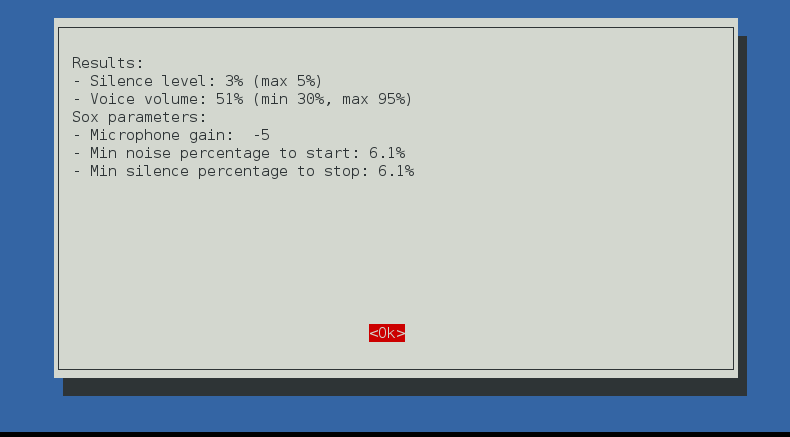
Today i installed another mic thru the 3D sound card adapter and Setup Wizard has been completed successfully.
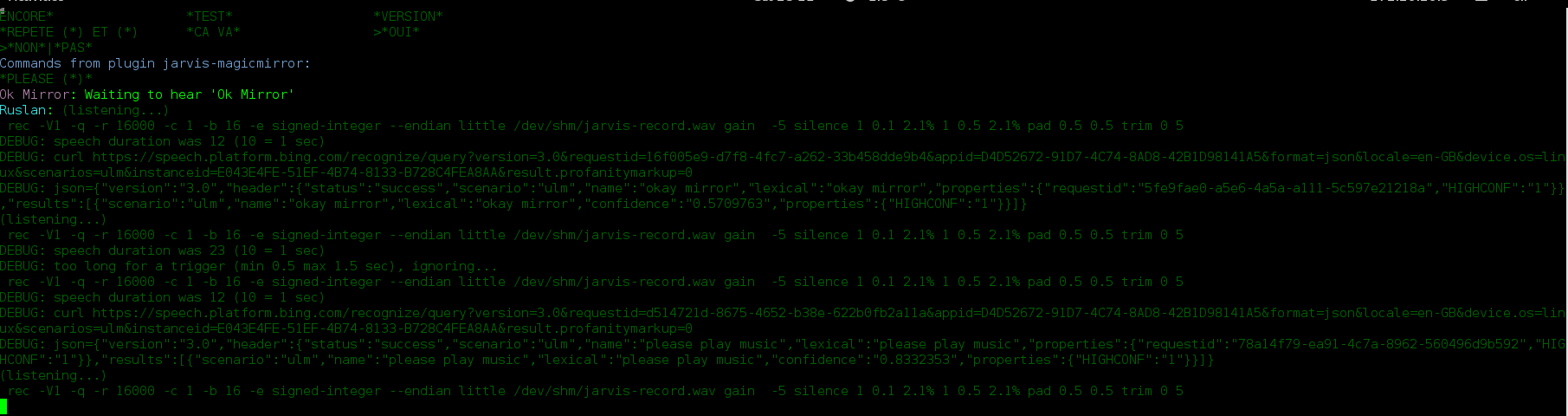
But MM is running without animated circle. Also, when i run Jarvis in troubleshooting mode, in the beginning it introduces itself and when i say something it’s just repeating my words
Should i configure something else? How do voice commands work here? I’m generally new to this.
Thank you in advance.
-
@aro28
Hi any updates on above?
What should to be installed first? MM or Jarvis?
Thanks! -
Clean it all out and reinstalled it…was good until Microsoft wanted a CC to register… that’s a big fat noooooooooooooooo…so this voice software will not do… ;)
-
@merceaemil
and to Anyone
How to Connect (Usage) Jarvis in Magic Mirror
such as How to open/close currentweather (Default module) ,
How to open/close clock (default module)
can you explain in detail becuase I,m Beginner
Thanks for your kind -
Hello,
although this thread is quite old, I have a question.
Is it possible to display the inner circle (e.g. in blue) when Jarvis is in standby mode?
Hello! It looks like you're interested in this conversation, but you don't have an account yet.
Getting fed up of having to scroll through the same posts each visit? When you register for an account, you'll always come back to exactly where you were before, and choose to be notified of new replies (either via email, or push notification). You'll also be able to save bookmarks and upvote posts to show your appreciation to other community members.
With your input, this post could be even better 💗
Register Login