Read the statement by Michael Teeuw here.
MMM-Hive
-
Good stuff, works great.
I was hoping someone would get a hive module up as I don’t have the knowledge to program one myself.
Cheers!
-
@randomnoise Cheers :) That’s great it’s working - you can never be too sure, when I’ve only got my own Hive to test on.
Let me know whether you find any issues with it though. And I wouldn’t worry about having any knowledge, I certainly didn’t! -
BTW, your default values in the readme appear to be wrong.
The JS shows they are set to
highestTemp: ‘30’
highTemp: ‘25’
lowTemp: ‘20’
lowestTemp: ‘15’But readme shows 30 for all of them
-
@randomnoise Doh! That’s the curse of copy / paste! Thanks for pointing this out - fixed the settings in the readme.
-
@mongo116- Don’t know how your module is going for you, but I seem to be getting errors appearing in my PM2 logs… my mm-out log is filling up with :
Whoops! There was an uncaught exception...
MagicMirror will not quit, but it might be a good idea to check why this happened. Maybe no internet connection?
If you think this really is an issue, please open an issue on GitHub: https://github.com/MichMich/MagicMirror/issues
my mm-error log has lots of:
TypeError: Cannot read property 'statusCode' of undefined
    at Request._callback (/home/pi/MagicMirror/modules/MMM-Hive/node_helper.js:87:21)
    at self.callback (/home/pi/MagicMirror/node_modules/request/request.js:188:22)
    at emitOne (events.js:96:13)
    at Request.emit (events.js:188:7)
    at Request.onRequestError (/home/pi/MagicMirror/node_modules/request/request.js:884:8)
    at emitOne (events.js:96:13)
    at ClientRequest.emit (events.js:188:7)
    at TLSSocket.socketErrorListener (_http_client.js:309:9)
    at emitOne (events.js:96:13)
    at TLSSocket.emit (events.js:188:7)
seems to happen regularly, but cant really tell exactly what causes it. The module still appears to be working so whatever this is, it isn’t crashing the module or MM itself.
Is yours doing this as well? Let me know if I can do anything else to gather info to troubleshoot.
-
@randomnoise I’m still waiting for my 2-way acrylic to arrive, so to be honest I haven’t run the module for any real length of time. Most I’ve really done is run it for a few hours. While the pi is still in bits waiting to be fitted into a frame, I will run MM and the module on my Windows desktop over night and see what’s occurring. Funnily enough, I have just started MM up and got the following error which I’ve not seen before
Whoops! There was an uncaught exception...
TypeError: Cannot read property 'name' of undefined
    at D:\MagicMirror\modules\default\updatenotification\node_helper.js:35:43
    at D:\MagicMirror\node_modules\simple-git\src\git.js:721:18
    at Git. (D:\MagicMirror\node_modules\simple-git\src\git.js:761:18)
What are the config settings you are using for the module? What’s the updateInterval set as?
Thanks…
-
Haven’t changed any of the intervals so its just using module defaults
{
			module: "MMM-Hive",
			position: "top_right",
			config: {
				temperatureSuffix: "°C",
				username: "[TOP SECRET]",
				password: "[NOPE]",
				postcode: '[WHERE I LIVE]',
				showNext: true,
				animatedLoading: false,
				highestTemp: '22',
				highTemp: '20',
				lowTemp: '16',
				lowestTemp: '14',
			},
		},
Also got it running in my windows browser ATM with debug console open, but it hasn’t thrown the error yet. I don’t think its occurring all the time, but as my mirror has been running 24/7 there are quite a few of these errors in the logs so definitely not a one off. Log files don’t seem to time stamp entries so I can only tell if I see the timestamp of the log itself change when it occurred.
-
@randomnoise Let me know how it goes and I will do some troubleshooting myself.
-
I’ve added some slight changes and I am going to leave it running today. I did see the same issue as you are having last night. Not sure why yet, but at least I am seeing the same. Once I’ve tested the changes for a day or so, I will update github and let you know.
-
@randomnoise I’ve updated github with the changes. Can you update and enable debug. I’ve added a timestamp so if you have developer tools open, you should see the errors. Let me know. I will keep it running overnight to see whether I am still experiencing the problem. Thanks
-
@mongo116 Cheers, have updated & will keep an eye on it.
FWIW it hadn’t thrown the error again since I restarted it yesterday either.
-
I came back from work and had loads of the uncaught exception errors, but the module was not showing any error on the screen. Apparently the internet had been down since 2pm, so looks like that was the cause. Hopefully the errors being seen are just down to the Hive site not being available, so the changes I have made should prevent these from generating errors. If you have debug on though you will see them. Hopefully it’s sorted now :)
-
Hi
Thanks so much for building this module from the screenshots it looks excellent. I am getting a null value for the internal temperature from my thermosta, any ideas why this might be? I have double checked my username and password and proven this works by putting in a dummy value and it then refuses to authenticate so I don’t believe its that.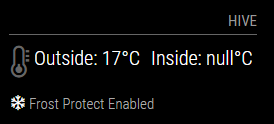
Maybe its a case of RTFM??
Thanks in advance
Stephen -
@spwood100 Hi, can you connect to the magicmirror via Chrome or some other browser and enable developer tools (F12). Refresh the page and you should see information shown in the developer tools window. If you set debug: true in the config.js that will output more details. If your username / password are wrong, then it should show that on the magic mirror screen.
-
@mongo116 Thanks for the quick response. No error messages are showing in the console and I have also enabled verbose mode as well as debug mode. One thing I did notice is that I am running this on my dev server which is a few releases behind so I will try it on my prod which is at the latest release.
Cheers -
@spwood100 Ok, let me know. Thanks…
-
Hi
Just tested it on an up to date version of MM and still the same issue. The logs do not show anything out of the ordinary/home/pi/.pm2/logs/MagicMirror-out-0.log last 15 lines:
0|MagicMir | Starting server on port 8080 …
0|MagicMir | Server started …
0|MagicMir | Connecting socket for: updatenotification
0|MagicMir | Connecting socket for: calendar
0|MagicMir | Starting node helper for: calendar
0|MagicMir | Connecting socket for: MMM-Hive
0|MagicMir | Starting node helper for: MMM-Hive
0|MagicMir | Connecting socket for: newsfeed
0|MagicMir | Starting module: newsfeed
0|MagicMir | Sockets connected & modules started …
0|MagicMir | Launching application.
0|MagicMir | Create new calendar fetcher for url: http://www.calendarlabs.com/templates/ical/US-Holidays.ics - Interval: 300000
0|MagicMir | Create new news fetcher for url: http://www.nytimes.com/services/xml/rss/nyt/HomePage.xml - Interval: 300000
0|MagicMir | Use existing news fetcher for url: http://www.nytimes.com/services/xml/rss/nyt/HomePage.xml
0|MagicMir | Use existing news fetcher for url: http://www.nytimes.com/services/xml/rss/nyt/HomePage.xmlhowever in developer mode I can see the the payload for the inside temp is not getting generated where as the outside temp is

Do I have to enable something on my Hive account to let the API be called on it?
Cheers
-
@spwood100 Can you add deb: true, to your config.js under the MMM-Hive configuration options, and then reload and check the developer tools console. It should show more detailed information.
-
Hi Mongo
Thanks for your continued help on this. This is my config for this module and it doesnt give more detailed information in developer tools than already shown. Is there something worng with how I am calling it?
{
module: “MMM-Hive”,
header: “Hive”,
position: “top_right”,
config: {
temperatureSuffix: “°C”,
username: “myusername”,
password: “mypassword”,
postcode: ‘whereIlive’,
showNext: true,
debug: true,
animatedLoading: true,
highestTemp: ‘22’,
highTemp: ‘20’,
lowTemp: ‘16’,
lowestTemp: ‘14’,
},
},nothing in the pm2 error logs either it just does not look to be calling the payload for the INTERNAL temp.
Cheers
-
@mongo116 , If I click into the output in developer tools I get the following (not sure if thats any help?)
socketNotificationReceived: function(notification, payload) {
var dt = new Date();
var utcDate = dt.toUTCString();
if (notification === “INSIDE”) {
if (this.config.debug == true) {
Log.log(utcDate + " " + this.name + " received notification: " + notification);
this.processData(“INSIDE”, JSON.parse(payload));
this.updateDom(this.config.animationSpeed);
this.loaded = true;
this.error = false;
this.error401 = false;
}

Hello! It looks like you're interested in this conversation, but you don't have an account yet.
Getting fed up of having to scroll through the same posts each visit? When you register for an account, you'll always come back to exactly where you were before, and choose to be notified of new replies (either via email, or push notification). You'll also be able to save bookmarks and upvote posts to show your appreciation to other community members.
With your input, this post could be even better 💗
Register Login