MagicMirror Forum
    • Recent
    • Tags
    • Unsolved
    • Solved
    • MagicMirror² Repository
    • Documentation
    • 3rd-Party-Modules
    • Donate
    • Discord
    • Register
    • Login
    A New Chapter for MagicMirror: The Community Takes the Lead
    Read the statement by Michael Teeuw here.

    MMM-CalendarExt

    Scheduled Pinned Locked Moved Productivity
    198 Posts 45 Posters 232.8k Views 45 Watching
    Loading More Posts
    • Oldest to Newest
    • Newest to Oldest
    • Most Votes
    Reply
    • Reply as topic
    Log in to reply
    This topic has been deleted. Only users with topic management privileges can see it.
    • bokifideB Offline
      bokifide
      last edited by

      Hi! Love this module :) thank you.

      Just wondering if there’s a way to omit Saturday and Sunday?
      Been poking around and I haven’t been able to figure it out =/

      0_1541395138331_8e5ca64d-0d05-4a5f-8077-0e0a44b6452b-image.png

      Thanks ahead <3 :)

      ? 1 Reply Last reply Reply Quote 0
      • ? Offline
        A Former User @bokifide
        last edited by

        @bokifide
        Add this to your css/custom.css

        .day_6 {
          display:none;
        }
        
        .day_7 {
          display:none;
        }
        
        .CALEXT .tableStyle td {
          width:17%;
        }
        
        1 Reply Last reply Reply Quote 0
        • bokifideB Offline
          bokifide
          last edited by

          @sean said in MMM-CalendarExt:

          .day_6 {
          display:none;
          }

          .day_7 {
          display:none;
          }

          .CALEXT .tableStyle td {
          width:17%;
          }

          Worked!! Thank you so much, that’s perfect :)

          1 Reply Last reply Reply Quote 0
          • D Offline
            Doudy
            last edited by Doudy

            Hello,
            alt text

            How can I delete the text ‘in 15 hours’
            In addition it does not seem right to me.
            Or does this indicate the end of the event?

            module: 'MMM-CalendarExt',
            position: "top_left",
            config: {
            		colored: true,
            		        system: {
            		        show: ['current','daily'],
            		        locale: 'fr-be', //when omitted, default value would be your system default locale by moment.js
            			showEmptyView: 0,
            			fullDayEventLocalize: 0,
            			redrawInterval: 30*60*1000, //minimum 60000
            			userProfileConfig: 0,
            			startProfile: ''
            			},
            views: {
            	current: {
            		position: "top_left",
            		title: "Aujourdhui",
            		limit: 3,
            
            etc...
            

            Thanks![alt text]

            ? D 3 Replies Last reply Reply Quote 0
            • ? Offline
              A Former User @Doudy
              last edited by

              @doudy
              I’m on travel, so I’ll reply to you on Monday.

              1 Reply Last reply Reply Quote 0
              • D Offline
                Doudy @Doudy
                last edited by

                @doudy
                Thanks

                1 Reply Last reply Reply Quote 0
                • ? Offline
                  A Former User @Doudy
                  last edited by

                  @doudy said in MMM-CalendarExt:

                  How can I delete the text 'in 15 hours’

                  add this in your ~/MagicMirror/css/custom.css

                  .CALEXT .current .eventTime {
                    display:none;
                  }
                  

                  Or does this indicate the end of the event?

                  Sorry, That’s not available.

                  1 Reply Last reply Reply Quote 0
                  • D Offline
                    Doudy
                    last edited by

                    That is OK.
                    Thanks

                    1 Reply Last reply Reply Quote 0
                    • C Offline
                      cptkex
                      last edited by

                      hi! still loving your module but im having some issues :/

                      i´ve been trying to add the code you have linked previously to make the calender bigger but i cant seem to stretch it to the screen sides?

                      also, why is tuesday bigger then the rest?

                      how do i remove the corners for each entry text?

                      it doesnt seem to recognize my oneLineEvent: 1; ?

                      any help is greatly appriciated
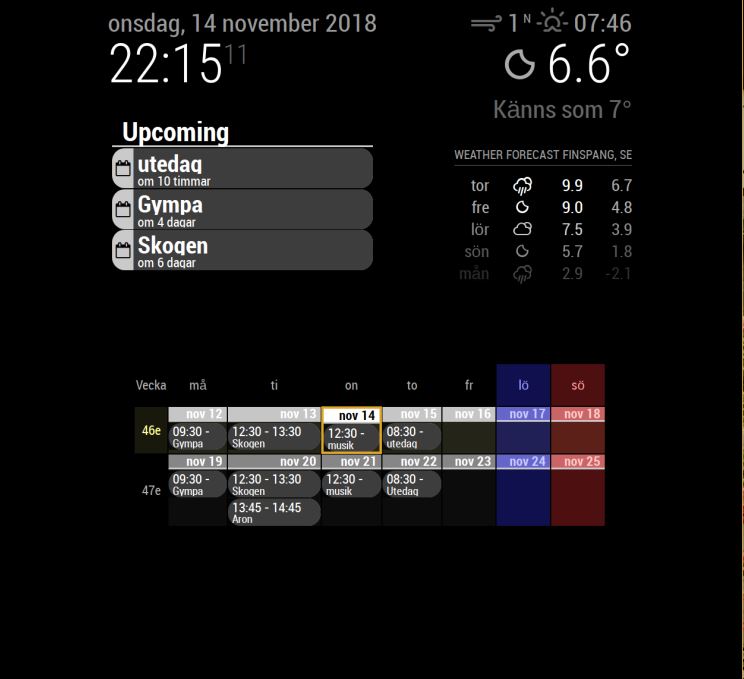
                      0_1542230152864_Skärmklipp.JPG

                      ? 1 Reply Last reply Reply Quote 0
                      • ? Offline
                        A Former User @cptkex
                        last edited by A Former User

                        @cptkex
                        First, I should know your whole CSS and Configuration to give detail and exact answer,
                        Anyway,

                        i´ve been trying to add the code you have linked previously to make the calender bigger but i cant seem to stretch it to the screen sides?

                        Add this into your MagicMirror/css/custom.css

                        .CALEXT .tableStyle {
                            margin:0;
                            max-width: 100%;
                        }
                        

                        More detailed adjustment could be needed. But most of case, this is enough.

                        also, why is tuesday bigger then the rest?

                        Because Tuesday has more long-text event than other day. I set this as relative-width. You can fix it by this.

                        .CALEXT .tableStyle td {
                            /* Set values for your environment or screen size */
                            width: 17%; 
                            max-width: 17%;
                            min-width: 17%;
                        }
                        

                        Or This.

                        .CALEXT .tableStyle td {
                          /* adjust for your screen size */
                            width: 100px; 
                        }
                        

                        how do i remove the corners for each entry text?

                        #CALEXT_weeks.tableStyle .event.endHere .eventContainer{
                          border:none;
                          border-radius:0;
                        }
                        
                        #CALEXT_weeks.tableStyle .event.startHere {
                          border:none;
                          border-radius:0;
                        }
                        

                        it doesnt seem to recognize my oneLineEvent: 1; ?

                        It is working. So, Some events are showing only start time. If you grow the width of cell, you can see more clearly.

                        Anyway, weeks and months types are not so good for Vertical Screen because vertical-width could be around 1080px,(Maximized, when you remove all the default margin of MM) It means each cell could have only 140px width at most. it would be not enough space for displaying event. You need to use smaller font size.

                        (you’d better to learn some CSS skills if you have interests.)

                        C 1 Reply Last reply Reply Quote 0
                        • C Offline
                          cptkex @Guest
                          last edited by

                          @sean thanks for replying, and yes i should definitly learn more CSS if i want to use this. I just needed to know where to start, and i can work myself forward from there. I know the 1080 pixel space isnt optimal for a Weeks setup, but going through all the other alternatives, it provides just the right kind of data for my family´s day to day activities, so its more suitable. I am playing around with the font sizes, trying to find what fits within the design and how visible it is. I have tried other setups for greater visibility, but ended up with this being the best option together with the upcoming one that is more “at a glance”

                          thank you so much for your help, ill try to read up on some CSS so i dont bother you with every little detail. My biggest problem has been that i dont know where to start, and now i have enough data to start changing parameters to learn what i need to change to achieve the best possible outcome.

                          ? 1 Reply Last reply Reply Quote 0
                          • ? Offline
                            A Former User @cptkex
                            last edited by

                            @cptkex
                            I think https://www.w3schools.com/ is the best source for the beginners. I wish you have a good luck.

                            1 Reply Last reply Reply Quote 1
                            • S Offline
                              Smotx
                              last edited by

                              Hi,

                              It’s possible to start ‘roll’ at the date of current day and no first day of month ?

                              Thx

                              ? 1 Reply Last reply Reply Quote 0
                              • ? Offline
                                A Former User @Smotx
                                last edited by

                                @smotx Sorry, it can’t without source modifying.

                                1 Reply Last reply Reply Quote 0
                                • J Offline
                                  jimmysmalls
                                  last edited by

                                  I can’t seem to figure out why I don’t have the start times on my calendar. I’m really liking it other than that. I’m sure it’s probably something simple but I’m open to feeling stupid after the time I’ve spend trying to figure it out haha

                                  {
                                        module: 'MMM-CalendarExt',
                                        position: "lower_third", // ignore this.
                                        config: {
                                          system: {
                                            show: ['month'],
                                            locale: 'en',
                                  	  showEmptyView: 1,
                                          },
                                          views: {
                                            month: {
                                              position:'lower_third',
                                  	    showWeeks: 0,
                                  	    onlyStartingTime:1,
                                            },
                                          },
                                          calendars :[
                                            {
                                  
                                  ? 1 Reply Last reply Reply Quote 0
                                  • ? Offline
                                    A Former User @jimmysmalls
                                    last edited by

                                    @jimmysmalls
                                    By default, time of month/week view is hidden because there might be not enough space.
                                    Add this into your css/custom.css;

                                    .CALEXT .tableStyle .eventTime {
                                       display: block;
                                       order: 3; // when you want to display time under the event title. 
                                    }
                                    
                                    J 1 Reply Last reply Reply Quote 0
                                    • J Offline
                                      jimmysmalls @Guest
                                      last edited by

                                      @sean
                                      That did the trick, thank you! One other quick question that maybe I’m overlooking the answer to in the documentation but is there a way to have it show the time on a 12 hour format instead of 24?

                                      ? 1 Reply Last reply Reply Quote 0
                                      • ? Offline
                                        A Former User @jimmysmalls
                                        last edited by

                                        @jimmysmalls
                                        use timeFormat: "hh:mm A" instead timeFormat: "HH:mm"
                                        If you don’t want AM/PM indicator, just use "hh:mm"

                                        1 Reply Last reply Reply Quote 0
                                        • J Offline
                                          JKTitanium @Vauxdvihl
                                          last edited by

                                          @vauxdvihl

                                          Hi, Sorry I new here. Do I need a seperate Calender for each icon/emoj? Can I use Rules for one single Calendar?

                                          ? 1 Reply Last reply Reply Quote 0
                                          • ? Offline
                                            A Former User @JKTitanium
                                            last edited by

                                            @jktitanium
                                            Symbol is fixed per calendar.
                                            However each event style(color or font except symbol) could be variable by condition.

                                            1 Reply Last reply Reply Quote 0

                                            Hello! It looks like you're interested in this conversation, but you don't have an account yet.

                                            Getting fed up of having to scroll through the same posts each visit? When you register for an account, you'll always come back to exactly where you were before, and choose to be notified of new replies (either via email, or push notification). You'll also be able to save bookmarks and upvote posts to show your appreciation to other community members.

                                            With your input, this post could be even better 💗

                                            Register Login

                                            • 1
                                            • 2
                                            • 5
                                            • 6
                                            • 7
                                            • 8
                                            • 9
                                            • 10
                                            • 7 / 10
                                            • First post
                                              Last post
                                            Enjoying MagicMirror? Please consider a donation!
                                            MagicMirror created by Michael Teeuw.
                                            Forum managed by Sam, technical setup by Karsten.
                                            This forum is using NodeBB as its core | Contributors
                                            Contact | Privacy Policy