Read the statement by Michael Teeuw here.
Todoist accesstoken
-
Hi, can anyone help me to understand where and how I get the accesstoken for Todoist.
A step by step guide would be very helpful. Must I have a premium account?Thanks Robert
-
Did you figure it out??
-
- Create an app (e.g. “My Private MagicMirror”) in the developer’s console. If you don’t have a website, use
example.com. - Then with your client ID and secret, construct an OAuth query (with whatever
scopeyour app will need) and visit in a browser. - It will then redirect you to your app’s website with a
codeparameter. (If usingexample.com, it will fail to reach the site; just look at the address bar and find thecodeparameter.) - Use the
codeparameter to exchange for an access token (e.g. usingcurl):
$ curl "https://todoist.com/oauth/access_token" \
    -d "client_id=0123456789abcdef" \
    -d "client_secret=secret" \
    -d "code=abcdef" \
    -d "redirect_uri=https://example.com"
Problem with config or JavaScript? Copy/paste it into JSHint.
Check out the detailed walkthroughs on install, config, modules, etc. - Create an app (e.g. “My Private MagicMirror”) in the developer’s console. If you don’t have a website, use
-
@ninjabreadman great, but I’m lost. 1. is clear, but what to do now, where to construct OAuth (whetever is it)…?..
thanks, Zdeněk
-
@zdenek Go here. Follow the instructions to create an OAuth string, that will look something like this:
https://todoist.com/oauth/authorize?client_id=0123456789abcdef&scope=data:read,data:delete&state=secretstringProblem with config or JavaScript? Copy/paste it into JSHint.
Check out the detailed walkthroughs on install, config, modules, etc. -
@ninjabreadman thx. My steps:
- went to https://todoist.com/oauth/authorize?client_id=0123456789abcdef&scope=data:read,data:delete&state=secretstring
where I used my client_id and a “state” used "client_secret - got
https://example.com/?state=client_secert&code=string_of_characters - on MM from commandlind I run
curl "https://todoist.com/oauth/access_token" \ -d "client_id=my_client_id" \ -d "client_secret=my_client_secret" \ -d "code=string_from_previous_step" \ -d "redirect_uri=https://example.com"- got answer
“access_token”:“another_string”,“token_type”:“Bearer”
so, I guess, that “another_string” is the right think for the module = access_token, right?
		{
			module: 'MMM-Todoist',
			position: 'top_center',	// This can be any of the regions. Best results in left or right regions.
			//header: 'Todoist', // This is optional
			config: { // See 'Configuration options' for more information.
 		         	accessToken: 'axxxxxxxxxxb',
				maximumEntries: 60,
				updateInterval: 10*60*1000, // Update every 10 minutes
				//projects: [ 166564794 ],
				fade: false
 				 }
		},
should be OK, but nothing :-(. Checked in browser:
div id="module_10_MMM-Todoist" class="module MMM-Todoist MMM-Todoist">div class="module-content">table class="normal small light">/table>/div>/div>(removed < signs)
in Console no Warnings, no Erros…
any idea?
- went to https://todoist.com/oauth/authorize?client_id=0123456789abcdef&scope=data:read,data:delete&state=secretstring
-
i’m soooooooooo stupid sorry. I thougt, without define any ProjectID I’ll get ToDo of all Projects in my account. Nope. After add of at least one ID, it works…
sorry for annoying …
Zdeněk -
@zdenek No problem, it happens to all of us. Glad to hear it’s working!
-
Hello all,
I also get so many trouble to make it work, but thanks to your help it is now ok ! :grinning_face:
So no need to create that incredibly complicated “OAuth string”, the use of the “Test token” works perfectly fine :
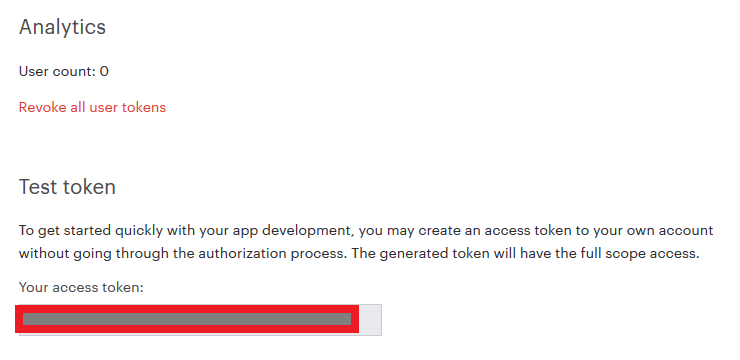
But… It is mandatory to define “projects” value in the config.js file.
As the default value is [] I also consider it as optional…:flushed_face:With this value defined, everything is OK !

Hello! It looks like you're interested in this conversation, but you don't have an account yet.
Getting fed up of having to scroll through the same posts each visit? When you register for an account, you'll always come back to exactly where you were before, and choose to be notified of new replies (either via email, or push notification). You'll also be able to save bookmarks and upvote posts to show your appreciation to other community members.
With your input, this post could be even better 💗
Register Login