MagicMirror Forum
    • Recent
    • Tags
    • Unsolved
    • Solved
    • MagicMirror² Repository
    • Documentation
    • 3rd-Party-Modules
    • Donate
    • Discord
    • Register
    • Login
    A New Chapter for MagicMirror: The Community Takes the Lead
    Read the statement by Michael Teeuw here.

    MMM-xiaomi - Temperature and Humidity from your smarthome

    Scheduled Pinned Locked Moved Utilities
    141 Posts 27 Posters 217.6k Views 27 Watching
    Loading More Posts
    • Oldest to Newest
    • Newest to Oldest
    • Most Votes
    Reply
    • Reply as topic
    Log in to reply
    This topic has been deleted. Only users with topic management privileges can see it.
    • G Offline
      gauka12345
      last edited by

      HI there i have got same problem the gateway was turned off
      then i have tried to reconnect all the temperature sensors and tokens shows with ??? question marks… can some one help please!

      1 Reply Last reply Reply Quote 0
      • G Offline
        gauka12345
        last edited by

        pi@raspberrypi:~/miio $ miio discover
        INFO Discovering devices. Press Ctrl+C to stop.

        Device ID: 72558327
        Model info: lumi.gateway.v3
        Address: 192.168.0.9
        Token: ???
        Support: At least generic

        1 Reply Last reply Reply Quote 0
        • S Offline
          Smotx
          last edited by

          hi,

          Same problem here too

          I have changed my router, so i have change wifi of Xiaomi hub

          On magicmirror config i have set new ip 192.168.2.xxx (before 192.168.1.xxx).

          But always nothing on MagicMirror after reboot.

          perhaps token has changed with new router… So, on the rasp i launch command ```
          miio discover

          
          ` $ sudo miio discover
           INFO  Discovering devices. Press Ctrl+C to stop.
          
          Device ID: 567xxxx54
          Model info: Unknown
          Address: 192.168.2.xxx
          Token: ???
          Support: Unknown
          `
          
          Anybody know why ? :(.
          garblefluxG 1 Reply Last reply Reply Quote 0
          • G Offline
            gauka12345
            last edited by

            Hi
            You can get token by installing older version of mi home app on you mobile
            https://www.apkmirror.com/apk/xiaomi-inc/mihome/mihome-5-0-19-release/mihome-5-0-19-android-apk-download/
            Then you will need to follow this tutorial to obtain the token
            https://www.youtube.com/watch?v=Q4QV8tMI8H4
            however so far i have swap the tokens but with no luck. i think the device need to be discovered by MIiio.

            S 1 Reply Last reply Reply Quote 0
            • S Offline
              Smotx @gauka12345
              last edited by Smotx

              @gauka12345

              I gave found new token on Mi home app android, it worked a few days, and then again it does not work anymore, it tells me ‘time out’ and in mioo discover there is nothing at all

              { Error: Call to device timed out
              at retry (/home/pi/MagicMirror/modules/MMM-xiaomi/node_modules/miio/lib/device.js:225:18)
              at _ensureToken.catch.err (/home/pi/MagicMirror/modules/MMM-xiaomi/node_modules/miio/lib/device.js:238:8)
              at code: ‘timeout’

              1 Reply Last reply Reply Quote 0
              • garblefluxG Offline
                garbleflux Project Sponsor @Smotx
                last edited by

                @smotx said in MMM-xiaomi - Temperature and Humidity from your smarthome:

                hi,

                Same problem here too

                I have changed my router, so i have change wifi of Xiaomi hub

                On magicmirror config i have set new ip 192.168.2.xxx (before 192.168.1.xxx).

                But always nothing on MagicMirror after reboot.

                perhaps token has changed with new router… So, on the rasp i launch command ```
                miio discover

                
                ` $ sudo miio discover
                 INFO  Discovering devices. Press Ctrl+C to stop.
                
                Device ID: 567xxxx54
                Model info: Unknown
                Address: 192.168.2.xxx
                Token: ???
                Support: Unknown
                `
                
                Anybody know why ? :(.
                

                I had the same problem. Meanwhile, I have found the solution. An update from Xiaomi changed the token in the gateway. This must now be read out via the smartphone. In my case the miio discovery command did not work any more. I followed this instruktion to get the new token

                https://forum.smartapfel.de/forum/thread/1219-xiaomi-mi-gateway-homebridge-mi-aqara/?postID=31779#post31779

                … and now all works fine again - I have all my sensors back on the mirror.

                regards
                Mike

                1 Reply Last reply Reply Quote 0
                • S Offline
                  Smotx
                  last edited by

                  after this command :

                  miio tokens update 567xxxxx --token 6xxxxxxxxxxxxxxxxxxxxxxxxxxx
                  

                  mine to work again a few days, and now is KO again… for the third time… :face_with_steam_from_nose: Token has not changed, ip has not changed…

                  1 Reply Last reply Reply Quote 0
                  • S Offline
                    Serg
                    last edited by

                    I can’t find what needs to be changed in CSS to change the font color of the temperature and humidity numbers.

                    1 Reply Last reply Reply Quote 0
                    • L Offline
                      lovesicker
                      last edited by lovesicker

                      Hi guys,

                      I have two temperature sensors. Each sensor registers with a gateway. Could anyone tell me how to add the two gateways in config.js file?

                      I try to add the following codes in config.js:

                      {
                      module: ‘MMM-xiaomi’,
                      position: ‘top_right’,
                      header: ‘Temperature / Humidity’,
                      config: {
                      gatewayIP: ‘192.168.186.181’,
                      gatewayToken: ‘xxxxxxxx-ceec093b30b1775dc741a7’,
                      showWindow: true,
                      showVentilation: true,
                      showLights: false,
                      audioNotifications: true,
                      rooms: [
                      {
                      name: ‘Bedroom’,
                      sortOrder: 20,
                      devices : [‘158d000xxxx9f’]
                      }
                      ],
                      gatewayIP: ‘192.168.186.166’,
                      gatewayToken: ‘xxxxxxxx–927e2d20b22c22b007194c’,
                      rooms: [
                      {
                      name: ‘Childroom’,
                      sortOrder: 30,
                      devices : [‘158d000xxxx4f6’]
                      }
                      ]
                      }
                      }

                      but MagicMirror always display the last sensor, which registers with the secondary gateway in config.js file.

                      image

                      Could anyone give me some suggestions? Thanks in advance!

                      garblefluxG 1 Reply Last reply Reply Quote 0
                      • garblefluxG Offline
                        garbleflux Project Sponsor @lovesicker
                        last edited by

                        @lovesicker Hi,
                        I think you are on the wrong way: You use gatewayIP and gatewayToken twice. Thats not necessary.
                        Look to my configuration - this works fine:
                        {
                        module: ‘MMM-xiaomi’,
                        position: ‘bottom_left’,
                        colored: true,
                        header: ‘Temperatur / Luftfeuchtigkeit’, // This is optional
                        config: {
                        gatewayIP: ‘192.168.160.xx’,
                        outsideSensorId: ‘15xxx0201dxxx’,
                        gatewayToken: ‘cd857eee1fc760d029767709cd50xxxx’,
                        showWindow: true,
                        showVentilation: true,
                        showLights: false,
                        showTend: false,
                        showNotifications: false,
                        audioNotifications: false,

                                            rooms:  [
                        		{
                        		name: 'Büro',
                        		minTemperature : 15,
                                            maxTemperature : 35,
                                            sortOrder: 1,
                        		devices : ['158d0001c2cxxx']
                        		},
                        		{
                        		name: 'Aussentemperatur  ',
                        		sortOrder: 20,
                                            devices : ['15xxx00201d4xxx']    
                                            },                  
                                            {
                                            name: 'Wohnzimmer  ',
                                            minTemperature : 15,
                                            maxTemperature : 35,
                                            sortOrder: 2,
                                            devices : ['158d0001c2cxxx']
                        		},
                        		{
                                            name: 'Schlafzimmer  ',
                                            sortOrder: 3,
                                            minTemperature : 15,
                                            maxTemperature : 30,
                                            devices : ['1xxx000201dxxx', '15xxx001f49xxx']
                                            },
                                            {
                                            name: 'Philipp',
                                            minTemperature : 15,
                                            maxTemperature : 35,
                                            sortOrder: 4,
                                            devices : ['1xxd0001c14xxx']
                                            },
                                            {
                        		name: 'Marco',
                                            minTemperature : 15,
                                            maxTemperature : 35, 
                                            sortOrder: 5,
                        		devices : ['15xxx01f54xxx']
                                            }, 
                                              {
                        		name: 'HW-Raum',
                                            minTemperature : 10,
                                            maxTemperature : 35, 
                                            sortOrder: 7,
                        		devices : ['15xxx002029xxx']
                                            }, 		
                        					{
                                            name: 'Garage',
                                            minTemperature : 15,
                                            maxTemperature : 35,
                                            sortOrder: 10,
                                            devices : ['15xxx001c1xxx']
                                            },
                                            {
                                            name: 'Keller',
                                            minTemperature : 15,
                                            maxTemperature : 35,
                                            sortOrder: 9,
                                            devices : ['15xxx001c2axxx']
                                            },
                                            {
                                            name: 'WC',
                                            minTemperature : 15,
                                            maxTemperature : 35,
                                            sortOrder: 8,
                                            devices : ['15xxx001c1axxx']
                                            },
                                            {
                                            name: 'Bad',
                                            minTemperature : 18,
                                            maxTemperature : 35,
                                            sortOrder: 6,
                                            devices : ['15xxx001c2cxxx']
                                            },  
                        

                        ]

                        L 1 Reply Last reply Reply Quote 0
                        • L Offline
                          lovesicker @garbleflux
                          last edited by lovesicker

                          @garbleflux First, thank you for your reply.
                          I have two different rooms. There are a temperature sensor and a gateway in each room! So I have to add two gateways in config.js file.

                          garblefluxG 1 Reply Last reply Reply Quote 0
                          • garblefluxG Offline
                            garbleflux Project Sponsor @lovesicker
                            last edited by

                            @lovesicker Hi,
                            why do you use two gateways? It’s not necessary. I use one gateway for my complete house. I use 10 temperature and humity sensors. Have a closer look to my config.
                            Regards Mike.

                            L 1 Reply Last reply Reply Quote 0
                            • L Offline
                              lovesicker @garbleflux
                              last edited by

                              @garbleflux thank you for your discussion.

                              It’s difficult to explain. Let me try. Maybe my scenario is very different with yours.

                              There are one Xiaomi temperature sensor, one Xiaomi air conditioning companion (gateway) and one Xiaomi intelligent clock (integrated partial AI function) in EACH bedroom.

                              When I speak to the clock, “Hi Xiaoai, please tell me the room temperature” or “temperature”, the clock tell me the correct number of degrees via the RIGHT gateway. When I say “power on the air conditioning”, the same thing happen.

                              It’s unsuitable that I say "tell me CHILDROOM temperature " or “power off CHILDROOM air conditioning” when I’m in my bedroom. Although I know it is realizable.

                              I’m not sure I clearly explain the reason. Anyway, I need two gateways in my house.

                              1 Reply Last reply Reply Quote 0
                              • garblefluxG Offline
                                garbleflux Project Sponsor
                                last edited by

                                @lovesicker OK. Did you try to start the module twice? Maybe this is the possibility to activate both gateways at the same time as you need it.
                                Regards Mike

                                L 1 Reply Last reply Reply Quote 0
                                • L Offline
                                  lovesicker @garbleflux
                                  last edited by

                                  @garbleflux

                                  Yes, I can add two instances in config.js file at the same time.

                                  YOU ARE RIGHT!
                                  It’s not necessary. According to your suggestion, I register all of my sensors on ONE gateway. I can still fulfill all my needs.

                                  I’m stupid. I’ve made simple things complicated.

                                  Tanks again!
                                  Good luck.

                                  1 Reply Last reply Reply Quote 0
                                  • L Offline
                                    lovesicker
                                    last edited by lovesicker

                                    Hi @mirko3000 ,

                                    How to remove the ‘>’ symbols which in front of the temperature and humidity?
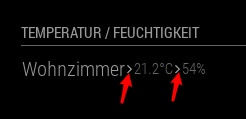
                                    0_1558832311773_10344818-eeef-4b5a-ac89-aa44732dac4a-image.png

                                    I try to set showTend: false, but it does not work.

                                    Could you or anyone give me some suggestions? Thanks in advance.

                                    1 Reply Last reply Reply Quote 0
                                    • N Offline
                                      norman
                                      last edited by

                                      Hello everyone,
                                      is there a chance to use this module with the Aqara Gateway and the Aqara Sensors? I have a problem to find the sensors with miio. Thanks in advance!

                                      Best regards!

                                      StoffbeuteluweS 2 Replies Last reply Reply Quote 0
                                      • StoffbeuteluweS Offline
                                        Stoffbeuteluwe Project Sponsor @norman
                                        last edited by

                                        @norman if you get the token from the Aqara gateway it should work …

                                        1 Reply Last reply Reply Quote 0
                                        • StoffbeuteluweS Offline
                                          Stoffbeuteluwe Project Sponsor @norman
                                          last edited by

                                          @norman I have the mii gateway with aqara sensors …works fine

                                          1 Reply Last reply Reply Quote 0
                                          • M Offline
                                            mydiva
                                            last edited by

                                            Hi @mirko3000 … oooh an update… what’s new? thx…

                                            1 Reply Last reply Reply Quote 0

                                            Hello! It looks like you're interested in this conversation, but you don't have an account yet.

                                            Getting fed up of having to scroll through the same posts each visit? When you register for an account, you'll always come back to exactly where you were before, and choose to be notified of new replies (either via email, or push notification). You'll also be able to save bookmarks and upvote posts to show your appreciation to other community members.

                                            With your input, this post could be even better 💗

                                            Register Login

                                            • 1
                                            • 2
                                            • 3
                                            • 4
                                            • 5
                                            • 6
                                            • 7
                                            • 8
                                            • 7 / 8
                                            • First post
                                              Last post
                                            Enjoying MagicMirror? Please consider a donation!
                                            MagicMirror created by Michael Teeuw.
                                            Forum managed by Sam, technical setup by Karsten.
                                            This forum is using NodeBB as its core | Contributors
                                            Contact | Privacy Policy
