Read the statement by Michael Teeuw here.
MMM-Page-Selector: A page switcher that can set positions of modules
-
Sorry for taking a bit to get back to you.
You shouldn’t need to put thepages: 3in the Page Indicator config as that should be handled automatically.
In order to get at the root of the problem, I would need to have the configs for you other modules since all pages are implicitly declared to exist inside thepagesobject of your modules.
For example:{ module: "MMM-a-module", position: "bottom_center", pages: {"pageOne": "top_center", "pageTwo": "bottom_left"}, config: {} },is defining two pages with the names
pageOneandpageTwoand then saying that this module will appear at thetop_centerandbottom_leftpositions on those two pages respectively.
I am assuming that something went wrong with thepagesobjects which is causing some problems.
If you post those I will probably be able to figure out the problem. -
Hello Veldrovive,
I also have a hard time with the config. But am still on the build.
The implementation is very complicated with many modules the overview is lost. All lines must also be marked with “” signs.But that’s just the way with the codes :-)
What would be great if you had a main config and for each additional page its own config which is then read out.
Would make the whole course very clear.
Even more if you did not need to provide the entire modules and each line with extra signs.That’s just wishful thinking, of course. ;-)
Nevertheless! A great module
Thank you -
Hey Robiv8,
First, I will address a couple of things.All lines must also be marked with “” signs:
To be clear, it is not necessary to put quotes around page names or props. For example:
"pages": {"main": "top_right", "fun": "top_left"}is exactly the same as
pages: {main: "top_right", fun: "top_left"}
I just believe that it is more clear for everything to be specified as strings.Even more if you did not need to provide the entire modules and each line with extra signs:
Could you elaborate a little bit about what this means? What do you mean when you say each line with extra signs?What would be great if you had a main config and for each additional page its own config which is then read out:
I’m still very much open to developing this further and possibly adding more ways to create pages.
I think I get the idea that when you have many modules it can be hard to keep track of what modules have been put on what pages and where, but I am unclear on what exactly you are suggesting.One idea that I had during development was to have a pages section in the config.js like this:
address: "localhost",
port: 8081,
ipWhitelist: ["127.0.0.1", "::ffff:127.0.0.1", "::1"],
modules: [
    ...
],
pages: {
    "main": {
        "calendar": "top_left",
        "MMM-Bob-Ross": "bottom_left",
        "clock": "top_right",
        "weatherforecast": "bottom_right",
        "newsfeed": "bottom_center"
    },
    "fun": {
        "clock": "top_left",
        "MMM-Lunartic": "bottom_right",
        "MMM-Astronauts": "bottom_left",
        "MMM-Reddit": "top_right"
    }
}
In order to condense the page config down when there are just too many modules to handle. Something like this would be very easy to implement.
Is this along the lines of what you were suggesting? -
Yes that would be a great help and clearly arranged. Good idea!
What I meant by extra commas is:
Example Normal:{ module: "currentweather", position: "top_right", config: { long: "de", location: "Beinstein", locationID: "3220785", appid: "08541acd123xxxxxxxxxxxxx" }For the MMM Page Selector:
{
"module": "weatherforecast",
"position": "bottom_center",
"pages": {"main": "bottom_right"},
"config": {
"locationID": "REMOVED",
"appid": "REMOVED"
}
},
So I have to use the extra commas for all modules and each line.
Example: “module”: “text” instead of module: “text”And that with over 200 lines of text, woe if you are even wrong at one ;-)
And please do not consider this as a criticism, only as a small piece of thought if it is not easier solvable.
Robert
-
Here my current config that I’m building, works quite well.
These I will now equip with more modules and expand to up to 5 pages. But I need a lot of time because I have to check each module if all commons are set correctly./* Magic Mirror Config Sample * * For more information how you can configurate this file * See https://github.com/MichMich/MagicMirror#configuration * */ var config = { address: "0.0.0.0", //address: "192.168.178.44", //address: "localhost", // Address to listen on, can be: //port: 8080, port: 8080, ipWhitelist: [], //ipWhitelist: ["127.0.0.1", "::ffff:127.0.0.1", "::1", "::ffff:192.168.3.0/28"], // Set [] to allow all IP addresses language: "de", timeFormat: 24, units: "metric", modules: [ { module: 'MMM-DWD-WarnWeather', position: 'top_bar', header: 'Wieslauf', config: { region: 'Rudersberg', changeColor: true, displayRegionName: false, interval: 3 * 60 * 1000, // every 10 minutes loadingText: 'Warnungen werden geladen...', noWarningText: 'Keine Warnungen' } }, { module: 'MMM-DWD-WarnWeather', position: 'top_bar', header: 'Strohgäu', config: { region: 'Hemmingen / BW', changeColor: true, displayRegionName: false, interval: 3 * 60 * 1000, // every 10 minutes loadingText: 'Warnungen werden geladen...', noWarningText: 'Keine Warnungen' } }, { module: 'MMM-DWD-WarnWeather', position: 'top_bar', header: 'Schönbuch', config: { region: 'Dettenhausen', changeColor: true, displayRegionName: false, interval: 3 * 60 * 1000, // every 10 minutes loadingText: 'Warnungen werden geladen...', noWarningText: 'Keine Warnungen' } }, { module: 'MMM-DWD-WarnWeather', position: 'top_bar', header: 'Täles', config: { region: 'Neuffen', changeColor: true, displayRegionName: false, interval: 3 * 60 * 1000, // every 10 minutes loadingText: 'Warnungen werden geladen...', noWarningText: 'Keine Warnungen' } }, { module: 'MMM-DWD-WarnWeather', position: 'top_bar', header: 'Rossberg', config: { region: 'Wolfegg', changeColor: true, displayRegionName: false, interval: 3 * 60 * 1000, // every 10 minutes loadingText: 'Warnungen werden geladen...', noWarningText: 'Keine Warnungen' } }, { module: "clock", position: "middle_center", config: { showDate: false, displayType: 'analog', analogSize: '540px', analogFace: 'face-001', secondsColor: '#FF0000', analogPlacement: 'top', //analogShowDate: 'bottom', } }, { module: "clock", position: "bottom_center", }, { module: "currentweather", position: "top_right", config: { lang: "de", location: "Beinstein", locationID: "3220785", //ID from http://www.openweathermap.org/help/city_list.txt appid: "removed-xxxxxxxxxxx" } }, { module: "MMM-PublicTransportHafas", position: "bottom_right", config: { stationID: "008007193", // Replace with your stationID! headerPrefix: "von", stationName: "Miedelsbach", // Replace with your station name! direction: "", // Show only departures heading to this station. (A station ID.) ignoredLines: [], // Which lines should be ignored? (comma-separated list of line names) excludedTransportationTypes: ["bus"], // Which transp not be shown (, list) values:StN tram, BuN bus, s suburban timeInFuture: 240, showColoredLineSymbols: true, // Want colored line symbols? useColorForRealtimeInfo: true, // Want colored real time information (timeToStation, early)? showTableHeadersAsSymbols: true, // Table Headers as symbols or text? maxUnreachableDepartures: 1, // How many unreachable departures should be shown? maxReachableDepartures: 5, // How many reachable departures should be shown? customLineStyles: "hafas", // Prefix for the name of the custom css file. ex: Leipzig-lines.css (case sensitive) showOnlyLineNumbers: false // Display only the line number instead of the complete name, i. e. "11" instead of "STR 11" } }, { module: "MMM-PublicTransportHafas", position: "bottom_right", config: { stationID: "008007446", // Replace with your stationID! headerPrefix: "von", stationName: "Frickenhausen", // Replace with your station name! direction: "", // Show only departures heading to this station. (A station ID.) ignoredLines: [], // Which lines should be ignored? (comma-separated list of line names) excludedTransportationTypes: ["bus"], // Which transp not be shown (, list) values:StN tram, BuN bus, s suburban timeInFuture: 240, showColoredLineSymbols: true, // Want colored line symbols? useColorForRealtimeInfo: true, // Want colored real time information (timeToStation, early)? showTableHeadersAsSymbols: true, // Table Headers as symbols or text? maxUnreachableDepartures: 1, // How many unreachable departures should be shown? maxReachableDepartures: 5, // How many reachable departures should be shown? customLineStyles: "hafas", // Prefix for the name of the custom css file. ex: Leipzig-lines.css (case sensitive) showOnlyLineNumbers: false // Display only the line number instead of the complete name, i. e. "11" instead of "STR 11" } }, { module: "MMM-PublicTransportHafas", position: "bottom_left", config: { stationID: "008003409",// Replace with your stationID! headerPrefix: "von", stationName: "Korntal DB", // Replace with your station name! direction: "", // Show only departures heading to this station. (A station ID.) ignoredLines: [], // Which lines should be ignored? (comma-separated list of line names) excludedTransportationTypes: ["bus", "Fernverkehr"], // Which transp not be shown (, list) values:StN tram, BuN bus, s suburban timeInFuture: 240, showColoredLineSymbols: true, // Want colored line symbols? useColorForRealtimeInfo: true, // Want colored real time information (timeToStation, early)? showTableHeadersAsSymbols: true, // Table Headers as symbols or text? maxUnreachableDepartures: 1, // How many unreachable departures should be shown? maxReachableDepartures: 5, // How many reachable departures should be shown? customLineStyles: "hafas", // Prefix for the name of the custom css file. ex: Leipzig-lines.css (case sensitive) showOnlyLineNumbers: false // Display only the line number instead of the complete name, i. e. "11" instead of "STR 11" } }, { module: "MMM-PublicTransportHafas", position: "bottom_left", config: { //stationID: "008007325",// Replace with your stationID! stationID: "000557824",// Replace with your stationID! headerPrefix: "von", stationName: "Münchingen", // Replace with your station name! direction: "", // Show only departures heading to this station. (A station ID.) ignoredLines: [], // Which lines should be ignored? (comma-separated list of line names) excludedTransportationTypes: ["bus"], // Which transp not be shown (, list) values:StN tram, BuN bus, s suburban timeInFuture: 240, showColoredLineSymbols: true, // Want colored line symbols? useColorForRealtimeInfo: true, // Want colored real time information (timeToStation, early)? showTableHeadersAsSymbols: true, // Table Headers as symbols or text? maxUnreachableDepartures: 1, // How many unreachable departures should be shown? maxReachableDepartures: 5, // How many reachable departures should be shown? customLineStyles: "hafas", // Prefix for the name of the custom css file. ex: Leipzig-lines.css (case sensitive) showOnlyLineNumbers: false // Display only the line number instead of the complete name, i. e. "11" instead of "STR 1 } }, ] }; /*************** DO NOT EDIT THE LINE BELOW ***************/ if (typeof module !== "undefined") {module.exports = config;} -
It shouldn’t be necessary to have quotes around everything. Does it error when you just use this?
{
    module: “weatherforecast”,
    position: “bottom_center”,
    pages: {main: “bottom_right”},
    config: {
        locationID: “REMOVED”,
        appid: “REMOVED”
    }
},
Also, I have implemented the method for setting up pages as I described above alongside the other method. The readme will be updated with full instructions on how it works. I will commit the changes to the repository soon.
-
Ok, the new commit includes the changes. Just git pull and then the new method should be available.
-
thanks for your support
I will implement it this week and report here. -
I just made a quick attempt with the first one of your code.
I’m slowly approaching the goal ;-).
I still have questions.
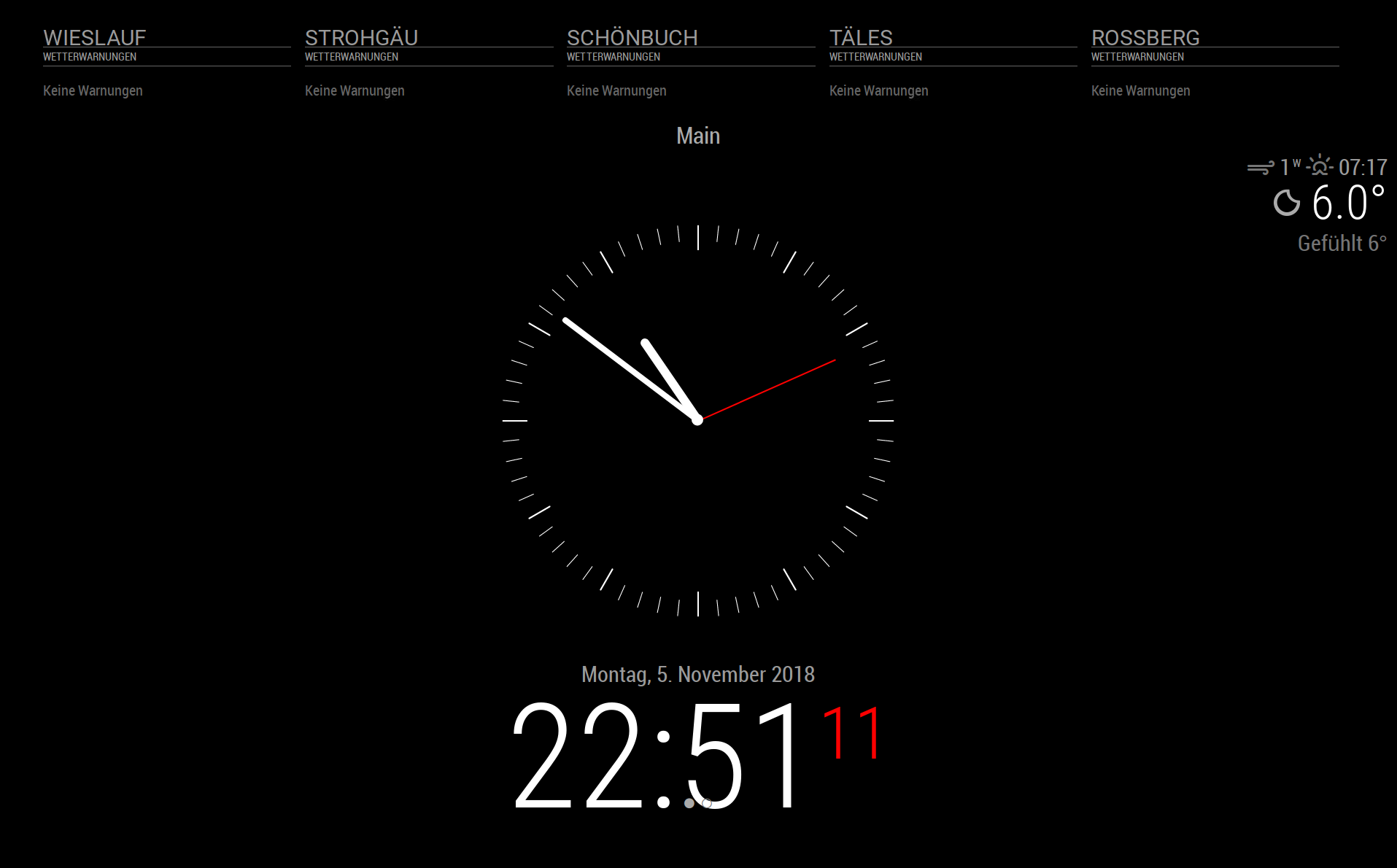
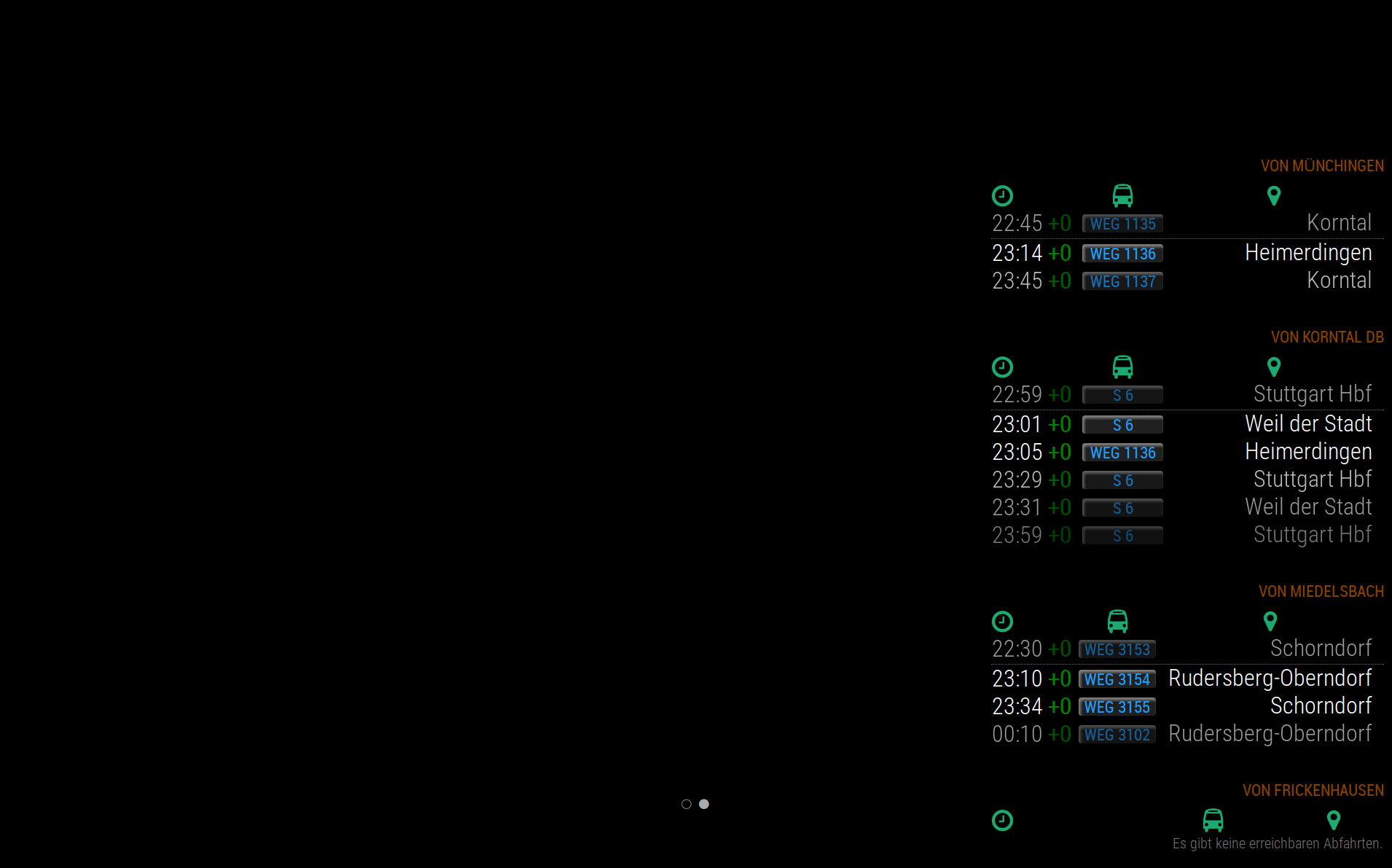
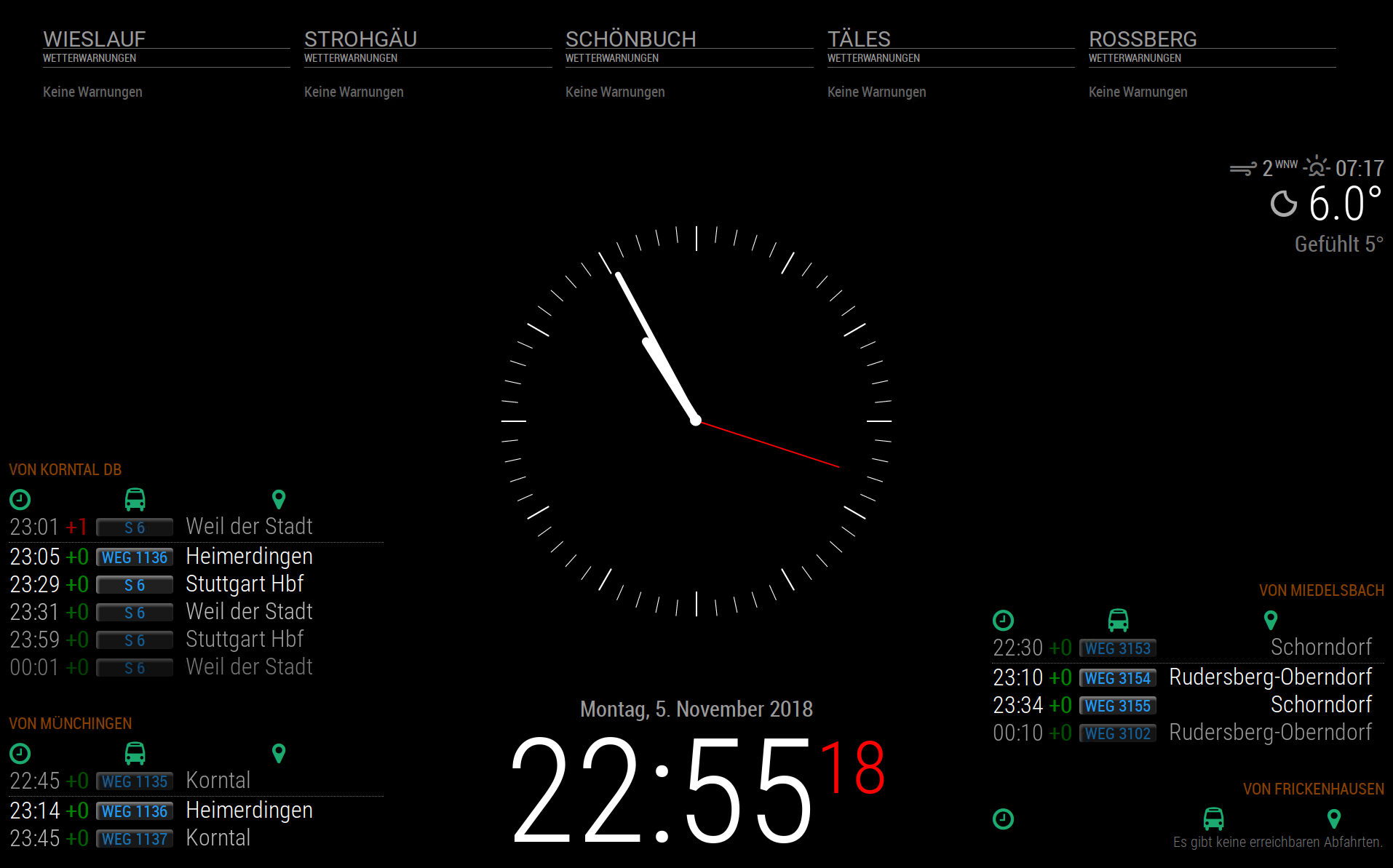
This is my code:/* Magic Mirror Config Sample * * For more information how you can configurate this file * See https://github.com/MichMich/MagicMirror#configuration * */ var config = { address: "0.0.0.0", //port: 8080, port: 8080, ipWhitelist: [], language: "de", timeFormat: 24, units: "metric", modules: [ { module: 'MMM-Page-Selector', position: 'top_center', config: { defaultPage: "main", displayTitle: true, selectPageNotif: [""], incrementPageNotif: [""], decrementPageNotif: [""] } }, { module: 'MMM-DWD-WarnWeather', position: 'top_bar', pages: {main: 'top_bar'}, header: 'Wieslauf', config: { region: 'Rudersberg', changeColor: true, displayRegionName: false, interval: 3 * 60 * 1000, // every 10 minutes loadingText: 'Warnungen werden geladen...', noWarningText: 'Keine Warnungen' } }, { module: 'MMM-DWD-WarnWeather', position: 'top_bar', pages: {main: 'top_bar'}, header: 'Strohgäu', config: { region: 'Hemmingen / BW', changeColor: true, displayRegionName: false, interval: 3 * 60 * 1000, // every 10 minutes loadingText: 'Warnungen werden geladen...', noWarningText: 'Keine Warnungen' } }, { module: 'MMM-DWD-WarnWeather', position: 'top_bar', pages: {main: 'top_bar'}, header: 'Schönbuch', config: { region: 'Dettenhausen', changeColor: true, displayRegionName: false, interval: 3 * 60 * 1000, // every 10 minutes loadingText: 'Warnungen werden geladen...', noWarningText: 'Keine Warnungen' } }, { module: 'MMM-DWD-WarnWeather', position: 'top_bar', pages: {main: 'top_bar'}, header: 'Täles', config: { region: 'Neuffen', changeColor: true, displayRegionName: false, interval: 3 * 60 * 1000, // every 10 minutes loadingText: 'Warnungen werden geladen...', noWarningText: 'Keine Warnungen' } }, { module: 'MMM-DWD-WarnWeather', position: 'top_bar', pages: {main: 'top_bar'}, header: 'Rossberg', config: { region: 'Wolfegg', changeColor: true, displayRegionName: false, interval: 3 * 60 * 1000, // every 10 minutes loadingText: 'Warnungen werden geladen...', noWarningText: 'Keine Warnungen' } }, { module: "clock", position: "middle_center", pages: {main: 'middle_center'}, config: { showDate: false, displayType: 'analog', analogSize: '540px', analogFace: 'face-001', secondsColor: '#FF0000', analogPlacement: 'top', //analogShowDate: 'bottom', } }, { module: "clock", position: "bottom_center", pages: {main: 'bottom_center'}, }, { module: "currentweather", position: "top_right", pages: {main: 'top_right'}, config: { lang: "de", location: "Beinstein", locationID: "3220785", //ID from http://www.openweathermap.org/help/city_list.txt appid: "08541xxxxxxxxxxxxxxxxx" } }, { module: "MMM-PublicTransportHafas", position: "bottom_right", pages: {second: 'bottom_right'}, config: { stationID: "008007193", // Replace with your stationID! headerPrefix: "von", stationName: "Miedelsbach", // Replace with your station name! direction: "", // Show only departures heading to this station. (A station ID.) ignoredLines: [], // Which lines should be ignored? (comma-separated list of line names) excludedTransportationTypes: ["bus"], // Which transp not be shown (, list) values:StN tram, BuN bus, s suburban timeInFuture: 240, showColoredLineSymbols: true, // Want colored line symbols? useColorForRealtimeInfo: true, // Want colored real time information (timeToStation, early)? showTableHeadersAsSymbols: true, // Table Headers as symbols or text? maxUnreachableDepartures: 1, // How many unreachable departures should be shown? maxReachableDepartures: 5, // How many reachable departures should be shown? customLineStyles: "hafas", // Prefix for the name of the custom css file. ex: Leipzig-lines.css (case sensitive) showOnlyLineNumbers: false // Display only the line number instead of the complete name, i. e. "11" instead of "STR 11" } }, { module: "MMM-PublicTransportHafas", position: "bottom_right", pages: {second: 'bottom_right'}, config: { stationID: "008007446", // Replace with your stationID! headerPrefix: "von", stationName: "Frickenhausen", // Replace with your station name! direction: "", // Show only departures heading to this station. (A station ID.) ignoredLines: [], // Which lines should be ignored? (comma-separated list of line names) excludedTransportationTypes: ["bus"], // Which transp not be shown (, list) values:StN tram, BuN bus, s suburban timeInFuture: 240, showColoredLineSymbols: true, // Want colored line symbols? useColorForRealtimeInfo: true, // Want colored real time information (timeToStation, early)? showTableHeadersAsSymbols: true, // Table Headers as symbols or text? maxUnreachableDepartures: 1, // How many unreachable departures should be shown? maxReachableDepartures: 5, // How many reachable departures should be shown? customLineStyles: "hafas", // Prefix for the name of the custom css file. ex: Leipzig-lines.css (case sensitive) showOnlyLineNumbers: false // Display only the line number instead of the complete name, i. e. "11" instead of "STR 11" } }, { module: "MMM-PublicTransportHafas", position: "bottom_left", pages: {second: 'bottom_left'}, config: { stationID: "008003409",// Replace with your stationID! headerPrefix: "von", stationName: "Korntal DB", // Replace with your station name! direction: "", // Show only departures heading to this station. (A station ID.) ignoredLines: [], // Which lines should be ignored? (comma-separated list of line names) excludedTransportationTypes: ["bus", "Fernverkehr"], // Which transp not be shown (, list) values:StN tram, BuN bus, s suburban timeInFuture: 240, showColoredLineSymbols: true, // Want colored line symbols? useColorForRealtimeInfo: true, // Want colored real time information (timeToStation, early)? showTableHeadersAsSymbols: true, // Table Headers as symbols or text? maxUnreachableDepartures: 1, // How many unreachable departures should be shown? maxReachableDepartures: 5, // How many reachable departures should be shown? customLineStyles: "hafas", // Prefix for the name of the custom css file. ex: Leipzig-lines.css (case sensitive) showOnlyLineNumbers: false // Display only the line number instead of the complete name, i. e. "11" instead of "STR 11" } }, { module: "MMM-PublicTransportHafas", position: "bottom_left", pages: {second: 'bottom_left'}, config: { stationID: "000557824",// Replace with your stationID! headerPrefix: "von", stationName: "Münchingen", // Replace with your station name! direction: "", // Show only departures heading to this station. (A station ID.) ignoredLines: [], // Which lines should be ignored? (comma-separated list of line names) excludedTransportationTypes: ["bus"], // Which transp not be shown (, list) values:StN tram, BuN bus, s suburban timeInFuture: 240, showColoredLineSymbols: true, // Want colored line symbols? useColorForRealtimeInfo: true, // Want colored real time information (timeToStation, early)? showTableHeadersAsSymbols: true, // Table Headers as symbols or text? maxUnreachableDepartures: 1, // How many unreachable departures should be shown? maxReachableDepartures: 5, // How many reachable departures should be shown? customLineStyles: "hafas", // Prefix for the name of the custom css file. ex: Leipzig-lines.css (case sensitive) showOnlyLineNumbers: false // Display only the line number instead of the complete name, i. e. "11" instead of "STR 1 } }, { module: "MMM-page-indicator", position: "bottom_center", pages: "all" }, { "module": "MMM-Cursor", } ] }; /*************** DO NOT EDIT THE LINE BELOW ***************/ if (typeof module !== "undefined") {module.exports = config;}The first page looks good, but on the second page, the modules are shown above the other instead of 2 left 2 right.
main:
second:
This is how the modules (train schedule) should look like:
-
I copied your config and it actually allowed me to catch a couple of bugs that I will be working to fix over the next few days. The main one that you are having trouble with stems from the fact that multiple modules with the same name are being used. I don’t know why I didn’t think about that during development, but it causes problems now. I’m going to fix that up and I’ll post again when it’s done. It’s a bit of a large change, however, so it probably won’t be done for at least 24 hours.
-
Hey, just no hectic and stress.
Then I’m just the beta tester ;-)What long matures will be good.
Thank you -
Ok, changes have been made and now the module is much more resilient.
The second method for setting up pages has become pretty powerful now, but that came with it becoming more complicated. I would suggest reading the readme section carefully before trying to implement it.
If you have any question, I am more than happy to clarify and edit the readme. -
Wow, that was fast.
Will it morning look at rest, and test.
But what I read so far looks like this for me:
First list all the modules as before.
Below that, under “pages:” and the page names, insert the module names with location.And I have to give the modules a name (name:) which is then used in pages: for the position.
So roughly right?
Oh! One question:
How implement more then 1 module in exclusion?exclusion: [ { "module": "MMM-Cursor" }, { "MMM-page-indicator", position: "bottom_center" } ] -
So the exclusions array takes a list of selectors. Those selectors could be the name of a module (Like
MMM-Cursor) or they could be the propname. Here’s some sample code:
This is the inside the module array:{ module: "MMM-page-indicator", name: "noHide", position: "bottom_center" },And then this is the exclusions:
[
    "noHide",
]
This one works because the name
noHideis a selector.You could also just use the name of the module:
[
    "MMM-Cursor",
]
because it is also just a selector.
The
pagesconfig also works off of selectors in the same way.noHideis a selector that you assign with thenameprop whileMMM-page-indicatoris a selector that is assigned via the fact that it is the name of the module. -
@veldrovive Thanks, for the reply. I finnaly did find the problem. It was as always a typo from my side. I have now konverted the config to the “second” config option which I like better as I can gather all the pages config in one section.
Thanks for a greate module :) -
Ah good. I’m glad that the changes I’m making are improving the module.
Thank you for the kind words. -
@Veldrovive Installed your module, along with the MMM-page-indicator.
Page1 shows OK, but I can’t move to Page2.
What i’m doing wrong?
Here’s my configmodules: [ { module: "alert", pages: "all", }, { disabled: false, module: "MMM-Page-Selector", position: "top_bar", config: { defaultPage: "Page1", displayTitle: true, selectPageNotif: ["SELECT_PAGE"], incrementPageNotif: ["PAGE_UP"], decrementPageNotif: ["PAGE_DOWN"] } }, { disabled: false, module: 'MMM-page-indicator', position: 'bottom_bar', pages: "all", config: { pages: 3, } }, { module: "updatenotification", position: "top_bar", pages: {"Page1": "top_bar"}, }, { disabled: false, module: "clock", position: "top_left", pages: {"Page1": "top_left"}, }, { disabled: false, module: "compliments", position: "lower_third", pages: {"Page2": "lower_third"}, }, { disabled: false, module: 'MMM-Lunartic', position: 'top_center', // Best in left, center, or right regions pages: {"Page3": "top_center"}, config: { mode: "rotating", // rotating or static image: "current", // animation, current, DayNight or static distance: "km", // miles or km useHeader: false, // true if you want a header header: "Huidige Maan stand", // Any text you want maxWidth: "300px", animationSpeed: 0, rotateInterval: 15000, } }, { disabled: false, module: 'MMM-BackgroundSlideshow', position: 'fullscreen_below', pages: {"Page1": "fullscreen_below"}, config: { imagePaths: ['modules/MMM-BackgroundSlideshow/Images/'], transitionImages: true, slideshowSpeed: 20000, // 20 Seconds //transitionSpeed: '2s', randomizeImageOrder: true, } }, { module: 'MMM-Cursor', pages: "all", }, ] }; /*************** DO NOT EDIT THE LINE BELOW ***************/I have installed MMM-Voice-Command as well, but I really don’t need voice for the moment so I didn’t add this in the config.
-
One small thing before I actually get into the meat of the issue. It is not necessary to specify the number of pages for MMM-page-indicator since it is overridden by the page selector.
While I was developing the new page system, I forgot about the very important issue of capitalization. Basically what was happening is that it was trying to switch to pages that did not exist. If you pull the update, everything should work fine.
-
@veldrovive Wow, that was a quick. Works fantastic now. Great job!! Thanks.
-
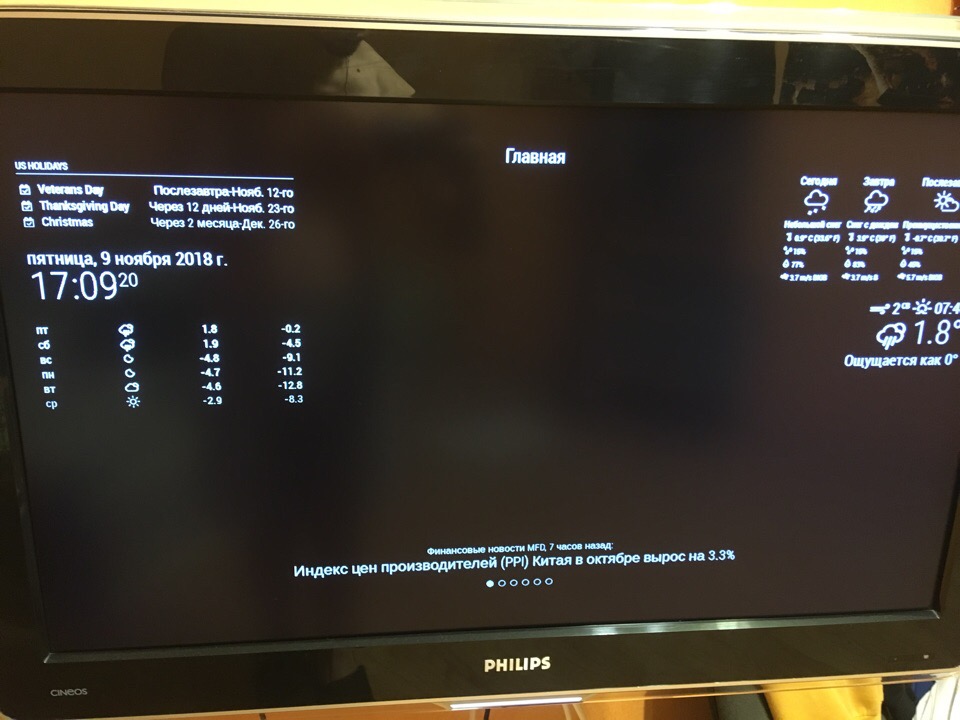
Hi @Veldrovive ! Can you help me to solve some problems with pages? The first is that it doesn’t swith sometimes. it works, but not the whole time. The second is rhat pages show modules while they don’t havw to. There are config file and examples. So the main page (главная) shows weather data but it doesn’t have to. The same situation with other pages (example - calendar “календарь”). While the weather page (with earth) doesn’t show these modules. Wrehe is the problem? Sorry for bad structure…
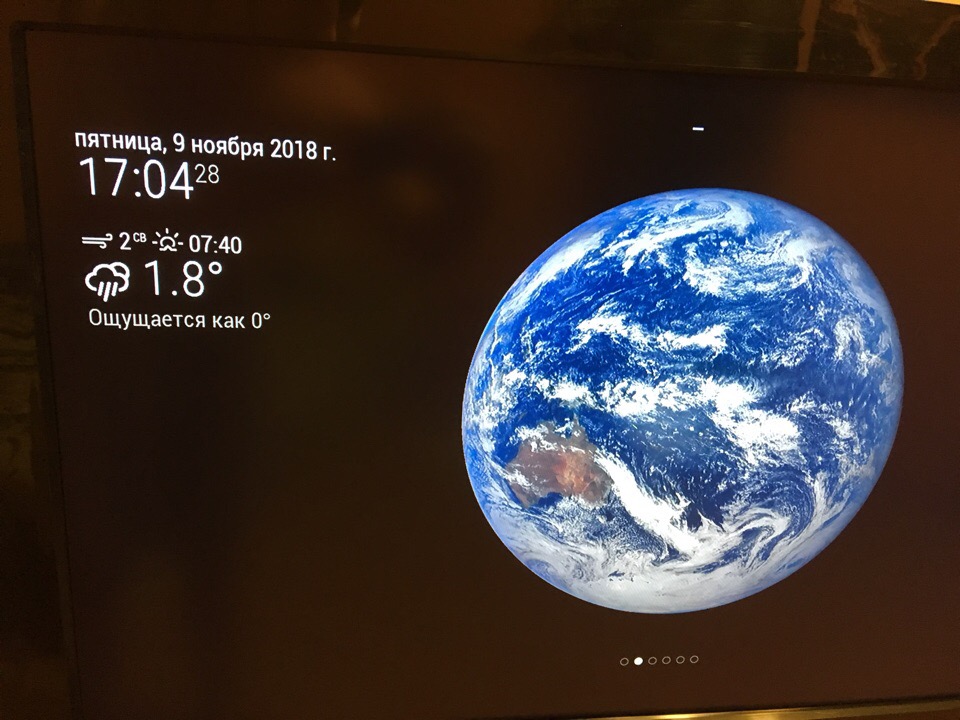
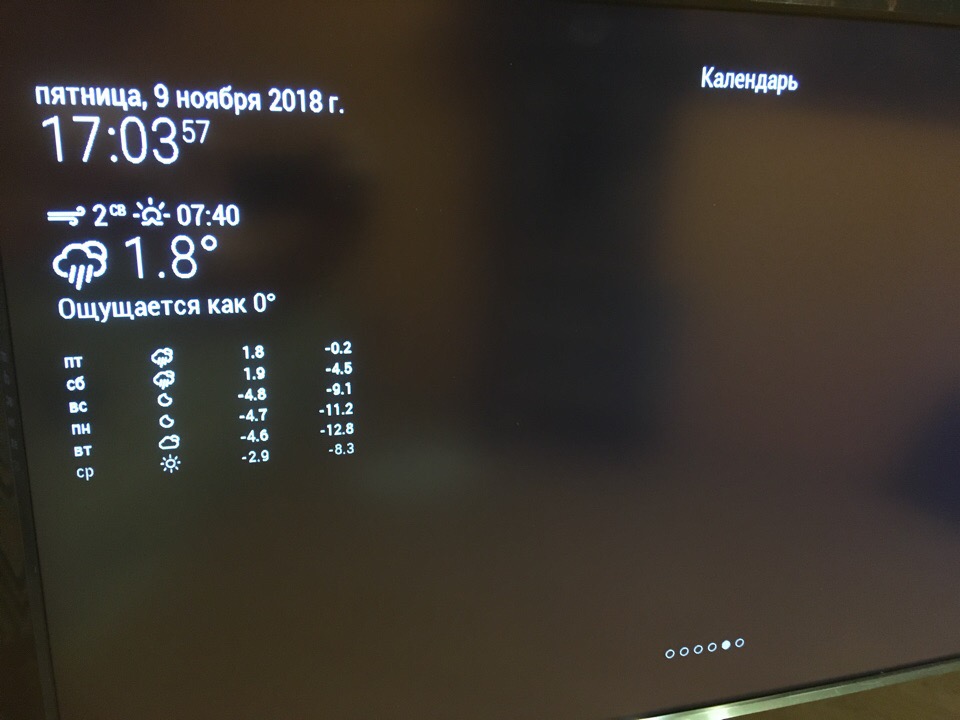
var config = {
	address: "localhost", // Address to listen on, can be:
	                      // - "localhost", "127.0.0.1", "::1" to listen on loopback interface
	                      // - another specific IPv4/6 to listen on a specific interface
	                      // - "", "0.0.0.0", "::" to listen on any interface
	                      // Default, when address config is left out, is "localhost"
	port: 8080,
	ipWhitelist: ["127.0.0.1", "::ffff:127.0.0.1", "::1"], // Set [] to allow all IP addresses
	                                                       // or add a specific IPv4 of 192.168.1.5 :
	                                                       // ["127.0.0.1", "::ffff:127.0.0.1", "::1", "::ffff:192.168.1.5"],
	                                                       // or IPv4 range of 192.168.3.0 --> 192.168.3.15 use CIDR format :
	                                                       // ["127.0.0.1", "::ffff:127.0.0.1", "::1", "::ffff:192.168.3.0/28"],

	language: "ru",
	timeFormat: 24,
	units: "metric",

	modules: [
                {
			"module": "MMM-Page-Selector",
			"position": "top_center",
			"config": {
				"defaultPage": "главная",
				"displayTitle": true,
				"selectPageNotif": [],
				"incrementPageNotif": [],
				"decrementPageNotif": []
			}
		},
                {
                   module: 'MMM-page-indicator',
                   position: 'bottom_bar',
                   "pages": "all",
                   config: {
                   pages: 6,
                   activeBright: true,
                   inactiveHollow: true,
                   }
                },
		{
     			module: "alert",
                        "pages": "all",
		},
                {
		module: 'MMM-PIR-Sensor',
	        "pages": "all",
           	config: {
                         sensorPIN: 22,
                         powerSaving: true,
                         powerSavingDelay: 120,
                        // See 'Configuration options' for more information.
		}
          	},
                {
                module:     'MMM-3Day-Forecast',
                position:   'top_right',
                "pages": {"главная": "top_right"},
         	config: {
		api_key:    '2f91769xxxxxxxxxxxxxxx',
		lat:        54.61972,
		lon:        39.740002,
		units:      'M',
		lang:       'ru',
		interval:   900000,
          	}
                },
                {
		module: "currentweather",
		position: "top_right",
                animationSpeed: 500,                     	// This can be any of the regions.
		"pages": {"погода": "top_left"},							// Best results in left or right regions.
		config: {
			// See 'Configuration options' for more information.
			location: "Рязань",
			locationID: "500096", //Location ID from http://openweathermap.org/help/city_list.txt
			appid: "ab3164xxxxxxxxxxxx" //openweathermap.org API key.
		}
            	},
                {
                module: "MMM-EARTH",
                position: "bottom_center",
                "pages": {"погода": "middle_center"},
                config: {
                mode: "Natural",
                rotateInterval: 5000,
                MaxWidth: "50%",
                MaxHeight: "50%",
                }
                },
                {
                module: "weatherforecast",
                position: "left",       // This can be any of the regions.
                colored: true,
                pages: {погода: "left"},
                config: {
                        // See 'Configuration options' for more information.
                        location: "Рязань",
                        locationID: "500096", //Location ID from http://openwea$
                        appid: "ab31646bxxxxxxxxxxxxx" //openweather
                }
                },
	        {
			module: "updatenotification",
			position: "top_bar",
                        "pages": "all",
	       	},
		{
			module: "clock",
			position: "top_left",
                        "pages":{"главная": "top_left", "погода": "top_left", "почта": "top_left", "новости": "top_left", "календарь": "top_left", "фото": "top_left" },
		},
		{
			module: "calendar",
			header: "US Holidays",
			position: "top_left",
	                "pages": {"календарь": "upper-third"},
                	config: {
				calendars: [
					{
						symbol: "calendar-check-o ",
						url: "webcal://www.calendarlabs.com/templates/ical/US-Holidays.ics"
         				}
				]
			}
		},
		{
        		module: "newsfeed",
			position: "bottom_bar",
			"pages": {"главная": "bottom_bar", "новости": "bottom_bar"},
                        config: {
				feeds: [
					{
						title: "Финансовые новости MFD",
						url: "http://mfd.ru/rss/news/handler.ashx"
					}
				],
				showSourceTitle: true,
				showPublishDate: true
			}
            	},
                {
			"module": "MMM-Cursor",
		},
	]

};
Hello! It looks like you're interested in this conversation, but you don't have an account yet.
Getting fed up of having to scroll through the same posts each visit? When you register for an account, you'll always come back to exactly where you were before, and choose to be notified of new replies (either via email, or push notification). You'll also be able to save bookmarks and upvote posts to show your appreciation to other community members.
With your input, this post could be even better 💗
Register Login