Read the statement by Michael Teeuw here.
MMM-iFrame-Ping
-
@rudibarani
Hello rudibarani,in fact it was my first try (as it is easier…) but I couldn’t succed to make it work and adding this “url”: is the only way I have found to make it work…
Did you try to change the code and it was ok ?I do my best to find some hours this week end to finally debug my code and be able to release that new version !
On the next version it will be possible to send a new url through http request, but also with the module scheduler or with a rotating button
-
@bolish
Hello Bolish,thanks and happy to see that my module is useful,
I didn’t know the module MMM-GroveGestures so far but I check its documentation and it will be possible on the next version of the iFrame-Ping module to change the URL through the following code :
notificationExec: {
  notification: "iFrame_Ping_URL",
  payload: {
     url: "http:whaturlyoulike.com"
  }
}
But it will not be a list of URL to switch between each other, just one url linked to a movement.
I will investigate a bit more this week end…
-
Hi @AgP42 , @rudibarani
The modification you will implement for @rudibarani 's need will help me in one sense.
Indeed, MMM-GroveGestures is able to send wathever notification we want.
So, based on gestures, I will be able to send different URL’s.It’s nevertheless, not covering fully my need as I was hoping for something incremental.
MMM-iFrame to manage the list of URL’s and able to move to next URL based on “URL NEXT” notification reception.Maybe a combined proposal (that would make sense to me) would be :
- Centralize URL management into MMM-iFrame with :
- URL 1 : htpps…
- URL 2 : hfkzejrhfzoer
This would allow :
- any other modules to call for URL 1 or 2 and maybe suiting to @rudibarani
- would to avoid people to manage the list of URL into several modules (keep it into MMM-iFrame)
- enable the possibility to manage incremental notification mgt (my intial request : “NEXT URL” by managing a kind of counter into mmm-iFrame (to move from URL X to URL X+1 or URLX-1)
I hope it’s clear.
And I also don’t want to mess up with @rudibarani 's need which was expressed before…
So if my proposal (which seems more generic to me, so potentially opening larger possibilities in future for this module), suits to @rudibarani , fine.
But if my proposal is not suiting to @rudibarani 's need, go for him first maybe, I will try to adapt myself later.
Hope you will have time to dig in soon!
- Centralize URL management into MMM-iFrame with :
-
Dear all,
so before to do a new release, let’s think a bit ! :thinking_face:
First, here is a summary of the request/question so far on this forum and on github issue about this module :
Major requests :
- Be able to display several URL :
- to be launched randomly - @rudibarani, Gavin-McLeod (GitHub)
- to be able to launch the next one, previous one and play/pause through notification - @bolish - Request new URL to display through notification (and without url formating will be better) - @rudibarani
- Be able to declare several instance of the module to display several different video on the same display - @Johans, @Horge, gpapig (github)
Minor requests :
- remove iFrame border @rudibarani and @THeStigh (github) --> no problem to add a param
- be able to scale the content Felisuk (github) --> complex and I don’t really want to spend time on it for now…
On a technical point of view, the most complicated part to manage several urls or instances is due to the fact that I use a “node_helper” to be able to manage asynchronous tasks to manage the ping functionality. And this node_helper has to be shared between all instances ; and as it is asynchronous, if a new url notifications arrives before the previous ping answer (or timeout), it causes url inversions…
I personally need that ping functionality because I use my module to display the image of a camera that is very oft down…(otherwise I wouldn’t have created this module ! :face_with_stuck-out_tongue_winking_eye: ), but I guess that several of this module users don’t need it, right ? :question_mark:
=> So my proposal will be to keep this module as it is now (with small bug correction that I found anyway), and to create a new one dedicated to the dynamic url management and able to display several instances.
My proposal for this new module (this is a proposal, let’s see after what I can really do !) :
- name : MMM-SmartWebDisplay (any other idea welcome ! I don’t want to keep iFrame on the name, nobody care of the technical mechanisms…)
- new functions :
- several instances possibles, identifiable with a name to be able to send them dedicated notifications
- url to display sent through notification (to be able to send a list of URL will be best). This notification could be send :
* by external http request, using MMM-RemoteControl. This will open a very big range of possibilities, as for example using IFTTT to change the content to display according to any trigger…
* by MMM-ModuleScheduler (according date and time)
* by rotating button module (or any other button module or PIR sensor)
* in fact by any module able to send a notification to other modules ! - management of several url (given on the config file or received by a notification) :
* possibility to define a timer to go to the next URL (if the URL is not a video it must be possible also to use the updateInterval time in addition)
* possibility to use notification to request the following actions : NEXT or PREVIOUS url. As before this notification can be send by any module, as for example MMM-GroveGestures, but also any physical button or by an http request, … - possibility to send notification to play/pause the rotation of URL and the intervalUpdate (to refresh images)
question : for videos what should I do ? Just stop the rotation of URL or stop the playing video too ? It will be possible to stop them (in fact : change the URL to empty), but not to stop the image where it is and restart the video later, because I have no access to this YouTube (or other) embedded function…
To clarify : what extra infos to be display bellow the image ? If several URL I can consider to write the name of the next URL.
-
previous functions of iFrame-Ping that will remains :
- management of stop and restart according to USER_PRESENCE and module hidden (in fact it will be the same behavior than on reception of the notification “play”/“stop”)
-
previous functions that will be removed :
- PING before display…
This dream list seams to me very interesting ! Any other idea ?
Also now… : let’s sleep :sleeping_face: and tomorrow : let’s code !! :smiling_face_with_open_mouth_cold_sweat:
- Be able to display several URL :
-
@AgP42
Perfect for me!!
Note : why note using your current module and just allow the ping Yes / No option? (or keep it by adding the possibility to hide it or??)Anyway, I would be happy with your above proposal anyway!! Up to you.
Several URL’s and NEXT / PREVIOUS URL is must for me, so +1000.
Regarding the play / pause option, I was thinking about play / pause the video but you just said it’s not possible and after thinking about it again, I believe stopping the rotation of URL as you proposed is even more important. So +1 for rotation play / pause.
Several instances would be perfect for me either, so +1!
I’m just thinking about additional dream :
Maybe I’m dreaming a bit, but the cherry on the cake for me, would be to be able to “define a mouse click parameter”. i.e : by sending notification “CLICK ON X”, this would simulate a click at a certain location on the page (I don’t know how it work, coordinate X,Y)…But I’m too noob to realize what my demand is really triggering in terms of dev.
(idea behind would be to display google agenda in an iframe and move to next and previous month by simulating the click).
If too complex, forget about it.
Forget about that one, I will manage differently and not with iFrame.Be strong tomorrow!!!
-
Thanks @bolish for your support ! :grinning_face_with_smiling_eyes:
So today was a good coding day (hopefully because I don’t know when will be the next one…), not all the functionnalities describe yesterday are working, but I have made some extra too…
So the new MMM-SmartWebDisplay version 1 is done , I will describe here the differences according to our previous discussions and then I will put it on GitHub and create a new post on the forum about it.
Going back to the requests :
- Be able to display several URL : –> DONE
- to be launched randomly - @rudibarani, Gavin-McLeod (GitHub) –> DONE but not randomly, one after the other following the order given on the config file. Why do you want it random ??
- to be able to launch the next one, previous one and play/pause through notification - @bolish –> DONE, 5 possibilities : Next, Previous, Stop (no more update and current URL stopped, black screen instead), Pause (no more update but the current URL remains, and continue to play if it is a video), Play (start again all updates, restart the same video currently running if any)
- Request new URL to display through notification (and without url formatting will be better) - @rudibarani –> DONE, it is possible to request 1 URL or a list of URLs, and it is possible to send also on the same notification the value for autorefresh update and the value for the timer to play the following URL (but not mandatory)
- Be able to declare several instance of the module to display several different video on the same display - @Johans, @Horge, gpapig (github) –> Unfortunately no working… I manage to display several iFrame on the same page together, but only the second one is updated and receive the notification… I don’t know why, but I didn’t spend much time on it…
So @bolish and @rudibarani : you are served ! :winking_face:
If you faced any bug, let me know… - Be able to display several URL : –> DONE
-
@AgP42 = you rock!!!
You made my evening Mate, can’t wait to test it!Thank you very much. Will keep you posted asap.
-
:smiling_face:
Here it is :
https://github.com/AgP42/MMM-SmartWebDisplayEnough screen for today, I will create the post for this new module on the coming days.
I tried to write the readme file as good as possible, but I will have to work on it again.Please test it and let me know if any bug…
-
thx, have a good “eye / brain” rest enjoy the weekend!
-
Review :
-
Using a list of several URL is working. Seems more “slow / laggy” than with iFrame-Ping and only one URL. Strange but OK.
-
URL rotation is working great. (maybe a bit slow because of reloading needs, but I guess than there is not much you can do for that?)
-
URL NEXT / PREV / PLAY / PAUSE is working like a charm. Which was my initial need, so perfect.
So all in all, a major and well managed update. Good job @AgP42 .
One thing :
Even by using the same size (% or px) parameter as in previous iFrame-Ping, the picture is much more smaller (tiny!!!) in this new module. Strange but nothing critical.
I’m displying youtube channels and “middle_center” parameter.
Nevertheless, when I increase the size of it, the centering is not working well. Indeed, the margin remains the same on left side, meaning the frame is off-centered on the right side of the screen.
Hope this can be fixed easily (I tried to look at it myself, .css, etc… but I’m not skilled enough). Maybe it’s something I’m doing wrong on my side…
-
-
@bolish, thanks for your very fast review ! I just upload an update that (should) solve the lagging issue (and on the same time this issue solved the problem of several instances !)
And your display issue was coming from the fact that I send on GitHub my css file with modifs for me, I update it too, so you should be able to get back your previous params
-
@AgP42
Centering frame is OK now.
Lagging seems to be much better.
But it seems that new issue is happening. I get constant (uncontrolled) change between status Playing and Stopped which is stopping the video.Strange.
-
I think it’s because of PIR Sensor “USER PRESENCE” notification!!!
(I don’t wnat any interaction between PIR and video), I only use PIR to turn screen ON / OFF.And this issue is not new since your morning correction…It’s new for me because I installed PIR this morning!!!
Regards
-
@bolish said in MMM-iFrame-Ping:
I think it’s because of PIR Sensor “USER PRESENCE” notification!!!
(I don’t wnat any interaction between PIR and video), I only use PIR to turn screen ON / OFF.And this issue is not new since your morning correction…It’s new for me because I installed PIR this morning!!!
Regards
But why do you want your video to run if your screen is off ?
-
No you’re right I don’t.
I believe I understood the issue :
- It seems the PIR sensor I’m using is very sensitive and triggering “USER PRESENCE FALSE” very easily.
- I’m able to manage it in MMM-PIR sensor module thanks to the additional delay option which I put to 30 seconds which is preventing the screen to turn ON / OFF every 2 seconds.
But this is then triggering the issue I’m referring to above for MMM-SmartWebDisplay.
Does that makes sense? It’s the only explanation I found for now.
-
maybe you should let your module more generic that what you currently did.
If someone wants to STOP the video based on any other notification (like USER PRESENCE, false) he will always have the possibility to use MMM-NotificationTrigger to convert user presence to stop.Up to you.
If you’re not keen to update that point (which I could understand), I believe I can maybe modify things a little bit myself to manage it.
Maybe the modification should be done directly in MMM-PIR Sensor, which should only trigger PRESENCE FALSE once the additional delay is over and not before…
-
@bolish
Yes I perfectly understand the issue you are facing, in fact I also did some contribution to the module PIR sensor :smiling_face_with_open_mouth_closed_eyes:Yes the delay on the module apply only about the screen off but the “USER_PRESENCE” is send anyway directly according to the sensor input.
Normaly on your sensor you have 2 screws, one to change the sensibility of the sensor and the other one to adjust the time delay more infos here
Did you check that ?
But you are also right that I could let the choice to the user to use this USER_PRESENCE or not, I will check what I can do for that.
-
The sensor I’m using doesn’t offer this option, unfortunatly.
link textThinking of it again :
Would it not be more “sustainable” to PR MMM-PIRSensor by putting a second notification trigger “USER_PRESENCE, Screen Off” after the timeout delay.
Then, we could play within MMM-SmartWebDisplay with that one instead of the only USER PRESENCE false, true.
By doing that + adding the option to use it or not, it would make the full thing more reliable and generic.If I believe it’s somewhere here :
else if (value == valueOff) { self.sendSocketNotification('USER_PRESENCE', false); if (!self.config.powerSaving){ return; } self.deactivateMonitorTimeout = setTimeout(function() { self.deactivateMonitor(); }, self.config.powerSavingDelay * 1000); } }); -
@bolish
On the link you sent, this sensor is exactly the same as mine and its allow to change the timer ! ;-)The best way to make that clean will be to change the PIR-sensor module to send the notification only at the end of the timer, but I have no time to do so now…
What you can do for now to desactivate the Stop at the reception of a USER_PRESENCE = false notification is to go on the file MMM-SmartWebDisplay.js, on the function “GestionUpdateIntervalSWD”, then comment (//) the line "this.StopDisplay();
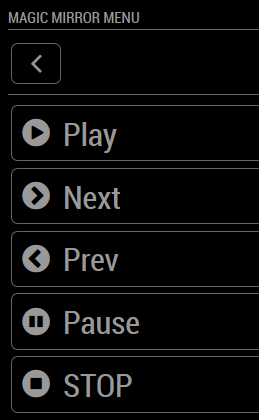
In fact I have no time to change the module PIR-Sensor now because I am about to finish an update of the module MMM-RemoteControl to be able to use "Next/Prev/Play/Pause/Stop directly on RemoteControl :
-
oh! I will look on the module again as I didn’t saw the famous screws you’re referring too…
Don’t worry @AgP42 , you already did a great job! Thanks again for that.
For the time being I will leave it like that (with your workaround) and if I have time on my side, I will maybe try to update MMM-PIRSensor. Maybe I could do it with trial and error method.
Thanks to the latest update of your module and MMM-GroveGestures (from @Sean ) , I end up with a perfect user experience :
- On my page 1 (main MM page), up / down gestures are handling news RSS details, etc…
- On my page 2, I have your iFrame and I’m able to change youtube live channels by up / down gestures also.
Perfect!
The Remote Control you are working on looks great also!
A bientôt et bonne continuation!! (tu as laissé qques indices dans ton code :-)
Hello! It looks like you're interested in this conversation, but you don't have an account yet.
Getting fed up of having to scroll through the same posts each visit? When you register for an account, you'll always come back to exactly where you were before, and choose to be notified of new replies (either via email, or push notification). You'll also be able to save bookmarks and upvote posts to show your appreciation to other community members.
With your input, this post could be even better 💗
Register Login