Read the statement by Michael Teeuw here.
Nest Thermostat & Protect
-
Is there somebody who can/will make a module for these products?
So we can see the temperature etc. on our MagicMirror
-
I will 2nd this one, I would love to be able to see my inside temp, and maybe some thermostat settings, or alert if there is smoke.
-
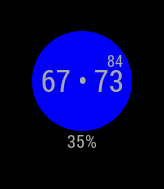
I just took a wack at making a Nest Module. It works, but it’s a pain to set up. Nest has you walk through a bunch of hoops to get an account so you can get a token for your nest. I made a simple script that walks you through it in the root folder. The Module is very basic right now. It just displays your current temp, requested temp, and humidity. I will try to change it in a little bit to make it look like the Nest (Have a blue background around your Temp to indicate it’s cooling, etc…). If you want to take a hand at making it look better, please go right ahead.
I am using the REST format to get all the data. If someone knows how to use firebase, that’s what Nest prefers you use to get all the info.
-
@mochman i will look in it asap, i’m really busy atm.
-
@mochman Works like a charm! The only thing I would like to see is the fan icon if the fan is running without the AC or Heat on.
-
@Sachin Sure. I’m in the middle of a move right now, but once I get settled in I take a look at it. It should be pretty straightforward.
-
@mochman Awesome, thank you!
-
Nice job @mochman i was working on it as well before i saw yours just on time.
Maybe it is better to put the Nest API pin code on the config file and let the module get the auth code from the API.This because the auth code has a expire date so you will replace it every year and it makes it easyer to install.
If you need some help… maybe i can help you with it. -
So I got around to setting this up today, got my product ID, the secret, and even the PIN code. Put it into the gettoken.sh and it spit out my token. I added it into my config.js and I see the little circle on my mirror, but the temp is different then what the nest shows. I’m also guessing that the % at the bottom is the inside humidity which also is not what the thermostat shows.
Any ideas?
-
Can you take a screenshot of what it is showing you and what it should be showing?
-
@Aartsie Any help would be great. I’ve been in the process of moving so all my stuff is still scattered around the house.
-
ok, rebooted everything and its now showing the set temp, and turning blue while running but the number inside the circle showing the current temp never changes, stays at 68 even though the thermostat is showing the correct room temperature.
Humidity % also seems correct now.
-
maybe it’s a problem with the unit? °C and °F
-
@pugsly Can you take a screenshot and post it along with what it should be showing? The way I have it configured, the small number is your current temp and the big number is the target temp.
-

-
Doesn’t matter what the thermostat says the inside temp is, the mirror always says its 68 deg.
-
Hmm, it looks like you have it set up to heat/cool. I haven’t programmed that function so I don’t know if the data the Nest API sends is correct. Can you switch it over to cooling only and see if that fixes your temp?
-
ah yes, that was it. I like keeping it in heat/cool mode and I have a program all setup, don’t really want to change it.
How hard would it be for you to code it that way?
-
It shouldn’t be that difficult. Can you add an issue to the repo and I’ll mess around with the code.
-
Its a little better, its now showing what my HEAT temp is set to, but not the COOL. Ideally it would show both with the dot in the middle as in the screen shot above, or if that’s not possible show the COOL setting when cooling, and the HEAT setting when heating and have the circle change colors.
Hello! It looks like you're interested in this conversation, but you don't have an account yet.
Getting fed up of having to scroll through the same posts each visit? When you register for an account, you'll always come back to exactly where you were before, and choose to be notified of new replies (either via email, or push notification). You'll also be able to save bookmarks and upvote posts to show your appreciation to other community members.
With your input, this post could be even better 💗
Register Login