Read the statement by Michael Teeuw here.
how to pull new element added to an array?
-
OK, so I was able to modify the default newsfeed module to show an icon/image and got the description to marquee across the page.
But, I want it to be able to use more than one feed.
I can’t seem to get it to pull from the feeds array, I don’t get any errors from this, It just won’t show the image…Here is my current configuration that gives me the undefined image…
                 feeds: [
                        {
                                icon: "NewYorkTimes.png",
                                title: "New York Times",
		       		url: "http://www.nytimes.com/services/xml/rss/nyt/HomePage.xml"
                        },
			{
				icon: "USAToday.png",
				title: "USA Today",
				url: "http://rssfeeds.usatoday.com/UsatodaycomNation-TopStories"
			},
			{
				icon: "BBCWorldNews.png",
				title: "BBC World News",
				url: "https://www.bbc.com/news/world"
			}
		],
if (this.config.showMarquee && this.config.showIcon) { var marquee = document.createElement("div"); marquee.className = "bright xlarge bold"; var icon = document.createElement("icon"); icon.innerHTML = "img class = image src=./modules/default/newsfeed/icons/" + this.newsItems[this.activeItem].icon; wrapper.appendChild(icon); var txtDesc = document.createElement("marquee"); txtDesc.className = "bright xlarge bold"; txtDesc.innerHTML = moment(new Date(this.newsItems[this.activeItem].pubdate)).fromNow() + ":" + " " + this.newsItems[this.activeItem].title; + " || " + this.newsItems[this.activeItem].description + " || "; wrapper.appendChild(txtDesc); }Any ideas would be greatly appreciated!
-
@justjim1220 said in how to pull new element added to an array?:
this.newsItems
what is that variable?
this.config.feeds is the confiured data -
yeah, I was going by how the rest of the info (title, url, description, etc) is pulled from the feeds array, so thought it would be the same.
-
can u show where newItems is set?
-
start: function () { Log.info("Starting module: " + this.name); // Set locale. moment.locale(config.language); this.newsItems = []; this.loaded = false; this.activeItem = 0; this.scrollPosition = 0; this.registerFeeds(); "use strict"; this.isShowingDescription = this.config.showDescription; }, -
this is the default MM newsfeed, I am trying to modify it to show different things.
-
-
@justjim1220 the problem is that the newsItems array is set from the rest api to pull the entries from the source. THAT data does NOT contain the icon you want to use.
your feed DEFINITION does , but not the feed response data…
so, can u tell from an item which ‘feeds’ entry caused this entry to be in the data? (ie, tell its source)… and can you search the feeds to locate the feed definition from any data in the item?
once u can do that, then u can use the feed entry icon
-
Not quite sure I am following you correctly…
Do you mean to pull the icon from the feeds source? the website? -
ok, so how would I be able to use the corresponding icons/images for the active feed showing if there isn’t any icon data in the rest API?
-
@justjim1220 you have to match up the feed definition (feeds array) with the element in the source response (newsItems array) somehow
the source does not send the icon back
-
that’s because I don’t think the source has an icon to pull from it.
So, is there a way to put the icons in an image folder in the newsfeed directory and pull from there for each corresponding newsfeed?
-
this is how I was able to modify the code to show a single icon and to get it to scroll across the screen
https://forum.magicmirror.builders/assets/uploads/files/1539381868184-screenshot-146.png
-
right… you hard coded it…
-
So, is what I am wanting to do even possible?
-
@justjim1220 sure… just have to figure out how to find the feeds entry from the newsItem entry… you MAY/PROBABLY have to add something to the newsItem entries (every one) when they are placed in the newsItem array…
i can’t look at any of the rss code til thursday sometime…
-
-
Note that that data is not part of the item. What code moves the xml to the Json object you are accessing?
-
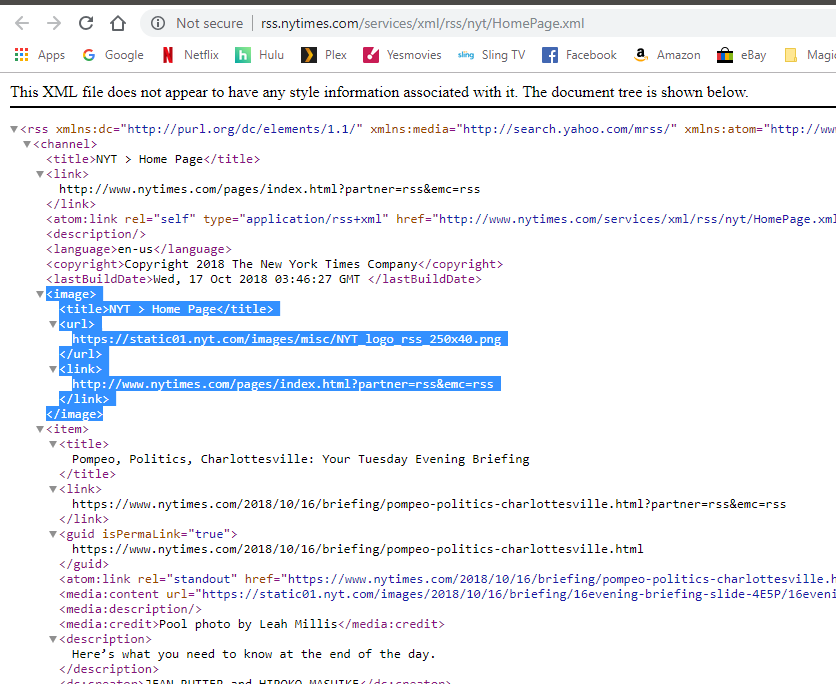
looking at the code on my phone, the fetcher.js needs another method to parse out the source icon.
parser.on("image", function(image){})To set a variable with the icon url,
That u can use in theparser.on("item", function(item)To add the icon url to each item to be able to use it during the display process
-
@justjim1220
But not all RSS would have thatchannel.image. that is optional.

Hello! It looks like you're interested in this conversation, but you don't have an account yet.
Getting fed up of having to scroll through the same posts each visit? When you register for an account, you'll always come back to exactly where you were before, and choose to be notified of new replies (either via email, or push notification). You'll also be able to save bookmarks and upvote posts to show your appreciation to other community members.
With your input, this post could be even better 💗
Register Login



