Read the statement by Michael Teeuw here.
Magic Mirror will not start
-
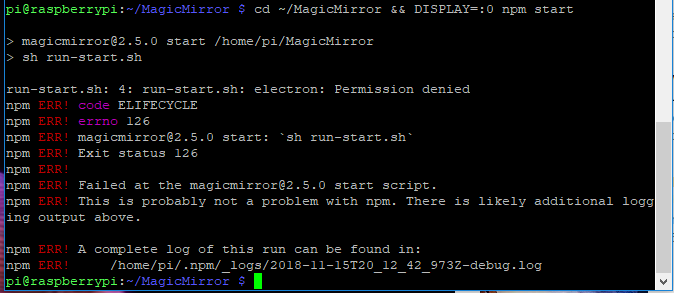
Trying to create a magic mirror with google home integration through the use of the voice kit (1.0). I had issues with npm not being present at first, thought i fixed that, got pm2 installed and tried to get everything running, but it wont start at all. Now i’m pretty lost. Thanks for the help.
-
@elporcho ‘permission denied’ sounds like you used
sudo npm install, which leaves files owned by root, not the normal pi user.Best to erase and start again
-
Sorry i’m pretty much a complete noob with linux. Should i be re-imaging the SD card, or is there a simpler way to clear out the installs i did wrong.
Also, what should i do instead of “sudo npm install”? I just followed instructions as I saw them, so I’m not even sure which installation you’re referring to. Sorry for my ignorance.
-
@elporcho from the home folder ( cd ~ ), do sudo -rf rm MagicMirror
Then clone the mm repo again, then cd MagicMirror, then npm install
-
I appreciate the help. I did sudo -rf rm MagicMirror and it gave the the following error:
rm: cannot remove ‘MagicMirror’: Is a directory
I also tried rmdir, but it says Directory not empty. -
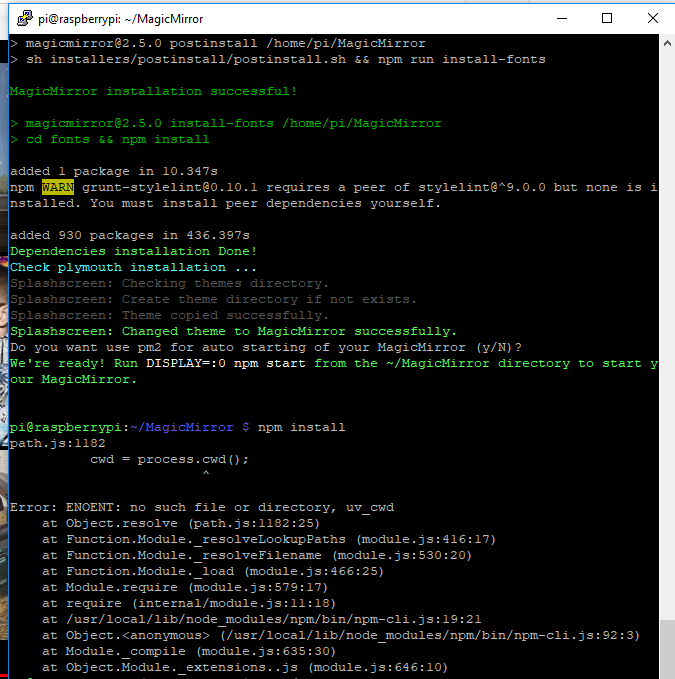
Seems that I’ve got it re-installed, but now npm install still does nothing. -
I was going to follow the instructions here for auto-starting magic mirror:
https://github.com/MichMich/MagicMirror/wiki/Auto-Starting-MagicMirror -
Huh, it appears the work i did before deleting and reinstalling the MagicMirror directory for the auto-start held over and it is working now. Thanks for dealing with me!
Hello! It looks like you're interested in this conversation, but you don't have an account yet.
Getting fed up of having to scroll through the same posts each visit? When you register for an account, you'll always come back to exactly where you were before, and choose to be notified of new replies (either via email, or push notification). You'll also be able to save bookmarks and upvote posts to show your appreciation to other community members.
With your input, this post could be even better 💗
Register Login