Read the statement by Michael Teeuw here.
MMM-CalendarExt2
-
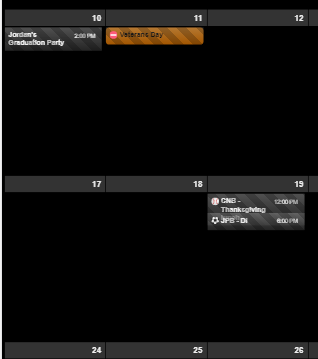
Trying to figure out two things:
One: I got the event title to wrap which is what I want, but it causes issues when there is an event following the one that wraps as you can see in the picture.
Second: How do I cut the overall height down of the whole thing? There is a lot of empty space, I’d like to limit the events per day to 3 and reduce the overall height of the calendar. -
-
I think you’ve modified CSS for sending event time to the right side, It could make the confusing wrapping. hmmm hard to explain. sorry for my poor English. What kind of method did you use?
float right?, By default this module usually useflexbox model. Try another approach with using flex. -
adjust
slotMaxHeightof view.
https://github.com/eouia/MMM-CalendarExt2/wiki/2c4.-View:week,-month
-
-
Ok, got the overall height down to manageable. I also reset the custom css work to time first, and all that. What I am looking to do is wrap the title of the event to multiple lines if it is too long, in doing so the event slot needs to increase, but when I do this, they still overlap like in the previous picture. I am very new to CSS so, I could easily have made a mistake.
-
@Sean @mrdenmark
Thanks for both of your help. I got it where I wanted it.@Sean Thanks for the module, its great! keep up the good work and awesome support.
-
I do have another question on the ics file. I am using one from a region but it does not seem to work, would you know why?
i works for google, outlook and others. Thanks -
I really appreciate the module and it is (almost) exactly what I want. I still looking the same thing as @mrmagoo_83 that I could wrap the events in multiple lines when needed.
Also, is there a way to make events as wide as the column? Now it is slightly narrower. Here’s a picture of what I mean.
https://www.dropbox.com/s/9iosscweizpthrb/IMG_0603.jpg?dl=0
Can I also shrink the gap between events vertically somehow? -
I really like this module and unlike the regular Calendar app is able to deal with DST.
I have a calendar of just my kids chores to do today. All i want is to display the chores that are today, in the calendar they are all day events. So i would like the “ends in xx hours” to go away altogether ideally, but at worst i would just like it to say “Today”. Also I would like to make the slot background transparent and the slot text white. I know that is in CSS, but don’t see where to make it transparent.
{ module: 'MMM-CalendarExt2', config: { updateInterval: 1000*60*240, calendars : [ { name: "Chores", scanInterval: 1000*60*240, url: "CAL URL", }, ], views: [ { name: "Chores", position: "top_right", mode: "current", hideOverflow: false, slotTitle: "Kid's Chores", slotMaxHeight: "75px", slotCount: 10, maxDays: 1, locale: "en", calendars: ["Chores"], }, ], scenes: [ { name: "DEFAULT", }, ], }, }, -
@jani-karna
- Slightly narrow event’s width is intentional to avoid margin of error on calculation. It is hardcoded. But if you want to modify it by yourself,
https://github.com/eouia/MMM-CalendarExt2/blob/a5d509ada997034f91e0790ad72e87512cb24c60/CALEXT2_Slot.js#L250
eventDom.style.width = width - 15 + "px"Change
15to what you want.Can I also shrink the gap between events vertically somehow?
Tell me more exact details? Even a picture will help.
- Slightly narrow event’s width is intentional to avoid margin of error on calculation. It is hardcoded. But if you want to modify it by yourself,
-
@scuppasteve
The default method of displaying time onagenda views(currentandupcoming) is defined asrelative form. So, you can use justuseEventTimeRelative: false,to display event time absolute format.
But what you want is just removing time of events from specific calendars or specific views, you can control it with CSS.
For example, when you want to hide time of all events fromChorescalendar on current view, try this.... calendars : [ { name: "Chores", scanInterval: 1000*60*240, url: "CAL URL", className: "CHORES_CAL" }, ...Then, add this code to your
css/custom.css.CX2 .current .CHORES_CAL .eventTime { display:none; }This means
hide eventTime of CHORES_CAL of current view. Of course you can specify your target in other ways.
And you might need some additional CSS adjustment to beautify the empty area. Try it yourself. -
@Sean - This don’t seem to work. Did I break my code? (line numbers added to show result from error check) - MM won’t start with code enabled - “Please create file”
65: transform: (event) => {
66:	if (event.title.search("Recycle") > -1) {
67:		event.icon = "mdi:recycle",
68:	},
69:	return event
70: },
Results in:
Checking file...  /home/pi/MagicMirror/config/config.js
Line 65 col 46 'arrow function syntax (=>)' is only available in ES6 (use 'esversion: 6').
Line 68 col 33 Unexpected '}'.
Line 67 col 63 Expected an assignment or function call and instead saw an expression.
Line 67 col 64 Missing semicolon.
Line 68 col 34 Expected an identifier and instead saw ','.
Line 68 col 34 Expected an assignment or function call and instead saw an expression.
Line 68 col 35 Missing semicolon.
Line 69 col 45 Missing semicolon.
Thanks!
-
-
@Sean That worked perfectly . How would you go about making the slot event background not be a black gradient? I just want the whole thing to be transparent.
-
@Sean Similar to the Transform method used to identify a keyword in a title and change the icon (birthday is the example) is there a way to do the same thing (identify a key word) and change the color and background-color for that specific item?
My example would be if the word “Softball” is found in the title of a calendar entry it would transform the icon to a softball icon (already have this figured out). I also want to change the background-color and possibly the (font) color.
-
This post is deleted! -
@sdetweil - It gets worse.
65:  transform: (event) => {
66:	if (event.title.search("Recycle") > -1) {
67:	event.icon = "mdi:recycle"
68: 	},
69: 	return event
70: },
Checking file... /home/pi/MagicMirror/config/config.js Line 65 col 46 'arrow function syntax (=>)' is only available in ES6 (use 'esversion: 6'). Line 67 col 63 Missing semicolon. Line 68 col 34 Expected an identifier and instead saw ','. Line 68 col 34 Expected an assignment or function call and instead saw an expression. Line 68 col 35 Missing semicolon. Line 69 col 45 Missing semicolon.0|mm | WARNING! Could not validate config file. Starting with default configuration. Please correct syntax errors at or above this line: /home/pi/MagicMirror/config/config.js:68 0|mm | }, 0|mm | ^ 0|mm | SyntaxError: Unexpected token , 0|mm | at new Script (vm.js:74:7) 0|mm | at createScript (vm.js:246:10) 0|mm | at Object.runInThisContext (vm.js:298:10) 0|mm | at Module._compile (internal/modules/cjs/loader.js:678:28) 0|mm | at Object.Module._extensions..js (internal/modules/cjs/loader.js:722:10) 0|mm | at Module.load (internal/modules/cjs/loader.js:620:32) 0|mm | at tryModuleLoad (internal/modules/cjs/loader.js:559:12) 0|mm | at Function.Module._load (internal/modules/cjs/loader.js:551:3) 0|mm | at Module.require (internal/modules/cjs/loader.js:658:17) 0|mm | at require (internal/modules/cjs/helpers.js:20:18) -
@BKeyport said in MMM-CalendarExt2:
Please correct syntax errors at or above this line: /home/pi/MagicMirror/config/config.js:68
68: }, < ------- remove THAT trailing commaLine 65 col 46 ‘arrow function syntax (=>)’ is only available in ES6 (use ‘esversion: 6’).
need node V6, which we should be LONG past.
do a node -v -
@sdetweil @BKeyport I had the same issue with the arrow function. I did node -v and my system is v10.15.2. I was able to work around the issue by using the older notation like shown below.
FYI - I just revised your code so you can copy and try it.
65:  transform: function(event)  {
66:	if (event.title.search("Recycle") > -1) {
67:	event.icon = "mdi:recycle";
68: 	}
69: 	return event;
70: },
EDIT - line 68 revised to fix an error
-
@cskenney Your code almost got it. - had to remove the comma on line 68 there, but it now checks out…
Just don’t seem to do anything yet. Tweaking some more.Actually, it’s doing exactly what it’s designed to do. It shows the icon for the event. I didn’t expect it to leave the title in place too. That’ll do perfect.
-
@BKeyport said in MMM-CalendarExt2:
@cskenney Your code almost got it. - had to remove the comma on line 68 there, but it now checks out…
I’m glad it worked for you. I edited the code above to remove the comma in case someone else tries to use it. I originally missed it when I edited your code.
-
@cskenney said in MMM-CalendarExt2:
I also want to change the background-color and possibly the (font) color.
Sorry for the late reply. At weekends, I rarely am in front of computer.
You can define class in your CSS. then assign it into your transfrom code.transform: (event) => { if (event.title.search("Recycle") > -1) { event.icon = "mdi:recycle" event.className = "CLASS_RECYCLE" // in your css/custom.css, define color and bgcolor for this class } return event },

Hello! It looks like you're interested in this conversation, but you don't have an account yet.
Getting fed up of having to scroll through the same posts each visit? When you register for an account, you'll always come back to exactly where you were before, and choose to be notified of new replies (either via email, or push notification). You'll also be able to save bookmarks and upvote posts to show your appreciation to other community members.
With your input, this post could be even better 💗
Register Login