MagicMirror Forum
    • Recent
    • Tags
    • Unsolved
    • Solved
    • MagicMirror² Repository
    • Documentation
    • 3rd-Party-Modules
    • Donate
    • Discord
    • Register
    • Login
    A New Chapter for MagicMirror: The Community Takes the Lead
    Read the statement by Michael Teeuw here.

    MMM-CalendarExt2

    Scheduled Pinned Locked Moved Utilities
    486 Posts 83 Posters 942.4k Views 83 Watching
    Loading More Posts
    • Oldest to Newest
    • Newest to Oldest
    • Most Votes
    Reply
    • Reply as topic
    Log in to reply
    This topic has been deleted. Only users with topic management privileges can see it.
    • S Offline
      scuppasteve @Guest
      last edited by

      @Sean That worked perfectly . How would you go about making the slot event background not be a black gradient? I just want the whole thing to be transparent.

      C 1 Reply Last reply Reply Quote 0
      • C Offline
        cskenney
        last edited by cskenney

        @Sean Similar to the Transform method used to identify a keyword in a title and change the icon (birthday is the example) is there a way to do the same thing (identify a key word) and change the color and background-color for that specific item?

        My example would be if the word “Softball” is found in the title of a calendar entry it would transform the icon to a softball icon (already have this figured out). I also want to change the background-color and possibly the (font) color.

        ? 1 Reply Last reply Reply Quote 0
        • J Offline
          jani.karna @Guest
          last edited by jani.karna

          This post is deleted!
          1 Reply Last reply Reply Quote 0
          • BKeyportB Offline
            BKeyport Module Developer @sdetweil
            last edited by

            @sdetweil - It gets worse.

            65:  transform: (event) => {  
            66:	if (event.title.search("Recycle") > -1) {
            67:	event.icon = "mdi:recycle"
            68: 	},
            69: 	return event
            70: },
            
            Checking file...  /home/pi/MagicMirror/config/config.js
            Line 65 col 46 'arrow function syntax (=>)' is only available in ES6 (use 'esversion: 6').
            Line 67 col 63 Missing semicolon.
            Line 68 col 34 Expected an identifier and instead saw ','.
            Line 68 col 34 Expected an assignment or function call and instead saw an expression.
            Line 68 col 35 Missing semicolon.
            Line 69 col 45 Missing semicolon.
            
            0|mm     | WARNING! Could not validate config file. Starting with default configuration. Please correct syntax errors at or above this line: /home/pi/MagicMirror/config/config.js:68
            0|mm     |                                                              },
            0|mm     |                                                               ^
            0|mm     | SyntaxError: Unexpected token ,
            0|mm     |     at new Script (vm.js:74:7)
            0|mm     |     at createScript (vm.js:246:10)
            0|mm     |     at Object.runInThisContext (vm.js:298:10)
            0|mm     |     at Module._compile (internal/modules/cjs/loader.js:678:28)
            0|mm     |     at Object.Module._extensions..js (internal/modules/cjs/loader.js:722:10)
            0|mm     |     at Module.load (internal/modules/cjs/loader.js:620:32)
            0|mm     |     at tryModuleLoad (internal/modules/cjs/loader.js:559:12)
            0|mm     |     at Function.Module._load (internal/modules/cjs/loader.js:551:3)
            0|mm     |     at Module.require (internal/modules/cjs/loader.js:658:17)
            0|mm     |     at require (internal/modules/cjs/helpers.js:20:18)
            

            The "E" in "Javascript" stands for "Easy"

            S 1 Reply Last reply Reply Quote 0
            • S Offline
              sdetweil @BKeyport
              last edited by

              @BKeyport said in MMM-CalendarExt2:

              Please correct syntax errors at or above this line: /home/pi/MagicMirror/config/config.js:68
              68: }, < ------- remove THAT trailing comma

              Line 65 col 46 ‘arrow function syntax (=>)’ is only available in ES6 (use ‘esversion: 6’).

              need node V6, which we should be LONG past.
              do a node -v

              Sam

              How to add modules

              learning how to use browser developers window for css changes

              C 1 Reply Last reply Reply Quote 0
              • C Offline
                cskenney @sdetweil
                last edited by cskenney

                @sdetweil @BKeyport I had the same issue with the arrow function. I did node -v and my system is v10.15.2. I was able to work around the issue by using the older notation like shown below.

                FYI - I just revised your code so you can copy and try it.

                65:  transform: function(event)  {  
                66:	if (event.title.search("Recycle") > -1) {
                67:	event.icon = "mdi:recycle";
                68: 	}
                69: 	return event;
                70: },
                

                EDIT - line 68 revised to fix an error

                BKeyportB 1 Reply Last reply Reply Quote 0
                • BKeyportB Offline
                  BKeyport Module Developer @cskenney
                  last edited by BKeyport

                  @cskenney Your code almost got it. - had to remove the comma on line 68 there, but it now checks out…

                  Just don’t seem to do anything yet. Tweaking some more.

                  Actually, it’s doing exactly what it’s designed to do. It shows the icon for the event. I didn’t expect it to leave the title in place too. That’ll do perfect.

                  The "E" in "Javascript" stands for "Easy"

                  C 1 Reply Last reply Reply Quote 0
                  • C Offline
                    cskenney @BKeyport
                    last edited by

                    @BKeyport said in MMM-CalendarExt2:

                    @cskenney Your code almost got it. - had to remove the comma on line 68 there, but it now checks out…

                    I’m glad it worked for you. I edited the code above to remove the comma in case someone else tries to use it. I originally missed it when I edited your code.

                    1 Reply Last reply Reply Quote 0
                    • ? Offline
                      A Former User @cskenney
                      last edited by A Former User

                      @cskenney said in MMM-CalendarExt2:

                      I also want to change the background-color and possibly the (font) color.

                      Sorry for the late reply. At weekends, I rarely am in front of computer.
                      You can define class in your CSS. then assign it into your transfrom code.

                      transform: (event) => {  
                        if (event.title.search("Recycle") > -1) {
                          event.icon = "mdi:recycle"
                          event.className = "CLASS_RECYCLE" // in your css/custom.css, define color and bgcolor for this class
                        }
                        return event
                      },
                      
                      
                      C 1 Reply Last reply Reply Quote 1
                      • C Offline
                        cskenney @Guest
                        last edited by

                        @Sean said in MMM-CalendarExt2:

                        @cskenney said in MMM-CalendarExt2:

                        I also want to change the background-color and possibly the (font) color.

                        Sorry for the late reply. At weekends, I rarely am in front of computer.
                        You can define class in your CSS. then assign it into your transfrom code.

                        transform: (event) => {  
                          if (event.title.search("Recycle") > -1) {
                            event.icon = "mdi:recycle"
                            event.className = "CLASS_RECYCLE" // in your css/custom.css, define color and bgcolor for this class
                          },
                          return event
                        },


                        I figured that out about an hour ago and was coming back to the forums to revise my post. Thanks for confirming what I did works!

                        1 Reply Last reply Reply Quote 0
                        • C Offline
                          cskenney @scuppasteve
                          last edited by cskenney

                          @scuppasteve said in MMM-CalendarExt2:

                          @Sean That worked perfectly . How would you go about making the slot event background not be a black gradient? I just want the whole thing to be transparent.

                          You can adjust the background color in the CSS file.

                          Since you already defined the eventName: “CHORES_CAL” you can use it in CSS.

                          syntax:

                          background-color: rgba(red, green, blue, alpha);
                          

                          alpha: 0~1 (0:transparent, 1:opaque)

                          Try this in your CSS file.

                          .CX2 .event.CHORES_CAL {
                          	background-color:rgba(0,0,0,0);
                          	}
                          

                          I believe that will make the background transparent for all the events in that eventName class.

                          1 Reply Last reply Reply Quote 0
                          • J Offline
                            jani.karna
                            last edited by

                            @Sean said in MMM-CalendarExt2:

                            @jani-karna

                            1. Slightly narrow event’s width is intentional to avoid margin of error on calculation. It is hardcoded. But if you want to modify it by yourself,
                              https://github.com/eouia/MMM-CalendarExt2/blob/a5d509ada997034f91e0790ad72e87512cb24c60/CALEXT2_Slot.js#L250
                            eventDom.style.width = width - 15 + "px"
                            

                            Change 15 to what you want.

                            Worked perfectly, thank you!

                            1 Reply Last reply Reply Quote 0
                            • J Offline
                              jani.karna @Guest
                              last edited by jani.karna

                              @Sean said in MMM-CalendarExt2:

                              Can I also shrink the gap between events vertically somehow?

                              Tell me more exact details? Even a picture will help.

                              What I mean with gap between events is this:
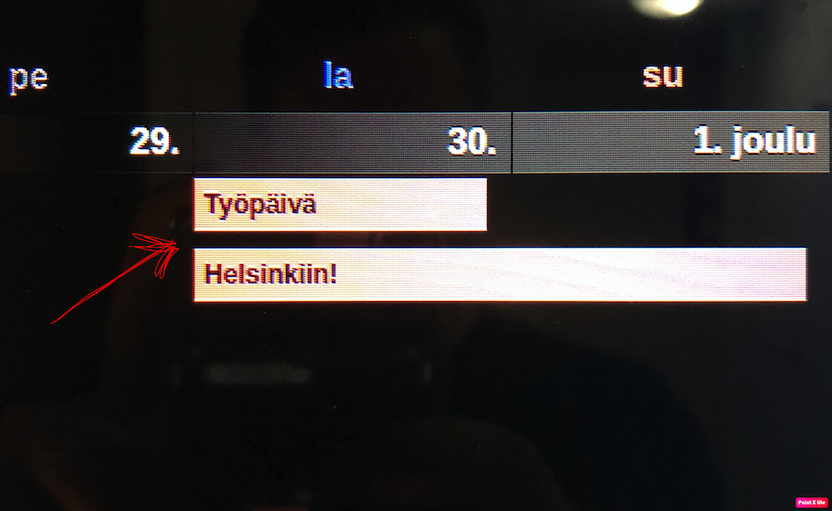
                              0_1575273829573_IMG_0603.png

                              ? 1 Reply Last reply Reply Quote 0
                              • ? Offline
                                A Former User @jani.karna
                                last edited by

                                @jani-karna
                                0_1575277296246_e7b38c60-d926-45c5-bd2e-0fdc0edec9ec-image.png
                                Hmmm… in Original CSS, there was no huge gap. It would be only 2px. I think you probably have modified CSS by yourself, but I don’t know what you changed. Sorry, can’t help you.

                                J 1 Reply Last reply Reply Quote 0
                                • J Offline
                                  jani.karna @Guest
                                  last edited by

                                  @Sean said in MMM-CalendarExt2:

                                  Hmmm… in Original CSS, there was no huge gap. It would be only 2px. I think you probably have modified CSS by yourself, but I don’t know what you changed. Sorry, can’t help you.

                                  Thats fine, I’ll figure it out.

                                  In the upcoming calendar, I have location or additional information in the events and their font is too big. Can I somehow make it smaller? Here’s a pic, the last row being the additional information:
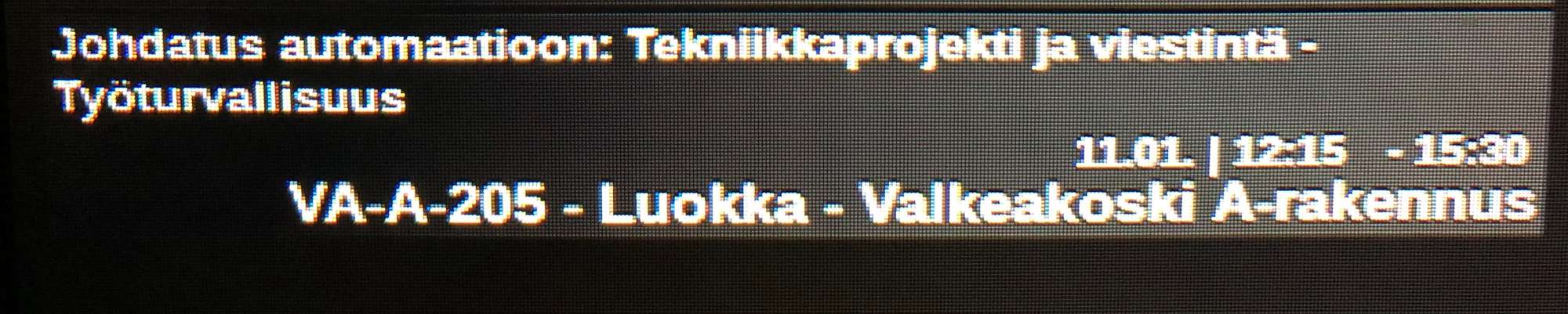
                                  0_1575325368287_IMG_0614.jpg

                                  ? 1 Reply Last reply Reply Quote 0
                                  • ? Offline
                                    A Former User @jani.karna
                                    last edited by

                                    @jani-karna
                                    https://github.com/eouia/MMM-CalendarExt2/wiki/4.-Styling
                                    Each event has eventSub (and its sub-elements eventLocation and eventDescription). By default, agenda(upcoming and current) views would reveal eventSub, so, you can use that CSS selector to specify.

                                    J 1 Reply Last reply Reply Quote 0
                                    • J Offline
                                      jani.karna @Guest
                                      last edited by

                                      @Sean said in MMM-CalendarExt2:

                                      @jani-karna
                                      https://github.com/eouia/MMM-CalendarExt2/wiki/4.-Styling
                                      Each event has eventSub (and its sub-elements eventLocation and eventDescription). By default, agenda(upcoming and current) views would reveal eventSub, so, you can use that CSS selector to specify.

                                      Missed that styling part… :grimacing_face: got it working, thank you again!

                                      1 Reply Last reply Reply Quote 0
                                      • C Offline
                                        code999
                                        last edited by

                                        Hello again. is there a way to scroll the events when there are so many on a single day with displaying the (+x).
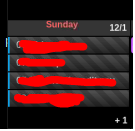
                                        0_1575487198314_bfe79fce-4c8c-4cd5-ba04-86023f46686e-image.png

                                        Thanks.

                                        ? 2 Replies Last reply Reply Quote 0
                                        • ? Offline
                                          A Former User @code999
                                          last edited by

                                          @code999
                                          no. i was tried scrolling in my older CALEXT but too burden to rpi.

                                          C 1 Reply Last reply Reply Quote 0
                                          • ? Offline
                                            A Former User @code999
                                            last edited by

                                            @code999
                                            Instead, you can sort and filter the order of events to be shown.

                                            1 Reply Last reply Reply Quote 0

                                            Hello! It looks like you're interested in this conversation, but you don't have an account yet.

                                            Getting fed up of having to scroll through the same posts each visit? When you register for an account, you'll always come back to exactly where you were before, and choose to be notified of new replies (either via email, or push notification). You'll also be able to save bookmarks and upvote posts to show your appreciation to other community members.

                                            With your input, this post could be even better 💗

                                            Register Login

                                            • 1
                                            • 2
                                            • 7
                                            • 8
                                            • 9
                                            • 10
                                            • 11
                                            • 24
                                            • 25
                                            • 9 / 25
                                            • First post
                                              Last post
                                            Enjoying MagicMirror? Please consider a donation!
                                            MagicMirror created by Michael Teeuw.
                                            Forum managed by Sam, technical setup by Karsten.
                                            This forum is using NodeBB as its core | Contributors
                                            Contact | Privacy Policy