MagicMirror Forum
    • Recent
    • Tags
    • Unsolved
    • Solved
    • MagicMirror² Repository
    • Documentation
    • 3rd-Party-Modules
    • Donate
    • Discord
    • Register
    • Login
    A New Chapter for MagicMirror: The Community Takes the Lead
    Read the statement by Michael Teeuw here.

    MMM-CalendarExt2

    Scheduled Pinned Locked Moved Utilities
    486 Posts 83 Posters 939.0k Views 83 Watching
    Loading More Posts
    • Oldest to Newest
    • Newest to Oldest
    • Most Votes
    Reply
    • Reply as topic
    Log in to reply
    This topic has been deleted. Only users with topic management privileges can see it.
    • ? Offline
      A Former User @Lordy
      last edited by

      @Lordy
      Remove postion of module. This module doesn’t need it.

      LordyL 1 Reply Last reply Reply Quote 0
      • LordyL Offline
        Lordy @Guest
        last edited by Lordy

        @Sean said in MMM-CalendarExt2:

        Remove postion of module. This module doesn’t need it.

        I tried it, unfortunately without success. Or what exactly do you mean? Here is my config.

        {
        module:“MMM-CalendarExtMinimonth”,
        disabled: false,
        position: “bottom_bar”,
        pages: {main: ‘bottom_bar’},
        calendars: [ ],
        },
        {
        module: ‘MMM-CalendarExt2’,
        disabled: false,
        pages: {main: “bottom_bar”},
        config: {
        rotateInterval: 5601000,
        scenes:[
        {
        name: “”,
        views: [“”],
        },
        ],
        views:[
        {
        position: “bottom_bar”,
        name: “”,
        title: “”,
        mode: “week”,
        colored: true,
        type: “row”,
        slotCount: 2,
        slotSubTitleFormat: “dddd”,
        slotTitleFormat: “DD.MMMM”,
        slotAltTitleFormat: “DD.MMMM”,
        slotMaxHeight:“325px”,
        calendars: [“xxx”],
        locale: “de”,
        maxItems:2000,
        hideOverflow: false,
        },
        ],
        calendars: [

        ? 1 Reply Last reply Reply Quote 0
        • ? Offline
          A Former User @Lordy
          last edited by

          @Lordy
          Hmmm. this module would manage its hiding/revealing by itself. So there is no need set postion of this module itself. But you set the position by pages: {main: “bottom_bar”}, through MMM-Page-Selector by force.
          Unfortunately, MM would show the module name and id even when the module has nothing to draw at that position.

          Hmmm…

          I think the easiest way is to hide it by CSS.

          #module_7_MMM-CalendarExt2 {
            display:none;
          }
          

          The only problem is, if you change the order of modules(adding a new module or removing) in configuration, the module Id will be changed. In that case, you should modify again.

          LordyL 1 Reply Last reply Reply Quote 1
          • LordyL Offline
            Lordy @Guest
            last edited by

            @Sean said in MMM-CalendarExt2:

            The only problem is, if you change the order of modules(adding a new module or removing) in configuration, the module Id will be changed. In that case, you should modify again.

            Thank you for your prompt reply. And always, you were right about that. :thumbs_up_medium-light_skin_tone:

            1 Reply Last reply Reply Quote 0
            • N Offline
              nmeldre
              last edited by

              This post is deleted!
              ? 1 Reply Last reply Reply Quote 0
              • BKeyportB Offline
                BKeyport Module Developer
                last edited by

                Sean:

                Looks like we’re getting screwed over here:

                Starting February 15, 2021, G Suite accounts will only allow access to apps using OAuth. Password-based access will no longer be supported.

                Calendar
                If you use CalDAV to give an app or device access to your calendar, switch to a method that supports OAuth. We recommend the Google Calendar app [Web/iOS/Android] as the most secure app to use with your G Suite account.

                The "E" in "Javascript" stands for "Easy"

                ? 1 Reply Last reply Reply Quote 0
                • ? Offline
                  A Former User @nmeldre
                  last edited by A Former User

                  @nmeldre
                  i’ve been asked this already countless times, however still the answer is same.
                  i regard week/month view as a kind of brief overview or summary of long periods. so have no idea to provide details on these both views.

                  Because;

                  • wrapping usually looks ugly anyhow.
                  • the more title means the less events to show at a same time in same area.
                  • can use transforming for abbreviation or using icon or assigning styles for better distinguishing than long text
                  • additional better views exist to show detailed info of more important and close future events. like upcoming or daily.
                  • real web or desktop application - google calendar and apple calendar - also don’t provide title wrapping in month style views.

                  So, sorry.

                  1 Reply Last reply Reply Quote 0
                  • ? Offline
                    A Former User @BKeyport
                    last edited by

                    @BKeyport
                    hmm i don’t use G suit, so at this moment, have no idea how things going. I’ll research.
                    (maybe 3rd party converter module could be possible to solve that issue without modification of this module directly)

                    BKeyportB 1 Reply Last reply Reply Quote 0
                    • BKeyportB Offline
                      BKeyport Module Developer @Guest
                      last edited by

                      @Sean I figure Google’s gonna do that to main accounts sooner or later. GSuite is usually the test bed.

                      I’m likely going to be moving my calendar agenda system, depends on what my appointment manager supports.

                      The "E" in "Javascript" stands for "Easy"

                      1 Reply Last reply Reply Quote 0
                      • BKeyportB Offline
                        BKeyport Module Developer
                        last edited by BKeyport

                        @Sean,

                        I’m trying to add an ICS file, but it’s throwing an error, but other calendars accepts it.

                        The url is http://www.tax.gov/calendar/employer/calendar.ics

                        Log from PM2 LOGS shows this error:

                        [CALEXT2] calendar:irs >> invalid date-time value: “2016-12-30T::”

                        Is it the US Government not knowing what’s going on, or is it a bug in the code?

                        Thanks!

                        The "E" in "Javascript" stands for "Easy"

                        1 Reply Last reply Reply Quote 0
                        • jdfraserJ Offline
                          jdfraser @Guest
                          last edited by jdfraser

                          @Sean
                          Thanks for the great module, it is the main reason for my Magic Mirror / picture frame.

                          Could you explain the syntax for using the “transform” command to change the title of an event to a shorter abbreviation (e.g. “jack climbing” = > “J.C.”)? I have some items in my calendar that are displayed on the monthly view with a title “Dinner: Taco Soup” and I would like to use transform to remove the "Dinner: " from the title. I have searched the documentation and the forum, but am having a tough time figuring out how I need to specify this in my config.js (or custom.css).

                          ? 1 Reply Last reply Reply Quote 0
                          • ? Offline
                            A Former User @jdfraser
                            last edited by

                            @jdfraser

                            Basically, read this.
                            https://github.com/eouia/MMM-CalendarExt2/wiki/Filtering-and-Sorting#transforming
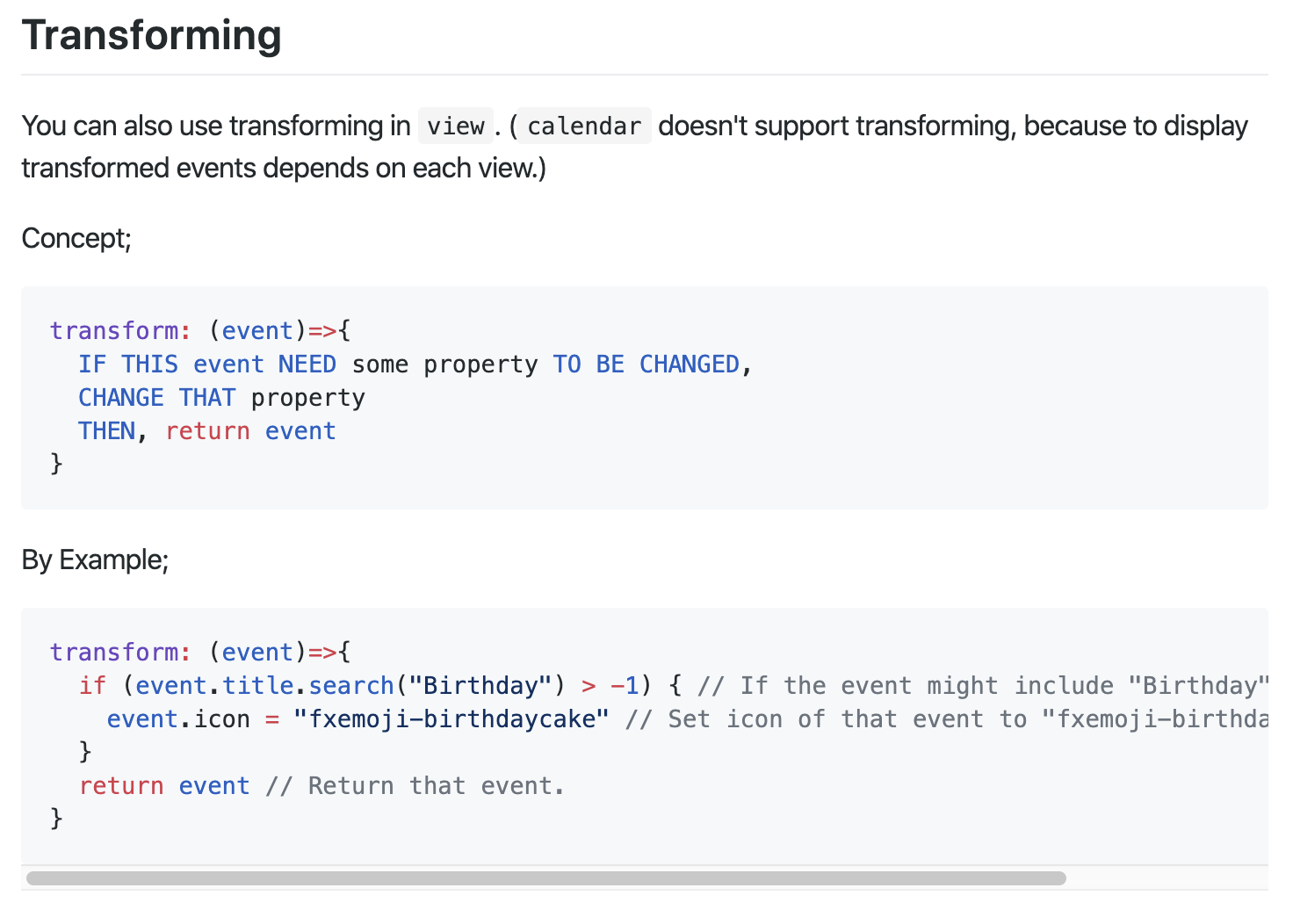
                            0_1576689031621_49ee04d5-231c-4662-a911-b93f39f5694e-image.png

                            You need some basic skills in JavaScript. Anyway, I’ll show some examples;

                            1. Original

                            I’ve added two events on 25th Dec. Lunch:Taco Soup Once and Dinner:Taco Soup Twiceon my Google calendar.
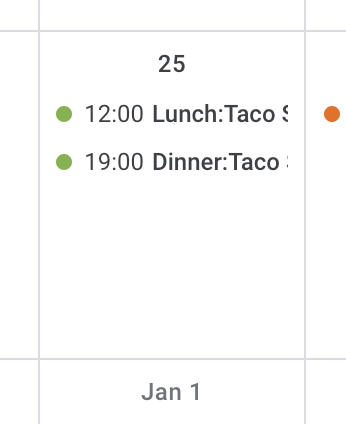
                            0_1576690912487_8cbe4a94-566c-41f3-aa75-763fe1b0a31a-image.png
                            Hmmmm Taco Soup on Christmas, what a poor…

                            It will be shown like this on MMM-CalendarExt2 without transforming;
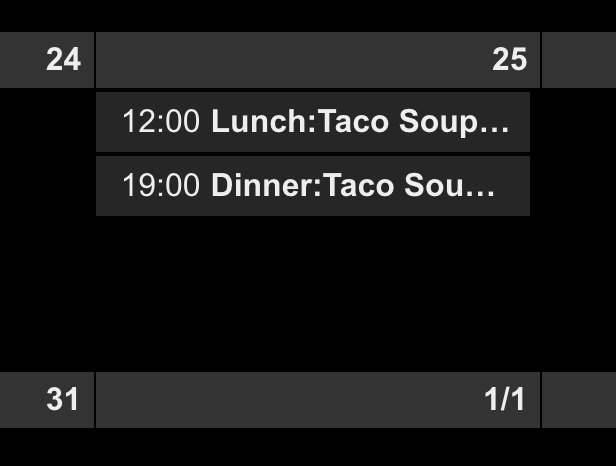
                            0_1576691004690_1f64ad4d-7173-45f2-bc25-284d12ff46d2-image.png

                            1. Remove Dinner:
                            transform: (event)=>{
                              event.title = event.title.replace("Dinner:", "")
                              return event
                            }
                            

                            will make this;
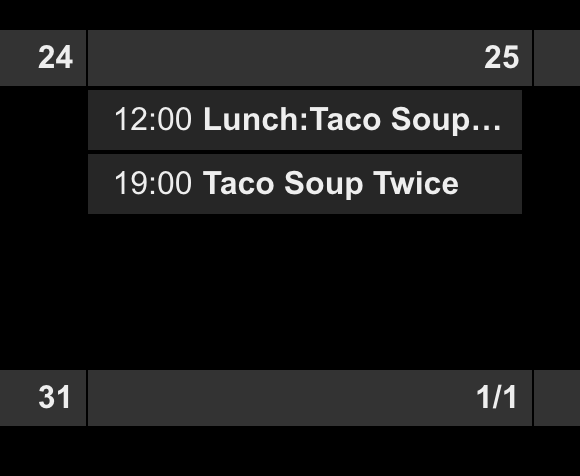
                            0_1576691065376_58de8515-e43f-47cd-a7d2-5fa9f7f6b19c-image.png

                            1. give more transforming.
                            transform: (event)=>{
                              if (event.title.search("Dinner:") > -1) {
                                event.title = event.title.replace("Dinner:", "")
                                event.icon = "emojione-pot-of-food"
                                event.className = "myDinnerClass"
                              }
                              return event
                            }
                            

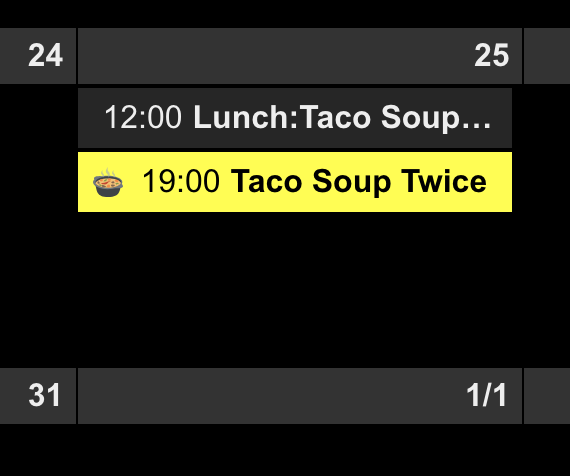
                            I’ve added icon and specific CSS class selector. So you can define your CSS class on MagicMirror/css/custom.css like this;

                            .CX2 .myDinnerClass {
                              color: Black;
                              background-color: Yellow;
                            }
                            

                            It will be shown like this;
                            0_1576691287656_a36b2008-915c-4bdb-8029-9786042beef9-image.png !

                            Of course, there would be more tricks if you know javascript somehow.

                            If you are not familiar with Javascript,… hmmm sorry for you. Anyway, this is DIY project. There is no ready-made out-of-box arts.

                            jdfraserJ 1 Reply Last reply Reply Quote 0
                            • C Offline
                              Clubjack
                              last edited by

                              Hello together.

                              Is it possible to Show two different calendars, on two different pages (mmm-pages)?

                              ? 1 Reply Last reply Reply Quote 0
                              • ? Offline
                                A Former User @Clubjack
                                last edited by A Former User

                                @Clubjack
                                Possible.
                                You need 2 scenes which have independent views of your calendars.
                                Then, read this;
                                https://github.com/eouia/MMM-CalendarExt2/wiki/3.-Usage#user-defined-notification-trigger

                                C 1 Reply Last reply Reply Quote 0
                                • C Offline
                                  Clubjack @Guest
                                  last edited by

                                  @Sean
                                  OK.
                                  But i want to same looking calendars with same View.
                                  I try it, with coping the mmm-calendarext2 and rename it to mmm-calendarext2.2

                                  S ? 2 Replies Last reply Reply Quote 0
                                  • S Offline
                                    sdetweil @Clubjack
                                    last edited by

                                    @Clubjack ust make another scene like the 1st one with a different name, and put that on the next page

                                    Sam

                                    How to add modules

                                    learning how to use browser developers window for css changes

                                    1 Reply Last reply Reply Quote 0
                                    • ? Offline
                                      A Former User @Clubjack
                                      last edited by A Former User

                                      @Clubjack said in MMM-CalendarExt2:

                                      I try it, with coping the mmm-calendarext2 and rename it to mmm-calendarext2.2

                                      This module will not work like that.

                                      But i want to same looking calendars with same View.

                                      Just make one more view with the same configured values.

                                      1 Reply Last reply Reply Quote 0
                                      • jdfraserJ Offline
                                        jdfraser @Guest
                                        last edited by

                                        @Sean Thank you for your quick response! I will practice my Javascript :)

                                        S 1 Reply Last reply Reply Quote 0
                                        • S Offline
                                          sdetweil @jdfraser
                                          last edited by sdetweil

                                          @jdfraser really no javascript , just stuff in config…

                                          you have for Ext2 a config section
                                          which has

                                          scenes: {
                                               [
                                                   { name:  "scene1",
                                                       viewes: ["view1", "view2"]
                                                   },
                                                   { name:  "scene2",            // < --- make secodn scene that looks like the 1st
                                                       viewes: ["view1", "view2"]
                                                   },
                                              ]
                                          }
                                          Views: {
                                               [
                                                   { name:  "view1"
                                                   },
                                                   {  name: "view2"
                                                   }
                                               ]
                                          }
                                          

                                          Sam

                                          How to add modules

                                          learning how to use browser developers window for css changes

                                          1 Reply Last reply Reply Quote 0
                                          • C Offline
                                            Clubjack
                                            last edited by

                                            I think there’s a little misunderstanding.
                                            I would like to create several pages with mmm-pages and control them via alexa. Therefore I have to specify in the configs of mmm-pages which modules should be there on the pages.

                                            Example:
                                            Page 1: mmm-clock, mmm-calendarext2
                                            Page 2: mmm-waether, mmm-calendarext2

                                            How should I insert different scenes or views there?

                                            ? 2 Replies Last reply Reply Quote 0

                                            Hello! It looks like you're interested in this conversation, but you don't have an account yet.

                                            Getting fed up of having to scroll through the same posts each visit? When you register for an account, you'll always come back to exactly where you were before, and choose to be notified of new replies (either via email, or push notification). You'll also be able to save bookmarks and upvote posts to show your appreciation to other community members.

                                            With your input, this post could be even better 💗

                                            Register Login

                                            • 1
                                            • 2
                                            • 19
                                            • 20
                                            • 21
                                            • 22
                                            • 23
                                            • 24
                                            • 25
                                            • 21 / 25
                                            • First post
                                              Last post
                                            Enjoying MagicMirror? Please consider a donation!
                                            MagicMirror created by Michael Teeuw.
                                            Forum managed by Sam, technical setup by Karsten.
                                            This forum is using NodeBB as its core | Contributors
                                            Contact | Privacy Policy