MagicMirror Forum
    • Recent
    • Tags
    • Unsolved
    • Solved
    • MagicMirror² Repository
    • Documentation
    • 3rd-Party-Modules
    • Donate
    • Discord
    • Register
    • Login
    A New Chapter for MagicMirror: The Community Takes the Lead
    Read the statement by Michael Teeuw here.

    MMM-CalendarExt2

    Scheduled Pinned Locked Moved Utilities
    486 Posts 83 Posters 940.9k Views 83 Watching
    Loading More Posts
    • Oldest to Newest
    • Newest to Oldest
    • Most Votes
    Reply
    • Reply as topic
    Log in to reply
    This topic has been deleted. Only users with topic management privileges can see it.
    • L Offline
      luke1
      last edited by

      Hi, i have a problem with my scanInterval I want it to update every 2 hours but it keeps updating every minute. (disappears for one second)
      I already tried different time formats but it didn’t work.
      Thanks,
      Luke

      module: 'MMM-CalendarExt2',
                              config: {
                                      calendars : [
                                              {
                                                      name: „Ich",
                                                      url: „***********“,
                                                      scanInterval: 7200000, (already tried: 1000*60*60*2, 2*60*60*1000, )
                                              },
                                              {
                                                      name: "Feiertage",
                                                      url: „***********",
                                                      scanInterval: 7200000, (already tried: 1000*60*60*2, 2*60*60*1000, )
                                              },
                                               {
                                                      name: "Uni",
                                                      url: „**********"
                                                      scanInterval: 7200000, (already tried: 1000*60*60*2, 2*60*60*1000, )
                                              },
                                      ],
                                      views: [
                                              {
                                                      name: "view1",
                                                      mode: "week",
                                                      calendars: [],
                                                      hideOverflow: false,
                                                      position: "bottom_bar",
                                                      slotCount: 3,
                                                      filterPassedEvent: true,
                                                      locale: "de-DE",
                                              },
                                              {
                                                      name: "upcoming",
                                                      mode: "upcoming",
                                                      position: "top_left",
                                                      maxItems: 5,
                                                      maxDays: 7,
                                                      locale: "de-DE",
                                                      hideOverflow: false,
                                                      filterPassedEvent: true,
                                              },
                                      ],
                                      scenes: [
                                              {
                                                      name: "DEFAULT",
                                              },
                                      ],
                              },
                      },
      
      
      BKeyportB 1 Reply Last reply Reply Quote 0
      • V Offline
        Vandrasky
        last edited by

        This post is deleted!
        1 Reply Last reply Reply Quote 0
        • BKeyportB Offline
          BKeyport Module Developer @luke1
          last edited by

          @luke1 I believe it refreshes every minute anyway, but don’t ping the servers for the time you specify. If you want it to stop animating as a stopgap, you can use this:

          /* Stop animating */ 
          
          .CX2.hidden {
            display: block;
            opacity: 1;
            animation-name: none;
            animation-iteration-count: 0;
            animation-timing-function: none;
            animation-duration: 0s;
          }
          
          .CX2.shown {
            display: block;
            opacity: 1;
            animation-name: none;
            animation-iteration-count: 0;
            animation-timing-function: none;
            animation-duration: 0s;
          }
          

          The "E" in "Javascript" stands for "Easy"

          L 1 Reply Last reply Reply Quote 1
          • L Offline
            luke1 @BKeyport
            last edited by

            @bkeyport Thanks a lot! :)

            1 Reply Last reply Reply Quote 0
            • V Offline
              Vandrasky
              last edited by

              Hi

              Just wondering if it’s possible to change the date format in the upcoming view.

              Its currently giving me how many days until the event. I’m looking for the date of the event.

              I’ve tried (useEventTimeRelative: “false”)

              any other thoughts?

              Jeremy

              1 Reply Last reply Reply Quote 0
              • A Offline
                almightyyoshi
                last edited by

                Is there a way to show the next month in the “month” view? I want to rotate between the current month and next month. If it can be done, is there a way to show it without having to manually filter it each month (i.e filter = currentMonth + 1 … or something like that)?

                A 1 Reply Last reply Reply Quote 0
                • A Offline
                  almightyyoshi @almightyyoshi
                  last edited by

                  @almightyyoshi NM. I was way overthinking that. Found the “fromNow” setting.

                  1 Reply Last reply Reply Quote 0
                  • M Offline
                    Marva82 @BKeyport
                    last edited by

                    @bkeyport
                    That is not correct. If you want to get rid of the week count create a css/custom.css file, never change the main.css! And add this line
                    .CX2 .weeksmark {
                    display:none;
                    }

                    BKeyportB 1 Reply Last reply Reply Quote 0
                    • BKeyportB Offline
                      BKeyport Module Developer @Marva82
                      last edited by

                      @marva82 My statement was functionally correct. Yeah, I forgot to use the overused “Use custom.css” mantra

                      (Which in this case, don’t really matter, as if you’d adjust MMM-CX2’s css stub, it’ll likely never get overwritten as the projects effectively dead)

                      And yes, you can remove the Week of the year with your stub.

                      The "E" in "Javascript" stands for "Easy"

                      1 Reply Last reply Reply Quote 1
                      • D Offline
                        debaetstony
                        last edited by

                        Apparently I’m still using MMM-CalendarExt (which is archived) on my old configured MM, so I wanted to update it.
                        After a while with MMM-CalendarExt2 I still have an issue.

                        I don’t get the ‘Today’ and ‘Tomorrow’ in Dutch, also keep giving the date ‘month day’ instead of day/month.

                        Additional question;
                        I know that with following you hide the week numbers

                        .CX2 .weeksmark {
                           display: none;
                        }
                        
                        • But how can you remove the block so that the empty space disappears.
                        • Also how do you get less space between the ‘Today / Tomorrow / next days’
                        • Is it possible to see the entire appointment in ‘month’ view, even on multiple lines?
                          alt text
                        S 1 Reply Last reply Reply Quote 0
                        • S Offline
                          SARCux @debaetstony
                          last edited by SARCux

                          @debaetstony

                          hi,
                          these are my lines in the config.js

                          views: [
                          			{
                          				name: "VIEW1",
                          				mode: "daily",
                          				title: "Termine nächsten Tage",
                          				position: "top_center",
                          				locale: "de-DE",
                          				calendars: ["eigene Kalender eintragen"],
                          				slotCount: 3,
                          				slotTitleFormat: {
                          						sameDay: "[Heute]",
                          						nextDay: "[Morgen]",
                          						nextWeek: "[am] dddd",
                          						lastDay: "[Gestern]",
                          						lastWeek: "[letzte] ddd",
                          						sameElse: "DD.MM."
                          								},
                          			},
                          
                          			],
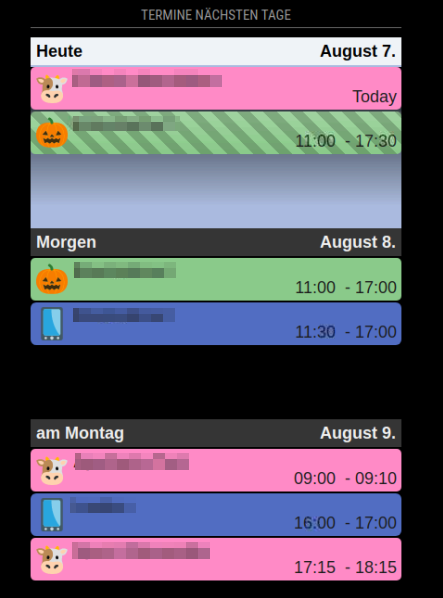
                          

                          2021-08-07 18_50_57-Window.png

                          S 1 Reply Last reply Reply Quote 0
                          • S Offline
                            sdetweil @SARCux
                            last edited by

                            @sarcux the doc seems to suggest where you have

                            sameDay: "[Heute]",
                            

                            you could have the date format too

                            sameDay: "[Heute]  D, MMM",  
                            

                            you do that on lastWeek

                            lastWeek: "[letzte] ddd"
                            

                            formatting options
                            https://devhints.io/moment

                            Sam

                            How to add modules

                            learning how to use browser developers window for css changes

                            D 1 Reply Last reply Reply Quote 0
                            • D Offline
                              debaetstony @sdetweil
                              last edited by

                              @sdetweil @SARCux
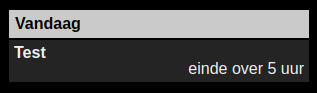
                              changed to

                              slotTitleFormat: {
                              	sameDay: "[Vandaag]",
                              	nextDay: "[Morgen]",
                              	nextWeek: "[Overmorgen]",
                              	},
                              slotSubTitleFormat: " ", // (default value is "ddd")
                              

                              and give me this
                              2021-08-08 16_46_56.png
                              (slotSubTitleFormat empty because changing date format does not work)

                              1 Reply Last reply Reply Quote 0
                              • D Offline
                                debaetstony
                                last edited by

                                How can you make the empty spaces smaller?
                                I have an overlap between ‘today’ view and ‘month’ view.
                                Make both narrower in ‘today’ and ‘month’ view
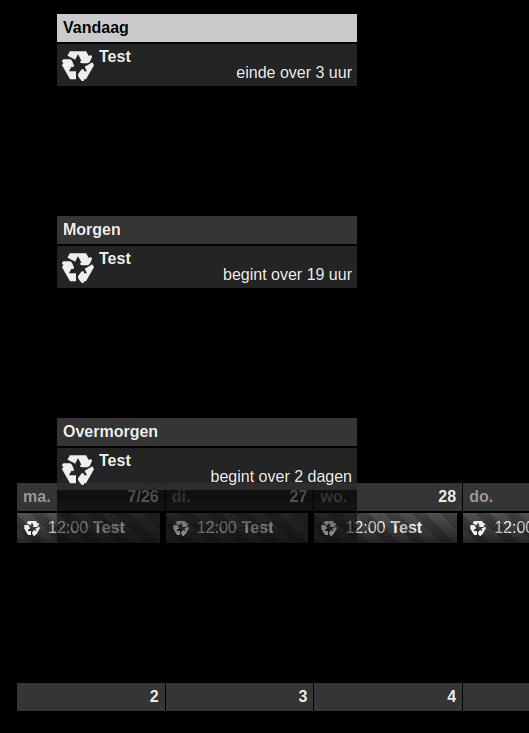
                                2021-08-08 17_09_12.png

                                BKeyportB 1 Reply Last reply Reply Quote 0
                                • BKeyportB Offline
                                  BKeyport Module Developer @debaetstony
                                  last edited by

                                  @debaetstony

                                  Use daily view. Eliminates the space almost completely. Also, if I remember right, if you change the order of views in the config.js, you may be able to get month view on top of daily view, but I’m not sure about that. Sean wasn’t too clear in order of building the modules.

                                  something else you might be interested in. If you’d like empty days to disappear in daily view:

                                  In your config.js, under views, add the following className: "remove_empty_slot",

                                  For example:

                                  views: [
                                  		{
                                  		mode: "daily",
                                  		position: "top_right",
                                  		slotCount: 14,
                                  		timeFormat:"LT",
                                  		hideOverflow: false,
                                  		filterPassedEvent: true,
                                  		name: "Schedules",
                                  		className: "remove_empty_slot",
                                  

                                  Then in custom.css add:

                                  .CX2 .remove_empty_slot .eventCount_0 {
                                    display:none;
                                  }
                                  

                                  The "E" in "Javascript" stands for "Easy"

                                  1 Reply Last reply Reply Quote 0
                                  • P Offline
                                    pkup10
                                    last edited by

                                    Re: MMM-CalendarExt2
                                    I am new here and am trying to get the calendar extension to work. I set it up with the basic configuation but I am getting a blank screen in Magic Mirror. Any help would be appreciated.

                                    {
                                    module: ‘MMM-CalendarExt2’,
                                    config: {
                                    calendars : [
                                    {
                                    url: “https://www.google.com/calendar/ical/ovb564thnod82u5c4njut98728%40group.calendar.google.com/public/basic.ics”,
                                    },
                                    ],
                                    views: [
                                    {
                                    mode: “daily”,
                                    },
                                    ],
                                    scenes: [
                                    {
                                    name: “DEFAULT”,
                                    },
                                    ],
                                    },
                                    },

                                    BKeyportB 1 Reply Last reply Reply Quote 0
                                    • BKeyportB Offline
                                      BKeyport Module Developer @pkup10
                                      last edited by

                                      @pkup10 way underconfigured. Compare to mine, stripped down to it’s bare minimum.

                                      	{
                                      			module: "MMM-CalendarExt2", // https://github.com/MMM-CalendarExt2/MMM-CalendarExt2
                                      			config: {
                                      				calendars : [
                                      					{
                                      						url: "<URL>",
                                      						name: "Main Calendar",
                                      					},
                                      				],
                                      				views: [
                                      					{
                                      						mode: "daily",
                                      						position: "top_right",
                                      						calendars: ["Main Calendar"],				
                                      					},
                                      				],
                                      				scenes: [
                                      					{
                                      						name: "DEFAULT",
                                      					},
                                      				],
                                      			},
                                      		},
                                      

                                      The "E" in "Javascript" stands for "Easy"

                                      W 1 Reply Last reply Reply Quote 0
                                      • W Offline
                                        Wenike @BKeyport
                                        last edited by

                                        @bkeyport actually, that might be @pkup10 's problem: he didn’t put a position item in his config. MM won’t display it without knowing where to display it.

                                        S BKeyportB 2 Replies Last reply Reply Quote 0
                                        • S Offline
                                          sdetweil @Wenike
                                          last edited by

                                          @wenike that module doesn’t use the typical display approach. position is not used

                                          Sam

                                          How to add modules

                                          learning how to use browser developers window for css changes

                                          1 Reply Last reply Reply Quote 0
                                          • BKeyportB Offline
                                            BKeyport Module Developer @Wenike
                                            last edited by

                                            @wenike Take a look at my barebones config above. You’ll notice the position is part of the view config not the main part. This module creates virtual positions after the main stuff is done.

                                            The "E" in "Javascript" stands for "Easy"

                                            1 Reply Last reply Reply Quote 0

                                            Hello! It looks like you're interested in this conversation, but you don't have an account yet.

                                            Getting fed up of having to scroll through the same posts each visit? When you register for an account, you'll always come back to exactly where you were before, and choose to be notified of new replies (either via email, or push notification). You'll also be able to save bookmarks and upvote posts to show your appreciation to other community members.

                                            With your input, this post could be even better 💗

                                            Register Login

                                            • 1
                                            • 2
                                            • 21
                                            • 22
                                            • 23
                                            • 24
                                            • 25
                                            • 49 / 25
                                            • First post
                                              Last post
                                            Enjoying MagicMirror? Please consider a donation!
                                            MagicMirror created by Michael Teeuw.
                                            Forum managed by Sam, technical setup by Karsten.
                                            This forum is using NodeBB as its core | Contributors
                                            Contact | Privacy Policy