Read the statement by Michael Teeuw here.
MMM-CalendarExt2
-
Just a general question. I have my calendar pulling from 6-7 different Google calendars. I have the module configured to retrieve the calendar data every 5 minutes. I did this to allow changes made to an entry to be updated pretty quickly on my display.
The issue is if I modify a calendar entry in my Google calendar it doesn’t get updated in the MM calendar display. If I stop MM and then restart it then everything will be correct. But leaving it running it doesn’t update with the changes. I have also seen this if I deleted a calendar entry it will remain in my MM calendar on the display.
Here is the code I am using. I put the scan interval for the calendars in the default section.
locale: "en", defaultSet: { calendars: { maxItems: 500, scanInterval: 1000*60*5, beforeDays: 5, afterDays: 60, maxIterations: 100, }, -
@cskenney
scanIntervalis just for scanning calendars, finding something changed, then loading them. So, your modified events would definitely be loaded on the module.
But displaying is another issue.rotateInterval(when you are using multi-scenes) orupdateInterval(When you are using single-scenes) could make refreshing the displaying.
https://github.com/eouia/MMM-CalendarExt2/wiki/2e.-Configuration:Others -
@Sean I have the rotateInterval set to 0 and the updateInterval set to (5 minutes).
I will post my code below but I will need to removed the URL to my calendars.
{ /*MMM-CalendardExt2*/ module: 'MMM-CalendarExt2', config: { rotateInterval: 0, //rotate between scenes default = 60*1000; 0 disables updateInterval: 5*60*1000, //If not auto-rotated firstDrawingDelay: 10*1000, //delay to allow calendar parsing locale: "en", defaultSet: { calendars: { maxItems: 500, scanInterval: 1000*60*5, beforeDays: 5, afterDays: 60, maxIterations: 100, }, view: { timeFormat: "h:mm A", transform: function(event) { if (event.title.search("Panic") > -1) { event.icon = "noto-softball"; event.className = "view_panic"; } else if (event.title.search("Arin") > -1) { event.icon = "noto-softball"; } else if (event.title.search("Violin") > -1) { event.icon = "emojione-monotone:violin"; } return event; }, }, scene: {} }, calendars: [ { name: "Chris", url: "https://calendar.google.com/calendar/ical...basic.ics", className: "cal_chris", }, { name: "Kim", url: "https://calendar.google.com/calendar/ical...basic.ics", icon: "twemoji-medical-symbol", className: "cal_kim", }, { name: "Lauren", url: "https://calendar.google.com/calendar/ical...basic.ics", className: "cal_lauren", }, { name: "Ryan", url: "https://calendar.google.com/calendar/ical...basic.ics", className: "cal_ryan", }, { name: "MHS Softball", url: "https://calendar.google.com/calendar/ical/...basic.ics", icon: "noto:softball", className: "cal_mhs_softball", }, { name: "Softball Badgers", url: "https://calendar.google.com/calendar/ical/...basic.ics", icon: "noto-badger", className: "cal_badgersoftball", }, { name: "BOPA", url: "https://calendar.google.com/calendar/ical...basic.ics", icon: "emojione-musical-score", className: "cal_bopa", }, ], views:[ { name: "View_Daily", mode: "daily", position: "top_left", calendars: ["Chris","Kim","Lauren","Ryan","MHS Softball","Softball Badgers","BOPA"], hideOverflow: false, filterPassedEvent: false, slotCount: 2, maxItems: 500, }, { name: "View_Upcoming", mode: "upcoming", slotTitle: "UPCOMING", position: "top_center", maxItems:10, maxDays: 3, hideOverflow: false, filterPassedEvent: true, calendars: ["Chris","Kim","Lauren","Ryan","MHS Softball","Softball Badgers","BOPA"], className: "views_upcoming", }, { name: "View_5D_Overview", title: "CALENDAR", mode: "daily", type: "row", position: "bottom_bar", maxItems: 500, slotCount: 5, hideOverflow: false, filterPassedEvent: false, calendars: ["Chris","Kim","Lauren","Ryan","MHS Softball","Softball Badgers","BOPA"], }, ], scenes:[ { name: "DEFAULT", views: ["View_Daily","View_5D_Overview"], className: "Scene_Default", }, ], }, },//end of calendarext2 module ], }; -
hey, Sean -
three minor issues and I got my install perfect:
- I’m trying to set up a wider slot for the calendar - I’ve got the region expanded and adjusted, but how do I get the item slots to match?:

.region.top.center { left: 40%; -moz-transform: translateX(-40%); -o-transform: translateX(-40%); -webkit-transform: translateX(-40%); -ms-transform: translateX(-40%); transform: translateX(-40%); min-width: 750px; }-
I’d like to get rid of the refresh fade. I find it annoying - how to do so?
-
When I have the “Seahawks” calendar enabled, only the trash calendar loads initially, and after first refresh, the others come in. Can you help with why?
{
			module: 'MMM-CalendarExt2',
				config: {
					calendars : [
						{
							url: "https://calendar.google.com/calendar/ical/PRIVATE",
							name: "Main Calendar", // Optional, Recommended
							maxItems: 100,
							scanInterval: 1000*60*1, // every minute, Appt Book, needs this speed
							beforeDays: 0,
							afterDays: 999,
							maxIterations: 999,
							forceLocalTZ: false,
						},
						{
							url: "https://calendar.google.com/calendar/ical/PRIVATE2",
							name: "Trash Calendar", // Optional, Recommended
							maxItems: 100,
							scanInterval: 24*60*60*1000, // Once a day
							beforeDays: 0,
							afterDays: 999,
							maxIterations: 999,
							forceLocalTZ: false,
						},
						{
							url: "http://www.trumba.com/calendars/seattle-seahawks-schedule.ics",
							name: "Seahawks Calendar",
							maxItems: 100,
							scanInterval: 24*60*60*1000, // Once a day (Is once a week acceptable???)
							beforeDays: 0,
							afterDays: 999,
							maxIterations: 999,
							forceLocalTZ: false,
						},

					],
					views: [
						{
							mode: "daily",
							position: "top_center",
							slotCount: 99,
							timeFormat:"h:mm A",
							hideOverflow: false,
							name: "Daily View",
							className: "remove_empty_slot",
							calendars: ["Main Calendar","Trash Calendar","Seahawks Calendar"],
							transform: function(event) {
								if (event.title.search("Recycle") > -1) {
									event.icon = "mdi:recycle";
								}
								if (event.title.search("Yard Waste") > -1) {
									event.icon = "entypo-leaf";
								}
								if (event.title.search("Seahawks") > -1) {
									event.icon = "fa-solid:football-ball";
								}
								return event;
							},
//
						},
					],
					scenes: [
						{
							name: "DEFAULT",
						},
					],
				},
		},
Edit: I guess I have a fourth - I’d like to adjust anything to do with Seahawks (the transform above) to have the inverse color like an all day event. Possible?
- I’m trying to set up a wider slot for the calendar - I’ve got the region expanded and adjusted, but how do I get the item slots to match?:
-
@cskenney
That will take 5 minutes to refresh displaying. However, That’s not synced toscanInterval(Those are individual for each other), so, at most 10 minutes could be taken to show modified events in unlucky case. -
Overwrite these values in your
css/custom.css- Adjust default size: (If you want to modifying on specific view, choose a proper CSS Selectors)
https://github.com/eouia/MMM-CalendarExt2/wiki/4.-Styling
.CX2 { /* default values which are used frequently or dependently */ --row-min-width: 100px; --row-max-width: 1000px; --column-min-width: 300px; --column-max-width: 400px; --font-size: 16px; }- Adjust css animation duration; Or change
animation-nameto any other improper name.
.CX2.hidden { opacity:0; animation-name: fadeOutOpacity; animation-iteration-count: 1; animation-timing-function: ease-in; animation-duration: 0.5s; } .CX2.shown { display:block; opacity: 1; animation-name: fadeInOpacity; animation-iteration-count: 1; animation-timing-function: ease-in; animation-duration: 0.5s; }-
That is because just parsing of other calendars is not finished before the first drawing of current loaded events. Just wait, in the next turn remains will be displayed.
Or set enough time offirstDrawingDelayto wait for all the parsing be completed.
https://github.com/eouia/MMM-CalendarExt2/wiki/2e.-Configuration:Others -
Give the
classNameto your targetted events like what you do withicon. Define CSS styles with thatclassName.
https://github.com/eouia/MMM-CalendarExt2/wiki/4.-Styling
- Adjust default size: (If you want to modifying on specific view, choose a proper CSS Selectors)
-
@Sean I understand that they are not synced. I can run a test where I set both values to 1 minute (each). I can then make a change in my calendar then come back to the MM 10 minutes later and nothing has changed.
Last night I added an item to my calendar and waited for a couple of hours and it never appeared. Today it is added to the MM calendar. It is like it finally refreshed at midnight when it had to adjust the days.
I am now left wondering if the scanInterval in the default section is actually only used at startup and at midnight.
Edit: I added the scanInterval into the section for a specific calendar and it solved the problem. It looks like when the scanInterval is in the default section that it must not be applied to each calendar. The result is that each calendar is only scanned once per day (or so it seems).
-
@cskenney
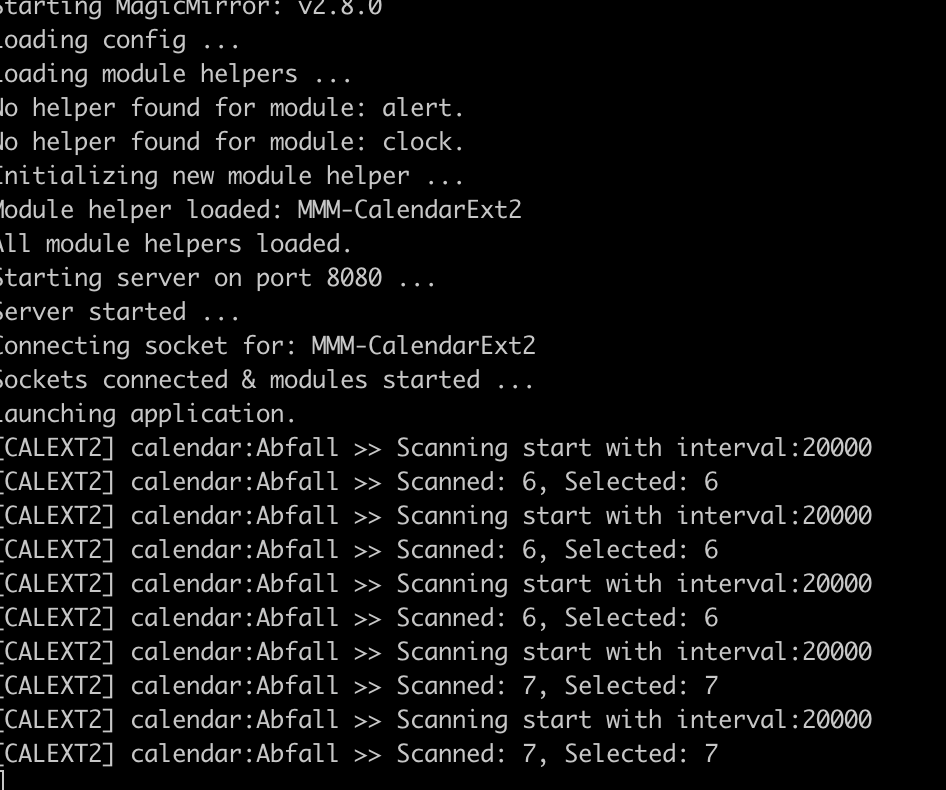
Not at all.I tested this; I gave 20seconds for updateInterval and scanInterval

At start there was no event to show;
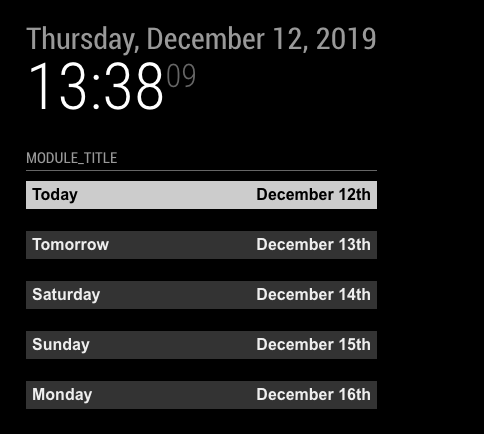
In a minute, I added a test event on my google calendar;
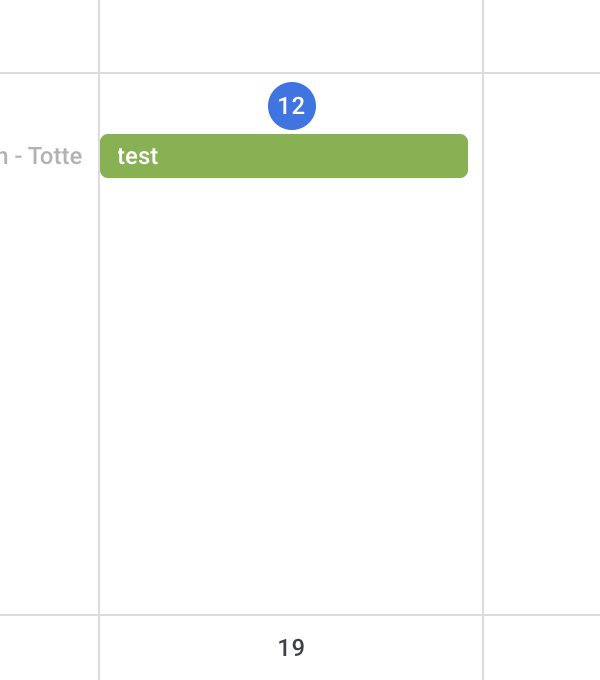
log says There happend 1 event added at that time. (See
ScannedandSelected)
And the screen was changed.(See the time of the clock.)
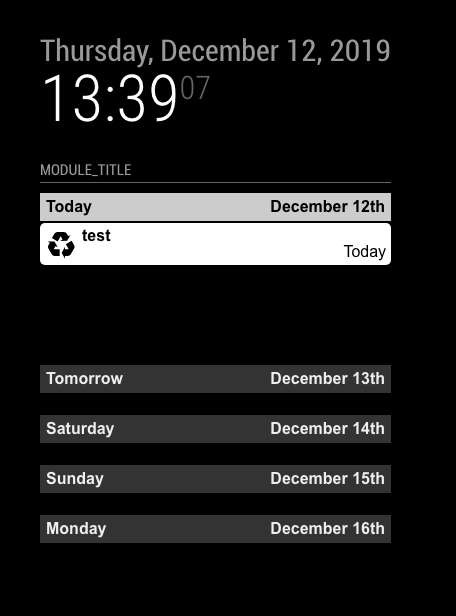
-
@Sean where is this log file located? I will take a look at it and see what I can find.
-
@cskenney
If you want to see the log on real time;
first stop yourpm2(if you are using), thennpm start devon your MagicMirror directory. -
@Sean said in MMM-CalendarExt2:
- That is because just parsing of other calendars is not finished before the first drawing of current loaded events. Just wait, in the next turn remains will be displayed.
Or set enough time offirstDrawingDelayto wait for all the parsing be completed.
https://github.com/eouia/MMM-CalendarExt2/wiki/2e.-Configuration:Others
is there a way to set priority of loading? If the trumba calendar referenced (Seahawks) is causing issues, I’d rather my main calendar loads first (Hold display until loaded), then the “trash” calendar, then the Trumba calendar. If not, feature request.
Thanks again, Love being able to make this exactly the way I want.
- That is because just parsing of other calendars is not finished before the first drawing of current loaded events. Just wait, in the next turn remains will be displayed.
-
@BKeyport
It would be over spec I think. Because;- This symptom would be improved by
delayFirstDrawingto some degree. I think a few seconds would be enough to complete all parsing. If some calendar would take over 10 seconds, it would be the connection issue not parsing issue. - This symptom would be issued on short time only when MM starts. Usually, after the first cycle of refreshing, this issue would be gone away.
- None the less assigning priority, there would be no guarantee for the specific calendar completing to parse first. The main reason for this delay lays in the network connection quality between your RPI and the calendar server.
Anyway thanks for the suggestion. I’ll research more.
- This symptom would be improved by
-
@Sean I think I have it figured out now. If looks like putting the calendar scanInterval in the default section (look at the code I posted above) doesn’t apply it to all the calendars. Instead it looks like they are using a default value of 30 minutes. Does that make sense?
-
@cskenney
Hmmm. without real ical data, I can’t say anything about your case. Configuration itself seems nothing wrong.
When I changed yourupdateIntervalto1000*30, it refreshes per 30 seconds.
If you don’t mind, send me your configuration with real ical URL. my email iseouia0819@gmail.com -
@cskenney
Wait a sec. I think found something. -
@cskenney
You have a mistyping indefaultSet. Notcalendars, Fix it tocalendar -
@Sean You can also do it through PM2 directly.
In a second session run “pm2 logs” – it’ll live update the logs on that session’s screen.
-
@Sean That did the trick. You used Calendars (with an S) for the main code section but the default section only used calendar (without the s). I didn’t notice the syntax difference. Thanks for the help.
-
@cskenney
BecausecalendarofdefaultSetwould be applied to eachcalendarofcalendars:[]. But anyway, my English is not so good so there could be confusing. -
@Sean No, it’s fine. I just didn’t notice the syntax difference when I created the default section.
Thanks again for your help.

Hello! It looks like you're interested in this conversation, but you don't have an account yet.
Getting fed up of having to scroll through the same posts each visit? When you register for an account, you'll always come back to exactly where you were before, and choose to be notified of new replies (either via email, or push notification). You'll also be able to save bookmarks and upvote posts to show your appreciation to other community members.
With your input, this post could be even better 💗
Register Login