Read the statement by Michael Teeuw here.
MMM-CalendarExt2
-
Did anybody else’s MMM-CalendarExt2 module break after daylight savings? (Sunday November 3rd). Both my “MMM-MyCalendar” AND “MMM-CalendarExt2” modules are showing events on the wrong days now. The problem seems to only occur with reoccurring events; they usually show up one day earlier. Rebooting does not correct the issue. I hope someone can figure this out soon 😞
-
Hi All,
So I have been trying to figure out how to make the calendar smaller. It is over lapping other modules. I have read the docs but I am unclear on how it all comes together to work. Please help.
-
@code999 I guess no one knows how to do this? Everything I try it does not change what I want.
-
@code999
Too ambiguous. What you tried and what you expected as a result? It would be nice to understand with an image about where is an issue and how to change it.
You can customize CSS to adjust the size of almost every element, and you can adjust some height-related values on the configuration. And, there be some brief information about the HTML structure and CSS selectors on docs. e.g) https://github.com/eouia/MMM-CalendarExt2/wiki/4.-Styling
So, what is your issue? -
@Sean sorry about me not able to explain what I am trying to do. this is how it looks now.
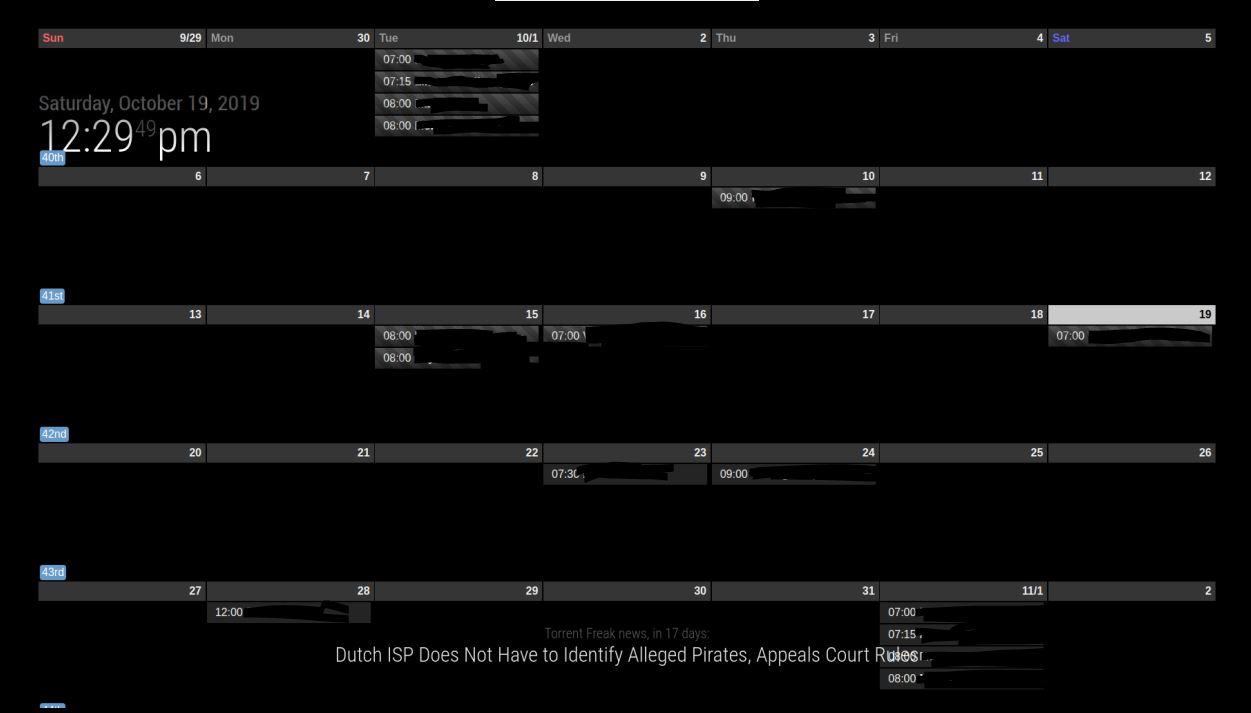 I want to move it to the right and shrink it so it does not overlap the other modules.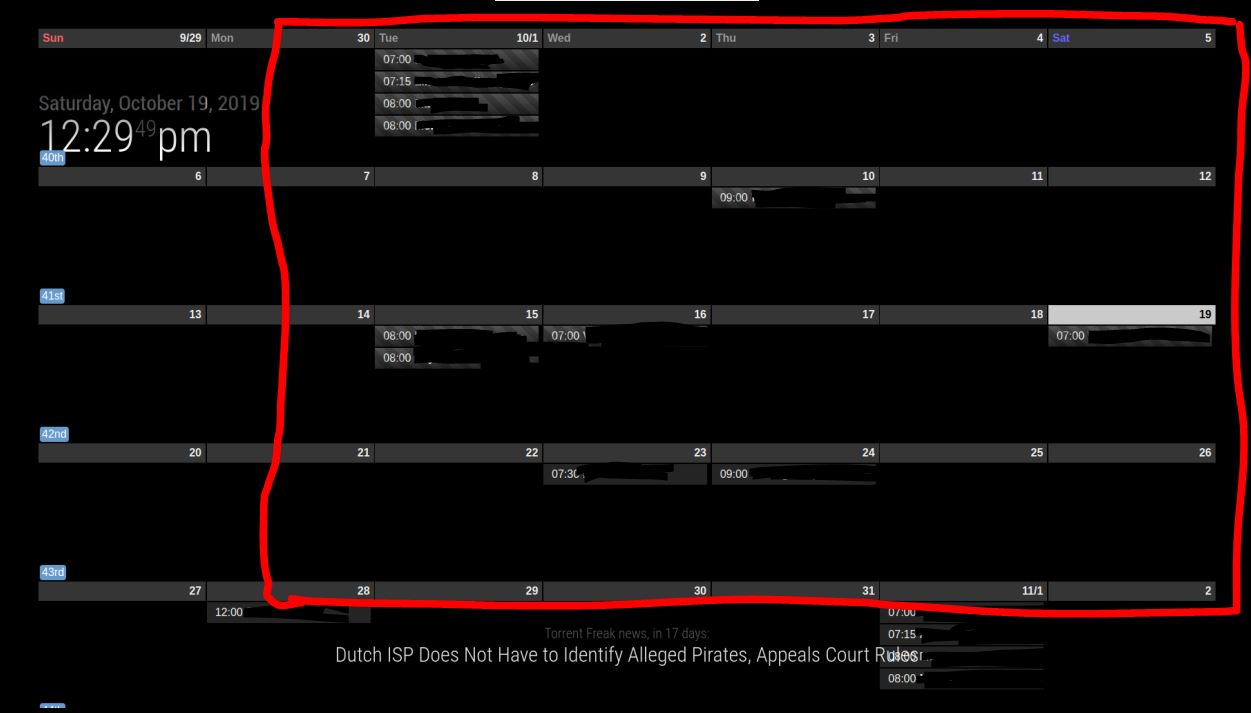
Thanks for your help. -
This post is deleted! -
@code999
try position top_right instead of full_screen and see how that looks, you can then have a dig around the files and see if you can alter the size by specifying the size % or pixels -
@Sean ,
can this module work with mmm-keybindings?i’d like to use the spacebar or similar to cycle through scenes -
@code999
Which position did you set for the view? put the view in a proper position, then, add this into yourcss/custom.css.CX2 { width: 800px; }Or any size you want.
-
can this module work with mmm-keybindings?i’d like to use the spacebar or similar to cycle through scenes
https://github.com/eouia/MMM-CalendarExt2/wiki/3.-Usage
If your module can emit customized notifications(e.g: CALEXT2_SCENE_NEXT or somethings), possible.
Or you can useMMM-NotificationTriggerto translate or relay original notification to specific customized target notification. -
Hi! I’m trying to modify css. I created css/custom.css in MagicMirror/modules/MMM-CalendarExt2/ and tried doing modifications but none of them seem to do anything. Permissions for dir and file are 777.
Is there something I’m not understanding here?for example I tried this in custom.css but it doesn’t work. This only works in MMM-CalendarExt.css file.
.CX2 .weekSlot.seq_0 .cellSlot .slotSubTitle {
  position:relative;
  top:-30px;
  left:40%;
}
Also, how can I get month calendar to only show 4 weeks instead of 5?
-
@jani-karna
You don’t need to create your owncss/custom.cssunder module directory. That file locates under your MagicMirror directory.css/custom.cssis a global common file to be used by all the modules. -
Oh, I see. Some modules seem to have their own directory, like MMM-CalendarExt for example. But I’ll use MagicMirror directory instead and try with that.
How about the other question? How can I get month calendar to show 4 weeks instead of 5?
-
@jani-karna
MMM-CalendarExtwas so an early and old module, so it has an improper structure. I’ll deprecate the css in some days.For your Second Question.
monthview could have 4~6 weeks in a table by the days. If you want to fix 4 weeks, useweekview insteadmonth -
I’m not sure I understood. Is month view possible to set to show 4 weeks? I also changed to week mode but it only shows 3 weeks instead of 4.
-
@jani-karna
You can set how many weeks to be shown withslotCountinweekview. -
@Sean
Thank you, that did the job.Sorry to bother you with one more question: I have 1 scene and 1 view and 3 calendars. All of the calendars are in same week view. I’m trying to have all the 3 calendars to be visible at the same time in week view without rotating between them. I thought this is default with just one scene and one view.
-
@jani-karna
I have 1 scene and 1 view and 3 calendars. All of the calendars are in same week view. I’m trying to have all the 3 calendars to be visible at the same time in week view without rotating between them. I thought this is default with just one scene and one view.
??? You mean your calendars are not shown in one week view? As you said, that is the default unless you set separate views.
If all of your events are not shown in a view, it might bemaxItemsissue. It is limited as max 100 events by default for the performance. In that case, you can set bigger value tomaxItemsof view. -
@Sean
That is exactly what I’m saying. I don’t think I have that many events. Just in case I tried maxItems: 500, but that didn’t change anything.My config looks like this:
module: 'MMM-CalendarExt2',
    		config: {
    				scenes: [
    						{
    							name: "DEFAULT",
    							views: [],
    						},
    				],
    				views: [
    						{
    							name: "Kaikki",
    							mode: "week",
    							slotCount: 4,
    							maxItems: 500,
    							fromNow: 0,
    							slotTitleFormat: "D.",
    							slotAltTitleFormat: "D. MMM",
    							position: "bottom_bar",
    							className: "monthClass",
    							hideOverflow: "false",
    							slotMaxHeight: "150px",
    							calendars: [],
    							timeFormat: "HH.mm",
    							dateFormat: "DD.MM",
As I said earlier, it keeps rotating between 3 different calendars and they never show in one view at the same time.
-
@jani-karna
Are those a full configuration of MMM-CalendarExt2 ? Share with me including your real ical url. (eouia0819@gmail.com)
Hello! It looks like you're interested in this conversation, but you don't have an account yet.
Getting fed up of having to scroll through the same posts each visit? When you register for an account, you'll always come back to exactly where you were before, and choose to be notified of new replies (either via email, or push notification). You'll also be able to save bookmarks and upvote posts to show your appreciation to other community members.
With your input, this post could be even better 💗
Register Login