MagicMirror Forum
    • Recent
    • Tags
    • Unsolved
    • Solved
    • MagicMirror² Repository
    • Documentation
    • 3rd-Party-Modules
    • Donate
    • Discord
    • Register
    • Login
    1. Home
    2. banbutcher
    3. Posts
    A New Chapter for MagicMirror: The Community Takes the Lead
    Read the statement by Michael Teeuw here.
    B
    Offline
    • Profile
    • Following 0
    • Followers 0
    • Topics 17
    • Posts 128
    • Groups 0

    Posts

    Recent Best Controversial
    • RE: MMM-Carousel w/ Slide Navigation

      hey buddy,
      take a look at the way each slide is defined! think your missing quotes from main page

      • at bottom not sure but i think mode should be keyBindingsMode
      • missing a comma after slide0
      • not sure but check that all your open { have a closer }
      • do you have MMM-Keybindings installed? (eidt - i just checked and carousel wont change pages without MMM-Keybindings.)
      {
                  module: 'MMM-Carousel',
      	    position: 'bottom_bar',
                  config: {
                      transitionInterval: 0,
      		showPageIndicators: true,
      		showPageControls: true,
                      ignoreModules: ['alert', 'MMM-GoogleAssistant'],
                      mode: 'slides',
                      slides: {
                          "Default":['clock', 'calendar_monthly', 'MMM-NetworkScanner', 'currentweather', 'weatherforecast', 'MMM-Weather'],
                          "Work":['MMM-google-route'],
                          "Office":['MMM-google-route2'],
      //		    "Traffic":['MMM-GoogleMapsTraffic'],	
                          "Home":['clock', 'calendar_monthly', 'calendar', 'currentweather', 'weatherforecast', 'MMM-MyCommute', 'MMM-NetworkScanner', 
      		    'MMM-COVID19-SPARKLINE', 'MMM-Spotify', 'MMM-GoogleFit', 'MMM-Todoist', 'newsfeed'],
                          "Info":['clock', 'calendar_monthly', 'currentweather', 'weatherforecast', 'MMM-Tools', 'MMM-NetworkScanner', 
      		    'MMM-NetworkConnection', 'deluge', 'MMM-SystemStats'],
                      	},
                      keyBindings: { 
                          enabled: true,
                          map: {
                              NextSlide: "ArrowRight", 
                              PrevSlide: "ArrowLeft", 
                              Slide0: "ArrowUp",
      			Slide5: "ArrowDown",
                         	 },
                          keyBindingsMode: "DEFAULT"
                      }
                  }
              },
      

      here is my config for MMM-Keybindings:

      /*-------------------- MMM-KeyBindings Start-----------------*/
      
      {
          module: 'MMM-KeyBindings',
          config: {
      	evdev: {enabled: false},
              enableKeyboard: true,
      	actions: [
      	{
      	  key: "ArrowRight",
      	  state: "KEY_PRESSED",
      	  instance: "SERVER",
      	  mode: "DEFAULT",
      	},
      	{
      	 key: "ArrowLeft",
      	 state: "KEY_PRESSED",
      	 instance: "SERVER",
      	 mode: "DEFAULT",
      	},
      
      	]
          }
      },
      

      have a look at my working code and try again! :)
      posted in Troubleshooting
      B
      banbutcher
    • RE: MMM-GroveGesture to control MMM-Carousel & MMM-CECControl

      Hi,

      Not sure if you got your ideas sorted or not but ive just been tru the same process and i came up with these solutions to my problems, hopefuly you or someone else can find them usefull.

              "UP": {
                notificationExec: {
                  notification: "CAROUSEL_GOTO",
                  payload: 4,
                }
              },
      
              "DOWN": {
                notificationExec: {
                  notification: "CAROUSEL_GOTO",
                  payload: 5,
                }
              },
      
              "LEFT": {
                notificationExec: {
                  notification: "CAROUSEL_PREVIOUS",
                  payload: null,
                }
              },
      
              "RIGHT": {
                notificationExec: {
                  notification: "CAROUSEL_NEXT",
                  payload: null,
                }
              },


      I use MONITORON and MONITOROFF for the onIdle and onDetected

          onIdle: {  
      //      shellExec: "vcgencmd display_power 0",
                notificationExec: {
                  notification: "REMOTE_ACTION",
                  payload: { action: "MONITOROFF", },                      
                                  }
                  },
      
          onDetected: {
      //      shellExec: "vcgencmd display_power 1",
                notificationExec: {
                  notification: "REMOTE_ACTION",
                  payload: { action: "MONITORON", },                      
                		    }
          	    },
      

      i also found that if i use MONITOROFF then the shellExec: "vcgencmd display_power 1" command will not work.

      Richie

      posted in Troubleshooting
      B
      banbutcher
    • RE: MMM-Weather

      do we use the same api key from orignal weather app or new one?

      thanks

      posted in Utilities
      B
      banbutcher
    • RE: MMM-Weather

      Love the look of this… Cant wait to try it in the morning! :)

      thanks @Bugsounet

      posted in Utilities
      B
      banbutcher
    • RE: MMM-Todoist - Your todoist tasks on your mirror

      hi,

      ive just installed mmm-todoist on my mirror and after the install i can start the mirror fine but it seems that after its installed i think its affecting either mmm-keybindings of mmm-carousel because normally i can use the arrow keys to gleft and right BUT im not able to click on the page indicator to select a page, and after installing mmm-todoist im now not able to use arrow keys to select page BUT i am now able to click on the page indicator to select pages!! Curious!!

      i get no errors starting but in the development tools section im getting these warnings and errors:

      /home/pi/MagicMirror…rity-warnings.js:95 Electron Security Warning (Insecure Resources) This renderer process loads resources using insecure
        protocols.This exposes users of this app to unnecessary security risks.
        Consider loading the following resources over HTTPS or FTPS. 
       - http://0.0.0.0:8080/css/main.css
      - http://0.0.0.0:8080/fonts/roboto.css
      - http://0.0.0.0:8080/socket.io/socket.io.js
      - http://0.0.0.0:8080/vendor/node_modules/nunjucks/browser/nunjucks.min.js
      - http://0.0.0.0:8080/js/defaults.js
      - http://0.0.0.0:8080/config/config.js
      - http://0.0.0.0:8080/vendor/vendor.js
      - http://0.0.0.0:8080/modules/default/defaultmodules.js
      - http://0.0.0.0:8080/js/logger.js
      - http://0.0.0.0:8080/translations/translations.js
      - http://0.0.0.0:8080/js/translator.js
      - http://0.0.0.0:8080/js/class.js
      - http://0.0.0.0:8080/js/module.js
      - http://0.0.0.0:8080/js/loader.js
      - http://0.0.0.0:8080/js/socketclient.js
      - http://0.0.0.0:8080/js/main.js
      - http://0.0.0.0:8080/fonts/node_modules/roboto-fontface/fonts/roboto-condensed/Roboto-Condensed-Regular.woff2
      - http://0.0.0.0:8080/translations/en.json
      - http://0.0.0.0:8080/translations/en.json
      - http://0.0.0.0:8080/modules/MMM-Carousel//MMM-Carousel.js
      - http://0.0.0.0:8080/modules/MMM-Carousel/MMM-Carousel.css
      - http://0.0.0.0:8080/modules/MMM-GoogleAssistant//MMM-GoogleAssistant.js
      - http://0.0.0.0:8080/modules/MMM-GoogleAssistant/components/response.js
      - http://0.0.0.0:8080/modules/MMM-GoogleAssistant/MMM-GoogleAssistant.css
        
       
      For more information and help, consult
      https://electronjs.org/docs/tutorial/security.
       This warning will not show up
      once the app is packaged.
      /home/pi/MagicMirror…ity-warnings.js:145 Electron Security Warning (Insecure Content-Security-Policy) This renderer process has either no Content Security
          Policy set or a policy with "unsafe-eval" enabled. This exposes users of
          this app to unnecessary security risks.
       
      For more information and help, consult
      https://electronjs.org/docs/tutorial/security.
       This warning will not show up
      once the app is packaged.
      :8080/modules/MMM-Go…ib/highcharts.js:10 Uncaught Error: Highcharts error #16: www.highcharts.com/errors/16
          at Object.a.error (:8080/modules/MMM-Go…ib/highcharts.js:10)
          at :8080/modules/MMM-CO…lib/highcharts.js:8
          at :8080/modules/MMM-CO…lib/highcharts.js:8
      TypeError: Cannot read property 'items' of undefined
          at Class.getDom (:8080/modules/MMM-To…/MMM-Todoist.js:551)
          at main.js:111
          at new Promise (<anonymous>)
          at updateDom (main.js:110)
          at main.js:52
          at Array.forEach (<anonymous>)
          at createDomObjects (main.js:21)
          at Object.modulesStarted (main.js:499)
          at startModules (loader.js:56)
          at loader.js:38
      :8080/modules/MMM-To…/MMM-Todoist.js:551 Uncaught (in promise) TypeError: Cannot read property 'items' of undefined
          at Class.getDom (:8080/modules/MMM-To…/MMM-Todoist.js:551)
          at main.js:111
          at new Promise (<anonymous>)
          at updateDom (main.js:110)
          at main.js:52
          at Array.forEach (<anonymous>)
          at createDomObjects (main.js:21)
          at Object.modulesStarted (main.js:499)
          at startModules (loader.js:56)
          at loader.js:38
      api.openweathermap.o…ef566eab7f1c9b6c4:1 Failed to load resource: the server responded with a status of 401 (Unauthorized)
      :8080/modules/defaul…therforecast.js:261 weatherforecast: Your AppID does not support long term forecasts. Switching to fallback endpoint.
      

      and my config is:

      
      /*-------------------- MMM-Todoist Route Start-----------------*/
      
          {
      		module: 'MMM-Todoist',
      		position: 'top_left',	
      		header: 'Todoski...', 
      		config: { 
      			hideWhenEmpty: true,
      			accessToken: 'xoxoxoxox',
      			maximumEntries: 60,
      			updateInterval: 10*60*1000, // Update every 10 minutes
      			fade: false,      
      			// projects and/or labels is mandatory:
      			projects: [ xxxxxxx, xxxxxxx ], 
      			//labels: [] // Tasks for any projects with these labels will be shown 		     			
      			},
          },


      also but not a biggie, i have 2 projects todo and magicmirror after adding a couple to each, the mirror displays them in staggered project order rather than in order as added - ie:

      task1 - todo
      task5 - MM
      task2 - todo
      task6 -MM
      task3 - todo
      task7 - MM
      task4 - todo

      id like:

      task1 - todo
      task2 - todo
      task3 - todo
      task4 - todo
      task5 - MM
      task6 -MM
      task7 - MM

      any help or ideas would be great!

      Many thanks,

      Richie

      posted in Productivity
      B
      banbutcher
    • MMM-GoogleFit module update...

      Hi team,

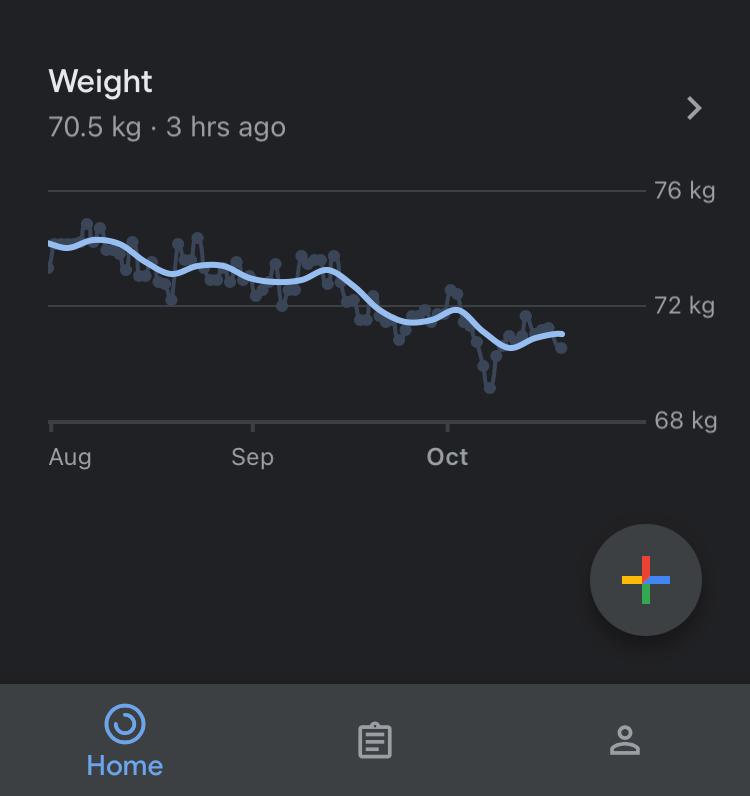
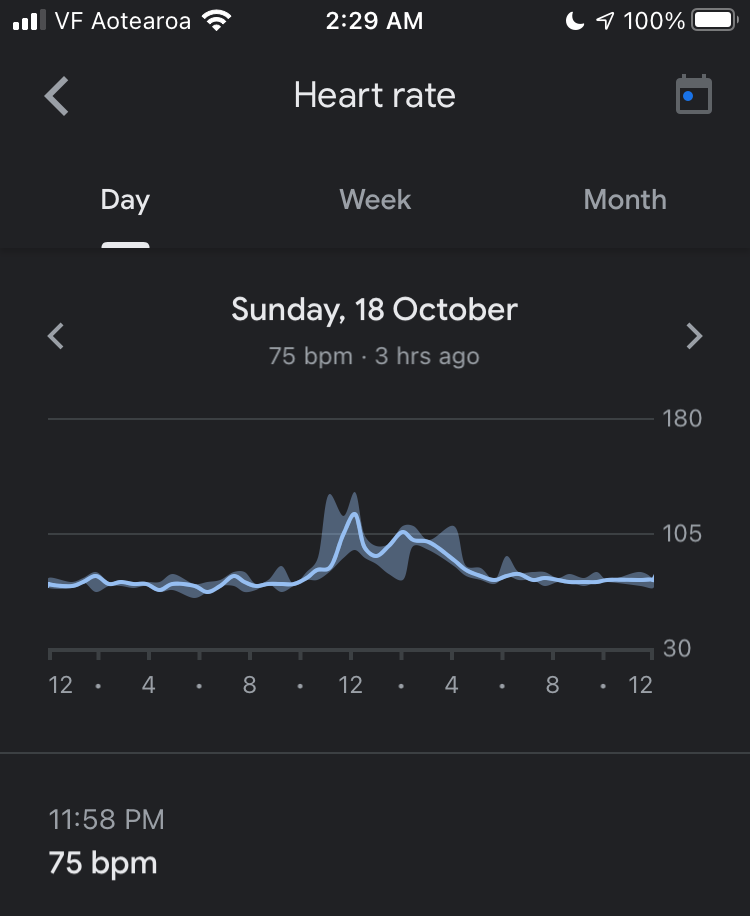
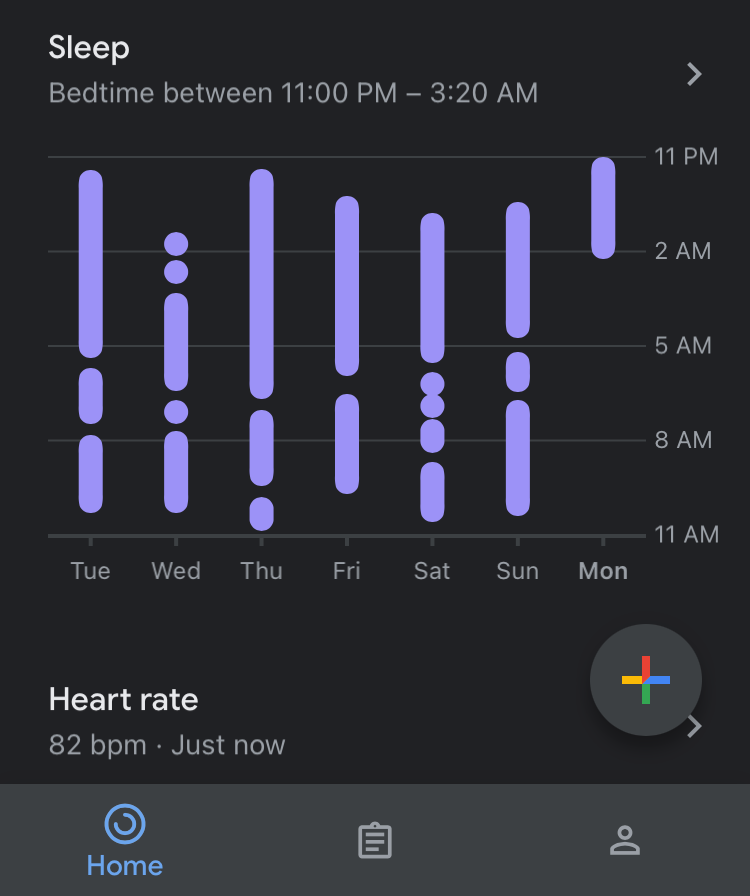
      i use this module, its great AND i know that @amcolash does not maintain it anymore but i was wondering if any of the super skilled gurus here could update it to show more information as its shown in the GoogleFit app like:

      Sleep info:
      Sleep Small.PNG

      Weight info:
      Weight-am.PNG

      Heart Rate info:
      Heart rate.PNG

      i know its not easy as i have tried and failed to find anything helpful on the google developers site. :( (ive like zero knowledge in this field - im an electrician by trade!) :D

      thanks for taking the time to look!

      Richie

      posted in Requests
      B
      banbutcher
    • RE: What's the best RasPi to use to make a magic mirror at the moment and why?

      @videogame95 said in What's the best RasPi to use to make a magic mirror at the moment and why?:

      I would use a raspberry pi 4 but your need get a good way powering it up as it need a power supple with 3.1 amps

      anyone have a better way of powering up the pi 4 to tv

      ive just come across 2 usb modules (dual usb A, usb A+C) that go inside wall sockets for charging… im going to do a little bit of wiring with this a couple of suitable fuses to power my monitor and the usb A+C module. the module will power my pi4 and a usb speaker. i just have to finalise a few other things before i finish it all up.

      posted in Hardware
      B
      banbutcher
    • RE: MMM-Carousel w / Slide Navigation

      Using search helps! :)

      posted in Troubleshooting
      B
      banbutcher
    • RE: MMM-KeyBindings: Control your mirror with Amazon Fire Stick Remote and Generic Keyboard Inputs

      Hi @shbatm ,

      ive been using MMM-Keybindings for a while with MMM-pages and up untill a month or so ago i noticed a problem that if ive used google assistant or click on screen, keybindings seems to loose focus and pressing the keys will not work until you click in the top bar where alerts come then i can use again untill problem repeats itself. i also have had the same problems with it when using your MMM-Carousel module as i taught it might be pages fault.

      thank you

      posted in Utilities
      B
      banbutcher
    • RE: Could use some assistance setting up MMM-Carousel w/ Navigation and understanding the architecture

      @sdetweil

      so i figured it out… using barnabycolby im not able to have the page rotation set to 0.
      MMM-GoogleAssistant works as intended along with MMM-GABackground.

      My config for barnabycolbys:

      {
                  module: 'MMM-Carousel',
                  config: {
                      transitionInterval: 10000,
      		showPageIndicators: true,
      		showPageControls: true,
                      ignoreModules: ['alert'],
                      mode: 'slides',
                      slides: [
                          ['clock', 'calendar_monthly', 'MMM-NetworkScanner', 'currentweather', 'weatherforecast'],
                          ['MMM-google-route'],
                          ['MMM-google-route2'],
      		    ['MMM-GoogleMapsTraffic'],	
                          ['clock', 'calendar_monthly', 'calendar', 'currentweather', 'weatherforecast', 'MMM-MyCommute', 'MMM-NetworkScanner', 
      		    'MMM-COVID19-SPARKLINE', 'MMM-Spotify', 'MMM-GoogleFit', 'newsfeed'],
                          ['clock', 'calendar_monthly', 'currentweather', 'weatherforecast', 'MMM-YouTube', 'MMM-NetworkScanner', 
      		    'MMM-NetworkConnection', 'deluge', 'MMM-SystemStats'],
                      	],
                  }
              },


      using shbatm i needed the position: 'bottom_bar' and now i can set the rotation time to 0 and control the slides with the arrow keys and MMM-KeyBindings, however it seems that when i use this version the MMM-GoogleAssistant does not display the correct background and therefore cannot use the new MMM-GABackground

      my config for shbatm:

      {
                  module: 'MMM-Carousel',
      	    position: 'bottom_bar',
                  config: {
                      transitionInterval: 0,
      		showPageIndicators: true,
      		showPageControls: true,
                      ignoreModules: ['alert'],
                      mode: 'slides',
                      slides: {
                          "Default":['clock', 'calendar_monthly', 'MMM-NetworkScanner', 'currentweather', 'weatherforecast'],
                          "Work":['MMM-google-route'],
                          "Office":['MMM-google-route2'],
      		    "Traffic":['MMM-GoogleMapsTraffic'],	
                          "Home":['clock', 'calendar_monthly', 'calendar', 'currentweather', 'weatherforecast', 'MMM-MyCommute', 'MMM-NetworkScanner', 
      		    'MMM-COVID19-SPARKLINE', 'MMM-Spotify', 'MMM-GoogleFit', 'newsfeed'],
                          "Info":['clock', 'calendar_monthly', 'currentweather', 'weatherforecast', 'MMM-YouTube', 'MMM-NetworkScanner', 
      		    'MMM-NetworkConnection', 'deluge', 'MMM-SystemStats'],
                      	},
                      keyBindings: { 
                          enabled: true,
                          map: {
                              NextSlide: "ArrowRight", 
                              PrevSlide: "ArrowLeft", 
                              Slide0:    "Home"
                         	 },
                          keyBindingsMode: "DEFAULT"
                      }
                  }
              },
      

      hope this helps someone

      @Bugsounet @shbatm any idea why GAB will work with one carousel module and not another?

      posted in Troubleshooting
      B
      banbutcher
    • RE: Could use some assistance setting up MMM-Carousel w/ Navigation and understanding the architecture

      @sdetweil

      ive used both barnabycolby and shbatm versions.

      posted in Troubleshooting
      B
      banbutcher
    • RE: Could use some assistance setting up MMM-Carousel w/ Navigation and understanding the architecture

      @sdetweil

                      slides: {
                          "Default":['clock', 'calendar_monthly', 'MMM-NetworkScanner', 'currentweather', 'weatherforecast'],
                          "Work":['MMM-google-route2'],
      		    "Traffic":['MMM-GoogleMapsTraffic'],	
                          "Home":['clock', 'calendar_monthly', 'calendar', 'currentweather', 'weatherforecast', 'MMM-MyCommute', 'MMM-NetworkScanner', 
      		    'MMM-COVID19-SPARKLINE', 'MMM-Spotify', 'MMM-GoogleFit', 'newsfeed'],
                          "Info":['clock', 'calendar_monthly', 'currentweather', 'weatherforecast', 'MMM-YouTube', 'MMM-NetworkScanner', 
      		    'MMM-NetworkConnection', 'deluge', 'MMM-SystemStats'],
                      	},
      

      like this? again all modules stacked on first and only page, also tried with numbers instead of words!

      posted in Troubleshooting
      B
      banbutcher
    • RE: Hardware Compatibility Question: Using the Grove Adjustable PIR Sensor & ReSpeaker Pi HAT in the Same Build?

      @lxne said in Hardware Compatibility Question: Using the Grove Adjustable PIR Sensor & ReSpeaker Pi HAT in the Same Build?:

      My MM hardware:
      Raspberry Pi 3b+
      Respeaker 2-Mics Hat
      Grove PIR Motion Sensor (connected to Respeaker GP12 SENSOR_PIN=12)
      Grove Gesture Sensor (PAJ7620u2) connected to Respeaker I2C-Input

      Works for me.

      @lxne

      how are you using the gesture sensor? have you it behind glass/2 way mirror/plastic ?

      thanks

      posted in Hardware
      B
      banbutcher
    • RE: MMM-GroveGestures

      in the readme file it says it doesnt work behind spy glass, does that include regular glass with a reflective film?

      im guessing that it wont work but hoping that it will! :)

      thanks

      posted in System
      B
      banbutcher
    • RE: Could use some assistance setting up MMM-Carousel w/ Navigation and understanding the architecture

      hi,

      while we are on the subject of carousel… ive just been playing with it and only having moderate success.

      first here is my Module Code:

      /*-------------------- MMM-Carousel Start-----------------*/
      
      {
      
                  module: 'MMM-Carousel',
      //	    position: 'botton_bar',
                  config: {
                      transitionInterval: 10000,
      		showPageIndicators: true,
      		showPageControls: true, 
                      ignoreModules: ['alert'],
                      mode: 'slides',
                      slides: [
                          ['clock', 'calendar_monthly', 'MMM-NetworkScanner', 'currentweather', 'weatherforecast'],
                          ['MMM-google-route2'],
      		    ['MMM-GoogleMapsTraffic'],	
                          ['clock', 'calendar_monthly', 'calendar', 'currentweather', 'weatherforecast', 'MMM-MyCommute', 'MMM-NetworkScanner', 
      		    'MMM-COVID19-SPARKLINE', 'MMM-Spotify', 'MMM-GoogleFit', 'newsfeed'],
                          ['clock', 'calendar_monthly', 'currentweather', 'weatherforecast', 'MMM-YouTube', 
      		    'MMM-NetworkConnection', 'deluge', 'MMM-SystemStats', 'MMM-NetworkScanner'],
                      	],
                      keyBindings: { 
                          enabled: true,
                          map: {
                              NextSlide: "ArrowRight", 
                              PrevSlide: "ArrowLeft", 
                              Slide0:    "Home"
                         	 },
                          mode: "DEFAULT" 
                      } 
                  }
              },


      when i used barnabycolby/MMM-Carousel it works fine rotating tru the pages every 10 secs… but when i change the rotation time to 0 so i can manually pick with arrow keys, it kind of has a fit and cant decide what page to show. and cpu usage goes high also

      then i found shbatm/MMM-Carousel tried it and when used in the config above its loads all modules and stacks them on the first and only page. Then i tried it withhh this code:

                      slides: [
                          Default: ['clock', 'calendar_monthly', 'MMM-NetworkScanner', 'currentweather', 'weatherforecast'],
                          Work: ['MMM-google-route2'],
      		    Traffic:['MMM-GoogleMapsTraffic'],	
                          Home: ['clock', 'calendar_monthly', 'calendar', 'currentweather', 'weatherforecast', 'MMM-MyCommute', 'MMM-NetworkScanner', 
      		    'MMM-COVID19-SPARKLINE', 'MMM-Spotify', 'MMM-GoogleFit', 'newsfeed'],
                          Info: ['clock', 'calendar_monthly', 'currentweather', 'weatherforecast', 'MMM-YouTube', 
      		    'MMM-NetworkConnection', 'deluge', 'MMM-SystemStats', 'MMM-NetworkScanner'],
                      	],
      

      and i get the “please create a config file” error

      then i noticed the different type bracket after slide: changed the []'s to {}'s and again it tries to load all modules on first page. then taught to delete the Default: Work: etc and i was back with the “please create a config file” error.

      also tried taking all the duplicate modules out and only have unique modules on each page with no luck, i think ive tried all the different ways covered in the post.

      to say im stumped is a bit of an understatement! :/

      hope all that made sense…hope someone can help :)

      Thanks,

      Richie

      posted in Troubleshooting
      B
      banbutcher
    • RE: MMM-GABackgound -- Allow Change GoogleAssistant Background

      hi again,

      so ive been playing about to see what the problem was and i found out that when using MMM-Carousel GA and GAB work fine but when used with MMM-Pages i GA works fine but doesnt show the black google assistant logo or the GAB - Jarvis. earlier you said to configure MMM-Pages correctly, im not sure what in pages i need to change.

      i would just use MMM-Carousel but im having some issues with that too! :/

      Thanks again

      posted in System
      B
      banbutcher
    • 1 / 1