MagicMirror Forum
    • Recent
    • Tags
    • Unsolved
    • Solved
    • MagicMirror² Repository
    • Documentation
    • 3rd-Party-Modules
    • Donate
    • Discord
    • Register
    • Login
    1. Home
    2. binderth
    3. Posts
    A New Chapter for MagicMirror: The Community Takes the Lead
    Read the statement by Michael Teeuw here.
    Offline
    • Profile
    • Following 0
    • Followers 0
    • Topics 18
    • Posts 80
    • Groups 0

    Posts

    Recent Best Controversial
    • RE: Wunderlist won't display entries

      @binderth said in Wunderlist won't display entries:

      CLIENT ID: 20 characters
      CLIENT SECRET: 60 characters

      Please be aware, that in the Wunderlist API there’s a CLIENT SECRET, which is exactly as long as the ACCESS TOKEN.
      The ACCESS TOKEN is not shown directly after generating the Keys, there’s a button “CREATE ACCESS TOKEN”, after that, the token is generated on the fly (note: it changes, everytime you press the button!). Then you can put in the token, which then resulted in my lists showing up in the MM as expected! ;)

      So please be aware, there are in fact three keys, only two are needed in config.js.

      posted in Troubleshooting
      binderthB
      binderth
    • RE: Netflix Module

      @schlachtkreuzer6 said in Netflix Module:

      viewing netflix in the bathroom :P why not?

      ok, fair point. but behind the mirror with false colours and without decent sound and being a Pi as a source, I don’t think it will be much of a great experience! I’d just take my tablet in the bath tub for that! ;)

      posted in Requests
      binderthB
      binderth
    • RE: Netflix Module

      I’m just wondering, what would be your use case?

      posted in Requests
      binderthB
      binderth
    • personalized calender, depending on CURRENT_USER

      Everyone in our family has it’s own google calendar. Would it be feasible to show the respective calender using the logged in person? I’m thinking of face recognition and then using the CURRENT_USER to show the respective calendar.
      I’m not sure, how to do this, if someone already did it, the config and a short howto would be great! ;)

      Thanks,
      Thomas.

      posted in Troubleshooting
      binderthB
      binderth
    • RE: MMM-Globe

      @lolobyte said in MMM-Globe:

      EUMETSAT_MSG_RGBNatColour_LowResolution.jpg

      only Problem with these images are the white bottomline, on my MM it looks like this:
      0_1483012096329_upload-dda9a5c9-d918-4dc6-b35c-ecf790791bed

      sadly, there’s some white capping down there, but I guess we have to live with that - real time cropping of images won’t make the PIs any faster! ;)

      posted in Utilities
      binderthB
      binderth
    • RE: MMM-Globe

      @lolobyte said in MMM-Globe:

      EUMETSAT_MSG_MPE_LowResolution.png’

      That’s great! I did this:

      start: function () {
      	self = this;
      	this.url = '';
      	this.imageUrls = {
      		'natColor': 'http://rammb.cira.colostate.edu/ramsdis/online/images/latest/himawari-8/full_disk_ahi_natural_color.jpg',
      		'geoColor': 'http://rammb.cira.colostate.edu/ramsdis/online/images/latest/himawari-8/full_disk_ahi_true_color.jpg',
      		'airMass': 'http://rammb.cira.colostate.edu/ramsdis/online/images/latest/himawari-8/full_disk_ahi_rgb_airmass.jpg',
      		'fullBand': 'http://rammb.cira.colostate.edu/ramsdis/online/images/latest/himawari-8/himawari-8_band_03_sector_02.gif',
      		'europeDiscNat': 'http://oiswww.eumetsat.org/IPPS/html/latestImages/EUMETSAT_MSG_RGBNatColour_LowResolution.jpg',
      		'europeDiscSnow': 'http://oiswww.eumetsat.org/IPPS/html/latestImages/EUMETSAT_MSG_RGBSolarDay_CentralEurope.jpg'
      	}
      	this.hiResImageUrls = {
      		'natColor': 'http://rammb.cira.colostate.edu/ramsdis/online/images/latest_hi_res/himawari-8/full_disk_ahi_natural_color.jpg',
      		'geoColor': 'http://rammb.cira.colostate.edu/ramsdis/online/images/latest_hi_res/himawari-8/full_disk_ahi_true_color.jpg',
      		'airMass': 'http://rammb.cira.colostate.edu/ramsdis/online/images/latest_hi_res/himawari-8/full_disk_ahi_rgb_airmass.jpg',
      		'fullBand': 'http://rammb.cira.colostate.edu/ramsdis/online/images/latest/himawari-8/himawari-8_band_03_sector_02.gif',
      		'europeDiscNat': 'http://oiswww.eumetsat.org/IPPS/html/latestImages/EUMETSAT_MSG_RGBNatColour_LowResolution.jpg',
      		'europePartSnow': 'http://oiswww.eumetsat.org/IPPS/html/latestImages/EUMETSAT_MSG_RGBSolarDay_CentralEurope.jpg'
      	}
      	console.log(this.imageUrls[this.config.style]);
      

      So, you can choose from more Images.

      • europeDiscNat: natural Color Europe Picture
      • europeDiscSnow: snow!!! ;)

      config.js

      	{
      		module: 'MMM-Globe',
      		position: 'center',
      		config: {
      			style: 'europeDiscNat',
      			imageSize: 600,
      			ownImagePath:'',
      			updateInterval: 10*60*1000
      		}
      	},
      

      If I have a bit more time, I’d like to add the standard ones and make a pull request to choose from. There’s a list of (near) real-time images from EUMETSAT: http://oiswww.eumetsat.org/IPPS/html/latestImages.html

      posted in Utilities
      binderthB
      binderth
    • RE: MagicMirror Pimatic (Home Automation) Dashboard

      @sero said in MagicMirror Pimatic (Home Automation) Dashboard:

      @binderth
      When using REST you need to poll / ask pimatic for updated values in a regular interval. With WebSockets pimatic can push changed values. This is less overhead and minimizes delays.

      @Mr.Sponti said in MagicMirror Pimatic (Home Automation) Dashboard:

      @binderth
      as @sero mentioned, the Advantage over the socket-API is that you get live events, if something in pimatic changes.
      In addition I use the “MMM-REST” (push) module for displaying selected status messages in case a specific pimatic rule is fullfilled.

      Thanks for the update. So, I think, I’ll do the same for my openHAB items, as openHAB can also push item changes through an API to MM. oh, I love challenges, since I never had done something in node.js! ;)

      posted in Show your Mirror
      binderthB
      binderth
    • RE: MagicMirror Pimatic (Home Automation) Dashboard

      @Mr.Sponti nice! just curious, why didn’t you use the “MMM-REST” module for your pimatic integration? I’m about to display some of the exact same Information (but from openHAB as a source for my home automation). So I wonder, if there were any impediments for using MMM-REST.

      Thanks,
      Thomas.

      posted in Show your Mirror
      binderthB
      binderth
    • RE: MMM-Globe

      @LukeCodewalker said in MMM-Globe:

      Hey guys,
      here is a module for displaying live pictures of our planet on your mirror.
      The pictures are taken from the Himawari-8 satellite.
      It’s also possible to use custom pictures.

      Thanks! Looks huge on my MagicMirror!
      Did you come across a live pic feed of a different satellite? I’m thinking of one, which has Europe and not Asian Pacific in the center! ;) Would be great to have a switch, so it would show the live shadows of my Position.

      greets,
      Thomas.

      posted in Utilities
      binderthB
      binderth
    • RE: frameless mirror

      @Bangee that Looks so great!
      I’m looking into planning my frame at the moment. How do you attach the Monitor to the mirror and how do you place it on the wall, could you please add some information/pictures on that?
      Thanks!

      posted in Show your Mirror
      binderthB
      binderth
    • RE: Wunderlist won't display entries

      @tidus5 said in Wunderlist won't display entries:

      maybe that can help you
      same error

      Perhaps I just don’t understand it… ;)
      But: at first, I did create my first keys with the PI’s browser, meaning I did not have any login in this browser yet. But i did created a new pair of keys, after I cleared the cache and stuff:

      https://developer.wunderlist.com/apps/new:

      • NAME: Magic Mirror
      • DESCRIPTION: beautiful mirror on the wall
      • APP URL: https://a.wunderlist.com/api/v1/lists
      • AUTH CALLBACK URL: http://localhost:8080

      after that, I get two Keys:

      • CLIENT ID: 20 characters
      • CLIENT SECRET: 60 characters

      Those key I fill in in my config:

      	{
      		module: 'MMM-Wunderlist',
      		position: 'top_left',  // This can be any of the regions. Best results in left or right regions.
      		header: 'Einkaufslisten', // This is optional
      		config: {
      			accessToken: 'CLIENT SECRET',
      			clientID: 'CLIENT ID',
      			lists: ['inbox'],
      			interval: '10',
      			fade: true
      		    // See 'Configuration options' for more information.
      		}
      	},
      

      but: I don’t get any information out of wunderlist. I don’t get an error in the console, but here’s the full console, if that helps:

      pi@MagicMirror:~/MagicMirror $ DISPLAY=:0 npm start

      magicmirror@2.0.0 start /home/pi/MagicMirror
      electron js/electron.js

      Loading config …
      Loading module helpers …
      Initializing new module helper …
      No helper found for module: alert.
      No helper found for module: clock.
      Initializing new module helper …
      Initializing new module helper …
      No helper found for module: compliments.
      No helper found for module: MMM-Globe.
      Initializing new module helper …
      No helper found for module: MMM-Callmonitor-Current-Call.
      No helper found for module: currentweather.
      No helper found for module: weatherforecast.
      Initializing new module helper …
      Initializing new module helper …
      No helper found for module: trainconnections.
      All module helpers loaded.
      Starting server op port 8080 …
      Server started …
      Connecting socket for: MMM-PIR-Sensor
      Staring module helper: MMM-PIR-Sensor
      Connecting socket for: calendar
      Starting node helper for: calendar
      Connecting socket for: MMM-Wunderlist
      Connecting socket for: MMM-FRITZ-Box-Callmonitor
      Starting module: MMM-FRITZ-Box-Callmonitor
      Connecting socket for: MMM-DWD-WarnWeather
      MMM-DWD-WarnWeather helper started…
      Connecting socket for: newsfeed
      Starting module: newsfeed
      Sockets connected & modules started …
      Launching application.
      [2016-12-28 16:23:10] [MMM-PIR] Watching on GPIO #23 …
      Create new calendar fetcher for url: http://calendar.google.com/calendar/ical/xxx%40group.calendar.google.com/private-xxx/basic.ics - Interval: 300000
      Received config for MMM-FRITZ-Box-Callmonitor
      MMM-FRITZ-Box-Callmonitor is waiting for incoming calls.
      Starting access to FRITZ!Box…
      Create new news fetcher for url: http://rss.sueddeutsche.de/rss/Topthemen - Interval: 300000
      Create new calendar fetcher for url: http://calendar.google.com/calendar/ical/xxx/private-xxx/basic.ics - Interval: 300000
      Access to FRITZ!Box finished.
      [2016-12-28 16:23:34] [MMM-PIR] Motion detected
      [2016-12-28 16:23:34] [MMM-PIR] Not turning monitor ON, its already ON
      [2016-12-28 16:23:37] [MMM-PIR] Motion no longer detected
      [2016-12-28 16:23:37] [MMM-PIR] Turning Screen OFF in 120 seconds
      [2016-12-28 16:23:37] [MMM-PIR] Motion detected
      [2016-12-28 16:23:37] [MMM-PIR] Not turning monitor ON, its already ON

      Thanks for help!
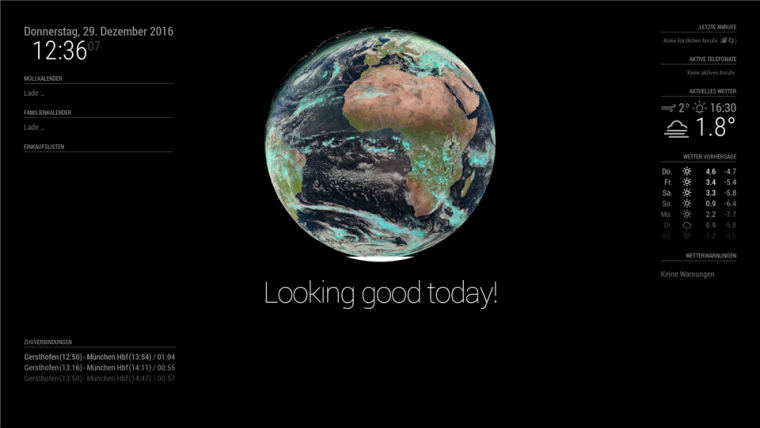
      posted in Troubleshooting
      binderthB
      binderth
    • Deutsche Bahn: list of connections with delays

      The “trainconnection”-module does show the schedule for my daily ride. But without delays. I’d like to have a overview of a specific connection with delays, just like I can find on e.g. bahn.de.
      Purpose is to see, whether my commute is on time or delayed.

      Anybody came across this already?

      posted in Requests
      binderthB
      binderth
    • RE: MMM-IPCam - Display images from your (foscam) ip camera

      I got a FOSCAM FI-9805W, which seems also not supported. I think, there are different FOSCAM APIs out there.
      My camera returns a JPG after this call:

      • http://192.168.x.x:8080/cgi-bin/CGIProxy.fcgi?usr=XXX&pwd=xxx&cmd=snapPicture2

      I’m not sure, which one the library uses? the one of the foscam forum works with me.

      posted in Utilities
      binderthB
      binderth
    • RE: calendar: maximumNumberOfDays is ignored

      @broberg said in calendar: maximumNumberOfDays is ignored:

      it should be outside the calendar array

      thanks, that did the trick. I got the “README.md” wrong! ;)

      posted in Bug Hunt
      binderthB
      binderth
    • calendar: maximumNumberOfDays is ignored

      Platform [ Raspberry Pi 2/3, Windows, Mac OS X, Linux, Etc … ]: Raspberry pi 3

      Node Version [ 0.12.13 or later ]: ? did a new install yesterday

      MagicMirror Version [ V1 / V2-Beta ]: V2

      Description: While showing a google calendar, the argument “maximumNumberOfDays” is ignored.

      Steps to Reproduce: configure a google calendar, add “maximumNumberOfDays” with a low value

      Expected Results: calendar entries shown in Magic Mirror should be max days as described in the value

      Actual Results: calendar entries above maximumNumberOfDays are shown also

      Configuration: What does the used config.js file look like? (Don’t forget to remove any sensitive information.)
      {
      module: ‘calendar’,
      header: ‘Müllkalender’,
      position: ‘top_left’,
      config: {
      calendars: [
      {
      symbol: ‘calendar-times-o’,
      url: ‘webcal://calendar.google.com/calendar/ical/xxx%40group.calendar.google.com/private-xxx/basic.ics’,
      maximumNumberOfDays: ‘7’,
      user: ‘xxx@xxx.de’,
      pass: ‘xxx’
      }
      ]
      }
      },

      Additional Notes: none

      posted in Bug Hunt
      binderthB
      binderth
    • RE: Wunderlist won't display entries

      @tidus5 said in Wunderlist won't display entries:

      you forgot to add your access token, client ID and (maybe) the folder you want.

      sorry, I forgot to mention, in the post above, I crossed out my own accessToken and clientID. ;) That’s what makes me wonder, because I defined my own keys in wundertlist API and put them in the config…?
      As I had difficulties to access my own Folder (which is within a group), I just wanted to access a system-folder provided by Wunderlist.

      posted in Troubleshooting
      binderthB
      binderth
    • Wunderlist won't display entries

      Re: Wunderlist - Lists not showing up

      As described here, I configured everything like this:
      …
      {
      module: ‘MMM-Wunderlist’,
      position: ‘top_left’, // This can be any of the regions. Best results in left or right regions.
      header: ‘Einkaufsliste’, // This is optional
      config: {
      accessToken: ‘xxxxxxxxxxxxxxxxxxxx’,
      clientID: ‘xxxxxx’,
      lists: [‘inbox’]
      // See ‘Configuration options’ for more information.
      }
      }
      …
      For the test I did within the ./modules/MMM-Wunderlist:
      node fetcher_debug_client.js
      which showed:
      /home/pi/MagicMirror/modules/MMM-Wunderlist/fetcher_debug_client.js:59
      createFetcher(“id”, “Inbox”, 1000, accessToken, clientID);
      ^

      ReferenceError: accessToken is not defined
      …

      is there something I missed? For the API-Key Generator in put in
      API URL: http://localhost:8080
      callback: https://a.wunderlist.com/api/v2/lists

      PS: Is there a possibility to have code formatted? ;)

      posted in Troubleshooting
      binderthB
      binderth
    • RE: Touchscreen instead of simple monitor behind MagicMirror?

      Thanks,
      I found some losely coupled openHAB modules like “MMM-floorplan” or “MMM-Rest”, the latter of course a simple GETter of openHAB items. But on that I could do some neat things already.
      on second thought I think, with some scripting as you described it, I could at least put the most important commands to the MagicMirror via voice control.
      In combination with some gesture module I think I can strip down my needs to meet the “Display”-functionality of MagicMirror! ;)

      Thanks,
      Thomas.

      posted in Hardware
      binderthB
      binderth
    • RE: Touchscreen instead of simple monitor behind MagicMirror?

      Hi broberg,

      thanks for the quick reply. As I do understand, the voice controls can take control over “System Tasks” like turn on/off something. Is there a way to interact with something on application Level, which is shown in a browser?

      My use case is to show the openHAB frontend (my home automation) and there I can use switches or dropdowns like “switch lights in bathroom on”. Also to insert items to the wunderlist shopping list. or to open the door, if there’s someone out there I can see on the webcam, …

      thanks,
      Thomas.

      posted in Hardware
      binderthB
      binderth
    • Touchscreen instead of simple monitor behind MagicMirror?

      I want to build my own MagicMirror, but came across the actual bidirectional problem if I just use a Monitor. I’d like to use the MagicMirror with my home automation frontend, so I can push some buttons on the mirror also.

      So I thought, there are three ways to solve this:

      1. use a Touchscreen instead of a monitor
      2. use gesture control (don’t know how to do this…)
      3. use voice activation (don’t know how to do this, either)

      So, the best thing would be to use all three of them (if I can learn how to do 2 and 3). And for this, I’d like to use an touchscreen in MagicMirror. I see, there are some of you using some kind of touch-film or something, but didn’t find a tutorial on which hardware would be best.

      Thanks for your help!
      Thomas.

      posted in Hardware
      binderthB
      binderth
    • 1 / 1