Hi, Gateway is not needed since 1 year 1/2 now.
Can you read againNew wiki of MMM-GoogleAssistant v7.x ?
Happy use,
@bugsounet
 B
Offline
B
Offline
Hi, Gateway is not needed since 1 year 1/2 now.
Can you read againNew wiki of MMM-GoogleAssistant v7.x ?
Happy use,
@bugsounet
@sdetweil I will install last OS in my pi 4 for inspect (when i have some keep time :/)
info on labwc
Labwc, a Wayland window-stacking compositor, doesn’t have screen saver settings. However, you can configure Labwc to do other things, such as:
Set a shortcut to a launcher: Create a configuration file at ~/.config/labwc/rc.xml and add a entry.
Start a background-image client and a panel: Add the command to ~/.config/labwc/autostart.
Labwc is a lightweight compositor that stacks windows and renders some window decorations. It’s inspired by openbox and takes a simple approach, avoiding features like animations.
on pi those files are in
/etc/xdg/labwc/autostart
/etc/xdg/labwc/rc.xml
/etc/xdg/labwc/environment
none of that appears changed when setting screen dimming on in raspi-config
none of the script older settings are triggered
@sdetweil Really… So maybe current version of MM² have to be patched :/
@sdetweil yes, again more work ;/
(and more bugs)
Hi,
MMM-Pir v2 is under coding
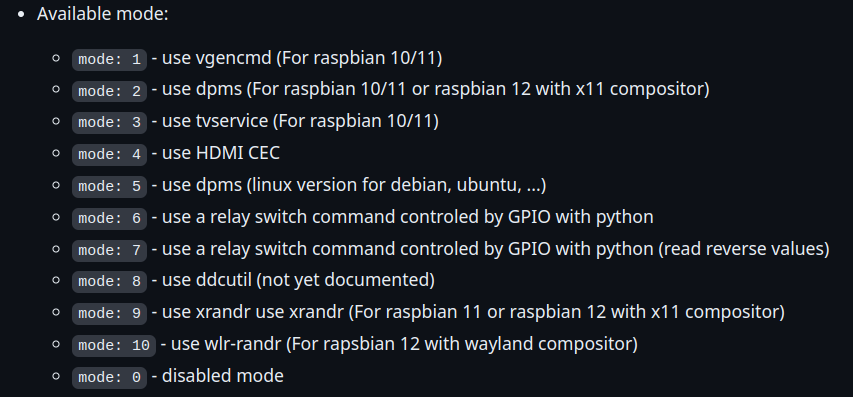
Unfortunately, it is not possible to use mode 6 and 7 at the same time (same GPIO)
This module send USER_PRESENCE notification with trueor false payload (it’s the screen state)
You can trigger it with this module MMM-NotificationTrigger and exec a personal script for this
Note:
RPi.GPIO will be deleted (in next release) because there is a compatibility problem with pi5 and with bookworm too.gpiod library for both compatibility@sdetweil I know but MMM-Pir v2 is under-coding
In all case:
[MMM-Pir] [LIB] [PIR] Mode 0 Selected (onoff library) : onoff library will be removed[MMM-Pir] [LIB] [SCREEN] Mode 1: vcgencmd : vcgencmd will be removedHi, try to enable auto hide task bar option
@santex in this case try: npm run rebuild
@karsten13 don’t forget: node_helper use node version installed on system ;)
and node v20.9.0 i used on module core
—> So: fetch calandar use node version installed on system (node v21.x)
we checked this on a github issue, 5-6 months ago
@karsten13 maybe it’s related with node v21.x
@Jazz said in Module error after updating - MMM-Pir: Pir Error detected: EINVAL: invalid argument, write:
pir_mode: 0,
Sorry, I have forget to update ReadMe for this error
Generally happen with x64 system (Rpi 4 and Rpi 5)
Available pir_mode:
pir_mode: 0 - use onoff library (For Raspberry Pi 3b+ and 4)
pir_mode: 1 - use python script with RPI.GPIO library (For Raspberry Pi 3b+ and 4)
pir_mode: 2 - use python script with gpiozero library (For Raspberry Pi 5, not tested on other Raspberry Pi)
So, Can you try pir_mode: 1, or pir_mode: 2,
Hi, for MagicMirror² v2.28.0, EXT-Detector need v2.7.0 for working
Can you try to update it (with npm run update inside EXT-Detector folder)
Hi, maybe the best way is using zoom functionality because,any logos will not follow the font size
in custom css try this:
#CARBURANTS {
  zoom: 120%;
}
Hi, I just fix it in my MMM-NetatmoThermostat module (same API … so same Issue)
See there
Author of this module have to do some changes
My Change in GitHub, if can help it
Change Log
Update Deps:
Fix:
Add:
token.json fileIn accord with new API of Netatmo:
New token is now writed into a file (token.json)
refresh_tohen feature in config file will be now used only on FIRST TIME for starting the module (token.json file don’t exist) and as usual you have to take it in Netatmo Connect website
All next token will be writed in token.json file automaticaly
On restart MagicMiror²: MMM-NetatmoThermostat will use token.json file for authenticate and will ignore refresh_token config feature