@sdetweil yes indeed there is:
Reason: CORS header ‘Access-Control-Allow-Origin’ missing
C
Offline
A New Chapter for MagicMirror: The Community Takes the Lead
Read the statement by Michael Teeuw here.
Read the statement by Michael Teeuw here.
Posts
-
RE: Compliments with remote file doesnt work.
{ "anytime": ["Ich sehe viel von mir in dir", "Verdammt. Du siehst gut aus!", "Möge die Macht mit dir sein", "Es gibt keinen Ort wie zu Hause", "*Ich trug eine Wassermelone*", "Dein Lächeln ist ansteckend", "Du siehst heute großartig aus", "Du bist ein schlauer Keks", "Aufgeben ist keine Option!", "Don't worry - be happy", "Perfektion ist langweilig!", "Du bist wundervoll", "Ich liebe Kaktusblümchen", "Smile every day", "Never give up", "Gib alles - nur nicht auf", "Today is a good day", "Wenn nicht jetzt - wann dann", "You are your only limit", "Dein lächeln steht dir gut", "Everything is possible", "Mit dir kann ich Pferde stehlen", "Gegensätze ziehen sich an", "Wake up and be awesome", "*Mein Baby gehört zu mir*", "Carpe Diem", "Du bist mein Zuhause", "*Bibe di babe di Buh!*", "Du hast das schönste Lachen", "Du bist ein großartiger Freund", "Du erstrahlst den Raum", "Du verdienst jetzt eine Umarmung", "Du kannst stolz auf dich sein", "Du bist hilfreicher als du denkst", "Du bist ein großartiger Zuhörer", "Ich wette du schwitzt Glitzer", "Du bist wundervoll", "Du bist einzigartig!", "Du inspirierst" ], "morning": ["Guten Morgen Sonnenschein!", "Lass doch das Kissen im Bett", "Du bist heute früh dran", "Dein Haar ist mega heute!", "Der fühe Vogel fängt den Wurm", "Das wird ein schöner Tag!", "Heute wird großartig", "Carpe Diem" ], "afternoon": ["Zeit für lecker Njam - Njam", "Dieser Tag ist großartig", "Beinahe Abendessenszeit!" ], "evening": ["Zeit zu Schlemmen", "Bis morgen!", "Schlaf gut", "Guten Appetit", "Yeah, Freizeit", "War das Essen gut?" ], "snow": ["Schneeballschlacht!", "Leise rieselt der Schnee", "Baue einen Schneemann" ], "day_sunny": ["Heute ist ein sonniger Tag", "Sonne tanken", "Time for a Dog Walk", "Cora will spielen!", "Die Sonne scheint heute!", "Have a wonderful Day", "Sunny Day Today" ], "day_cloudy": ["Couch Time" ], "rain": ["Ein Regenschirm wäre nützlich" ], "night_clear": ["Die Sterne funkeln" ], "....-01-01": ["Happy new year!"] } -
Compliments with remote file doesnt work.
I would like to use an external compliments file. Therefore I use the following config:
		{
			module: "compliments",
			position: "bottom_bar",
				config: {
    				remoteFile: "https://www.xxx.com/magicmirror/compliments_remote.json"
				}
		},
I have checked the link, which is valid (entering in the browser displays the files content). Furthermore I have used a JSON validator in order to check if the content is json compliant. This is the content:
{
    "anytime": ["Ich sehe viel von mir in dir",
                "Verdammt. Du siehst gut aus!",
                "Möge die Macht mit dir sein",
                "Es gibt keinen Ort wie zu Hause",
                "*Ich trug eine Wassermelone*",
                "Dein Lächeln ist ansteckend",
                "Du siehst heute großartig aus",
                "Du bist ein schlauer Keks",
                "Aufgeben ist keine Option!",
                "Don't worry  -  be happy",
                "Perfektion ist langweilig!",
                "Du bist wundervoll",
                "Ich liebe Kaktusblümchen",
                "Smile every day",
                "Never give up",
                "Gib alles - nur nicht auf",
                "Today is a good day",
                "Wenn nicht jetzt - wann dann",
                "You are your only limit",
                "Dein lächeln steht dir gut",
                "Everything is possible",
                "Mit dir kann ich Pferde stehlen",
                "Gegensätze ziehen sich an",
                "Wake up and be awesome",
                "*Mein Baby gehört zu mir*",
                "Carpe Diem",
                "Du bist mein Zuhause",
                "*Bibe di babe di Buh!*",
                "Du hast das schönste Lachen",
                "Du bist ein großartiger Freund",
                "Du erstrahlst den Raum",
                "Du verdienst jetzt eine Umarmung",
                "Du kannst stolz auf dich sein",
                "Du bist hilfreicher als du denkst",
                "Du bist ein großartiger Zuhörer",
                "Ich wette du schwitzt Glitzer",
                "Du bist wundervoll",
                "Du bist einzigartig!",
                "Du inspirierst"
                ],
    "morning": ["Guten Morgen Sonnenschein!",
                "Lass doch das Kissen im Bett",
                "Du bist heute früh dran",
                "Dein Haar ist mega heute!",
                "Der fühe Vogel fängt den Wurm",
                "Das wird ein schöner Tag!",
                "Heute wird großartig",
                "Carpe Diem"
                ],
    "afternoon": ["Zeit für lecker Njam - Njam",
                "Dieser Tag ist großartig",
                "Beinahe Abendessenszeit!"
                ],
    "evening": ["Zeit zu Schlemmen",
                "Bis morgen!",
                "Schlaf gut",
                "Guten Appetit",
                "Yeah, Freizeit",
                "War das Essen gut?"
                ],
    "snow": ["Schneeballschlacht!",
                "Leise rieselt der Schnee",
                "Baue einen Schneemann"
                ],
    "day_sunny": ["Heute ist ein sonniger Tag",
                "Sonne tanken",
                "Time for a Dog Walk",
                "Cora will spielen!",
                "Die Sonne scheint heute!",
                "Have a wonderful Day",
                "Sunny Day Today"
                ],
    "day_cloudy": ["Couch Time"
                ],
    "rain": ["Ein Regenschirm wäre nützlich"
                ],
    "night_clear": ["Die Sterne funkeln"
                ],
    "....-01-01": ["Happy new year!"]
}
The remote file wont get loaded and/or displayed but instead the default and local compliments.js file shows the standard english sentences.
Any idea on what I’m missing?
-
RE: Client wont keep Modules up-to-date
@sdetweil yes, you should do that.
-
RE: Client wont keep Modules up-to-date
I figured out that is was due to several reasons.
- The reported error messages from the client side were old ones from the time when I set up the client and before I switched to clientonly mode. So they are supposed to be ignored.
- The calendar module was able to receive the events from all calendars except for one calendar that runs on my NAS system where I forgot to add the port number to the calendar url.
- the module MMM-Tankerkoenig is not up to date as there is an error message regarding the identifier that was not found. As far as I can see the code has an error and therefore the module wont update correctly.
- the module MMM-Formula1 (wrongly called it MMM-SocerLiveScore) module has a ReloadInterval which was just wrongly set up and far to long.
@karsten13
In the Docker on the server side is there anything adequate to the command pm2 logs --lines 300 mm ? -
RE: Client wont keep Modules up-to-date
@karsten13
yes and using pm2 to start this command:DISPLAY=:0 node clientonly --address 192.168.0.13 --port 8080And yes I have errors, it seems as if there is a problem using the 127.0.0.1 address and port 8080:
0|mm       | [13.07.2021 13:19.37.499] [ERROR] Error: listen EADDRINUSE: address                                                                                                                                           already in use 127.0.0.1:8080
0|mm       |     at Server.setupListenHandle [as _listen2] (net.js:1313:16)
0|mm       |     at listenInCluster (net.js:1361:12)
0|mm       |     at GetAddrInfoReqWrap.doListen [as callback] (net.js:1498:7)
0|mm       |     at GetAddrInfoReqWrap.onlookup [as oncomplete] (dns.js:68:8) {
0|mm       |   code: 'EADDRINUSE',
0|mm       |   errno: 'EADDRINUSE',
0|mm       |   syscall: 'listen',
0|mm       |   address: '127.0.0.1',
0|mm       |   port: 8080
0|mm       | }
0|mm       | [13.07.2021 13:19.37.506] [ERROR] MagicMirror will not quit, but it                                                                                                                                           might be a good idea to check why this happened. Maybe no internet connection?
0|mm       | [13.07.2021 13:19.37.510] [ERROR] If you think this really is an is                                                                                                                                          sue, please open an issue on GitHub: https://github.com/MichMich/MagicMirror/iss                                                                                                                                          ues
and I wonder why there is an error catching the newsfeed, as the stated feed is the one from the client, not the server:
0|mm | /home/pi/MagicMirror/node_modules/electron/dist/electron exited wit h signal SIGINT 0|mm | [13.07.2021 19:59.53.918] [ERROR] Newsfeed Error. Could not fetch n ewsfeed: https://rss.nytimes.com/services/xml/rss/nyt/HomePage.xml FetchError: request to https://rss.nytimes.com/services/xml/rss/nyt/HomePage.xml failed, rea son: getaddrinfo EAI_AGAIN rss.nytimes.com 0|mm | at ClientRequest.<anonymous> (/home/pi/MagicMirror/node_modules /node-fetch/lib/index.js:1461:11) 0|mm | at ClientRequest.emit (events.js:315:20) 0|mm | at TLSSocket.socketErrorListener (_http_client.js:426:9) 0|mm | at TLSSocket.emit (events.js:315:20) 0|mm | at emitErrorNT (internal/streams/destroy.js:92:8) 0|mm | at emitErrorAndCloseNT (internal/streams/destroy.js:60:3) 0|mm | at processTicksAndRejections (internal/process/task_queues.js:8 4:21) { 0|mm | type: 'system', 0|mm | errno: 'EAI_AGAIN', 0|mm | code: 'EAI_AGAIN' 0|mm | } 0|mm | [13.07.2021 19:59.56.921] [ERROR] Calendar Error. Could not fetch c alendar: http://www.calendarlabs.com/ical-calendar/ics/76/US_Holidays.ics Fetch Error: request to http://www.calendarlabs.com/ical-calendar/ics/76/US_Holidays.i cs failed, reason: getaddrinfo EAI_AGAIN www.calendarlabs.com 0|mm | at ClientRequest.<anonymous> (/home/pi/MagicMirror/node_modules /node-fetch/lib/index.js:1461:11) -
Client wont keep Modules up-to-date
I’m running @karsten13 Docker on my Synology NAS, which runs smooth and nicely.
As I have configured my MagicMirror to work as client/server, the client runs on a Raspberry Pi feeding the Mirror itself.I have figured out that the client wont show the most current data of the modules. It is not frozen, the time is running and other modules like “MMM-DWD-WarnWeather” or “MMM-Traffic” are always up-to-date.
But the default calendar module as well as the “MMM-SoccerLiveScore” module are always outdated.How can that be and what can I do to find the root cause?
-
Not getting custom.css with Docker
I’m successfully running bastilimbach’ docker image of magicmirror.
The config is running, the modules are running.What I cannot achieve to get running is the custom.css file.
I have tried several mounting options:
Folder:-v /volume1/docker/magicmirror/css:/opt/magic_mirror/css \File:
-v /volume1/docker/magicmirror/css/custom.css:/opt/magic_mirror/css/custom.css \Folder to File:
-v /volume1/docker/magicmirror/css:/opt/magic_mirror/css/custom.css \In all cases the custom.css file wont get used by MagicMirror.
In the Dev-Tools I get the following errors:Refused to apply style from 'http://192.168.0.23:8036/css/custom.css/' because its MIME type ('text/html') is not a supported stylesheet MIME type, and strict MIME checking is enabled. 192.168.0.23/:1and
Error on loading stylesheet: css/custom.css loader.js:215If I call the URL http://192.168.0.23:8036/css/main.css, i can see the content of the main.css. If I call the URL http://192.168.0.23:8036/css/custom.css I get an error “Cannot GET /css/custom.css/”
In the /opt/magic_mirror/css/ folder I have the main.css and the custom.css file stored.
The code of my custom.css is:
/*****************************************************
 * Magic Mirror                                      *
 * Custom CSS                                        *
 *                                                   *
 * By Michael Teeuw http://michaelteeuw.nl           *
 * MIT Licensed.                                     *
 *                                                   *
 * Add any custom CSS below.                         *
 * Changes to this files will be ignored by GIT. *
 *****************************************************/

body {
 margin: 10px;
 height: calc(100% - 10px);
 width: calc(100% - 10px);
}

@font-face {
  font-family: SFPro;
  font-style: normal;
  font-weight: normal;
  font-size: 50%;
  letter-spacing: -2px;
  src:
    url("apple_font.woff2") format("woff2"),
    url("apple_font.woff") format("woff");
}

.MMM-Fuel {
    font-family: SFPro;
}

.MMM-Fuel .sortBy {
    margin-left: 0px;
}

.MMM-Fuel .table {
    border-spacing: 0px 0;
}

.MMM-Fuel .centered {
    padding-right: 10px;
    padding-left: 10px;
}

.MMM-Traffic {
    font-family: SFPro;
    line-height: 0;
}

.MMM-Tankerkoenig {
    font-family: SFPro;
}

.MMM-Formula1 {
    font-family: SFPro;
}

.MMM-google-route {
    font-family: SFPro;
    font-size: 100%;
    max-width: 325px;
    line-height: 0;
}

.MMM-google-route table td.small {
    font-size: 100%;
}

.MMM-google-route #title {
    line-height: 1.5em;
}

.MMM-RTSPStream .innerWrapper {
    border: 0px;
    padding-bottom: 10px;
}

.MMM-RMV {
    font-family: SFPro;
}

.MMM-COVID19-AMPEL {
    font-family: SFPro;
}

.MMM-DWD-WarnWeather {
    font-family: SFPro;
}

.MMM-DWD-WarnWeather .warning {
    float: right;
}

.MMM-DWD-WarnWeather .status {
    text-align: right;
}

.MMM-WiFiPassword {
    font-family: SFPro;
    float: right;
    text-align: right;
}

.calendar {
    font-family: SFPro;
    max-width: 475px;
}

.calendar .normal {
    text-align: left;
}

.MMM-soccer .table {
    font-family: SFPro;
    font-size: 64%;
    font-weight: 100;
}

.MMM-soccer .name{
    color: #999;
    font-weight: lighter;
}

.MMM-soccer .centered{
    color: #999;
}

.MMM-soccer .centered {
    color: #fff;
}

.MMM-soccer .icon {
    width: 16px;
    height: 16px;
}

.alert {
    font-family: SFPro;
    max-width: 325px;
}

.clock {
    font-family: SFPro;

}

.compliments {
    font-family: SFPro;
}

.compliments .xlarge {
    font-size: 50px;
    letter-spacing: 0px;
}

.currentweather {
    font-family: SFPro;
}

.newsfeed {
    font-family: SFPro;
}

.updatenotification {
    font-family: SFPro;
    max-width: 325px;
}

.weather {
    font-family: SFPro;
}

.weatherforecast {
    font-family: SFPro;
    display: table;
    margin-left: auto;
    margin-right: 0;
}
Any idea how to fix this?
@bastilimbach -
RE: [MMM-RTSPStream] - Video Streaming from Live Feeds & Security Cameras
I keep getting this error:
0|mm | [15.04.2021 15:10.29.116] [ERROR] TypeError: Cannot set property 'omx_stream1' of undefined 0|mm | at Timeout.worker [as _onTimeout] (/home/pi/MagicMirror/modules/MMM-RTSPStream/node_helper.js:367:87) 0|mm | at listOnTimeout (internal/timers.js:549:17) 0|mm | at processTimers (internal/timers.js:492:7) -
RE: MMM-Fuel
With the new update of MM I’m getting the following error:
0|mm | [15.04.2021 14:11.21.945] [ERROR] (node:15096) UnhandledPromiseRejectionWarning: Error: Cannot find module 'geolib' 0|mm | Require stack: 0|mm | - /home/pi/MagicMirror/modules/MMM-Fuel/apis/tankerkoenig.js 0|mm | - /home/pi/MagicMirror/modules/MMM-Fuel/node_helper.js 0|mm | - /home/pi/MagicMirror/js/app.js 0|mm | - /home/pi/MagicMirror/js/electron.js 0|mm | - /home/pi/MagicMirror/node_modules/electron/dist/resources/default_app.asar/main.js -
RE: Time format in default calendar module
@sdetweil I know and this is what I did. But it seems that the calendar module is not respecting the flags that have been set. Maybe a bug?
What I understand out of the doc is that the format can only be changed if the timeFormat is absolute.
But to be honest, in my case it just doesn’t matter at all. The format won’t change, no matter if I use relative or absolute.With Absolute it always says “In one day”
With relative it says “Tomorrow at 12:00 o’clock”The values for dateFormat seem to get ignored.
I tried “DD-MM-YYYY”, “MMM Do”, “LT” for both cases relative and absolute.What am I missing?
-
RE: Alignmend of modules
@majorc The question with the MMM-DWD-WarnWeather module I can answer. Was a bit tricky to find out, but what works for me is to set the follwing into the custom.css:
.MMM-DWD-WarnWeather .warning { float: right; } -
Time format in default calendar module
I would like to change the way the time information gets displayed within the default calendar module.
The first entry says “In 6 hours”, instead I would like it to display "“Today at 12:00”
The second entry says “Today at 20:00 o’clock” and I would like to remove the “o’clock” at the end and habe instead "Today at 20:00 "
How would the config look like?
My config:
module: "calendar", header: "Calednarname", position: "top_right", config: { displaySymbol: false, maxTitleLength: 20, showLocation: false, wrapEvents: true, maxTitleLines: 3, nextDaysRelative: true, selfSignedCert: true, timeFormat : "relative", dateFormat: "Do MMM", fullDayEventDateFormat : "Do MMM", displayRepeatingCountTitle: true, calendars: [ { url: "<calendar-url>", }, ], }, -
RE: Alignmend of modules
@karsten13 correct they are all top_right. Your suggestion worked:
.MMM-DWD-WarnWeather .status {
    font-family: "SFPro";
    text-align: right;
}
Your hint with playing with css in my browser helped to figure out that currentweather and weatherforecast behave like this because of a max-width of 325 that I already had set in the custom.css, as where the calendar has 475px.
-
Alignmend of modules
As I have the default calendar plugin, which needs a width of 475px, the upper modules currentweather, weatherforecast and MMM-DWD-WarnWeather are not really right-aligned. As you can see on the screenshot, I would like to keep the module on the right border of the frame. For the DWD-WarnWeather module, the module itself is placed correct, but the content is not right aligned.
What Do I need to do in order to fix that?
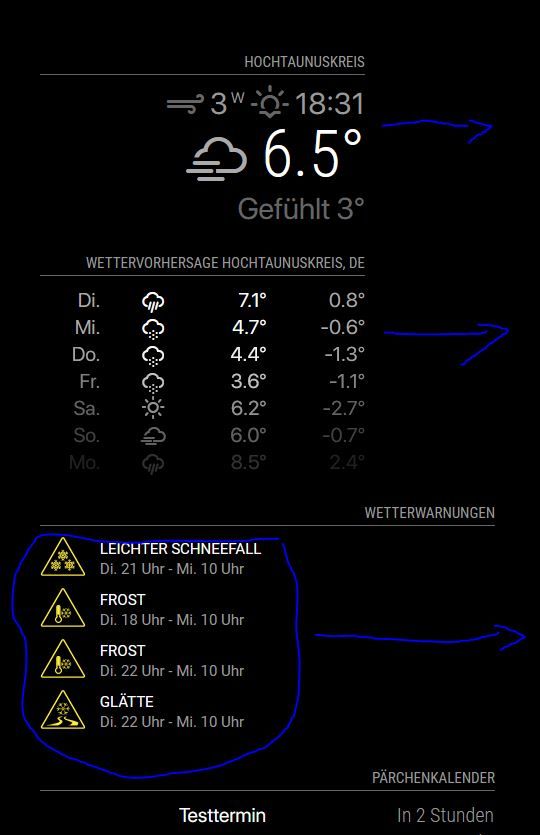
-
MMM-CalendarExt2 not showing up
I have already searched the other posts regarding this topic, but no solution worked for me. The calendar is a Nextcloud calendar, hence the ?export part.
The module is simply not showing up and I can’t find the error.
The config is:
{ module: "MMM-CalendarExt2", config: { calendars: [ { name: "PrivateCalendar", url: "https://<usernam>:<password>@<hostname>/remote.php/dav/calendars/<username>/privatecalendar?export", }, ], views: [ { mode: "daily", locale: "de-DE", position: "top_right", calendars: ["PrivateCalendar"], }, ], scenes: [ { name: "DEFAULT", views: [], }, ], }, }, -
RE: Default calendar and Nextcloud CalDav
I’m still struggeling. I have tried several versions of the url and with credentials in the url or as a parameter, nothing works and the MagicMirror shows: loading calendar…
The weird thing is that the URL itself works like a charm as long as I post it in a web browser. I do get an .ics file immediately.
So maybe if the url is correct, I do need to change some settings in nextcloud?
For example has the calendar to be public?My current working (in browser only) version is:
calendars: [
                     {
                     symbol: "calendar-check",
                     url: "https://USERNAME:PASSWORD@DOMAIN/remote.php/dav/calendars/USERNAME/persoenlich/?export",
                     }
                    ]
Any help?
-
RE: Fresh Installation stuck at node ./download-chromedriver.js
Reason: Downloding electron takes for ages as the download was below 1kb/s.
Solution: Executing the following command using a faster chinese mirror:ELECTRON_MIRROR=http://npm.taobao.org/mirrors/electron/ npm install --prefix ~/MagicMirror electron --save-dev -
Fresh Installation stuck at node ./download-chromedriver.js
Today I’ve followed this tutorial in order to make a new install of Raspbian Stretch and MagicMirror.
No matter if I install MagicMirror with the automated script or I execute the commands manually following the manual, every time I get stuck at the following step:
pi@magicmirror:~/MagicMirror $ npm install && npm start

npm WARN deprecated time-grunt@2.0.0: Deprecated because Grunt is practically unmaintained. Move on to something better. This package will continue to work with Grunt v1, but it will not receive any updates.

npm WARN deprecated nomnom@1.8.1: Package no longer supported. Contact support@npmjs.com for more info.

> electron-chromedriver@1.8.0 install /home/pi/MagicMirror/node_modules/electron-chromedriver

> node ./download-chromedriver.js
Even after over an hour of waiting, the process won’t continue.
Any help is appreciated.
-
RE: Fully uninstall/remove MagicMirror
In the installation Script i saw an installation of PM2, the Splash Screen and some more, that would then still be kept in the system…