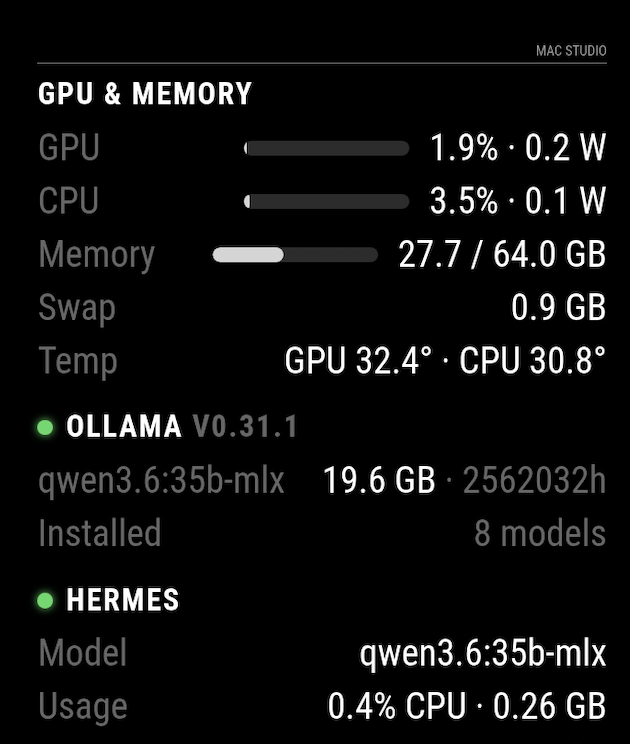
I built MMM-OllamaHostMonitor to keep an eye on the Mac Studio that runs my local LLMs, right on the MagicMirror. It shows live GPU/CPU usage & power, unified memory, the Ollama models currently resident (with VRAM), and Hermes status.
Why a companion agent + MQTT? macOS doesn’t expose GPU/memory over HTTP, and hermes-agent has no metrics endpoint. So a tiny collector runs on the Mac (using the sudoless macmon, the Ollama REST API, and process inspection) and publishes retained JSON to your MQTT broker. The module just subscribes — it’s push-based, needs no inbound ports on the Mac, and populates instantly on boot. If the Mac/agent stops, an MQTT Last-Will greys the card out.
Features
- GPU & CPU utilization (bars) + power draw, unified memory, swap, GPU/CPU temps
- Ollama: up/down, version, each resident model + VRAM, installed-model count
- Hermes: up/down, configured model, CPU%/RSS
- Native MM look: standard module header, theme color variables, relative sizing so it scales with your font size and drops into any region
- i18n-ready (
getTranslations),requiresVersionset, smooth non-flashing updates - Bonus: built-in Home Assistant MQTT discovery — flip one config flag and every metric auto-registers as an HA entity under one device (loaded models exposed as attributes)
Requirements
- An MQTT broker reachable by both the Mac and the mirror (e.g. the Mosquitto add-on many of us already run for Home Assistant)
- macOS host with
brew install macmon; Ollama on:11434
Install (module side)
cd ~/MagicMirror/modules
git clone https://github.com/coreycaverly/MMM-OllamaHostMonitor
cd MMM-OllamaHostMonitor && npm install
{
  module: "MMM-OllamaHostMonitor",
  position: "top_right",
  config: {
    mqttServer: "homeassistant.local",
    topicPrefix: "ollama-host/metrics",
    title: "Mac Studio"
  }
}
The Mac-side collector (setup, launchd service, config) is in the repo's agent/ folder with its own README.

Repo: https://github.com/coreycaverly/MMM-OllamaHostMonitor

Feedback welcome — happy to generalize beyond Macs if there's interest.