MagicMirror Forum
    • Recent
    • Tags
    • Unsolved
    • Solved
    • MagicMirror² Repository
    • Documentation
    • 3rd-Party-Modules
    • Donate
    • Discord
    • Register
    • Login
    1. Home
    2. dangerousden
    3. Posts
    A New Chapter for MagicMirror: The Community Takes the Lead
    Read the statement by Michael Teeuw here.
    D
    Offline
    • Profile
    • Following 0
    • Followers 0
    • Topics 2
    • Posts 10
    • Groups 0

    Posts

    Recent Best Controversial
    • RE: MMM-RTSPStream no longer working

      UPDATE

      After playing around with settings and various options, I could NOT find a way to get the image back where I wanted it. I also realised the RTSP feed was only picking up a single frame and nothing more.

      Reading into the options of the RTSP module I wondered if I would utilise WebRTC. So off I went at a complete tangent, and 5 hours of work…

      I installed MediaMTX and configured as suggested on a post I found inside this wonderful forum. Nothing! I could not see the stream at all. After lots of head scratching I realised I did not use the default name for my pi (pi) so I had to edit all the configs for MediaMTX and replace the home/pi with my username.

      I created an autostart for the MediaMTX service and configured that too.

      After lots of confusing back and forth between 2 different websites around the setup for this, one using RTSP stream, but the main one using a RaspberryPi Camera, I was getting close, but the feed was being rejected. I stepped away and had lunch. On my return, it was very obvious. I had used port 553 in the RTSP stream URL, instead of 554. Duh! Rookie mistake, but only spotted when I took a break. This allowed the MediaMTX service to connect to the RTSP stream.

      A little bit of jiggerypokery with the config.js file in MagicMirror, and I now have the WEBRTC feed into the Pi and also out to my remote browser on the network. The feed does indeed seem faster and so far, stabled. Time will tell, but I refused to be beaten :)
      posted in Troubleshooting
      D
      dangerousden
    • RE: MMM-RTSPStream no longer working

      @sdetweil said:

      @dangerousden never apologize for what goes on in your life. NOTHING here is more important than that

      I will try to help as your time allows…

      Thank you. that is very much appreciated

      I managed to get the RTSPStream working again, by simply rebooting the camera. This is a guy who has worked 40 years in IT and I didn’t follow the golden rule. Switch it off and on again :D

      However, the image is now showing right bang in the middle of the screen, ignoring any of the config, and blocking the Background slideshow. I tried the MPlayer plugin but it refuses to connect and show anything. So I returned back to RTSPStream, tried updating ffmpeg, and changing the stream to that - nothing. So - best I can get is a rather annoying image where it should not be, or a blank box.

      Am I missing something simple??

      {
          module: "MMM-RTSPStream",
          position: "bottom_left",
          config: {
              autoStart: true,
              rotateStreams: false,
              moduleWidth: 354,
              moduleHeight: 240,
              localPlayer: 'ffmpeg',
              remotePlayer: 'ffmpeg',
              showSnapWhenPaused: true,
              remoteSnaps: true,
              shutdownDelay: 12,
              stream1: {
                  name: 'DRIVE',
                  url: 'rtsp://un:pw@192.168.1.241:554/live/ch1',
                  width: undefined,
                  height: undefined,
                  ffmpegPort: 9999,
                  },
              }
      },
      
      posted in Troubleshooting
      D
      dangerousden
    • RE: MMM-RTSPStream no longer working

      @sdetweil I apologise for the delay in replying. Not been well. I was trying to get some sort of webRTC feed from my HomeAssistant, but failed miserably. I will give the MPlayer plug in a try when I get home.

      Thanks for the suggestion

      posted in Troubleshooting
      D
      dangerousden
    • MMM-RTSPStream no longer working

      Hi All

      Since the update to version 4 of RTSPStream, I can no longer get my IP Camera to show on the screen. I have attempted a reinstall, and checked the settings. Just the outline of the module, with the heading, but no image. The best I have had was a still image in the centre of the screen which vanished shortly after.

      AFAIK my camera has had no firmware or software updates.

      Does the hive mid have any suggestions?

      Many thanks

      posted in Troubleshooting
      D
      dangerousden
    • RE: change font of modules (local fonts)

      @epi

      Did you ever get this working? I’m having exactly the same issue. I have the holiday countdown module. We’re off to Disney, so I thought it would be fun to put it in a Disney font. I’ve downloaded one and put it into a fonts folder under MagicMirror.
      I have defined it with an @ statement, included the fonts/ source folder and file name, and added it to the countdown module, but it is still not changing the font for that module :(

      posted in Custom CSS
      D
      dangerousden
    • RE: Cannot access MM2 across the network - localhost ok

      I have made so many changes to the config of both Pi and MM2, I decided it would be easier to start with a fresh instance. So I backed up the config.js and custom.css files and reimaged the SD Card

      I used @sdetweil amazing scripts to reinstall MM2 I was back up and running just 20 mins later. I pulled over the GIT repositories that I wanted and reconfigured the config files.

      I DID NOT INSTALL VNC SERVER. This is almost definitely causing the network issues. I have reverted to Pi Connect

      and everything is working. I synched the wrong MS account for my OneDrive images which I use for backgrounds, but I quickly downloaded them from my server backup and uploaded to my personal MS account. Recreated the Album and am very happy to say it is all running.

      I wanted to try to set up a media player to link to my DLNA server (Serviio) but I had to give up on that. I also tried to mnt a folder to the music repository, but I have so much music that I couldn’t find a music player that gives me access to albums, so that I can choose what I want to play. But that is just me trying to push too far I think.

      In short, I have my Google family calendar, I have weather and forecast (I’m a Brit and we LOVE weather), I have my holiday countdown and I have my OneDrive images on rotation for a background.

      Thank you so much for the assistance. It is much appreciated. Now I need to mount my touchscreen monitor and Pi on the wall in the kitchen for all to admire :)

      posted in Troubleshooting
      D
      dangerousden
    • RE: Cannot access MM2 across the network - localhost ok

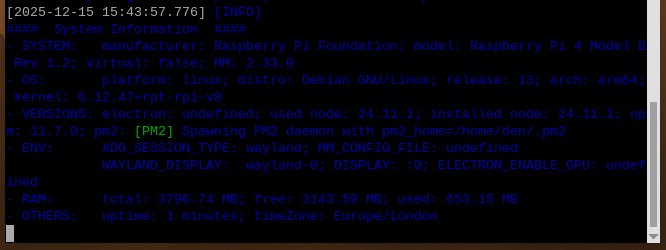
      Regarding my failure to access MM via IP, but only localhost, does this mean anything to anyone??
      I have installed VNC, so am wondering if this is causing problems

      ![alt text](Screenshot 2025-12-15 154505.png image url)

      posted in Troubleshooting
      D
      dangerousden
    • RE: Cannot access MM2 across the network - localhost ok

      @sdetweil

      As soon as you pointed out the double comma, I spotted it. Amazing how despite 2 hours of double checking, I missed that I had left a comma before a {

      thank you, that has resolved the config error, but I still don’t have access via IP, just localhost

      posted in Troubleshooting
      D
      dangerousden
    • RE: Cannot access MM2 across the network - localhost ok

      @sdetweil Thank you for your prompt response. Apologies that mine is not so prompt. I didn’t get notifications about your reply.

      Node -c config.js didn’t seem to do anything. It just returned to CLI

      I’m having problems copying the config.js via Pi Connect, so I will get back to you when I return home.

      TIA

      posted in Troubleshooting
      D
      dangerousden
    • Cannot access MM2 across the network - localhost ok

      Hi All. I have been using computers for a long time, and have recently taken the jump into Linux. My wife started my interest with the MagicMirror project.

      So far all has been great. I’ve install the MM2 v2.33 and had it running. I’ve added modules and all was good. Testing on the Pi was fine, and I would even access from my Laptop. However, I have made some silly mistake somewhere, which only became apparent when I rebooted. I cannot access from the IP any longer. localhost on the Pi still works, but Modules like FormulaOne and getting my Gmail calendar just sit “loading”. All was good before the reboot.

      Can anyone offer any suggestions?

      I’ve checked config.js and the IP is blank, and IPWhitelist is blank (unchanged from before the reboot)

      On starting the MM

      [2025-12-14 15:19:39.798] [LOG]   Starting MagicMirror: v2.33.0 
      [2025-12-14 15:19:39.814] [LOG]   Loading config ... 
      [2025-12-14 15:19:39.818] [LOG]   config template file not exists, no envsubst 
      [2025-12-14 15:19:41.369] [INFO]  Checking config file /home/den/MagicMirror/config/config.js ... 
      [2025-12-14 15:19:41.638] [INFO]  Your configuration file doesn't contain syntax errors :) 
      [2025-12-14 15:19:41.646] [INFO]  Checking modules structure configuration ... 
      [2025-12-14 15:19:41.936] [ERROR] This module configuration contains errors:
      undefinedmust be object 
      [2025-12-14 15:19:41.943] [ERROR] WARNING! Could not load config file. Starting with default configuration. Error found: TypeError: Cannot read properties of undefined (reading 'module') 
      [2025-12-14 15:19:41.946] [LOG]   Loading module helpers ... 
      [2025-12-14 15:19:41.981] [LOG]   Initializing new module helper ... 
      [2025-12-14 15:19:41.983] [LOG]   Module helper loaded: updatenotification 
      [2025-12-14 15:19:41.984] [LOG]   No helper found for module: helloworld. 
      [2025-12-14 15:19:41.985] [LOG]   All module helpers loaded. 
      [2025-12-14 15:19:42.011] [LOG]   Starting server on port 8080 ...  
      [2025-12-14 15:19:42.999] [LOG]   Server started ... 
      [2025-12-14 15:19:43.003] [LOG]   Connecting socket for: updatenotification 
      [2025-12-14 15:19:43.005] [LOG]   Starting module helper: updatenotification 
      [2025-12-14 15:19:43.006] [LOG]   Sockets connected & modules started ... 
      [2025-12-14 15:19:43.344] [LOG]   Launching application. 
      

      There seems to be an error, but it isn’t giving me any pointers

      Many thanks for any help

      posted in Troubleshooting
      D
      dangerousden
    • 1 / 1