Interesting on the ACD cmd line option. Let me know if you come up with something as that would be awesome. Had been thinking of Flickr due to the options it has, but haven’t seen a good way to easily create a module which can access hundreds or thousands of Flickr photos randomly.
D
Offline
A New Chapter for MagicMirror: The Community Takes the Lead
Read the statement by Michael Teeuw here.
Read the statement by Michael Teeuw here.
Posts
-
RE: Tried any connection to Amazon photo's or other?
-
Tried any connection to Amazon photo's or other?
So has anyone tried to connect to Amazon Prime or Could or Photo’s API to use with MM? Just curious as I am trying to figure best way to approach what I want to use for pic slideshow.
Thanks much.
-
RE: Help with showing todoist tasks?
That issue @d3r mentioned was the problem. It now displays just fine. Thanks for the help!
-
RE: Help with showing todoist tasks?
@barnosch and @d3r - something seems messed up and nothing is going right with this. Tried quite a few variances.
For some reason, I had it as
lists:but I see in the repo for the project that it lists asprojects:. So toyed around between the both of them with 1, 2, and 3 projects and creating test tasks. The config says the “projects” look a certain way in the URL with the number being after “%2F”. So in my case for 1 project, this screenshot: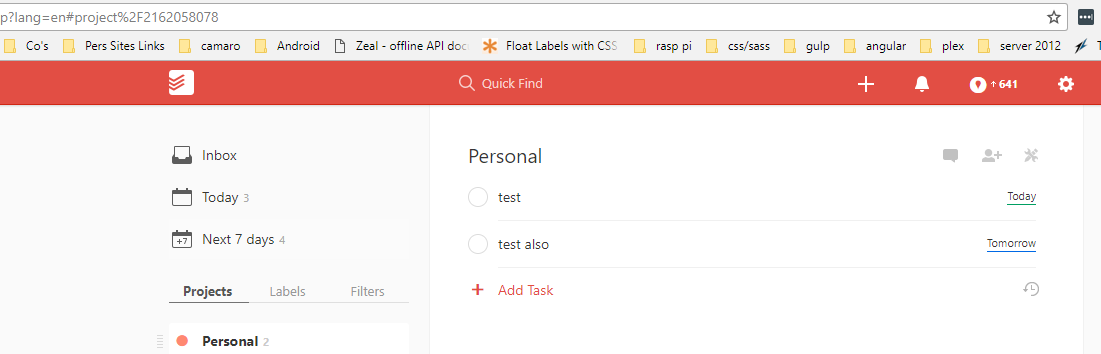
So now my code in the config should be:
{
	module: 'MMM-Todoist',
	position: 'top_right',	// This can be any of the regions. Best results in left or right regions.
	header: 'Todoist test', // This is optional
	config: { // See 'Configuration options' for more information.
		  accessToken: 'xxxxxxxxxxxxxxxxxxxxxxxxxxxxxxxxxxxxxxxx',
		maximumEntries: 60,
		interval: 60,
		lists: ["2162058078"],
		fade: false
  }
},
I am using the correct API key as noted from a previous response.
If I look via dev tools at the page, here is a snapshot:
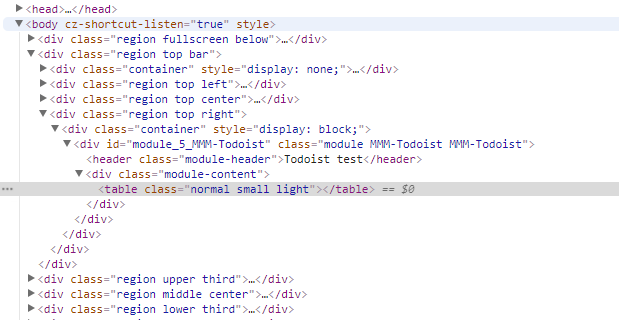
But still, the best I can get is just the title showing up. Further thoughts please?
Thanks much.
-
RE: Help with showing todoist tasks?
Thanks. Is that all that seems wrong?
-
Help with showing todoist tasks?
So I thought I had this setup correctly, but none of my list are showing. Not sure what is going wrong, but the header “Todoist” is showing as shown in the screenshots. Can anyone help with this?
this is in my config:
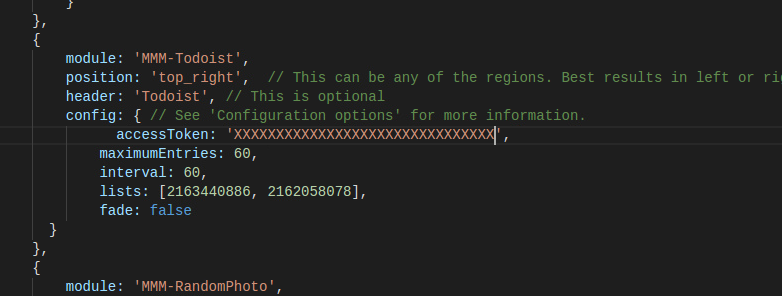
I tried using both the client ID and the client secret. are these the api keys I am after?
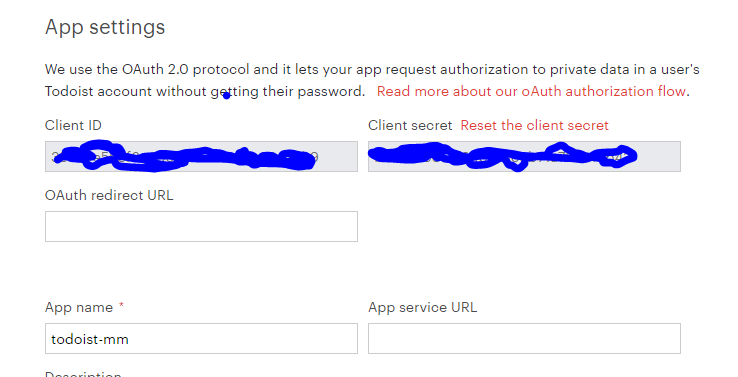
You can see the title on upper right with no tasks shown below:
Been struggling with this for a bit. Thanks much.
-
RE: Maybe Flickr for photo?
Anyone know why this module limits to just last 20 images in Flickr? Anyone know if that can be a quick fix?
Thanks much.
-
RE: Maybe Flickr for photo?
Hi @Sean I did see that one, but had forgot. The problem to me is being able to rotate through more than the last 20 Flickr photos as the way this one works. Any thoughts there? Had tried some of the other photo modules, but none seem to do this.
-
RE: Todoist behind - but npm install does not update
Yes, I have done that. What was needed actually though was
git reset --hardin my case.MMM-Todoist is still not working though. I do get the heading, but no tasks are showing.
-
Maybe Flickr for photo?
Anyone ever thought of doing a module to pull pics from Flickr? Public, private, etc…?
Thought I could do it by adding my a public Flickr URL in the config, but it shows nothing.
Thoughts?
Thanks much.
-
Todoist behind - but npm install does not update
The update notification module built into MM says that MMM-Todoist is 16 commits behind. I went into the module and did
npm install, but it says the module isalready up to date. What gives here? Should I do something else? -
RE: MM & Google Maps Traffic
@Mirrorolentia - I was thinking of trying this too, but looks like you have made some progress. I hope to dig into what you have later this week. I had seen some further customization I would like to add when time allows. Thanks for the work on this!
-
RE: Running Magic Mirror remotely from source on a pi
Thanks. The plan isn’t to run it on RPI at all at this time. But I do just want to showcase it via the RPI. That said, was there something special you have to do if you run it on RPI in Electron from a VM on another machine?
@Snille - can you share your config for how you have that setup on 3 mirrors and maybe explain the just behind it?
What is pm2?
Thanks much. Glad I found this and hope to contribute as well as I have some great ideas, but had been exploring similar software that didn’t seem as robust or maintained any longer.
-
RE: Running Magic Mirror remotely from source on a pi
Thanks for the reply. My issue isn’t with running Chromium in a Pi, but what do I need to do on the MM side to make this the way it should. For instance, when I run
npm start, it pulls up Electron and browses from there. What config do I need to make this happen? Is it possible to use the Electron viewer inside Pi rather than Chromium? I do not have preference for Chromium in this case, but wasn’t sure how I could basically runnpm start, then have it start Electron or Chromium in the pi, but then if I also wanted to, be able to test out new modules within the VM and such? -
Running Magic Mirror remotely from source on a pi
Hi all. New to Magic Mirror, but like what I see so far.
So I have MM running in my VM, but ultimately what I want to do is have the source in my VM and be able to run it from there, but be able to grab the IP and port and display on my RPI 3 separately. For instance, if MM runs on 192.168.1.12 in a VM that is bridged on my network with Virtualbox, then I simply want to have chromium on my pi grab the URL:port and display. Is this possible? Has anyone done this and are there any “gotchas”? Any suggestions along with this?
Thanks much.