MagicMirror Forum
    • Recent
    • Tags
    • Unsolved
    • Solved
    • MagicMirror² Repository
    • Documentation
    • 3rd-Party-Modules
    • Donate
    • Discord
    • Register
    • Login
    1. Home
    2. dkhorse74
    3. Posts
    A New Chapter for MagicMirror: The Community Takes the Lead
    Read the statement by Michael Teeuw here.
    D
    Offline
    • Profile
    • Following 0
    • Followers 0
    • Topics 1
    • Posts 16
    • Groups 0

    Posts

    Recent Best Controversial
    • RE: Default Calendar not updating with new info

      @dkhorse74 said in Default Calendar not updating with new info:

      @sdetweil
      I created a test event today… I will update the location of this test event tomorrow and run the curl command to see results

      @sdetweil
      so the issue is isolated with repeated events.

      If, for example, I enter a repeated event which is to occur every Sunday at the same location and then I edit the location of just one of those repeated events that’s where the location update fails.

      I redirected the URL output (per your suggestion) and I still see the old location in the file. Any ideas what would cause this?
      posted in Troubleshooting
      D
      dkhorse74
    • RE: Default Calendar not updating with new info

      @sdetweil
      I created a test event today… I will update the location of this test event tomorrow and run the curl command to see results

      posted in Troubleshooting
      D
      dkhorse74
    • RE: Default Calendar not updating with new info

      @sdetweil said in Default Calendar not updating with new info:

      @dkhorse74 can u pull the ics file after your update and verify the event is there

      curl -sL your_ical_url  >somefile.txt
      

      then examine somefile.txt for your modified event

      Will do once I get back into town tomorrow. Thanks @sdetweil

      posted in Troubleshooting
      D
      dkhorse74
    • Default Calendar not updating with new info

      MM Software = 2.21.0
      Module = Default Calendar
      Calendar = Google ical using secret address

      Issue:
      If I update the original location to a new location in my google calendar, the update of new location doesn’t reflect in MM Default Calendar module. Reboot/Restart to no avail. The default calendar still shows the original location when I had first created the event.

      I tried updating “calendarfetcher.js” using the following link:

      https://forum.magicmirror.builders/topic/9894/default-module-calendar-not-updating

      however, this did not work either. At a loss… Any advice?

      posted in Troubleshooting
      D
      dkhorse74
    • RE: MMM-PIR-Sensor-Lite does not switch HDMI off

      @grena said in MMM-PIR-Sensor-Lite does not switch HDMI off:

      :thumbs_up: Yes, You can also run the python script of the module: python3 -u ~/MagicMirror/modules/MMM-PIR-Sensor-Lite/pir.py SENSOR_PIN

      posted in Troubleshooting
      D
      dkhorse74
    • RE: MMM-PIR-Sensor-Lite does not switch HDMI off

      Got everything to work perfectly…

      For anyone else who maybe considering using the doppler sensor with a potentiometer, you can follow the “how-to” thread in my initial post BUT use the MMM-PIR-Sensor-Lite module only as it keeps things simple. The other PIR modules may not work with Debian 11 (Bullseye)

      As for the resolution, the mistake was on my end:

      • I had “GND” and “Vout” swapped on the board pins

      • I had to join my raspberry login id to group “gpio”

      The following page is very useful to test the functionality of the sensor before you implement the change to mirror config file (thanks to @sdetweil for posting the link in a different thread):

      https://projects.raspberrypi.org/en/projects/parent-detector/3

      Again thanks to all for the help…

      posted in Troubleshooting
      D
      dkhorse74
    • RE: MMM-PIR-Sensor-Lite does not switch HDMI off

      @sdetweil
      Found another post where you shared a link on how to run a PY script to test the sensor:

      https://projects.raspberrypi.org/en/projects/parent-detector/3

      Going to try this later tonight.

      posted in Troubleshooting
      D
      dkhorse74
    • RE: MMM-PIR-Sensor-Lite does not switch HDMI off

      @sdetweil
      yep, understood… Still not able to wake up the screen… I tested the sensor with a meter and getting correct input voltage… is there anything I could be missing?

      posted in Troubleshooting
      D
      dkhorse74
    • RE: MMM-PIR-Sensor-Lite does not switch HDMI off

      @sdetweil
      that did it! Screen goes to sleep… now need to figure out how to get the doppler sensor to “wake-up” the monitor

      posted in Troubleshooting
      D
      dkhorse74
    • RE: MMM-PIR-Sensor-Lite does not switch HDMI off

      @sdetweil
      Thank you I will try… I ran:

      xrandr -q

      which show HDMI-2 is what is currently plugged in… Will report back

      posted in Troubleshooting
      D
      dkhorse74
    • RE: MMM-PIR-Sensor-Lite does not switch HDMI off

      @grena
      Hello Grena… Hoping you or someone maybe able to help. I had to rebuild my MM (using Pi4b). With regards to using a PIR sensor, I’m using a doppler sensor vs. a PIR sensor using the following build thread:

      https://forum.magicmirror.builders/topic/11704/update-replaced-my-pir-sensor-with-a-doppler-microwave-sensor?page=1

      Everything prior to rebuild worked great… The screen would go into stand-by after 2 mins and flip back on when the sensor picked up presence. The repo I had, originally, used:

      https://github.com/paviro/MMM-PIR-Sensor

      is no longer supported so I didn’t clone it. Instead, I used yours but having issues getting it to work. I can see the countdown on the screen but nothing happens. I unplugged the doppler sensor but no change. Any ideas? I’m running

      Debian v11
      MM v2.21

      on pi4b. Any help is greatly appreciated

      posted in Troubleshooting
      D
      dkhorse74
    • RE: MMM-OpenWeatherForecast - Replacement for MMM-DarkSkyForecast

      @j-e-f-f

      Thanks Jeff!!

      posted in Utilities
      D
      dkhorse74
    • RE: MMM-OpenWeatherForecast - Replacement for MMM-DarkSkyForecast

      @bkeyport said in MMM-OpenWeatherForecast - Replacement for MMM-DarkSkyForecast:

      @dkhorse74 That’s the main header… hint…

      :thumbs_up: Thank You

      posted in Utilities
      D
      dkhorse74
    • RE: MMM-OpenWeatherForecast - Replacement for MMM-DarkSkyForecast

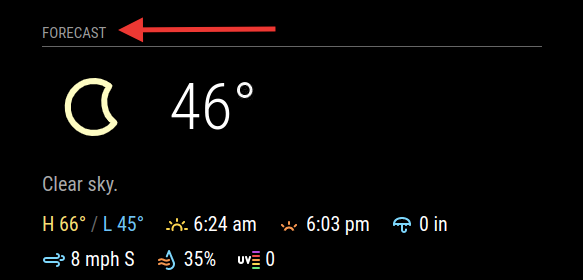
      @j-e-f-f This is AWESOME!! SO SO much better than the default weather module… Question, how do I change the current weather header from “Forecast” to “Current”?

      Screen Shot 2021-03-08 at 10.31.03 PM.png

      posted in Utilities
      D
      dkhorse74
    • RE: MMM-DynamicWeather

      @scottcl88 said in MMM-DynamicWeather:

      A module to display different weather effects (ie: rain, snow, clouds, lightning) based on current weather from OpenWeatherMap API. Also allows for custom effects based on weather codes or just a date; such as for displaying hearts on the screen for Valentine’s day. Heavily configurable.

      All info can be found here: https://github.com/scottcl88/MMM-DynamicWeather

      This is AWESOME work!!! My kids enjoy looking at the clouds scroll through the screen… Makes an, otherwise, tad bit boring mirror quiet a bit more fun to look at. :thumbs_up:

      posted in Fun & Games
      D
      dkhorse74
    • RE: Pre-built frame

      This is an option although expensive:

      https://www.twowaymirrors.com/smart-mirror-frame/

      posted in Hardware
      D
      dkhorse74
    • 1 / 1