@sdetweil Thank you - I’ll do some research; I’ve also requested early access to the new ‘official’ Ring developer portal hosted on AWS. If you hear me talking about this again - it’ll be in a new thread (hopefully announcing a more supportable novel module!)
E
Offline
A New Chapter for MagicMirror: The Community Takes the Lead
Read the statement by Michael Teeuw here.
Read the statement by Michael Teeuw here.
Posts
-
RE: MMM-Ring: Displays a video stream of your Ring doorbell when someone rings your doorbell.
-
RE: MMM-Ring: Displays a video stream of your Ring doorbell when someone rings your doorbell.
@sdetweil I’ll move to a new thread depending on your response - I know this is an abandoned module, but do you know if it’s still working (anywhere) or do I need to start from scratch? The wife has submitted another ‘feature request’. I fear I have created a monster :D
-
RE: MMM-MealViewer
@sdetweil - At work, all of my criteria and commentary lives in jira and my PR’s are pretty lean [read: RTSIDXCMT-11142, accept my d**n PR if you want that bug fix] .
I’d appreciate any feedback on manners/standards for submitting PR to open source projects so I can better align with norms!
https://github.com/ElliAndDad/MMM-MealViewer/pull/4
Thank you for being such an active mod/admin/mentor!
Take care,
E
-
RE: MMM-MealViewer
@sdetweil as usual - you are very correct lol - this was sheer laziness on my part!
<instinctively ducks to see if my DevOps lead is hurling a pot in my direction, remembers that she’s 7,600 miles away, ducks again anyway>
-
RE: Happy wife is a happy life!
@videogame95 - @sdetweil is 100% on point with their advice!
I also struggled with config overload at first- so I did a few things that made my life easier:
I downloaded vscode and installed the SSH connection extension so I could use a more functional editor than being stuck in ‘nano’
I commented out all of the module configs I’d dumped into config.js EXCEPT for the basic ones like weather, etc.
Starting the MM using npm start means you can watch the console messages slide by - this was a game changer for me because I was able to watch the console in my SSH session, anything red or yellow - might need to pay attention to it!
When sharing configs - make sure you scrub your api keys - usually you’ll sse people use or etc - which also means if you’ve copied anyone’s suggested configs, you may have inadvertently included text that needs to be replaced.
Screen locations - I’ve struggled with modules consuming more space than I thought they would, messing up the display and resulting in ‘missing’ modules - and with screen locales incorrectly spelled, formatted, etc -they just won’t show up, period. This will ‘pop’ in red when you use npm start (ask me how I know lol).
Once you get the basic mirror up and running, hit me up and I’ll be happy to share more configurations with you - but right now the advice is get the simple stuff working, THEN move to more complex configurations. getting MMM-Pages working was a humbling experience and forced me to really (really) take formatting and code quality more seriously lol. -
Happy wife is a happy life!
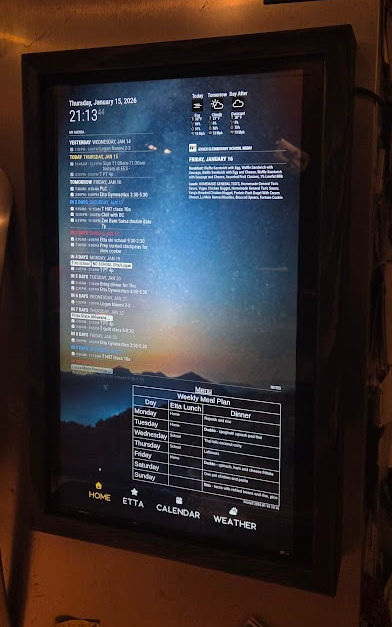
My wife has a number of friends with the subscription-based touchscreen tools and hinted at being interested in getting one - I didn’t love the idea of (another) monthly cost - and the fact that if the company goes under, we have an expensive paperweight.
I tried a few different open source tools but discovered MagicMirror2 and fell in love! Currently have a home screen, an interactive chore chart running -MMM-Chores for my kiddo, a monthly calendar view and a weather tab (still under development).
Here’s a brief demo video: You_tube
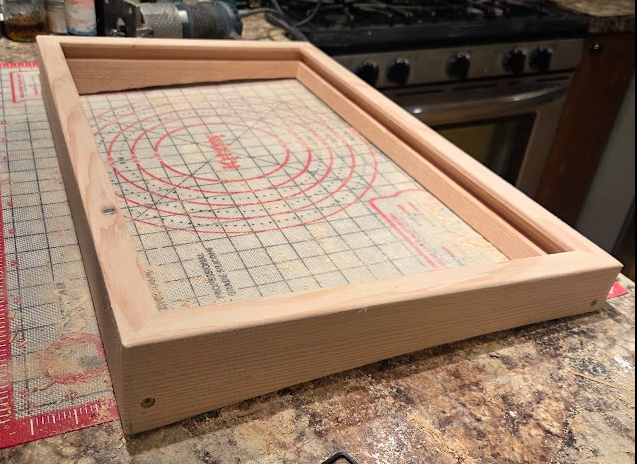
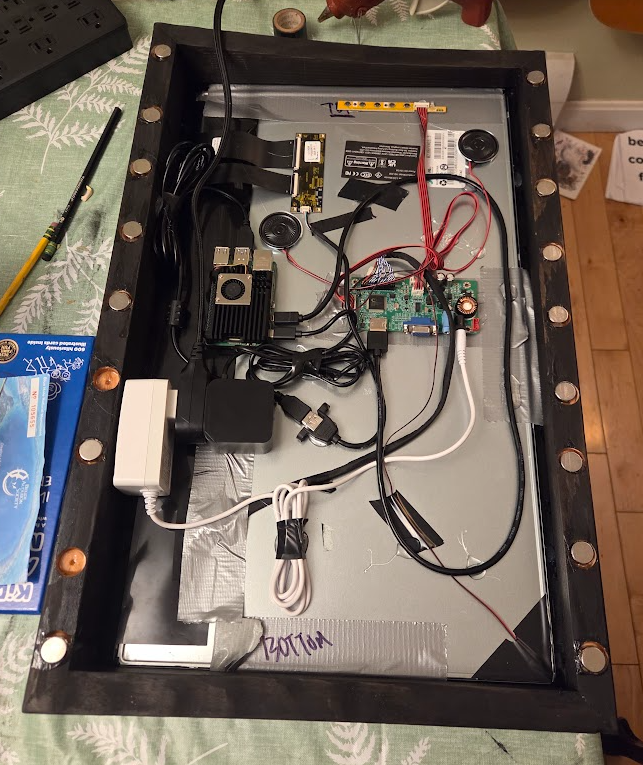
The hardest part was definitely making the custom wood bezel - I was a woodworker, but matching the profile of the refrigerator, keeping weight down, minimizing the profile, and ensuring I only have one flexible cord having to make the corner from fridge side into the MM was definitely a challenge.
So far, my wife is really happy with it, and is eagerly submitting feature requests. Ok, sigh, that part might get a little tiring!!!
The bezel is Douglas fir, which is much lighter than my preferred maple, but also easier to mill:
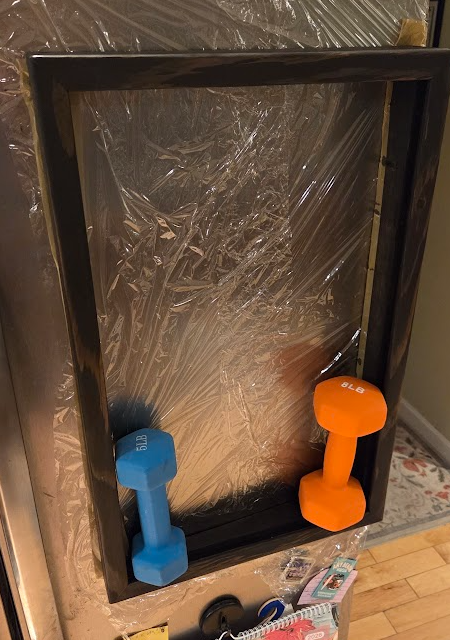
After countersinking and wet-setting the 16 N42 5/8" magnets, I attached the chassis to the refrigerator door with some seran wrap - this allowed the magnets to align with the door for the best contact surface, and I let it cure overnight. Testing with a few dumbells made me more confident that I’d used enough magnets!!
NO project would be complete without a late night final assembly, including duct tape and PLENTY of hot glue lol.
-
RE: MMM-Chores - Manage and keep track of your household Chores
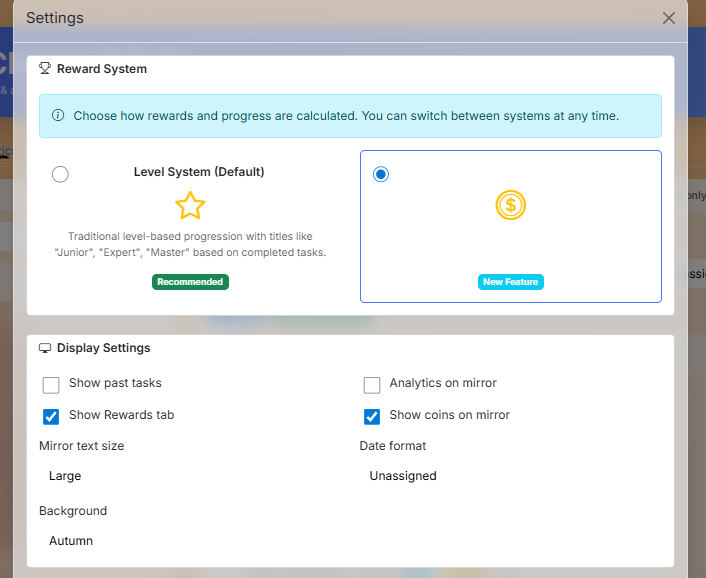
I use a touch screen magic mirror and Pierre’s module and haven’t seen this behavior - can you paste the module’s contents from the config.js as a place to start? Perhaps also a screenshot of this part of the settings in the admin portal?
-
RE: MMM-MealViewer
Hello @dadandel !
I love this (and more importantly, my WIFE and kiddos love this module - GREAT WORK!
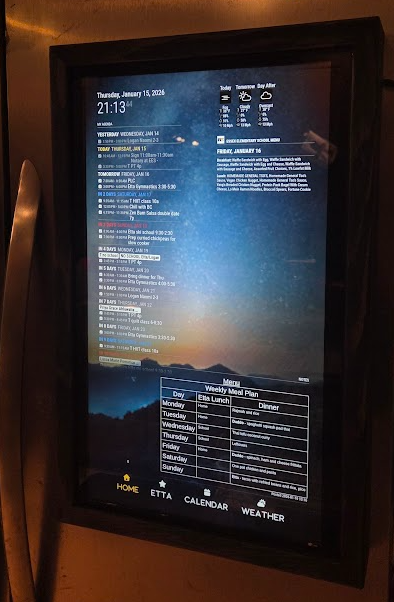
My wife does meal planning, shopping and tasks me with meal prep for the upcoming week on the weekends, so she really wants to see the next week’s school lunches on Friday evening when she’s in the fridge and going through what we have, and what meals my kiddo wants to eat at school and which meals they want to pack a lunch for.
Currently, the getDateRange function (which is super robust, excellent work) is strictly ‘look back’. I did quite a bit of testing (thank you for baking in all the testing and logging logic!!!) and my testing shows that you can maintain all of the robustness and add the ‘look ahead’ my wife is looking for by updating the function just a bit like:
getDateRange: function (startDay, endDay, testMode = false, testDate = null) {
    let today;

    if (testMode && testDate) {
        const [year, month, day] = testDate.split('-').map(Number);
        today = new Date(year, month - 1, day);
        console.log(`Using test date (local timezone): ${today.toLocaleString()}`);
    } else {
        today = new Date();
    }

    const currentDay = today.getDay();
    console.log(`Current day of week: ${currentDay}`);

    // ------------------------------------------------------------
    // Calculate the date for the week's start (most recent startDay)
    // ------------------------------------------------------------
    const startDate = new Date(today);
    const daysToSubtract = ((currentDay - startDay + 7) % 7);
    startDate.setDate(today.getDate() - daysToSubtract);

    console.log(`Days to subtract: ${daysToSubtract}`);
    console.log(`Initial start date: ${startDate.toLocaleString()}`);

    // ------------------------------------------------------------
    // Calculate the end date (inclusive range)
    // ------------------------------------------------------------
    const endDate = new Date(startDate);
    const daysInRange = (endDay - startDay + 7) % 7 + 1;
    endDate.setDate(startDate.getDate() + daysInRange - 1);

    // ------------------------------------------------------------
    // LOOK-AHEAD LOGIC
    // If today is on or after the trigger day (Friday for Mon–Fri),
    // shift the entire range forward by one week
    // ------------------------------------------------------------
    const lookAheadTriggerDay = (startDay + 4) % 7;

    if (currentDay >= lookAheadTriggerDay) {
        console.log("Look-ahead condition met — shifting range to next week");
        startDate.setDate(startDate.getDate() + 7);
        endDate.setDate(endDate.getDate() + 7);
    }

    console.log(`Final start date: ${startDate.toLocaleString()}`);
    console.log(`Final end date: ${endDate.toLocaleString()}`);

    // ------------------------------------------------------------
    // Format output
    // ------------------------------------------------------------
    const formatDate = (date) => {
        const year = date.getFullYear();
        const month = String(date.getMonth() + 1).padStart(2, '0');
        const day = String(date.getDate()).padStart(2, '0');
        return `${month}-${day}-${year}`;
    };

    return {
        start: formatDate(startDate),
        end: formatDate(endDate)
    };
},
-
OpenWeather API change to 3.0 - backwards compatible?
Re: MMM-OpenWeatherMapForecast loading issue?
Hello @sdetweil - I’ve tried the original and your fork - did these break when they moved to v 3.0?
one-call-3)
(figured I’d ask you before I wade in)rm -rf MMM-OpenWeatherMapForecast
git clone https://github.com/sdetweil/MMM-OpenWeatherMapForecast
cd MMM-OpenWeatheMapForecast
npm install
cd ~/MagicMirror/
npm start… in both cases I get a ‘null’ error like the OP in the thread I’ve referenced.
My config file entry:
{ module: "MMM-OpenWeatherMapForecast", header: "Weather", classes: "default everyone", position: "middle_center", config: { apikey: "API_KEY_REDACTED", //latitude: 44.50498257209399, //longitude: -73.12579372208883, latitude: 43.6930, longitude: 4.2783, iconset: "4c", concise: false, forecastLayout: "table" } }, -
RE: MMM-Chores - Manage and keep track of your household Chores
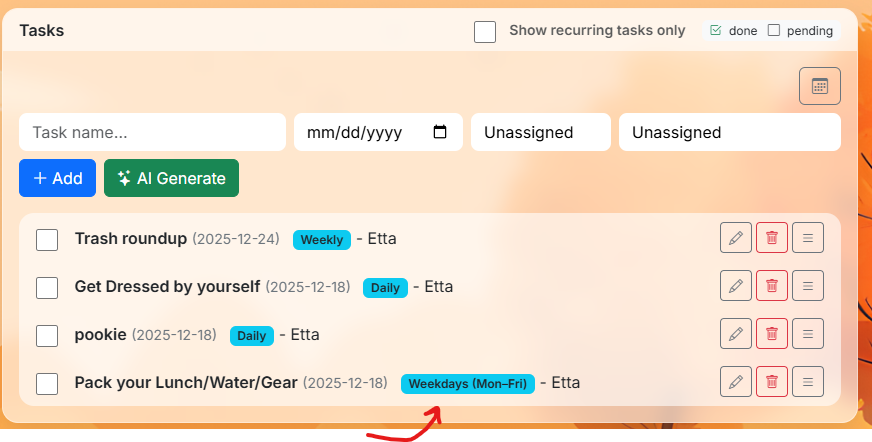
I’ve done a lot of testing and submitted PR-220 . It turns out there are some really complicated date functions that worked—unless they didn’t (edge cases with creating a weekday only task, setting start date on a Weekend, etc).
else if (recurring === "daily-weekdays") {
    // We ignore the d.setDate(+1) and just find the next valid weekday from today
    let testDate = new Date();
    testDate.setDate(testDate.getDate() + 1);
    while (testDate.getDay() === 0 || testDate.getDay() === 6) {
        testDate.setDate(testDate.getDate() + 1);
    }
    // Force 'd' to be this specific date, bypassing module interference
    d.setTime(testDate.getTime());

  } else if (recurring === "daily-weekends") {
    let testDate = new Date();
    testDate.setDate(testDate.getDate() + 1);
    while (testDate.getDay() >= 1 && testDate.getDay() <= 5) {
        testDate.setDate(testDate.getDate() + 1);
    }
    d.setTime(testDate.getTime());
The logic is working (finally)- I wish I was better at this stuff, I’m a DevOps guy, so I’m lazy and not particularly talented at coding unless I can break thousands of servers with automation (then I’m a pro lol).
I also went through and added the requisite language support for the 10 supported languages for the two new elements included in admin.html
                      <div class="col-sm-auto">
                        <select id="taskRecurring" class="form-select">
                          <option value="">One time</option>
                          <option value="daily">Daily</option>
                          <option value="weekly">Weekly</option>
                          <option value="daily-weekdays">Daily (Weekdays Only)</option>
                          <option value="daily-weekends">Daily (Weekends Only)</option>
                          <option value="monthly">Monthly</option>
                          <option value="yearly">Yearly</option>
                          <option value="every_X_days_2">Every 2 Days</option>
                          <option value="every_X_days_3">Every 3 Days</option>
                          <option value="every_X_weeks_2">Every 2 Weeks</option>
                          <option value="every_X_weeks_3">Every 3 Weeks</option>
                          <option value="first_monday_month">First Monday of Month</option>
                        </select>
                      </div>
I’m testing a few .css changes to improve touchscreen support - you can see plenty of other .css issues I’ll nave to sort out, sreenshots from chrome of the MM page shows it’s not adjusting well to different browsers…
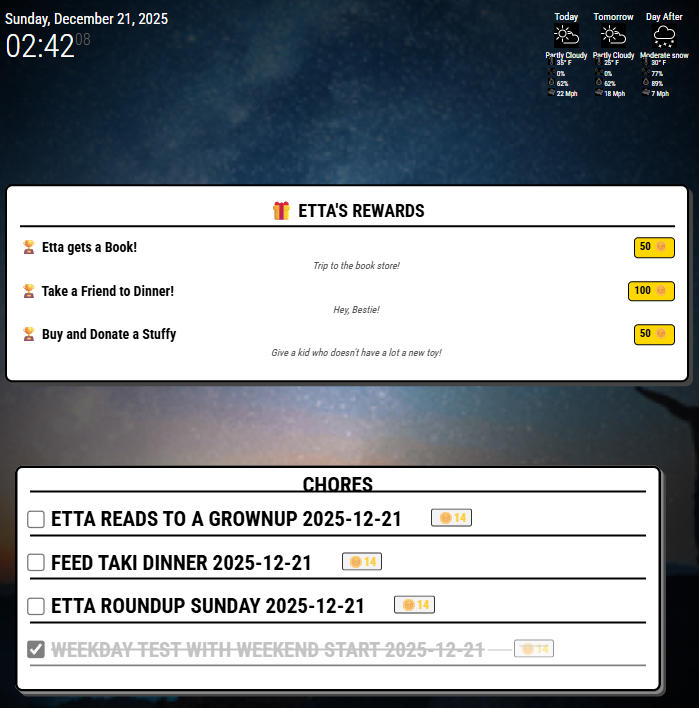
I also put together a mini-module to provide a placard showing the options in the ‘reward store’ - My kid is super goal oriented, so being able to take advantage of @pierregode 's awesome reward system is going to be a big win!
I’m going to look further into making this interactive and set up some kind of email to us to indicate she’s redeemed her coins on a particular reward.
The current MMM-ChoreRewards is super crude and rude - you can see plenty of other .css issues I’ll have to sort out. @sdetweil hopefully I’ve formatted this post better - thank you for the #mod help!
-
RE: 24" Kitchen Infoboard with FireTV Stick
@KamiSchami
Hello!! This looks GREAT. I can muddle my way through back-end programming, but the front-end stuff is Greek to me - would you mind sharing what modules you have added, and a few hints about what you did with css to get this super clean look?I have a secret plan to try an gin up an organization board for my wife as a (late) Christmas gift - we’ll be out of the country so I’m trying to get as much done now as possible, but she’s a terrible beta tester - it has to be pretty dialed in to get her to buy in on using something (she’s a wonderful wife and mother however)
Thank you in advance!
E
-
RE: MMM-Chores - Manage and keep track of your household Chores
@sdetweil - Thanks! I’m a total hack, so I appreciate the heads up. MUCH CLEANER. I’m not used to passing code blocks in chats, usually I’m in an SCM somewhere, causing trouble… giving my devs a headache… :D
-
RE: MMM-Chores - Manage and keep track of your household Chores
Hello! New user here, love the UI (especially the admin features!) I’m building a secret Christmas gift for my wife (who is obsessed with organization). I was about to give up on MM - until I found your module!
Question: I see daily, weekly, monthly options - is there a feature to set reoccurring events that are Monday Friday? This is specific to kids who may have daily ‘weekday’ tasks to do that aren’t required on Saturday or Sunday. I’m happy to skip the UI - aka, create an event in the UI and then tweak the underlying config via CLI.
Thank you!!!
E
EDIT:took a gander at your code (yeah, you are a pro - this is REALLY CLEAN (I’m a hack, but I know good work when I see it lol). Looks like an update to the getNextDate function, adding the pattern to the admin html file and the lang pack (I only added it to the enlish one (remember, hack here) seems to work pretty well. I’ll search a bit further and do a little testing to see how it behaves - but… a thing?
E
function getNextDate(dateStr, recurring) {
  const d = new Date(dateStr);
  if (recurring === "daily") {
    d.setDate(d.getDate() + 1);
  } else if (recurring === "weekly") {
    d.setDate(d.getDate() + 7);
  } else if (recurring === "monthly") {
    d.setMonth(d.getMonth() + 1);
  } else if (recurring === "yearly") {
    d.setFullYear(d.getFullYear() + 1);
  } else if (recurring && recurring.startsWith("every_")) {
    // Custom recurring patterns: every_X_days, every_X_weeks, first_monday_month
    const parts = recurring.split("_");
    if (parts[1] === "X" && parts[2] === "days") {
      const days = parseInt(parts[3]) || 2;
      d.setDate(d.getDate() + days);
    } else if (parts[1] === "X" && parts[2] === "weeks") {
      const weeks = parseInt(parts[3]) || 2;
      d.setDate(d.getDate() + (weeks * 7));
    } else if (recurring === "first_monday_month") {
      // First Monday of next month
      d.setMonth(d.getMonth() + 1);
      d.setDate(1);
      // Find first Monday
      while (d.getDay() !== 1) {
        d.setDate(d.getDate() + 1);
      }
    } else {
      return null;
    }
  } else {
    return null;
  }
  return d.toISOString().slice(0, 10);
}