MagicMirror Forum
    • Recent
    • Tags
    • Unsolved
    • Solved
    • MagicMirror² Repository
    • Documentation
    • 3rd-Party-Modules
    • Donate
    • Discord
    • Register
    • Login
    1. Home
    2. Gherry
    A New Chapter for MagicMirror: The Community Takes the Lead
    Read the statement by Michael Teeuw here.
    G
    Offline
    • Profile
    • Following 0
    • Followers 0
    • Topics 2
    • Posts 6
    • Groups 0

    Gherry

    @Gherry

    0
    Reputation
    1
    Profile views
    6
    Posts
    0
    Followers
    0
    Following
    Joined
    Last Online

    Gherry Unfollow Follow

    Latest posts made by Gherry

    • RE: Calendar Module not working as expected

      @sdetweil Hi, thank you for the help.

      I tried adding urgency:0, getRelative:0 but that didn’t work.

      So this weekend I started testing things a bit and I noticed that, despite changing the format (I tried many variations DD MMM. D MMM…) there was no change in the actual display and that got me suspicious:
      it was like the config wasn’t considered or parsed at all.

      So I went to edit calendar.js in ~/MagicMirror/modules/default/calendar:
      inside there was a dateFormat and, changing that, I fixed my issue.

      So for anyone wanting to change the date format, that’s a possibility.

      Thanks again

      posted in Troubleshooting
      G
      Gherry
    • Calendar Module not working as expected

      Hi,

      I’m still quite new to MagicMirror and I found a problem I cannot seem to solve, despite reading the documentation (and forum).

      I’d like my calendar to show the upcoming holidays with the Month and Day format (DD MMM), for example Easter should be “5 Apr”.

      I added to the config.js the relative lines as stated in the documentation (dateFormat…), but there’s no visible change on the screen where I keep seeing “Apr 5°”: I tried both with “DD MMM” and “D MMM” (I even tried “GG MMM” since in italian Day is Giorno) but the display keeps always showing the same thing.

      Here’s my config.js (I’m using the Thunderbird .ics calendar because it was the only one I could find online with italian holidays, I might change it in the future).

      module: "calendar",
                              header: "Giorni festivi",
                              position: "top_left",
                              config: {
                                      timeFormat: "absolute",
                                      dateFormat: "DD MMM",
                                      fullDayEventDayFormat: "DD MMM",
                                      calendars: [
                                              {
                                                      fetchInterval: 7 * 24 * 60 * 60 * 1000,
                                                      maximumEntries: 5,
                                                      symbol: "calendar-check",
                                                      url: "https://www.thunderbird.net/media/caldata/autogen/Itali>
                                              }
                                      ]
                              }
      

      The only other thing I changed in the config.js is language / locale

      language: "it",
      locale: "it-IT",
      

      The output was and is always the same, despite having added those lines.
      What am I doing wrong? How to fix it?
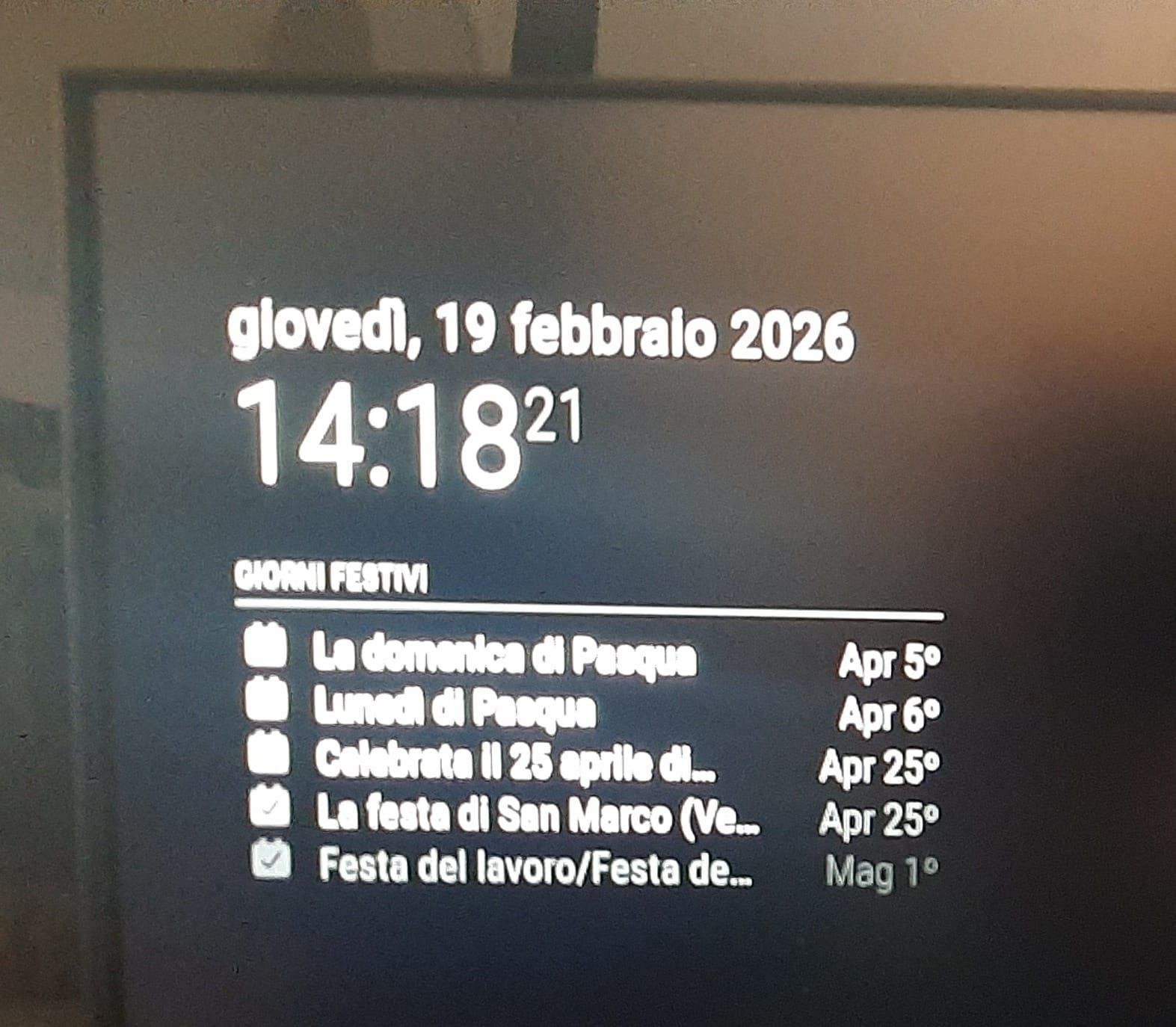
      WhatsApp Image 2026-02-19 at 14.19.27.jpeg

      Thank you in advance

      posted in Troubleshooting
      G
      Gherry
    • RE: Choosing a RPi model

      @noholdsbard a friend of mine had an unused Rpi zero 2W so hopefully this weekend I can run some tests using it as a client: would you mind sharing the bash script / cron jobs so I can take a look?

      Thank you in advance!

      posted in Hardware
      G
      Gherry
    • RE: Choosing a RPi model

      @noholdsbard server / client is something I didn’t think about but it’s actually interesting: if I can just use an RPi Zero I would solve a tons of problems (heat and dissipation mostly).
      I’ll take a look at that, thank you!

      posted in Hardware
      G
      Gherry
    • RE: Choosing a RPi model

      @sdetweil thank you!

      posted in Hardware
      G
      Gherry
    • Choosing a RPi model

      Hello,

      I’ve decided to try to build a magic mirror and, since I’m still in the planning stage, my biggest doubt is which Raspberry to buy.

      On one hand I’d like to get a RPi 5, on the other hand the Raspberry will be on 24/7 and the latest model is power hungry, especially compared to older ones.
      Also more power means an higher electrical bill and more heat to dissipate (since it will be in a closed frame that’s obviously a problem both because of the enclosed nature of the installation and because of the small space available so I cannot use big heat sinks or fans).

      Cost is not an issue since RPi4 costs more or less equal to RPi5

      If this helps, I plan to use just a few modules:

      • a calendar
      • an IR touch screen
      • some kind of home assistant module to get some data out of HA
        -(optional) a face recognition module, still debating on this tho.

      The monitor will be a standard 1920x1080p@60Hz and I don’t plan to do much with MM but these few things (no audio in or out, no AI, no animations).

      Which Raspberry would work best in my scenario?
      Is RPi 3B+ too old? Is 4B better? Or do I just go with 5?

      And, last but not least, how much RAM do I actually need?
      I don’t want to buy one to find myself in need of an upgrade in 6 month or 1 year.

      Thank you in advance!

      posted in Hardware
      G
      Gherry