@monark - screen shot: 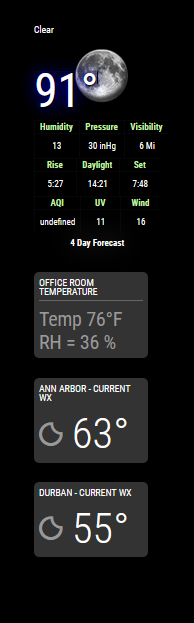
A New Chapter for MagicMirror: The Community Takes the Lead
Read the statement by Michael Teeuw here.
Read the statement by Michael Teeuw here.
J
Offline
Posts
-
RE: MMM-NOAA3 4day forcast doesn't display
@monark - I’m unsure what you mean by prove openmapweather. Following is the relevant code from my config.js, as well as a screenshot of the result.
0 { module: 'MMM-NOAA3', 191 position: 'top_right', 192 config: { 193 provider: "openweather", // From list 194 apiKey: "xxxxxxx", // From one of the providers listed above 195 airKey: "yyyyyyyyyy", 196 css: "NOAA3", // THIS MUST CONTAIN A CSS STYLE NAME 197 userlat: "36.xxx", //MUST HAVE BOTH 198 userlon: "-115.yyy" //MUST HAVE BOTH 199 } }, -
MMM-NOAA3 4day forcast doesn't display
Two issues with module installation:
[1] The 4 day forecast icons do not display. A prior response to a user with this issue suggested the fix would be to ensure all the images are in the images folder. The forecast for each of the next several days is mostly sunny, so I have verified the relevant image for ‘mostlysunny.png’ is in the images folder. I also tried deleting and reinstalling the entire module, and also ensuring this module is not inadvertently addressed in my custom.css file. No change…I’m not sure I should include the following in this post or create a separate post, as it feels like a separate installation issue. As such, if a moderator sees fit to separate them - that’s fine.
[2] The AQI value displays as ‘undefined’, which I suspect is an API issue. I do have an API from airvisual - but my notes tell me it expired a few months ago. I went to the airvisual site to renew the API key. The site does show the key identifier and shows it to be expired, but the site does not appear to support renewing a key after the initial one year period. Is a free user just out of luck after one year?
-
RE: calendar
@sdetweil – BTW, it this also true for all modules? That is, also for non-default modules? [Somehow I had internalized that even if default modules could be addressed this way, others required something like the following]:
.module.MMM-WeatherAlerts header {text-align: left; } .module.MMM-WeatherAlerts { background-color:rgba(255,255,255,0.2); } -
RE: calendar
@sdetweil - Thanks! I will clean up my code some, when I get a chance. I appreciate the input.
-
RE: calendar
You can try the following in your custom.css file. The first 3 lines are comments, explaining what is happening. Next the background is applied to the clock module. Finally it is applied to the calendar module, with a different transparency - it produces a dark grey background.
// background-color: rgba(red, green, blue, alpha) // red, green, blue: 0 - 255 // alpha: 0 -1 (0=transparent, 1=opaque) .module.clock { background-color:rgba(0,0,0,0.4); border-radius:8px; padding:8px; } .module.calendar { background-color:rgba(0,0,0,0.6); border-radius:8px; padding:8px; } -
RE: MMM-WeatherAlerts
@Gjones93 - Humm, this is interesting. Thanks for the update. While I might just try moving the alert module to the bottom of the stack of weather modules, the core issue I have with it is it appears to also hold on to horizontal real estate when not actively displaying an alert - with the effect of carrying all the modules in that region with it. In my case, I have the weather modules down the right side of the display, narrowed to 82% in custom.css. Sadly, when running your alerts module, I cannot get custom.css to narrow it using the same code, and it also pads out the other modules from the side of the monitor… FWIW, I also tried controlling the alert module width using an absolute number of pixels, but that also had no effect.
The weather css code follows:
.module.weather { background-color:rgba(255,255,255,0.1); border-radius:8px; padding:8px; text-align: left !important; width: 82%; max-width: 82%; min-width: 82%; } -
RE: MMM-WeatherAlerts
@Gjones93 - I am unable to replicate this today, too. It appears to be working as designed today. [There is no active alert at my location, so I changed the lat/lon to the same location in Alaska as before, and a Winter Weather Advisory displays. Both the local and Alaska work on the display and when accessing via a browser at port 8080 on my desktop.] For completeness, no - I did not set or change alertDateFormat from the default in the config.js.
Related but separate query: Does the module take up any space or affect existing modules when it is not actively displaying an alert? I ask because I have several instances of the default weather module stacked in the top_right region, and this module appears to affect their placement.
-
RE: MMM-WeatherAlerts
@Gjones93: BTW, when I set alertTimeFormat to absolute [overriding the default ‘relative’] - I get a black screen on the display, and the web page won’t load on the remote machine. I haven’t done any troubleshooting on this yet, but it has the feel of a module using an old library that is no longer supported…