GOD, I WISH I KNEW!!!
A New Chapter for MagicMirror: The Community Takes the Lead
Read the statement by Michael Teeuw here.
Read the statement by Michael Teeuw here.
 Offline
Posts
-
RE: how to pull new element added to an array?
-
RE: how to pull new element added to an array?
ok, so do I need to add it like this:
parser.on("image", function(image){})
			var title = image.title;
			var image = image.image || image.logo || image.img || image.svg || this.feed_var_in_function.icon || "";
			var url = image.url || image.link || "";
Or, like this:
parser.on("image", function(image){}) var title = image.title; var image = item.image || item.logo || item.img || item.svg || this.feed_var_in_function.icon || ""; var url = image.url || image.link || ""; -
RE: how to pull new element added to an array?
well, sort of lost me there, but also getting a headache.
Gotta run some errands, I’ll look at it some more after a while.
AGAIN, THANK YOU for all the help!!!
-
RE: how to pull new element added to an array?
@sdetweil @sean
SO, I changed this part of the fetcher, but, after reading your posts, I am not sure if this is what you are talking about…
parser.on("item", function(item) {

			var title = item.title;
			var image = item.image || item.logo || item.img || item.svg || "";
			var description = item.description || item.summary || item.content || "";
			var pubdate = item.pubdate || item.published || item.updated || item["dc:date"];
			var url = item.url || item.link || "";

			if (title && pubdate) {

				var regex = /(<([^>]+)>)/ig;
				description = description.toString().replace(regex, "");

				items.push({
					title: title,
					image: image,
					description: description,
					pubdate: pubdate,
					url: url,
				});

			} else if (logFeedWarnings) {
				console.log("Can't parse feed item:");
				console.log(item);
				console.log("Title: " + title);
				console.log("Image: " + image);
				console.log("Description: " + description);
				console.log("Pubdate: " + pubdate);
			}
		});
It is looking like you are telling me I need to add a new section to the fetcher similar to this, but starting with
parser.on("image", function(image){})
			var title = image.title;
			var image = image.image || image.logo || image.img || image.svg || "";
			var url = image.url || image.link || "";
and would I also need this part?
                        if (image&& url) {

				var regex = /(<([^>]+)>)/ig;
				description = description.toString().replace(regex, "");

				images.push({
					title: title,
					image: image,
					url: url,
				});

			} else if (logFeedWarnings) {
				console.log("Can't parse feed item:");
				console.log(item);
				console.log("Title: " + title);
				console.log("Image: " + image);
				console.log("Description: " + description);
				console.log("Pubdate: " + pubdate);
			}
		});
And, would this be the way to add the image url in the config…
                        {
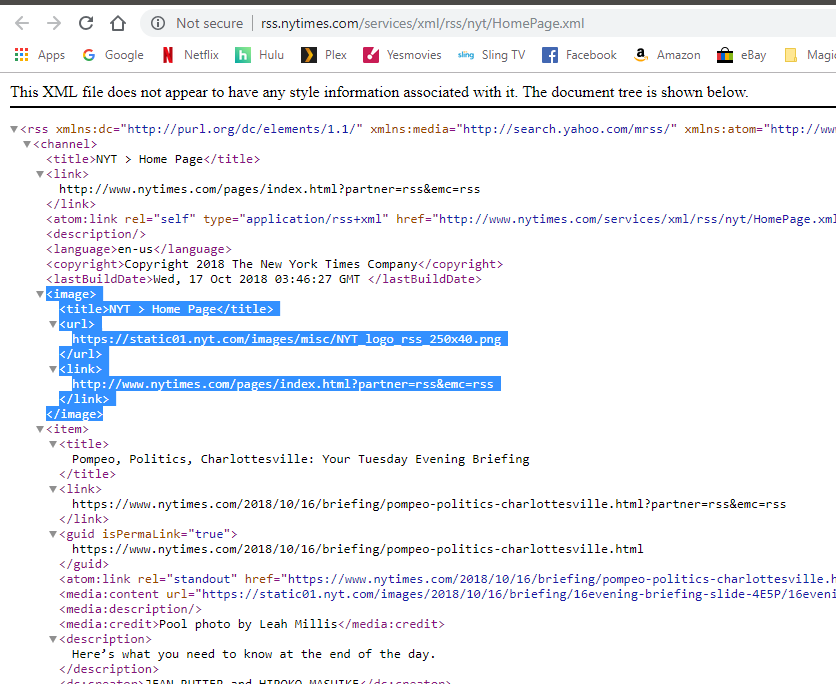
                                imageUrl: "https://static01.nyt.com/images/misc/NYT_logo_rss_250x40.png",
                                title: "New York Times",
				url: "http://www.nytimes.com/services/xml/rss/nyt/HomePage.xml"
                        },
			{
                                imageUrl: "http://online.wsj.com/img/wsj_sm_logo.gif",
				title: "Wall St. Journal",
				url: "http://www.wsj.com/xml/rss/3_7085.xml"
			},
			{
                                imageUrl: "http://www.gannett-cdn.com/sites/usatnetwork/images/RSS_Syndication_Logo-USATN.png",
				title: "USA Today",
				url: "http://rssfeeds.usatoday.com/UsatodaycomNation-TopStories"
			},
			{
                                imageUrl: "https://news.bbcimg.co.uk/nol/shared/img/bbc_news_120x60.gif",
				title: "BBC World News",
				url: "http://feeds.bbci.co.uk/news/world/rss.xml#"
			}
Sorry, for all the questions, just really trying to learn all this…
AND, thanks for all your help!!! :smiling_face_with_sunglasses: -
RE: MMM-Astrology font color
change the following highlighted part of your MMM-Astrology.css file:
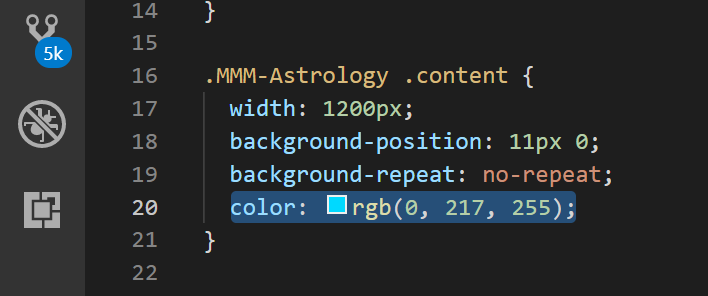
can use any type of color code IE:
words for some colors: red, blue, maroon, etc
hex code: #ff0000, #00ffff, #b80000, etc
rgb code, rgb(255, 0, 0), rgb(0, 255, 255), rgb(137, 40, 19), etcthen save it.
run MM.
Enjoy!
-
RE: Motion Sensor Toy
I have been looking to do something very similar to this, except I want a blank mirror that will sense motion and then play a video…
Let me know if you get this figured out!
-
RE: MMM-CalendarExt
what did you add? I have been looking to do this!
the height is self-adjusting per the font sizes and line heights for the table cells.
May be able to figure out a better way if I had the code you used to get the empty cells to show like that.
-
RE: how to pull new element added to an array?
So, is what I am wanting to do even possible?
-
RE: MMM-CalendarExt
@Sean
Do you see the calendar posted above by @yoey2112 ?
It has blank events instead of collapsed events, I am wanting mine to look like that!
But, I can’t figure out how to get it done!
-
RE: MMM-CalendarExt
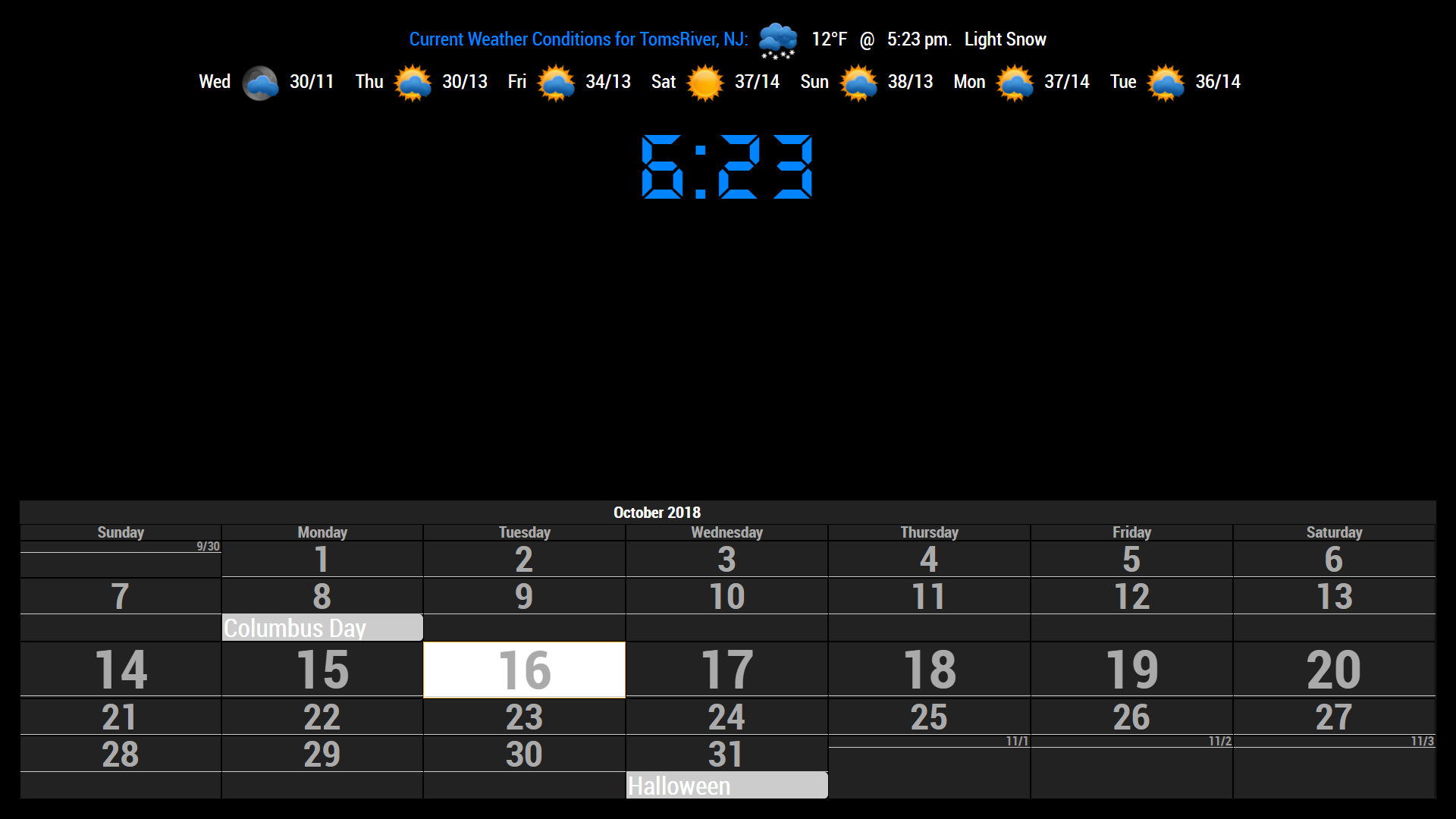
add the following to your custum.css file
#CALEXT_month.tableStyle { max-width:100%; width:100%; background:none; } -
RE: how to pull new element added to an array?
this is how I was able to modify the code to show a single icon and to get it to scroll across the screen
https://forum.magicmirror.builders/assets/uploads/files/1539381868184-screenshot-146.png
-
RE: how to pull new element added to an array?
that’s because I don’t think the source has an icon to pull from it.
So, is there a way to put the icons in an image folder in the newsfeed directory and pull from there for each corresponding newsfeed?
-
RE: how to pull new element added to an array?
ok, so how would I be able to use the corresponding icons/images for the active feed showing if there isn’t any icon data in the rest API?
-
RE: how to pull new element added to an array?
Not quite sure I am following you correctly…
Do you mean to pull the icon from the feeds source? the website? -
RE: how to pull new element added to an array?
-
RE: how to pull new element added to an array?
this is the default MM newsfeed, I am trying to modify it to show different things.
-
RE: how to pull new element added to an array?
start: function () { Log.info("Starting module: " + this.name); // Set locale. moment.locale(config.language); this.newsItems = []; this.loaded = false; this.activeItem = 0; this.scrollPosition = 0; this.registerFeeds(); "use strict"; this.isShowingDescription = this.config.showDescription; }, -
RE: how to pull new element added to an array?
yeah, I was going by how the rest of the info (title, url, description, etc) is pulled from the feeds array, so thought it would be the same.