MagicMirror Forum
    • Recent
    • Tags
    • Unsolved
    • Solved
    • MagicMirror² Repository
    • Documentation
    • 3rd-Party-Modules
    • Donate
    • Discord
    • Register
    • Login
    1. Home
    2. KirAsh4
    3. Posts
    A New Chapter for MagicMirror: The Community Takes the Lead
    Read the statement by Michael Teeuw here.
    Offline
    • Profile
    • Following 0
    • Followers 26
    • Topics 32
    • Posts 773
    • Groups 1

    Posts

    Recent Best Controversial
    • RE: TypeError: curr.start.toISOString is not a function

      It doesn’t appear that the event information is valid to begin with, at least not the way that Office386 is serving the information. It doesn’t make sense to me. It should be an array, not a string. So the next question is, is the data you are receiving valid? And if so, where is that getting mangled that 'curr' ends up with an invalid array.

      Unfortunately I don’t have/use Office386’s calendar, so I’m not going to be able to debug this unless you want to share your calendar link with me. or, recreate a blank one with similar events and share that.

      posted in Troubleshooting
      KirAsh4K
      KirAsh4
    • RE: TypeError: curr.start.toISOString is not a function

      There’s that failure … Notice the contents of curr.start in each iteration:

      curr.start is set to:
      { Mon, 01 Jan 1601 02:00:00 GMT tz: undefined }
      
      curr.start is set to:
      { Mon, 01 Jan 1601 01:00:00 GMT tz: undefined }
      
      curr.start is set to:
      00) Amsterdam, Berlin, Bern, Rome, Stockholm, Vienna":20160524T203000
      

      That’s where it fails. It processes the previous two just fine, then encounters an invalid time stamp. This is something within the Offce386 calendar. What is that event?

      posted in Troubleshooting
      KirAsh4K
      KirAsh4
    • RE: TypeError: curr.start.toISOString is not a function

      Right, that was simply checking what’s in 'comps', however it appears the variable itself isn’t being set from the line above it. That is assuming you put the 'console.dir()' line in the right spot. :)

      So you can literally start sprinkling console calls to try and figure out where and why it’s failing:

      console.log("curr contains:");
      console.dir(curr);
      console.log("curr.start is set to:");
      console.log(curr.start);
      if (curr.start.length === 8) {
          var comps = /^(\d{4})(\d{2})(\d{2})$/.exec(curr.start);
          console.log("comps array contains:");
          console.dir(comps);
          if (comps) {
              curr.start = new Date (comps[1], comps[2] - 1, comps[3]);
          }
      }
      posted in Troubleshooting
      KirAsh4K
      KirAsh4
    • RE: (2.1.0, API) Revising the Show/Hide mechanism

      Neither can I, but the moment we say that, someone will come up with a reason to need that. :)

      posted in Upcoming Features
      KirAsh4K
      KirAsh4
    • RE: Don't know where to start...looking to build my 1st module, a Microsoft health module.

      There you go then. Look at the Cloud API, specifically the Javascript example. That’s what you need to start writing your own module. You could also post a request in the Modules/Request forum section and see if someone might want to help you write one.

      posted in Forum
      KirAsh4K
      KirAsh4
    • RE: Don't know where to start...looking to build my 1st module, a Microsoft health module.

      The easiest, and recommended way of doing that is with an API. Does the site have one? Because if it doesn’t, you’re pretty much stuck.

      posted in Forum
      KirAsh4K
      KirAsh4
    • RE: NPM process dies

      Glad that’s working. It still doesn’t solve the fact that it’s dying on you, but at least it will restart it automatically for you. I think my process dies at least once a week or so … totally random, with the pi doing nothing.

      posted in Troubleshooting
      KirAsh4K
      KirAsh4
    • RE: TypeError: curr.start.toISOString is not a function

      Just a guess, since I don’t know what calendar you’re using nor what the specific entry might be that’s blowing up, but the lines above that are relevant here:

              if (curr.start.length === 8) {
                  var comps = /^(\d{4})(\d{2})(\d{2})$/.exec(curr.start);
                  if (comps) {
                      curr.start = new Date (comps[1], comps[2] - 1, comps[3]);
                  }
              }
      

      For some reason, the comps variable is failing to get set properly, which then causes the Date() object to fail and things just cascade from there. So you’d have to figure out why it’s failing, or what’s being set in it. What you could do is, in node-ical.js, after line 33, insert the following:

      console.dir(comps);
      

      Then run your debug.js file again and see what you get.

      posted in Troubleshooting
      KirAsh4K
      KirAsh4
    • Random Quotes

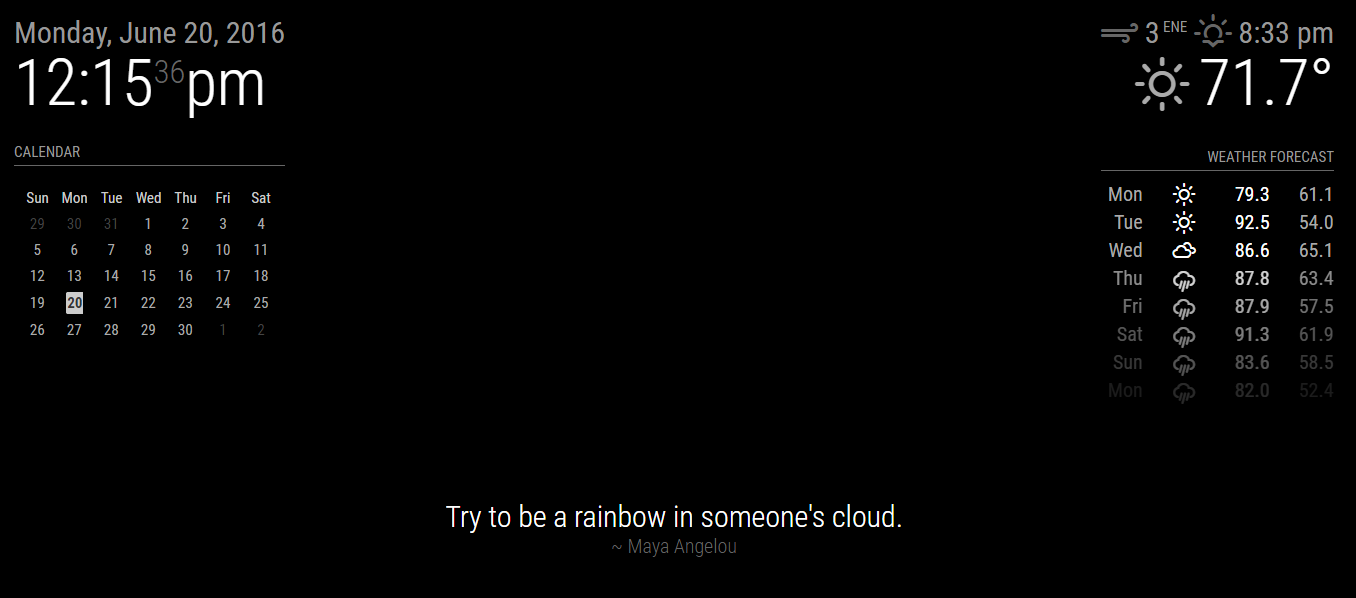
      I forgot who asked me to release my code, it may have been @paviro, but I honestly don’t remember. One of the very first modules I wanted was something that displays a random quote, so I modified the supplied ‘Compliments’ one to my needs. I used the popular http://www.brainyquote.com web site to fetch quotes, however they don’t provide an API. And looking around the web, all of the random quotes web sites that I found with an API only allows you one random quote per day. If you want a random one each time you send a request, then you need to subscribe and pay them. So, in keeping the ‘free’ nature of the module, I decided to hard code a few categories and quotes from each from BrainyQuote. If you want to edit the quotes, you’ll have to do that in the module’s js file.

      http://github.com/KirAsh4/random_quotes/

      0_1466446564627_quote.png

      posted in Utilities
      KirAsh4K
      KirAsh4
    • RE: NPM process dies

      Other than a potential file system corruption, or faulty memory on the rpi itself, I can’t think of anything else that could be killing the process. While rather rare, I have seen brand new rpis have faulty memory. You’d have to install and run 'memtester' to check the memory. If that checks out, you can check the file system itself with 'fsck'. WARNING: doing this on a running system can cause issues. However, since the rpi runs off of the card, it’s unable to unmount the card, so you have two choices:

      a) schedule a file system check at the next reboot:

      $ sudo touch /forcefsck
      $ sudo reboot
      

      b) alternatively, you can force a file system check while it’s running:

      $ sudo fsck -fy /dev/mmcblk0p2 
      $ sudo reboot
      

      The 'mmcblk0p2' listed above you get by typing in 'mount' and looking at the line that shows the root file system on, denoted by a single '/':

      $ mount
      /dev/mmcblk0p2 on / type ext4 (rw,noatime,data=ordered)  <============================= THAT LINE
      devtmpfs on /dev type devtmpfs (rw,relatime,size=469540k,nr_inodes=117385,mode=755)
      sysfs on /sys type sysfs (rw,nosuid,nodev,noexec,relatime)
      proc on /proc type proc (rw,relatime)
      ...
      

      And if it found errors, you can only hope that the fsck fixed them, otherwise you’re looking at either a system rebuild (where you start fresh, by burning a new image to the card and go through all the steps to configure the rpi and reinstall everything), or possibly even replacing the card as well (in which case you’re going to go through a rebuild anyways, so you may as well do that.)

      posted in Troubleshooting
      KirAsh4K
      KirAsh4
    • 1 / 1