Oh no, wasn’t meant as sarcasm at all. I have contributed hardware to projects before, and I’ve had people do the same to me as well. Basically if someone wants something running on a specific piece of hardware that I don’t have (or plan on getting), I welcome ‘project donations’ to do that for them. Most of the time people just send it and call it done, occasionally someone will ask for me to send it back.
A New Chapter for MagicMirror: The Community Takes the Lead
Read the statement by Michael Teeuw here.
Read the statement by Michael Teeuw here.
 Offline
Posts
-
RE: sudo npm start - Does nothing on a Pi Zero
-
RE: Flushing pm2 logs
Yes that’s another option, however personally I don’t use log rotates for a variety of reasons. In this case specifically, others have mentioned problems with it on the PM2 site.
-
RE: Monthly Calendar View
Spent the day wrangling code. Apparently I have a lot of ‘sumptinks’ coming up! :)
This is just raw data processing. Stuff comes in, gets processed, and placed in the array which I then fetch. There’s no formatting in the code yet. Just don’t ask.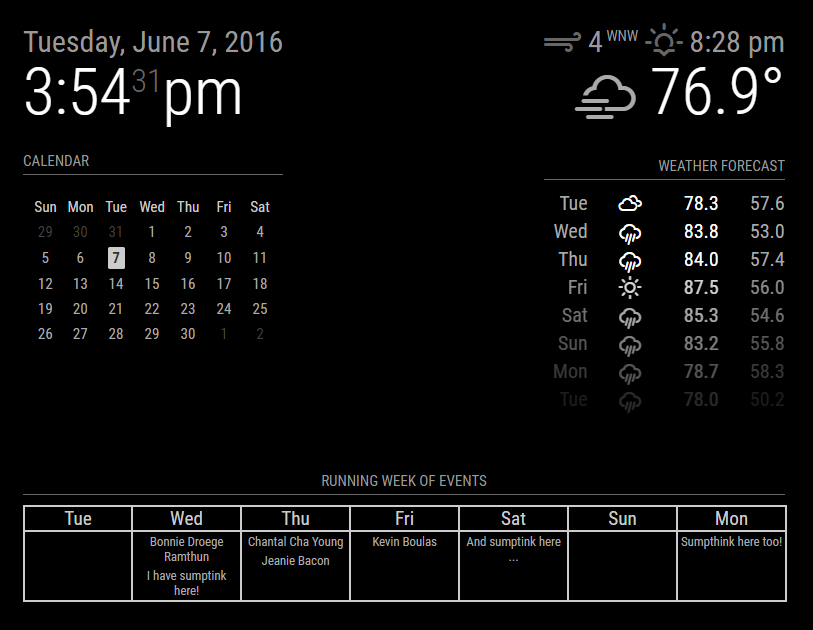
-
RE: sudo npm start - Does nothing on a Pi Zero
The README specifically states only Raspberry Pi 2 & 3 are supported. I don’t have a zero to test on. Not sure others have one. You’re welcome to send me a zero to develop on though. you’ll be contributing to the project.
-
RE: Shopping / To Do List
Personally I use Google Keep. The reason I like it is because I can use it to write notes, set alarm on notes, I can create shopping lists with it, and if I want to get creative, even to-do lists, although the latter is better done with Google Tasks. And, for me, best of all, it’s synced across all of my devices, computer, phone, tablet. The bad news is, Google Keep does not have an API, however Google Tasks does, it’s a REST API.
I’ve thought about it quite a bit actually, but haven’t had time to actually start looking at what it would take.
-
RE: See all watched topics ...
Personally I think the forum shouldn’t forcibly have you watch anything you reply to, but rather allow you to opt-in. But that’s just me …
-
RE: Calendar modification
That’s something that is outside of the scope of MM itself. They don’t have anything to do with the MM calendar module itself. When you said to keep the calendar in monthly mode, my first reaction was, ‘Uh, the calendar doesn’t have a monthly view’, hence my request for clarification.
It’s helpful to others who are using that specific service to host a calendar, and trying to incorporate it into MM, but you needed to specify what you were referring to.
Thanks for the clarification.
-
Flushing pm2 logs
While keeping MM alive with the
'pm2'facility, all of the messages that MM generates will get logged through it. This allows you to be able to look at them with'pm2 logs'. However, this also means that that log file is continuously growing.For those of you running the newsfeed module, every once in a while that will throw an error if the feed item has a problem, such as missing a title. That error will repeat each time the newsfeed cycles back to the beginning. Over time, this creates a large amount of logged errors and the physical log file will be rather large.
I was recently rather surprised to find the storage on my rpi at 99% full when I know that it should be closer to 48% … After scanning the file system I found the pm2 MagicMirror specific log file at several gigabytes in size. Left unchecked, this would’ve eventually filled the file system to 100% and caused the rpi itself to start failing in various, unpredictable ways.
So, ontop of my post about maintenance on your rpi, add this to the list:
'pm2 flush'. Run that as the user that’s running the MM task (usually that’s the'pi'user) and it will automatically flush the log file for you.If you care to know where all this is stored on your rpi, it’s in the
'pi'user’s folder, under a (hidden) folder called'.pm2'. Looking at its contents:pi/.pm2 ├── conf.js ├── dump.pm2 ├── logs │ ├── MagicMirror-error-0.log │ └── MagicMirror-out-0.log ├── module_conf.json ├── pids │ └── MagicMirror-0.pid ├── pm2.log ├── pm2.pid ├── pub.sock ├── rpc.sock └── touch 2 directories, 11 filesThe files you should look at are the
'MagicMirror-error'and'MagicMirror-out'ones. Running'pm2 flush'will clear both of them.Edited to add: I forgot, another way to also see where the logs are, if by running
'pm2 show <YOUR_MM_TASK>'. It should return a screen similar to this:pm2 show MagicMirror Describing process with id 0 - name MagicMirror ┌───────────────────┬────────────────────────────────────────────┐ │ status │ online │ │ name │ MagicMirror │ │ restarts │ 1 │ │ uptime │ 14s │ │ script path │ /home/pi/MagicMirror.sh │ │ script args │ N/A │ │ error log path │ /home/pi/.pm2/logs/MagicMirror-error-0.log │ │ out log path │ /home/pi/.pm2/logs/MagicMirror-out-0.log │ │ pid path │ /home/pi/.pm2/pids/MagicMirror-0.pid │ │ interpreter │ bash │ │ interpreter args │ N/A │ │ script id │ 0 │ │ exec cwd │ /home/pi │ │ exec mode │ fork_mode │ │ node.js version │ N/A │ │ watch & reload │ ✘ │ │ unstable restarts │ 0 │ │ created at │ 2016-06-07T16:41:36.004Z │ └───────────────────┴────────────────────────────────────────────┘