Ok den ordner habe ich auch…und alles was man verändern will kopiert man in die costum.css
 K
Offline
K
Offline
A New Chapter for MagicMirror: The Community Takes the Lead
Read the statement by Michael Teeuw here.
Read the statement by Michael Teeuw here.
Posts
-
RE: MagicMirror am PI 7" Monitor
-
RE: MagicMirror am PI 7" Monitor
Hallo Ulli,
Was meinst du mit Original ist gut?? Meinst du die main.css in die custom.css kopieren??
-
RE: Display waste bins in color
@sdetweil said in Display waste bins in color:
@kusselin if u set mm to allow remote access, then u can do the debugging on your windows machine w Firefox or Chrome
adress:"0.0.0.0",
ipWhitelist:[],
in config.js
then on pc
http://pi-address:mm-port
Yes, have it so!!
-
RE: Display waste bins in color
@ashishtank said in Display waste bins in color:
Keep break point at below position and also few more breakpoints before it.
Press F5 to reload the Magic Mirror
If it hits break point, you can press F10 to step to each line and you can press F8 to continue execution (if it reaches to highlighted line then it should work)is this right so:
/* global cloneObject */ /* Magic Mirror * Module: Calendar * * By Michael Teeuw https://michaelteeuw.nl * MIT Licensed. */ Module.register("calendar", { // Define module defaults defaults: { maximumEntries: 10, // Total Maximum Entries maximumNumberOfDays: 365, displaySymbol: true, defaultSymbol: "calendar", // Fontawesome Symbol see https://fontawesome.com/cheatsheet?from=io showLocation: false, displayRepeatingCountTitle: false, defaultRepeatingCountTitle: "", maxTitleLength: 25, maxLocationTitleLength: 25, wrapEvents: false, // wrap events to multiple lines breaking at maxTitleLength wrapLocationEvents: false, maxTitleLines: 3, maxEventTitleLines: 3, fetchInterval: 5 * 60 * 1000, // Update every 5 minutes. animationSpeed: 2000, fade: true, urgency: 7, timeFormat: "relative", dateFormat: "MMM Do", dateEndFormat: "LT", fullDayEventDateFormat: "MMM Do", showEnd: false, getRelative: 6, fadePoint: 0.25, // Start on 1/4th of the list. hidePrivate: false, hideOngoing: false, colored: false, coloredSymbolOnly: false, tableClass: "small", calendars: [ { symbol: "calendar", url: "https://www.calendarlabs.com/templates/ical/US-Holidays.ics" } ], titleReplace: { "De verjaardag van ": "", "'s birthday": "" }, locationTitleReplace: { "street ": "" }, broadcastEvents: true, excludedEvents: [], sliceMultiDayEvents: false, broadcastPastEvents: false, nextDaysRelative: false }, // Define required scripts. getStyles: function () { return ["calendar.css", "font-awesome.css"]; }, // Define required scripts. getScripts: function () { return ["moment.js"]; }, // Define required translations. getTranslations: function () { // The translations for the default modules are defined in the core translation files. // Therefor we can just return false. Otherwise we should have returned a dictionary. // If you're trying to build your own module including translations, check out the documentation. return false; }, // Override start method. start: function () { Log.log("Starting module: " + this.name); // Set locale. moment.updateLocale(config.language, this.getLocaleSpecification(config.timeFormat)); for (var c in this.config.calendars) { var calendar = this.config.calendars[c]; calendar.url = calendar.url.replace("webcal://", "http://"); var calendarConfig = { maximumEntries: calendar.maximumEntries, maximumNumberOfDays: calendar.maximumNumberOfDays, broadcastPastEvents: calendar.broadcastPastEvents }; if (calendar.symbolClass === "undefined" || calendar.symbolClass === null) { calendarConfig.symbolClass = ""; } if (calendar.titleClass === "undefined" || calendar.titleClass === null) { calendarConfig.titleClass = ""; } if (calendar.timeClass === "undefined" || calendar.timeClass === null) { calendarConfig.timeClass = ""; } // we check user and password here for backwards compatibility with old configs if (calendar.user && calendar.pass) { Log.warn("Deprecation warning: Please update your calendar authentication configuration."); Log.warn("https://github.com/MichMich/MagicMirror/tree/v2.1.2/modules/default/calendar#calendar-authentication-options"); calendar.auth = { user: calendar.user, pass: calendar.pass }; } this.addCalendar(calendar.url, calendar.auth, calendarConfig); // Trigger ADD_CALENDAR every fetchInterval to make sure there is always a calendar // fetcher running on the server side. var self = this; setInterval(function () { self.addCalendar(calendar.url, calendar.auth, calendarConfig); }, self.config.fetchInterval); } this.calendarData = {}; this.loaded = false; }, // Override socket notification handler. socketNotificationReceived: function (notification, payload) { if (this.identifier !== payload.id) { return; } if (notification === "CALENDAR_EVENTS") { if (this.hasCalendarURL(payload.url)) { this.calendarData[payload.url] = payload.events; this.loaded = true; if (this.config.broadcastEvents) { this.broadcastEvents(); } } } else if (notification === "FETCH_ERROR") { Log.error("Calendar Error. Could not fetch calendar: " + payload.url); this.loaded = true; } else if (notification === "INCORRECT_URL") { Log.error("Calendar Error. Incorrect url: " + payload.url); } this.updateDom(this.config.animationSpeed); }, // Override dom generator. getDom: function () { var events = this.createEventList(); var wrapper = document.createElement("table"); wrapper.className = this.config.tableClass; if (events.length === 0) { wrapper.innerHTML = this.loaded ? this.translate("EMPTY") : this.translate("LOADING"); wrapper.className = this.config.tableClass + " dimmed"; return wrapper; } if (this.config.fade && this.config.fadePoint < 1) { if (this.config.fadePoint < 0) { this.config.fadePoint = 0; } var startFade = events.length * this.config.fadePoint; var fadeSteps = events.length - startFade; } var currentFadeStep = 0; var lastSeenDate = ""; for (var e in events) { var event = events[e]; var dateAsString = moment(event.startDate, "x").format(this.config.dateFormat); if (this.config.timeFormat === "dateheaders") { if (lastSeenDate !== dateAsString) { var dateRow = document.createElement("tr"); dateRow.className = "normal"; var dateCell = document.createElement("td"); dateCell.colSpan = "3"; dateCell.innerHTML = dateAsString; dateCell.style.paddingTop = "10px"; dateRow.appendChild(dateCell); wrapper.appendChild(dateRow); if (e >= startFade) { //fading currentFadeStep = e - startFade; dateRow.style.opacity = 1 - (1 / fadeSteps) * currentFadeStep; } lastSeenDate = dateAsString; } } var eventWrapper = document.createElement("tr"); if (this.config.colored && !this.config.coloredSymbolOnly) { eventWrapper.style.cssText = "color:" + this.colorForUrl(event.url); } eventWrapper.className = "normal event"; if (this.config.displaySymbol) { var symbolWrapper = document.createElement("td"); if (this.config.colored && this.config.coloredSymbolOnly) { symbolWrapper.style.cssText = "color:" + this.colorForUrl(event.url); } var symbolClass = this.symbolClassForUrl(event.url); symbolWrapper.className = "symbol align-right " + symbolClass; var symbols = this.symbolsForEvent(event); for (var i = 0; i < symbols.length; i++) { var symbol = document.createElement("span"); symbol.className = "fa fa-fw fa-" + symbols[i]; if (i > 0) { symbol.style.paddingLeft = "5px"; } symbolWrapper.appendChild(symbol); } eventWrapper.appendChild(symbolWrapper); } else if (this.config.timeFormat === "dateheaders") { var blankCell = document.createElement("td"); blankCell.innerHTML = " "; eventWrapper.appendChild(blankCell); } var titleWrapper = document.createElement("td"), repeatingCountTitle = ""; if (this.config.displayRepeatingCountTitle && event.firstYear !== undefined) { repeatingCountTitle = this.countTitleForUrl(event.url); if (repeatingCountTitle !== "") { var thisYear = new Date(parseInt(event.startDate)).getFullYear(), yearDiff = thisYear - event.firstYear; repeatingCountTitle = ", " + yearDiff + ". " + repeatingCountTitle; } } titleWrapper.innerHTML = this.titleTransform(event.title, this.config.titleReplace, this.config.wrapEvents, this.config.maxTitleLength, this.config.maxTitleLines) + repeatingCountTitle; var titleClass = this.titleClassForUrl(event.url); if (!this.config.colored) { titleWrapper.className = "title bright " + titleClass; } else { titleWrapper.className = "title " + titleClass; } var timeWrapper; if (this.config.timeFormat === "dateheaders") { if (event.fullDayEvent) { titleWrapper.colSpan = "2"; titleWrapper.align = "left"; } else { timeWrapper = document.createElement("td"); timeWrapper.className = "time light " + this.timeClassForUrl(event.url); timeWrapper.align = "left"; timeWrapper.style.paddingLeft = "2px"; timeWrapper.innerHTML = moment(event.startDate, "x").format("LT"); eventWrapper.appendChild(timeWrapper); titleWrapper.align = "right"; } eventWrapper.appendChild(titleWrapper); } else { timeWrapper = document.createElement("td"); eventWrapper.appendChild(titleWrapper); var now = new Date(); // Define second, minute, hour, and day variables var oneSecond = 1000; // 1,000 milliseconds var oneMinute = oneSecond * 60; var oneHour = oneMinute * 60; var oneDay = oneHour * 24; if (event.fullDayEvent) { //subtract one second so that fullDayEvents end at 23:59:59, and not at 0:00:00 one the next day event.endDate -= oneSecond; if (event.today) { timeWrapper.innerHTML = this.capFirst(this.translate("TODAY")); } else if (event.startDate - now < oneDay && event.startDate - now > 0) { timeWrapper.innerHTML = this.capFirst(this.translate("TOMORROW")); } else if (event.startDate - now < 2 * oneDay && event.startDate - now > 0) { if (this.translate("DAYAFTERTOMORROW") !== "DAYAFTERTOMORROW") { timeWrapper.innerHTML = this.capFirst(this.translate("DAYAFTERTOMORROW")); } else { timeWrapper.innerHTML = this.capFirst(moment(event.startDate, "x").fromNow()); } } else { /* Check to see if the user displays absolute or relative dates with their events * Also check to see if an event is happening within an 'urgency' time frameElement * For example, if the user set an .urgency of 7 days, those events that fall within that * time frame will be displayed with 'in xxx' time format or moment.fromNow() * * Note: this needs to be put in its own function, as the whole thing repeats again verbatim */ if (this.config.timeFormat === "absolute") { if (this.config.urgency > 1 && event.startDate - now < this.config.urgency * oneDay) { // This event falls within the config.urgency period that the user has set timeWrapper.innerHTML = this.capFirst(moment(event.startDate, "x").from(moment().format("YYYYMMDD"))); } else { timeWrapper.innerHTML = this.capFirst(moment(event.startDate, "x").format(this.config.fullDayEventDateFormat)); } } else { timeWrapper.innerHTML = this.capFirst(moment(event.startDate, "x").from(moment().format("YYYYMMDD"))); } } if (this.config.showEnd) { timeWrapper.innerHTML += "-"; timeWrapper.innerHTML += this.capFirst(moment(event.endDate, "x").format(this.config.fullDayEventDateFormat)); } } else { if (event.startDate >= new Date()) { if (event.startDate - now < 2 * oneDay) { // This event is within the next 48 hours (2 days) if (event.startDate - now < this.config.getRelative * oneHour) { // If event is within 6 hour, display 'in xxx' time format or moment.fromNow() timeWrapper.innerHTML = this.capFirst(moment(event.startDate, "x").fromNow()); } else { if (this.config.timeFormat === "absolute" && !this.config.nextDaysRelative) { timeWrapper.innerHTML = this.capFirst(moment(event.startDate, "x").format(this.config.dateFormat)); } else { // Otherwise just say 'Today/Tomorrow at such-n-such time' timeWrapper.innerHTML = this.capFirst(moment(event.startDate, "x").calendar()); } } } else { /* Check to see if the user displays absolute or relative dates with their events * Also check to see if an event is happening within an 'urgency' time frameElement * For example, if the user set an .urgency of 7 days, those events that fall within that * time frame will be displayed with 'in xxx' time format or moment.fromNow() * * Note: this needs to be put in its own function, as the whole thing repeats again verbatim */ if (this.config.timeFormat === "absolute") { if (this.config.urgency > 1 && event.startDate - now < this.config.urgency * oneDay) { // This event falls within the config.urgency period that the user has set timeWrapper.innerHTML = this.capFirst(moment(event.startDate, "x").fromNow()); } else { timeWrapper.innerHTML = this.capFirst(moment(event.startDate, "x").format(this.config.dateFormat)); } } else { timeWrapper.innerHTML = this.capFirst(moment(event.startDate, "x").fromNow()); } } } else { timeWrapper.innerHTML = this.capFirst( this.translate("RUNNING", { fallback: this.translate("RUNNING") + " {timeUntilEnd}", timeUntilEnd: moment(event.endDate, "x").fromNow(true) }) ); } if (this.config.showEnd) { timeWrapper.innerHTML += "-"; timeWrapper.innerHTML += this.capFirst(moment(event.endDate, "x").format(this.config.dateEndFormat)); } } //timeWrapper.innerHTML += ' - '+ moment(event.startDate,'x').format('lll'); timeWrapper.className = "time light " + this.timeClassForUrl(event.url); eventWrapper.appendChild(timeWrapper); } wrapper.appendChild(eventWrapper); // Create fade effect. if (e >= startFade) { currentFadeStep = e - startFade; eventWrapper.style.opacity = 1 - (1 / fadeSteps) * currentFadeStep; } if (this.config.showLocation) { if (event.location !== false) { var locationRow = document.createElement("tr"); locationRow.className = "normal xsmall light"; if (this.config.displaySymbol) { var symbolCell = document.createElement("td"); locationRow.appendChild(symbolCell); } var descCell = document.createElement("td"); descCell.className = "location"; descCell.colSpan = "2"; descCell.innerHTML = this.titleTransform(event.location, this.config.locationTitleReplace, this.config.wrapLocationEvents, this.config.maxLocationTitleLength, this.config.maxEventTitleLines); locationRow.appendChild(descCell); wrapper.appendChild(locationRow); if (e >= startFade) { currentFadeStep = e - startFade; locationRow.style.opacity = 1 - (1 / fadeSteps) * currentFadeStep; } } } } return wrapper; }, /** * This function accepts a number (either 12 or 24) and returns a moment.js LocaleSpecification with the * corresponding timeformat to be used in the calendar display. If no number is given (or otherwise invalid input) * it will a localeSpecification object with the system locale time format. * * @param {number} timeFormat Specifies either 12 or 24 hour time format * @returns {moment.LocaleSpecification} formatted time */ getLocaleSpecification: function (timeFormat) { switch (timeFormat) { case 12: { return { longDateFormat: { LT: "h:mm A" } }; } case 24: { return { longDateFormat: { LT: "HH:mm" } }; } default: { return { longDateFormat: { LT: moment.localeData().longDateFormat("LT") } }; } } }, /** * Checks if this config contains the calendar url. * * @param {string} url The calendar url * @returns {boolean} True if the calendar config contains the url, False otherwise */ hasCalendarURL: function (url) { for (var c in this.config.calendars) { var calendar = this.config.calendars[c]; if (calendar.url === url) { return true; } } return false; }, /** * Creates the sorted list of all events. * * @returns {object[]} Array with events. */ createEventList: function () { var events = []; var today = moment().startOf("day"); var now = new Date(); var future = moment().startOf("day").add(this.config.maximumNumberOfDays, "days").toDate(); for (var c in this.calendarData) { var calendar = this.calendarData[c]; for (var e in calendar) { var event = JSON.parse(JSON.stringify(calendar[e])); // clone object if (event.endDate < now) { continue; } if (this.config.hidePrivate) { if (event.class === "PRIVATE") { // do not add the current event, skip it continue; } } if (this.config.hideOngoing) { if (event.startDate < now) { continue; } } if (this.listContainsEvent(events, event)) { continue; } event.url = c; event.today = event.startDate >= today && event.startDate < today + 24 * 60 * 60 * 1000; /* if sliceMultiDayEvents is set to true, multiday events (events exceeding at least one midnight) are sliced into days, * otherwise, esp. in dateheaders mode it is not clear how long these events are. */ var maxCount = Math.ceil((event.endDate - 1 - moment(event.startDate, "x").endOf("day").format("x")) / (1000 * 60 * 60 * 24)) + 1; if (this.config.sliceMultiDayEvents && maxCount > 1) { var splitEvents = []; var midnight = moment(event.startDate, "x").clone().startOf("day").add(1, "day").format("x"); var count = 1; while (event.endDate > midnight) { var thisEvent = JSON.parse(JSON.stringify(event)); // clone object thisEvent.today = thisEvent.startDate >= today && thisEvent.startDate < today + 24 * 60 * 60 * 1000; thisEvent.endDate = midnight; thisEvent.title += " (" + count + "/" + maxCount + ")"; splitEvents.push(thisEvent); event.startDate = midnight; count += 1; midnight = moment(midnight, "x").add(1, "day").format("x"); // next day } // Last day event.title += " (" + count + "/" + maxCount + ")"; splitEvents.push(event); for (event of splitEvents) { if (event.endDate > now && event.endDate <= future) { events.push(event); } } } else { events.push(event); } } } events.sort(function (a, b) { return a.startDate - b.startDate; }); return events.slice(0, this.config.maximumEntries); }, listContainsEvent: function (eventList, event) { for (var evt of eventList) { if (evt.title === event.title && parseInt(evt.startDate) === parseInt(event.startDate)) { return true; } } return false; }, /** * Requests node helper to add calendar url. * * @param {string} url The calendar url to add * @param {object} auth The authentication method and credentials * @param {object} calendarConfig The config of the specific calendar */ addCalendar: function (url, auth, calendarConfig) { this.sendSocketNotification("ADD_CALENDAR", { id: this.identifier, url: url, excludedEvents: calendarConfig.excludedEvents || this.config.excludedEvents, maximumEntries: calendarConfig.maximumEntries || this.config.maximumEntries, maximumNumberOfDays: calendarConfig.maximumNumberOfDays || this.config.maximumNumberOfDays, fetchInterval: this.config.fetchInterval, symbolClass: calendarConfig.symbolClass, titleClass: calendarConfig.titleClass, timeClass: calendarConfig.timeClass, auth: auth, broadcastPastEvents: calendarConfig.broadcastPastEvents || this.config.broadcastPastEvents }); }, /** * Retrieves the symbols for a specific event. * * @param {object} event Event to look for. * @returns {string[]} The symbols */ symbolsForEvent: function (event) { let symbols = this.getCalendarPropertyAsArray(event.url, "symbol", this.config.defaultSymbol); if (event.recurringEvent === true && this.hasCalendarProperty(event.url, "recurringSymbol")) { symbols = this.mergeUnique(this.getCalendarPropertyAsArray(event.url, "recurringSymbol", this.config.defaultSymbol), symbols); } if (event.fullDayEvent === true && this.hasCalendarProperty(event.url, "fullDaySymbol")) { symbols = this.mergeUnique(this.getCalendarPropertyAsArray(event.url, "fullDaySymbol", this.config.defaultSymbol), symbols); } return symbols; }, mergeUnique: function (arr1, arr2) { return arr1.concat( arr2.filter(function (item) { return arr1.indexOf(item) === -1; }) ); }, /** * Retrieves the symbolClass for a specific calendar url. * * @param {string} url The calendar url * @returns {string} The class to be used for the symbols of the calendar */ symbolClassForUrl: function (url) { return this.getCalendarProperty(url, "symbolClass", ""); }, /** * Retrieves the titleClass for a specific calendar url. * * @param {string} url The calendar url * @returns {string} The class to be used for the title of the calendar */ titleClassForUrl: function (url) { return this.getCalendarProperty(url, "titleClass", ""); }, /** * Retrieves the timeClass for a specific calendar url. * * @param {string} url The calendar url * @returns {string} The class to be used for the time of the calendar */ timeClassForUrl: function (url) { return this.getCalendarProperty(url, "timeClass", ""); }, /** * Retrieves the calendar name for a specific calendar url. * * @param {string} url The calendar url * @returns {string} The name of the calendar */ calendarNameForUrl: function (url) { return this.getCalendarProperty(url, "name", ""); }, /** * Retrieves the color for a specific calendar url. * * @param {string} url The calendar url * @returns {string} The color */ colorForUrl: function (url) { return this.getCalendarProperty(url, "color", "#fff"); }, /** * Retrieves the count title for a specific calendar url. * * @param {string} url The calendar url * @returns {string} The title */ countTitleForUrl: function (url) { return this.getCalendarProperty(url, "repeatingCountTitle", this.config.defaultRepeatingCountTitle); }, /** * Helper method to retrieve the property for a specific calendar url. * * @param {string} url The calendar url * @param {string} property The property to look for * @param {string} defaultValue The value if the property is not found * @returns {*} The property */ getCalendarProperty: function (url, property, defaultValue) { for (var c in this.config.calendars) { var calendar = this.config.calendars[c]; if (calendar.url === url && calendar.hasOwnProperty(property)) { return calendar[property]; } } return defaultValue; }, getCalendarPropertyAsArray: function (url, property, defaultValue) { let p = this.getCalendarProperty(url, property, defaultValue); if (!(p instanceof Array)) p = [p]; return p; }, hasCalendarProperty: function (url, property) { return !!this.getCalendarProperty(url, property, undefined); }, /** * Shortens a string if it's longer than maxLength and add a ellipsis to the end * * @param {string} string Text string to shorten * @param {number} maxLength The max length of the string * @param {boolean} wrapEvents Wrap the text after the line has reached maxLength * @param {number} maxTitleLines The max number of vertical lines before cutting event title * @returns {string} The shortened string */ shorten: function (string, maxLength, wrapEvents, maxTitleLines) { if (typeof string !== "string") { return ""; } if (wrapEvents === true) { var temp = ""; var currentLine = ""; var words = string.split(" "); var line = 0; for (var i = 0; i < words.length; i++) { var word = words[i]; if (currentLine.length + word.length < (typeof maxLength === "number" ? maxLength : 25) - 1) { // max - 1 to account for a space currentLine += word + " "; } else { line++; if (line > maxTitleLines - 1) { if (i < words.length) { currentLine += "…"; } break; } if (currentLine.length > 0) { temp += currentLine + "<br>" + word + " "; } else { temp += word + "<br>"; } currentLine = ""; } } return (temp + currentLine).trim(); } else { if (maxLength && typeof maxLength === "number" && string.length > maxLength) { return string.trim().slice(0, maxLength) + "…"; } else { return string.trim(); } } }, /** * Capitalize the first letter of a string * * @param {string} string The string to capitalize * @returns {string} The capitalized string */ capFirst: function (string) { return string.charAt(0).toUpperCase() + string.slice(1); }, /** * Transforms the title of an event for usage. * Replaces parts of the text as defined in config.titleReplace. * Shortens title based on config.maxTitleLength and config.wrapEvents * * @param {string} title The title to transform. * @param {object} titleReplace Pairs of strings to be replaced in the title * @param {boolean} wrapEvents Wrap the text after the line has reached maxLength * @param {number} maxTitleLength The max length of the string * @param {number} maxTitleLines The max number of vertical lines before cutting event title * @returns {string} The transformed title. */ titleTransform: function (title, titleReplace, wrapEvents, maxTitleLength, maxTitleLines) { for (var needle in titleReplace) { var replacement = titleReplace[needle]; var regParts = needle.match(/^\/(.+)\/([gim]*)$/); if (regParts) { // the parsed pattern is a regexp. needle = new RegExp(regParts[1], regParts[2]); } title = title.replace(needle, replacement); } title = this.shorten(title, maxTitleLength, wrapEvents, maxTitleLines); return title; }, /** * Broadcasts the events to all other modules for reuse. * The all events available in one array, sorted on startdate. */ broadcastEvents: function () { var eventList = []; for (var url in this.calendarData) { var calendar = this.calendarData[url]; for (var e in calendar) { var event = cloneObject(calendar[e]); event.symbol = this.symbolsForEvent(event); event.calendarName = this.calendarNameForUrl(url); event.color = this.colorForUrl(url); delete event.url; eventList.push(event); } } eventList.sort(function (a, b) { return a.startDate - b.startDate; }); this.sendNotification("CALENDAR_EVENTS", eventList); } }); -
RE: Display waste bins in color
Hi, its very difficult but i will try it
I can do this with mozilla browser… right?
In my config.js i no error because when an error is there the MM doesn‘t start then
Is the code so correct… with the Biotonne usw.
This is the word same in the google calender
Must i open the dev console when MM is running?
-
RE: Display waste bins in color
@kusselin said in Display waste bins in color:
customEvents: [
{
“keyword”: “Grüne Tonne plus”,
“color”: “green”
},
{
“keyword”: “Biomüll”,
“color”: “brown”
},
{
“keyword”: “Restmüll”,
“color”: “gray”
}
{
“keyword”: “Glasbox”,
“color”: “blue”
}
]now the code is so, but the colours are not displayed :-(
{
			module: "calendar",
			header: "Abfalltermine 2021",
			position: "top_left",
			config: {
				calendars: [
					{
						symbol: "calendar-check",
						url: "https://xxxxxxxxxxxxxxxxxxxxxxxxxxxxxxxxxxxxxxxxxxxxxxxxxxxxxxxxxx"
					}

				],

				customEvents: [
	 {
		"keyword": "Grüne Tonne plus",
		"color": "green"
	 },
	 {
		"keyword": "Biomüll",
		"color": "brown"
	 },
	 {
		"keyword": "Restmüll",
		"color": "gray"
	 },
	 {
		"keyword": "Glasbox",
		"color": "blue"
	 }
	]


	}
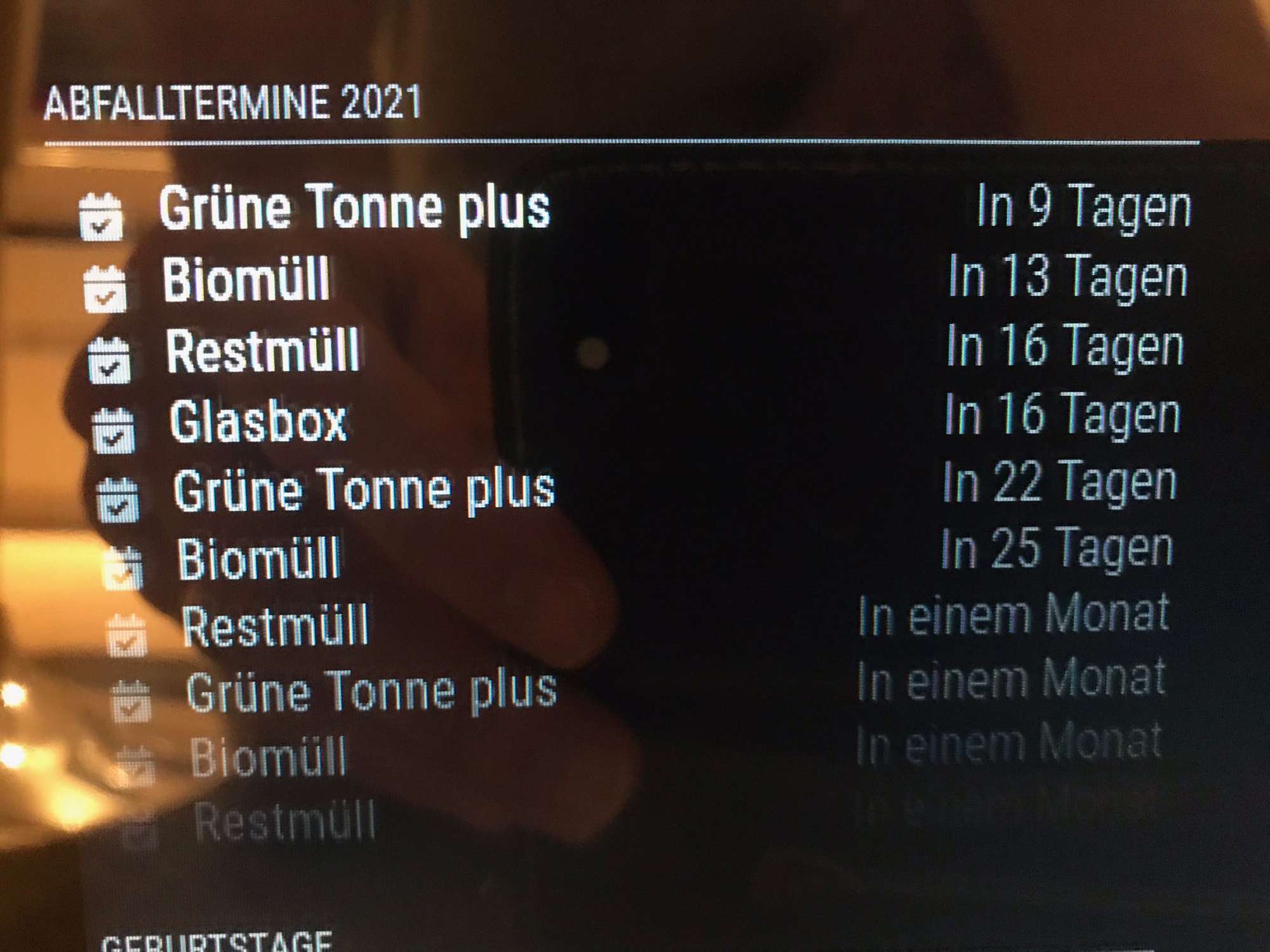
},
-
RE: compliments reduce font size and move down a little bit
hello sam…, but where can i find the css class…in custom.css i don´t find anythin also in main.css… :-(
EDIT:
O.K. i found this in main.css and put this with smaller numbers…then it´s ok.
Thank you sam
-
RE: Display waste bins in color
Can You help me please in the config.js…
here is my code but ist not show :
{ module: "calendar", header: "Abfalltermine 2021", position: "top_left", config: { calendars: [ { symbol: "calendar-check", url: "https://xxxxxxxxxxxxxxxxxxxxxxxxxxxxxxxxxxxxxxxxxxxxxxxxxxxxxx" } ], customEvents: [ { "keyword": "Grüne Tonne plus", "color": "green" }, { "keyword": "Biomüll", "color": "brown" }, { "keyword": "Restmüll", "color": "gray" } { "keyword": "Glasbox", "color": "blue" } ] } }, -
compliments reduce font size and move down a little bit
Hello everyone and have a nice Christmas,
where in which css file can I reduce the font of “compliments”? and how with which variables ?? and move a little bit down in the mirror?
Thank you very much for a short feedback. -
RE: Not all Modules are displaying on the tv
@sdetweil said in Not all Modules are displaying on the tv:
posting here probably won’t get the developer’s attention… open an issue on the module github site
ok. thanks
-
RE: Not all Modules are displaying on the tv
MMM-Traffic definitely doesn’t work with the module “Pages” !!! And the weather module doesn’t work either if you run the “pages” module !! This is a pity :-(
Can the developer of MMM Traffic and the MMM-OpenmapWeather take a look …
here again my config:
{ module: "MMM-pages", config: { modules: [[ "MMM-SoccerLiveScore" ], [ "MMM-COVID19-AMPEL" ], [ "MMM-Formula1" ]], fixed: [ "clock" , "MMM-OpenmapWeather" , "weatherforecast" , "MMM-PublicTransportHafas" , "newsfeed" , "calendar" , "MMM-Fuel", "MMM-Tankerkoenig" , "MMM-ioBroker" , "MMM-Traffic" ], rotationTime: 120000, } }, -
RE: Display waste bins in color
@ashishtank said in Display waste bins in color:
Sorry was occupied with something. The symbol is optional, if you do not provide it then it will take the default icon.
Below is my config and output, Notice the new year’s day.Hi no problem … I want something … thank you very much.
But does the config have to be copied into the custom.css or the normal css?
EDIT: I have this copied in my costum .css but the colours are not displayed :-)
what make i wrong?
/*****************************************************
 * Magic Mirror                                      *
 * Custom CSS                                        *
 *                                                   *
 * By Michael Teeuw http://michaelteeuw.nl           *
 * MIT Licensed.                                     *
 *                                                   *
 * Add any custom CSS below.                         *
 * Changes to this files will be ignored by GIT. *
 *****************************************************/

 body {
   zoom: 70%;
   margin: 5px;
  position: absolute;
  height: calc(100% - 10px);
  width: calc(100% - 10px);
 }

customEvents: [
	 {
		"keyword": "Grüne Tonne plus",
		"color": "green"
	 },
	 {
		"keyword": "Biomüll",
		"color": "brown"
	 },
	 {
		"keyword": "Restmüll",
		"color": "gray"
	 }
	 {
		"keyword": "Glasbox",
		"color": "blue"
	 }
	]
Green bin plus and glass box, etc. are the names of the words in the Google Calendar
-
RE: Display waste bins in color
@ashishtank said in Display waste bins in color:
Sorry I did not understand. do you want to have standard icons but with different color for icon and text ?
yes so is it!
-
RE: Display waste bins in color
Hi very thanks to you for the css… but i will only that the text an the standard icon for calender like in my photo is in the color…you know what i mean? No fa-icon in the christmas look …
best regards
-
RE: Display waste bins in color
@ashishtank said in Display waste bins in color:
Hi I will get back to you on this, it will not possible with only css but you also need to do some changes in javascript file to assign correct css class to the first checbox icon based on the bin type text.
ohjeee o.k. thank you very much
-
RE: Display waste bins in color
hi ashistank,
i have the standard calender what come with MagicMirror when you install it.
there you see now…
Biotonne…in 5 Tagen
Restmüll…in 10 Tagenand the font i will not in white…i will Biotonne in brown and Restmüll the colour in grey
what musst i do in what css item??
Best regards
here a picture…glasbox the font in blue bio in brown rest in grey paper in green…what must i do in what css?
-
RE: Display waste bins in color
@ashishtank said in Display waste bins in color:
Hi it is possible with both JavaScript and CSS. Based on bin type you can either create css class like .biobin or .residualbin and in that class have image background of that bin type or you can directly assign image source to bin type. It would be easier if you post some code here…
Below is quick example with .cssHello, thank you for the info!
What code should I post? what you write here is great with the bins … it looks a bit like Fhem.Where does that have to go? ind the costum.css?
Greeting
The standard Google calendar then shows, for example, “in 23 days” and you can then display the text in blue, for example, for the glass box … gray for residual waste and green for paper ??
-
Display waste bins in color
Hello everyone, I have created a Google waste calendar. Now I wanted to ask how I can do it with the CSS that for example the bio bin is displayed in brown and the residual waste bin in gray and the glass box in blue, for example.
Would be nice if you could tell me where I can change that and how …? Thank you
German:
Hallo Zusammen, ich habe mir einen Google Abfallkalender erstellt. Nun wollte ich fragen wie ich es hinbekomme mit dem CSS das mir zb die Biotonne in braun angeziegt wird und die Restmülltonne in grau und Glasbox zb in blau.Wäre nett wenn ihr mir mitteilen könnte wo ich das verändern kann und wie…? Danke Euch