@Mykle1 what should I look for? I had 475 requests today.
A New Chapter for MagicMirror: The Community Takes the Lead
Read the statement by Michael Teeuw here.
Read the statement by Michael Teeuw here.
M
Offline
Posts
-
RE: NOAA v3 using too many requests?
-
RE: NOAA v3 using too many requests?
@Mykle1 I haven’t modified the js file. I did get a new key. One thing I changed at darksky was to limit the number of requests. The default had me at 1000. I lowered it to 750 so I shouldn’t hit the maximum. I’ll give it a few days to monitor. The number of requests stays low most of the time but occasionally spikes up
-
RE: Knock on frame to activate mirror
@kiwimon No but I have a clapper I am going to use.
-
RE: NOAA v3 using too many requests?
@dazza120 I am running a Pi 3B the Pi doesn’t lock up. Occasionally if I try to do something a bit funky with a gif in the eye candy module it has but as soon as I use a different gif I am ok.
-
RE: NOAA v3 using too many requests?
@Mykle1 I have not changed the update interval Is that in the css? I only have the one module running. What seems weird is that it runs fine then all of the sudden spikes.
-
RE: NOAA v3 using too many requests?
@sdetweil Thanks for the heads up. Still curious about the spike in requests. Had that with darksky too which is why I switched to weather underground.
-
RE: NOAA v3 using too many requests?
So the weather with weather underground hasn’t updated since yesterday. I looked at my stats and they were super high for yesterday. Seems the same as what happened before. Weird that random days trigger high requests.
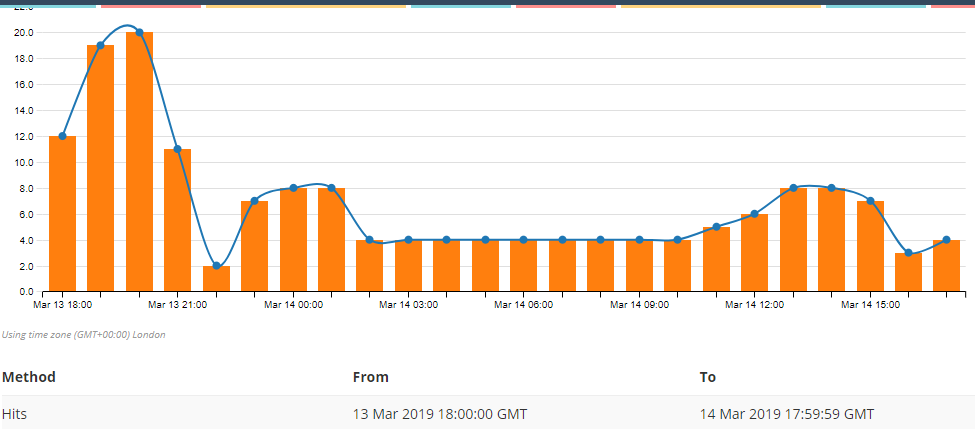
Any thoughts? I’m going to switch back to darksky api to see what happens.
-
RE: A couple of hopefully easy "how to's"
@bhepler Thanks. Will do. I don’t know if she will have a mouse/keyboard but Im sure I can find one at goodwill for a few bucks.
-
A couple of hopefully easy "how to's"
So the mirror I’ve finally got working the way I want is a graduation gift for a friend’s kid. When she gets to school the dorm has wifi for the floor. How can she access the pi to change the wifi network so the mirror works. I’m guessing via ethernet? Probably on a MacBook.
Once set up is there a way for me to ssh in from my place to add university calendar to the mirror? Don’t really trust her to do so. I guess maybe a screen share and then use vnc from her laptop or is there a better way.
Thanks all!
-
RE: NOAA v3 using too many requests?
I’m not sharing a key as far as I know. My usage just skyrocketed which was surprising. I switched from dark sky to another provider & all is well. Tomorrow I’ll get a new key from darksky and see what happens. Just seemed weird to me
-
NOAA v3 using too many requests?
Re: MMM-NOAA V3.0 doesn't see anything
The past 2 days I have lost weather access because I am using over 1000 requests via dark sky api. Nothing has changed in my config so I am wondering if other folks are having issues with this api or module
-
RE: [MMM-Remote-Control] Can not access remote control module
Thanks for all the feedback. I get the concerns and why its set up that way. No big deal at all
-
RE: [MMM-Remote-Control] Can not access remote control module
@Mykle1 my only other question is when I was at a friend’s house I tried to pull up the remote to show them the mirror & nothing happened on their wifi or cellular. I’m guessing on the white list I would have to input my phone ip address?
-
RE: [MMM-Remote-Control] Can not access remote control module
@Mykle1 Awesome! Thanks so much for your help.
-
RE: Frustrated rookie
@bhepler Yeah I got it fixed by doing the raspi-config. All good. Thanks for checking it out. Slowly trying to understand code and what it does and mean
-
RE: [MMM-Remote-Control] Can not access remote control module
@Mykle1 my bad. I am confusing on this. I did a fresh reboot of the whole thing using Jesse instead of Raspian stretch and don’t have the start up issues. I rebuilt the config like I wanted with all of the modules working good. I then add the remote module and change the address etc and get the please make a config file error. As soon as I remove the remote control info things work again. So I know the error comes when I add this module. The frustrating thing is at a previous point I was able to get the remote control module working. That’s why I am confused but here is my working config without remote control.
Thanks for your patience with me on this
var config = { address: "localhost", // Address to listen on, can be: // - "localhost", "127.0.0.1", "::1" to listen on loopback interface // - another specific IPv4/6 to listen on a specific interface // - "", "0.0.0.0", "::" to listen on any interface // Default, when address config is left out, is "localhost" port: 8080, ipWhitelist: ["127.0.0.1", "::ffff:127.0.0.1", "::1"], // Set [] to allow all IP addresses // or add a specific IPv4 of 192.168.1.5 : // ["127.0.0.1", "::ffff:127.0.0.1", "::1", "::ffff:192.168.1.5"], // or IPv4 range of 192.168.3.0 --> 192.168.3.15 use CIDR format : // ["127.0.0.1", "::ffff:127.0.0.1", "::1", "::ffff:192.168.3.0/28"], language: "en", timeFormat: 12, units: "imperial", modules: [ { module: "alert", }, { module: "updatenotification", position: "top_bar" }, { module: "clock", position: "top_left" }, { module: "calendar", position: "top_left", config: { calendars: [ { symbol: "calendar-check", url: "http://kuathletics.com/calendar.ashx/calendar.ics?sport_id=4&schedule_id=0&_=dd9bfb6f-df5f-4a47-9975-dd3bb74bd06a" }, { symbol: "calendar-check", url: "https://calendar.google.com/calenxxxxxxxxxxx7495e80bc22/basic.ics" }, { symbol: "calendar-check", url: "http://ical-cdn.tex3xxxxxxxxxx4e056117.ics" }, { symbol: "calendar-check", url: "http://ical-cdn.teamsnap.com/team_schedule/xxxxxxxxxxa68b.ics" } ] } }, { module: "compliments", position: "lower_third" }, { module: 'MMM-NOAA3', position: 'bottom_left', config: { provider: "darksky", apiKey: "6462c3f6d7c6dxxxxx311", airKey: "WZzmCBxxxxxmBM", css: "NOAA4", userlat: "x8.7xx9", userlon: "-x0.5xx" } }, { module: "MMM-NowPlayingOnSpotify", position: "bottom_right", config: { clientID: "85d8bxxxxxxx", clientSecret: "e6b226e4b819xxxxxx", accessToken: "Bxxxi-UItbKL3NR1dQXpC8sJ1041J5NjVeafoAb3fGVsicRUataJodmfa1urp0akDwThbo", refreshToken: "AQBP1w70KP5TqlxiFNgA4RU6mdTct0AHb58nasw2sEpl17iIz-uPDq9M0ifITQcOxxxxxx" } }, { module: "MMM-MyScoreboard", position: "top_right", classes: "default everyone", header: "My Scoreboard", config: { showLeagueSeparators: true, colored: true, viewStyle: "mediumLogos", sports: [ { league: "NHL", teams: ["STL"] }, { league: "NBA", teams: ["BOS", "GS", "HOU", "PHI"], }, { league: "MLB", teams: ["STL"] }, { league: "NFL", }, { league: "NCAAM", groups: ["Top 25"] } ] } }, { module: "currentweather", position: "top_right", config: { location: "New York", locationID: "", //ID from http://bulk.openweathermap.org/sample/; unzip the gz file and find your city appid: "YOUR_OPENWEATHER_API_KEY" } }, { module: "weatherforecast", position: "top_right", header: "Weather Forecast", config: { location: "New York", locationID: "5128581", //ID from https://openweathermap.org/city appid: "YOUR_OPENWEATHER_API_KEY" } }, { module: "newsfeed", position: "bottom_bar", config: { feeds: [ { title: "New York Times", url: "http://www.nytimes.com/services/xml/rss/nyt/HomePage.xml" } ], showSourceTitle: true, showPublishDate: true } }, ] }; /*************** DO NOT EDIT THE LINE BELOW ***************/ if (typeof module !== "undefined") {module.exports = config;} -
RE: [MMM-Remote-Control] Can not access remote control module
@Mykle1 its weird. I have a working config. I add the module exactly as you have it, I follow the directions and it doesn’t work. I have tried adding my phone IP into the whitelist area, doesn’t work. I followed the directions from the video which match your suggestion of
var config = {
   address: "0.0.0.0",
   port: 8080,
   ipWhitelist: [],
and still nothing. The crazy thing is I somehow got it working once before. then i had to rebuild my config and here I am.
-
RE: Frustrated rookie
i made a change in raspi-config that logs me in as user “pi” but I still have to enter startx Not sure how to prevent that so when the mirror is up if I need to reboot or move it, I can do so without having to hook up a keyboard. Any thoughts anyone? raspian stretch desktop is software
-
RE: [MMM-Remote-Control] Can not access remote control module
@cruunnerr said in [MMM-Remote-Control] Can not access remote control module:
do it like Mykle said
I think I have yet I still am getting config screen.
var config = {
	address: "0.0.0.0",
	ipWhitelist: [],

	language: "en",
	timeFormat: 12,
	units: "imperial",
{ module: 'MMM-Remote-Control' // uncomment the following line to show the URL of the remote control on the mirror , position: 'bottom_left' // you can hide this module afterwards from the remote control itself config: { customCommand: {}, // Optional, See "Using Custom Commands" below customMenu: "custom_menu.json", // Optional, See "Custom Menu Items" below showModuleApiMenu: true, // Optional, Enable the Module Controls menu apiKey: "", // Optional, See API/README.md for details } },I also watched this and at 4:41 seem to have exactly the same thing.