MagicMirror Forum
    • Recent
    • Tags
    • Unsolved
    • Solved
    • MagicMirror² Repository
    • Documentation
    • 3rd-Party-Modules
    • Donate
    • Discord
    • Register
    • Login
    1. Home
    2. NathTheDude
    3. Posts
    A New Chapter for MagicMirror: The Community Takes the Lead
    Read the statement by Michael Teeuw here.
    N
    Offline
    • Profile
    • Following 0
    • Followers 0
    • Topics 4
    • Posts 41
    • Groups 0

    Posts

    Recent Best Controversial
    • Calendar Module 'MMM-CalendarExt2' how to remove the weekend days?

      Hey all, I am using the great module MMM-CalendarExt2. I have managed to get filters working to take out birthdays and anniversarys which is cool.

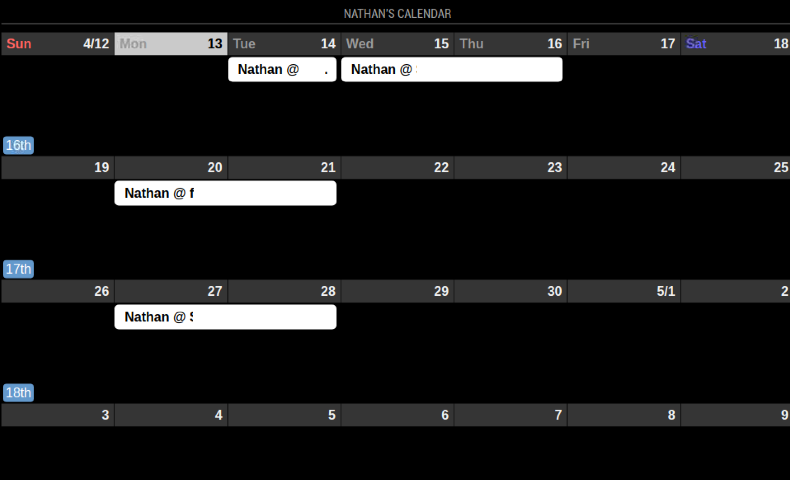
      I am not wanting a month view (which I have got) but only show the work week for Mon-Friday and leave out sat/sun, this is more down to wanting more space for the events for Mon-Fri but also just to show the work week.

      I have the following, anyone know how I can remove sat/sun from this and provide more room for the events Mon-Fri?

      Screenshot 2020-04-13 at 17.33.53.png

      Thanks

      posted in General Discussion mmm-calendarext2 calendar modules custom.css
      N
      NathTheDude
    • RE: MMM-GooglePhotos now says 'Loading...' in bottom right

      Hey @0YXmEQ , were you able to fix this?

      @Sean , where can I find the log? Thanks

      posted in Troubleshooting
      N
      NathTheDude
    • RE: Filter events on Calendar Module

      Hey @pedromrsantos,

      I know this post is quite old but I have just gotten around to setting up my new MM setup, not sure if filtering can be done with the standard calendar but it is possible with the module ‘MMM-CalendarExt2’.

      With this example I am able to filter out events that have ‘birthday’ in the title:

      filter: (event) =>{
        if (event.title.search(“Birthday”) > -1) {
          return true
        } else {
          return false
        }
      },
      

      On my setup I am importing 3 ics files and the displaying different views on my screen, one of them is a list of birthdays from three calendars.

      Let me know if you need more info.

      Cheers

      Nathan

      posted in Development
      N
      NathTheDude
    • RE: Rpi 4 and two monitors

      @sdetweil - if you comment out the chromium line in the run-start.sh does this cause you any issues/errors?

      posted in Hardware
      N
      NathTheDude
    • RE: Rpi 4 and two monitors

      @sdetweil - nice 2 x 4k’s.

      So, I did what you mentioned in your last post but unfortunetly I am in the same issue. I wonder if your problem was more to do with 2 x 4k’s which is perhaps different to mine? I am not sure.

      posted in Hardware
      N
      NathTheDude
    • RE: Rpi 4 and two monitors

      @sdetweil . I know it is a bit extreme but thought I would just start again and burn another image to the SD card. I am in the same position though

      • burnt image to sd card, booted rpi and did an update, enabled SSH and VNC
      • installed MM with your automation script
      • copied the ‘MagicMirror’ Folder to ‘MagicMirror2’, in the new folder I updated:
        – config.js - just updated port to 8082
        – run-start.sh - updated with window position and profile
        – mm.sh - new location
        – pm2_MagicMirror.json - updated with new locations
      • within the MagicMirror2 folder,
        – pm2 start ./installers/pm2_MagicMirror.json
        – pm2 save
      • This then started another MM from the MM2 folder on to screen 1
      • htop confirms that processes are running from both MagicMirror and MagicMirror2
      • pm2 status confirms that both are up

      In your setup, if you update the chromium line within run-start.sh with bad entries does that break your setup. Does not seem to be running this command from what I can see in my setup

      posted in Hardware
      N
      NathTheDude
    • RE: Rpi 4 and two monitors

      @sdetweil

      Thank you for this although it is still producing 2 x MM’s on the first screen (MM and MM2), not sure what could be wrong. If you have it working it obviously must me something I have done wrong…hmmmmm.

      I will review all the files and let you know if I find anything.

      posted in Hardware
      N
      NathTheDude
    • RE: Rpi 4 and two monitors

      Hey @sdetweil , after looking at how the current MM is setup with pm2 (pm2 show MagicMirror) this had the ‘mm.sh’ as the target.

      Within the MM2 folder I ran: ‘pm2 start ./installers/mm.sh --name MagicMirror2’ which started the MM2 but on the first screen. Then used pm2 save.

      I just setup pm2 with the .json file instead of the mm.sh file and the results seem to be the same from what i can see with it getting displayed on the first screen.

      Within the start-run.sh, I can comment out the chromium line and and it will not break anything which makes me think this line is not being referenced.

      MM line:

      chromium-browser --noerrdialogs --kiosk --user-data-dir='Default' --window-position=0,0 --disable-infobars --app=http://localhost:$port  --ignore-certificate-errors-spki-list --ignore-ssl-errors --ignore-certificate-errors 2>/dev/null
      

      MM2 line:

      chromium-browser --noerrdialogs --kiosk  --disable-infobars --app=http://localhost:8082 --ignore-certificate-errors-spki-list --ignore-ssl-errors --ignore-certificate-errors --window-postion=1920,0 --user-data-dir='Test2' 2>/dev/null
      
      posted in Hardware
      N
      NathTheDude
    • RE: Rpi 4 and two monitors

      Hey @sdetweil , thanks for the info on this - I am grateful.

      I think I am nearly there but just missing a bit or two.

      I copied the ‘MagicMirror’ to ‘MagicMirror2’ folder, updated the config.js, run-start.sh and the pm2_MagicMirror.json files.

      When I reboot I now get MM and MM2 load up but both on the same screen.

      I have messed around with the chromium line from the ‘run-start.sh’ and I don’t think it is actually be used in this case, I even commented the line out and this did not prevent me from running ‘npm start’ and MM2 still loaded albeit on top of the first MM.

      Any ideas on where it is getting it’s info on how to start up chromium?

      Thanks

      Nathan

      posted in Hardware
      N
      NathTheDude
    • RE: Rpi 4 and two monitors

      Hey @sdetweil , no problem at all - no rush indeed. Thank you for your help thus far.

      So thanks to this page I have been able to run up two chromiums, one on each page but I have started up chromium directly via terminal from the desktop. Not quite figured out how to implement this as two MM’s and if running up two at once would kill the CPU.

      raspberrypi.org forum post

      1st terminal session

      DISPLAY=:0 /usr/bin/chromium-browser \
      --noerrdialogs \
      --kiosk \
      --window-position=0,0 \
      --start-fullscreen \
      --user-data-dir=Default
      

      2nd terminal session

      DISPLAY=:0 /usr/bin/chromium-browser \
      --noerrdialogs \
      --kiosk \
      --window-position=1920,0 \
      --start-fullscreen \
      --user-data-dir=‘Test2’
      
      posted in Hardware
      N
      NathTheDude
    • RE: Rpi 4 and two monitors

      @sdetweil - ahhh. I need to do this from the desktop:

      pi@MagicMirrors:~ $ xrandr -q
      Screen 0: minimum 320 x 200, current 2160 x 1920, maximum 7680 x 7680
      HDMI-1 connected primary 1080x1920+0+0 left (normal left inverted right x axis y axis) 477mm x 268mm
         1920x1080     60.00*+  60.00    50.00    59.94  
         1680x1050     59.88  
         1280x1024     75.02    60.02  
         1440x900      59.90  
         1280x960      60.00  
         1280x720      60.00    60.00    50.00    59.94  
         1024x768      75.03    70.07    60.00  
         832x624       74.55  
         800x600       72.19    75.00    60.32    56.25  
         720x576       50.00    50.00    50.00  
         720x480       60.00    60.00    59.94    59.94    59.94  
         640x480       75.00    72.81    66.67    60.00    59.94    59.94  
         720x400       70.08  
      HDMI-2 connected 1080x1920+1080+0 right (normal left inverted right x axis y axis) 477mm x 268mm
         1920x1080     60.00*+  60.00    50.00    59.94  
         1680x1050     59.88  
         1280x1024     75.02    60.02  
         1440x900      59.90  
         1280x960      60.00  
         1280x720      60.00    60.00    50.00    59.94  
         1024x768      75.03    70.07    60.00  
         832x624       74.55  
         800x600       72.19    75.00    60.32    56.25  
         720x576       50.00    50.00    50.00  
         720x480       60.00    60.00    59.94    59.94    59.94  
         640x480       75.00    72.81    66.67    60.00    59.94    59.94  
         720x400       70.08  
      pi@MagicMirrors:~ $ 
      
      posted in Hardware
      N
      NathTheDude
    • RE: Rpi 4 and two monitors

      @sdetweil . I get the following when trying to run different xrandr commands:

      Can't open display
      
      posted in Hardware
      N
      NathTheDude
    • RE: Rpi 4 and two monitors

      @sdetweil , so I did the firmware update and rebooted.

      Slightly different now but still can not quite get this to work. When I now run a terminal on screen 1 the output of ‘echo $DISPLAY’ is ‘:0.0’ and when I run the terminal on the 2nd window the output is ‘:0’. However the same is seen when I try to either user ‘0’ or ‘0.0’ in run.sh (mm gets display on the 1st monitor.

      I have again tried to use different numbers (1,2,3 and 0.1, 0.2, 0.3) but again, these are not valid entries.

      posted in Hardware
      N
      NathTheDude
    • RE: Rpi 4 and two monitors

      @NathTheDude said in Rpi 4 and two monitors:

      @sdetweil , I opened up a terminal session on each screen and both indicated the same display was being used (:0).

      From the ‘Appearance Settings’ window (‘Prefences’ > ‘Apprearance Settings’, there is a ‘Taskbar’ tab and in this tab you select which hdmi output you want the taskbar to be on. You can choose both.

      Sorry, with my previous comment - I meant to say you ‘CANT’ choose both (taskbar can only be on one screen/output).

      posted in Hardware
      N
      NathTheDude
    • RE: Rpi 4 and two monitors

      @sdetweil , yeah buster.

      I can see temples on both screens, the image does not flow between screens. When looking at the 'Appearance Settings’, the is a tab for each HMDI with different settings but these are purely for what image is seen on the desktop. You can use the same image on both desktops however this is purely related to the desktop image or so is what I understand of it.

      posted in Hardware
      N
      NathTheDude
    • RE: Rpi 4 and two monitors

      @sdetweil , I opened up a terminal session on each screen and both indicated the same display was being used (:0).

      From the ‘Appearance Settings’ window (‘Prefences’ > ‘Apprearance Settings’, there is a ‘Taskbar’ tab and in this tab you select which hdmi output you want the taskbar to be on. You can choose both.

      posted in Hardware
      N
      NathTheDude
    • RE: Rpi 4 and two monitors

      @OldSunGuy , sorry mis read your comment. Not sure how I would start a terminal on one screen and a different terminal on another.

      posted in Hardware
      N
      NathTheDude
    • RE: Rpi 4 and two monitors

      @OldSunGuy - I get :0.0

      I wonder if both screens are being seen as 0.0, if that is the case I guess I would expect the MM screen to cover both screens and not just the first :-/

      posted in Hardware
      N
      NathTheDude
    • RE: Rpi 4 and two monitors

      Hey @OldSunGuy , thanks. ‘0’ and ‘0.0’ seem to be the first monitor however I get an error when I try anything else. So far I have tried using each of the following: 0, 1, 2, 3, 4, 5, 6, 7, 8, 9, 0.0, 0.1, 0.2, 0.3, 0.4, 0.5, 0.6, 0.7, 0.8, 0.9

      Each time I try to start npm (npm start) apart from when I use 0 or 0.0 I get the following (with the value reflecting the number I changed in ‘run-start.sh’):

      (electron:2238): Gtk-WARNING **: 06:14:02.236: cannot open display: :0.1
      

      @sdetweil - not sure if this is relevant but it does not seem to matter what value I set in ‘run-start.sh’, when I reboot the pi it will always start MM on the first screen. Should it not fail if it is using ‘run-start.sh’?

      Also with an incorrect value being added to ‘run-start.sh’, when I run ‘mm.sh’ this always works and displays MM on the first screen.

      okay, I think I understand it now. When I reboot it is using ‘mm.sh’, within mm.sh is the following:

      cd ~/MagicMirror
      DISPLAY=:0 npm start
      

      Which I assume means that the ‘run-start.sh’ is not used during boot up?

      When I change this value to anything other than 0, this will also fail with the same error seen when trying to run npm previously.
      posted in Hardware
      N
      NathTheDude
    • RE: Rpi 4 and two monitors

      @sdetweil , so using ‘0’ or ‘0.0’ give the same result and start MM on the first monitor.

      So far I have tried 1,2,3,4,5,6,7,8,9 and 0.1, 0.2, 0.3, 0.4, 0.5

      How far do I go? :)

      posted in Hardware
      N
      NathTheDude
    • 1 / 1