MagicMirror Forum
    • Recent
    • Tags
    • Unsolved
    • Solved
    • MagicMirror² Repository
    • Documentation
    • 3rd-Party-Modules
    • Donate
    • Discord
    • Register
    • Login
    1. Home
    2. nbrenn
    3. Posts
    A New Chapter for MagicMirror: The Community Takes the Lead
    Read the statement by Michael Teeuw here.
    Offline
    • Profile
    • Following 0
    • Followers 0
    • Topics 10
    • Posts 43
    • Groups 0

    Posts

    Recent Best Controversial
    • RE: Trying to write my own Module...

      I am trying to begin the next iteration of my module.

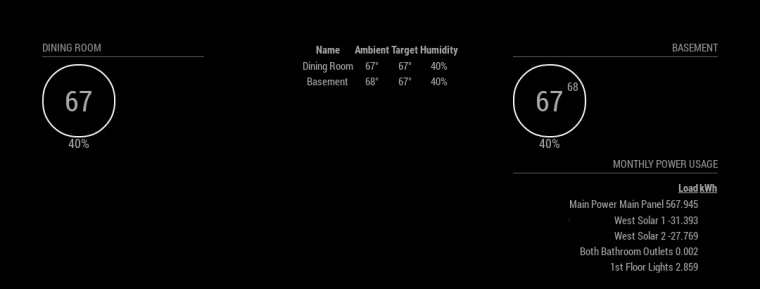
      I have the real-time energy usage, and monthly power usage being displayed in a list in the top left and right corners of my mirror.

      I am hoping to do something similar to the following:

      • Take a value from my Monthly Usage, and then display it in the center of my mirror with a sentence like, “Your monthly power usage is: XXX Watts”.

      Since this monthly energy usage module is in the top right of my mirror, how would I extract a value or variable from that module and then display it into the center of the mirror.

      So basically, I have a long list of power usages being displayed on my mirror, but I would like to display a sentence or two about that data on another part of my mirror - extracting a value from the module and displaying it in the center of the mirror. Can this be done using the same .js code in the module, and just modifying the .css?
      posted in Development
      nbrennN
      nbrenn
    • RE: How to load a <script> src = " " </script> into my mirror?

      @cowboysdude @strawberry-3-141

      I’m having trouble getting my icon to load. My getDom looks like the following:

      getDom: function() {
      		var wrapper = document.createElement("div");
      
      		if (!this.loaded) {
      			wrapper.innerHTML = this.translate("Loading...");
      			wrapper.className = "dimmed light small";
      			return wrapper;
      		}
      		wrapper.className = "datafeed";		
      		var myLogo = document.createElement("span");
      			var myIcon = document.createElement("img");
      			myLogo.classList.add("myLogo");		
      			myIcon.src = this.file("my_logo.png");
      			myLogo.appendChild(myIcon);
      		wrapper.appendChild(myLogo);
      		
      		wrapper.innerHTML = "Today, your sum is " + this.sum ;
      		return wrapper;
      	},
      
      posted in Development
      nbrennN
      nbrenn
    • RE: How to load a <script> src = " " </script> into my mirror?

      @cowboysdude Thanks for the example!

      Is there a specific styling that needs to be used for the images? For example, I would need the image to have the typical white/greyish hue to it.

      posted in Development
      nbrennN
      nbrenn
    • RE: How to load a <script> src = " " </script> into my mirror?

      Does anyone know of the best documentation for adding an image/graphic into a mirror module?

      For my example here, Mirror Datafeed and Sum Module, I am summing over the values in a column in a .csv and then outputting it.

      I would like to show an image based on what that value is. As a crude example, if the sum is greater than 50, output a frown. If it is less than 50, show a smiling face. What’s the best documentation for putting in graphics that will work on the mirror?

      posted in Development
      nbrennN
      nbrenn
    • RE: How to load a <script> src = " " </script> into my mirror?

      @morozgrafix I think I can work around this by changing the SQL query (that generates my .csv) to include just one column. Then I can implement it as a new module, placed above the current one.

      posted in Development
      nbrennN
      nbrenn
    • RE: How to load a <script> src = " " </script> into my mirror?

      @morozgrafix Everything is working very well so far!

      I am updating my “Sum” daily, but I would like to be able to show the previous day’s sum. Could I store the value of the sum at 11:59pm, each evening, and then display that value in addition to the current day’s sum?

      Additionally, how could I modify the line of code:

      this.sum = lines.reduce((a, b) => a + b, 0);
      

      to allow for me to sum across multiple columns? So, if my .csv has 3 columns, I’d like the sum total of them.

      posted in Development
      nbrennN
      nbrenn
    • RE: How to load a <script> src = " " </script> into my mirror?

      @morozgrafix This looks awesome! I will try to work with this over the next couple days and will let you know if I have any other questions! Thanks!

      posted in Development
      nbrennN
      nbrenn
    • RE: How to load a <script> src = " " </script> into my mirror?

      @morozgrafix Thanks for your outline. It is very, very helpful and appreciated. So I tried to take what you suggested to turn it into my code, and put it onto GitHub.

      I created a GitHub repository that contains my .css, .csv, and datafeed.js. My areas of confusion (which you’ll probably see in the code) are around how I called in the remoteFile in my getDom. I am not sure if I did that correctly. https://github.com/brennn1/Magic-Mirror-Datafeed-Module

      My .csv is coming in the format which you’ll see on the Github - so each data point is separated by a new line. So I changed where you had the line.split(",") to line.split("\n").

      Do you see anything obvious that will cause me problems? I will go ahead and see what errors I get when I load it onto my mirror.

      posted in Development
      nbrennN
      nbrenn
    • RE: How to load a <script> src = " " </script> into my mirror?

      @morozgrafix I am referring back to your jsfiddle example: jsfiddle example, and you created an object called csvData which you refer to in var data = ...

      I was wondering how I would create a similar object, except with the file that I have in my directory. I couldn’t seem to find an HTML DOM function that would allow me to load the .csv file. I looked at the examples for the Compliments module, and they were in json. So, I saw that I might be able to use Papa Parse to convert the .csv to json and then follow the similar route as the Compliments.

      My d3 approach loads the data from my csv onto my mirror, but the .css doesn’t seem to help it. It doesn’t appear in a table, and is very large (displaying in the upper left part of the mirror) even when I specified it to load in the middle.

      For some context, my .csv data table contains two columns of time-series data for which I want to sum together. And then I just want to output a sentence like, “Your sum is XXX.”

      Thanks again for the clarifications. I’m slowly wrapping my head around the interaction of the HTML and Javascript, and I think I get confused when I see code split into HTML and Javascript, when the modules are written with it all together in the HTML DOM format.

      posted in Development
      nbrennN
      nbrenn
    • RE: Displaying data from a CSV file saved on my Pi?

      @morozgrafix That’s fine with me! Thanks!

      posted in Development
      nbrennN
      nbrenn
    • RE: How to load a <script> src = " " </script> into my mirror?

      @morozgrafix You got it! The path was the issue. Do you know why I can’t use the path the way I specified?

      Now, I’ll go back and try your solution and see if I have any other problems!

      Thanks again for your help. It’s much appreciated.

      posted in Development
      nbrennN
      nbrenn
    • RE: How to load a <script> src = " " </script> into my mirror?

      @morozgrafix Yep, when the mirror was running, and running the wget http://localhost:8080 command, I connected successfully.

      So then when I open up a command terminal while the mirror is running, and run:

      wget http://localhost:8080/home/pi/MagicMirror/modules/datafeed/JANUARY22TEST.csv
      

      it says connected to 8080, but returns 404 Not Found.

      posted in Development
      nbrennN
      nbrenn
    • RE: How to load a <script> src = " " </script> into my mirror?

      @morozgrafix I start my mirror with npm start. And my Mirror config.js, I am using Port 8080.

      posted in Development
      nbrennN
      nbrenn
    • RE: How to load a <script> src = " " </script> into my mirror?

      @morozgrafix Thanks for the response and the support!

      This looks very promising solution and I’ll give it a go once I solve one nagging problem. I am receiving the connection refused error when I am connecting to the localhost: 8080:

      pi@raspberrypi:~ $ wget --verbose localhost:8080
      --2017-01-24 12:11:12--  http://localhost:8080/
      Resolving localhost (localhost)... ::1, 127.0.0.1
      Connecting to localhost (localhost)|::1|:8080... failed: Connection refused.
      Connecting to localhost (localhost)|127.0.0.1|:8080... failed: Connection refused.
      pi@raspberrypi:~ $
      
      posted in Development
      nbrennN
      nbrenn
    • RE: How to load a <script> src = " " </script> into my mirror?

      Thanks for the great response. Your example is very helpful.

      I would like to update the CSV while the mirror is running, so I will have to look in to how to accomplsh that.

      One question about loading the CSV, if I were to use your example. In your example, you are reading the CSV data from a text area. In my case, how would I read the CSV from a directory on my Raspberry Pi? It looks like I would have to access the file and then save it as the object “csvData”.

      It also looks like I am receiving a “http://localhost:8080/home/pi/MagicMirror/modules/datafeed/JANUARY22TEST.csv Failed to load resource: the server responded with a status of 404 (Not Found)” error. The connection to port 8080 is refused (and my mirror is running on Port 8080 and all of my other modules are running fine). Do you know a workaround for this?

      Thank you!

      posted in Development
      nbrennN
      nbrenn
    • RE: How to load a <script> src = " " </script> into my mirror?

      Thanks for your response! I tried to change it to the method you described, but it is still isn’t showing anything. Looking at my code, do you know if there is something else keeping it from working?

      I am getting an error that it failed to load resource, on the line of my csv. Do I have to specify the path?

      posted in Development
      nbrennN
      nbrenn
    • How to load a <script> src = " " </script> into my mirror?

      I am trying to have my module load the d3 library to create a table for my csv data. But I am not sure how to type in the line:

      src="d3.min.js?v=3.2.8"
      

      (which is wrapped in script brackets), into my module. Right now, nothing shows up on my Mirror aside from the name of the module, datafeed. My code is as follows:

      Module.register("datafeed",{
      getScripts: function() {
       	return ["d3.min.js"]
       },
      
       // Define styles.
       getStyles: function() {
       	return ["datafeed_styles.css"];
       },
       
      
       // Override dom generator.
       getDom: function() {
           d3.text("JANUARY22TEST.csv", function(data) {
                   var parsedCSV = d3.csvParseRows(data);
      
                   var container = d3.select("body")
                       .append("table")
      
                       .selectAll("tr")
                           .data(parsedCSV).enter()
                           .append("tr")
      
                       .selectAll("td")
                           .data(function(d) { return d; }).enter()
                           .append("td")
                           .text(function(d) { return d; });
               });
       },
      });
      
      posted in Development
      nbrennN
      nbrenn
    • Displaying data from a CSV file saved on my Pi?

      Hi all,

      I managed to connect my Raspberry Pi to a MySQL Database to retrieve some data from a database table. The file is then saved on my Raspberry Pi as a .csv, and I would like to display the data on my Mirror.

      The data contains time-series data from a remote temperature sensor, and I will try to update the query every few hours. The data has a column for the Time-Stamp and a column for the reading itself. I’d probably just have the output be a sentence like, “The temperature is X degrees” where X is taken from the .csv file.

      In my mind, I believe that I need to create an HTML document object that retrieves the data from the file, and then displays it. Is this a method that would be best for my application?

      Basically, how do I take the following code and turn it into code for the Magic Mirror?
      https://bl.ocks.org/ndarville/7075823

      posted in Development
      nbrennN
      nbrenn
    • RE: MMM-Fitbit

      Could this module be adapted to work for the Misfit?

      posted in Health
      nbrennN
      nbrenn
    • RE: Trying to write my own Module...

      @mochman I have another question. As shown below in the attached image, I am appending the name to the kWh values. How do I put the name into the Load column and the numbers into their kWh column?

      In this case, the “name” is in the same object as the channel, so that’s why I extracted it the way I do in my code… I have the name as a variable, but I can’t seem to put it into it’s own column.

      0_1484344461715_loadkhw2 (1).jpg

      Code:

         getDom: function(){
              var wrapper = document.createElement("div");
              if(!this.loaded) {
                      wrapper.innerHTML = "Loading...";
                      return wrapper;
              }
              if(this.xml !== null){
      	 var table = document.createElement("table");   
      	 var row = document.createElement("tr");   
      	 var header = document.createElement("th");
      	 var header2 = document.createElement("th");
      	 header.innerHTML = "Load";
      	 row.appendChild(header);
      	 header2.innerHTML = "kWh";
      	 row.appendChild(header2);
      	 table.appendChild(row);
      
      	 table.classList.add("xsmall", "table");
               var channels = this.xml.getElementsByTagName("channel");	 
      
               for(var i = 0; i < channels.length; i++){	   	
      		var row = document.createElement("tr");
                 for(var n = 0; n < channels[i].children.length; n++){
      		name = channels[i].getAttribute('name');
      		if(channels[i].children[n].tagName === "kWh"){
                      	var element = document.createElement("td");
      			element.classList.add(channels[i].children[n].tagName);
      		if (channels[i].children[n].textContent != 0){
      			element.innerHTML = name + " " + channels[i].children[n].textContent;
      
      			row.appendChild(element);
      			table.appendChild(row);
      			}
      		}          	   
                 }
               }
               wrapper.appendChild(table);
              } else {
                      console.log("Returned no Data");
                      wrapper.innerHTML = "NO DATA";
              }
              return wrapper;
         },
      
      posted in Development
      nbrennN
      nbrenn
    • 1
    • 2
    • 3
    • 1 / 3