@karsten13 I have used the “rguglar way” with
git pull && npm install
In which folder do i have to perform this coommands? Regular MagicMirror-Folder?
@karsten13 I have used the “rguglar way” with
git pull && npm install
In which folder do i have to perform this coommands? Regular MagicMirror-Folder?
Hi,
after Updating to 2.18 (from 2.17) - every 2 days the MM freezes… I dont have any clue why. The raspberryPi is still rechable.
NPM Version 6.14.15
pm2 log MagicMirror:
ERR! magicmirror@2.18.0 start: `DISPLAY="${DISPLAY:=:0}" ./node_modules/.bin/electron js/electron.js`


Logfile:
0 info it worked if it ends with ok
1 verbose cli [ '/usr/bin/node', '/usr/bin/npm', 'start' ]
2 info using npm@6.14.15
3 info using node@v14.18.2
4 verbose run-script [ 'prestart', 'start', 'poststart' ]
5 info lifecycle magicmirror@2.18.0~prestart: magicmirror@2.18.0
6 info lifecycle magicmirror@2.18.0~start: magicmirror@2.18.0
7 verbose lifecycle magicmirror@2.18.0~start: unsafe-perm in lifecycle true
8 verbose lifecycle magicmirror@2.18.0~start: PATH: /usr/lib/node_modules/npm/node_modules/npm-lifecycle/node-gyp-bin:/home/pi/MagicMirror/node_modules/.bin:/usr/local/sbin:/usr/local/bin:/usr/sbin:/usr/bin:/sbin:/bin:/usr/local/games:/usr/games
9 verbose lifecycle magicmirror@2.18.0~start: CWD: /home/pi/MagicMirror
10 silly lifecycle magicmirror@2.18.0~start: Args: [
10 silly lifecycle   '-c',
10 silly lifecycle   'DISPLAY="${DISPLAY:=:0}" ./node_modules/.bin/electron js/electron.js'
10 silly lifecycle ]
11 silly lifecycle magicmirror@2.18.0~start: Returned: code: 1  signal: null
12 info lifecycle magicmirror@2.18.0~start: Failed to exec start script
13 verbose stack Error: magicmirror@2.18.0 start: `DISPLAY="${DISPLAY:=:0}" ./node_modules/.bin/electron js/electron.js`
13 verbose stack Exit status 1
13 verbose stack     at EventEmitter.<anonymous> (/usr/lib/node_modules/npm/node_modules/npm-lifecycle/index.js:332:16)
13 verbose stack     at EventEmitter.emit (events.js:400:28)
13 verbose stack     at ChildProcess.<anonymous> (/usr/lib/node_modules/npm/node_modules/npm-lifecycle/lib/spawn.js:55:14)
13 verbose stack     at ChildProcess.emit (events.js:400:28)
13 verbose stack     at maybeClose (internal/child_process.js:1058:16)
13 verbose stack     at Process.ChildProcess._handle.onexit (internal/child_process.js:293:5)
14 verbose pkgid magicmirror@2.18.0
15 verbose cwd /home/pi/MagicMirror
16 verbose Linux 5.10.63-v7l+
17 verbose argv "/usr/bin/node" "/usr/bin/npm" "start"
18 verbose node v14.18.2
19 verbose npm  v6.14.15
20 error code ELIFECYCLE
21 error errno 1
22 error magicmirror@2.18.0 start: `DISPLAY="${DISPLAY:=:0}" ./node_modules/.bin/electron js/electron.js`
22 error Exit status 1
23 error Failed at the magicmirror@2.18.0 start script.
23 error This is probably not a problem with npm. There is likely additional logging output above.
24 verbose exit [ 1, true ]
@sdetweil said in Calendar Dates - Problematic behaviour since 2.18:
fullDayEventDateFormat
Thanks a lot, again @sdetweil .
fullDayEventDateFormat: 'D.MMMM',
did the job!
@sdetweil I found the problem!
Its about whole day events!

Now you see both events are from the same (google) calendar.
“Test - dayevent” is for the whole day.
“Zahnarzt” is just for a timeslot.
In the 2.18 releasenotes from @MichMich is mentioned, that “Fixed Calendar showEnd and Full Date overlay (#2629).” Maybe this or another change caused this issue.
Did you know, where i can add this issue to 2.18??? Whith dateFormat: ‘D.MMMM’, both entries should look in the same format.
This should moved to Troubleshooting (not modules/troubleshooting).
@sdetweil Hi @sdetweil , thx for your reply.
I mean, i added the dateFormat to every single calendar. But i doesnt work too.
    {
      module: 'calendar',
      header: 'Kalender',
      position: 'top_left',
      config: {
		dateFormat: 'D.MMMM',
		displayRepeatingCountTitle: true,
		colored: true,
		coloredSymbolOnly: true,
        calendars: [
		  {
			symbol: 'calendar',
            url: 'https://www.officeholidays.com/ics-local-name/germany',
			color: '#fdffe3'
          },
		  {
			symbol: 'trash-alt',

			url: 'https://calendar.google.com/calendar/ical/XXXXXXXXX%40import.calendar.google.com/public/basic.ics',
			color: '#DF0F32',
                        dateFormat: 'D.MMMM',
			maximumEntries: 5
		  },
		  {
            url: 'https://calendar.google.com/calendar/ical/oberfragger%40gmail.com/private-XXXXXXXXX/basic.ics',
			symbol: 'calendar-check',
			color: '#7cd2fc'
          },
		  {
 			url: 'http://localhost:8080/mmm-googlebirthdaysprovider',
			repeatingCountTitle: 'Geburtstag',
			dateFormat: 'D.MMMM',
			symbol: 'birthday-cake',
			color: '#F5DA81'
 		  },
          {
            symbol: 'flag-checkered',
            url: 'http://localhost:8080/MMM-Formula1/schedule.ics',
			color: '#b8e9fc'
          }
        ],
		customEvents: [
		  {
			keyword: 'tsfeiertag',
			color: '#fcb8d8',
			symbol: 'gifts'
		  },
		  {
			keyword: 'Könige',
			color: '#fff2cc',
			symbol: 'crown'
		  },
		  {
			keyword: 'gelbe',
			color: '#fff133',
			symbol: 'recycle'
		  },
		  {
			keyword: 'blaue',
			color: '#335cff',
			symbol: 'newspaper'
		  },
		  {
			keyword: 'bäume',
			color: '#06a929',
			symbol: 'tree'
		  },
		  {
			keyword: 'oster',
			color: '#adf542',
			symbol: 'egg'
		  }
		]
      }
    },
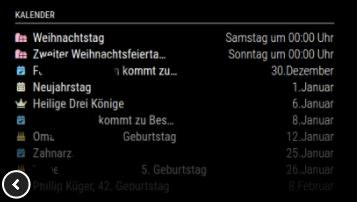
In 2.17 it looked so:
Moin,
ich habe soeben auf 2.18 upgegraded. Im default calender Modul habe ich ein paar Kalender konfiguert. Leider werden die Daten unterschiedlich formatiert. Warum das denn bzw. wie kann ich das anpassen?
Recently i updatet to 2.18. Since then the different confgured calendars in the default calendar muduls are showing a different time format. Pretty odd.
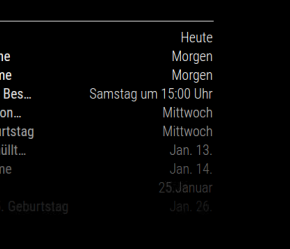
Gewünschte Formatierung wie unten “25. Januar”. Das kommt aus meinem persönlichen Google-Kalender. Die beiden Einträge darüber sind ein extra Google-Müllkalender (nicht Bestandteil des eigenen Kalenders, aber öffentlich.)
I want the dates shown like “25. Januar” and not Jan. 25… The right entry is from my personal google calendar, the others are from an extra Google-Calendar and from the ‘MMM-GoogleBirthdaysProvider’-Module. I 2.17 everything was fine!
Auch die Einträge aus ‘MMM-GoogleBirthdaysProvider’ werden im amerikanischen Format dargestellt (sieht man gerade nicht, da der 10. EIntrag im Screenshot zu dunkel ist).
Wie bekomme ich da die Formatierung hin? Auch der Versuch nochmal im eigentlichen Kalendereintrag das Datum anzupassen schlägt fehl.
    {
      module: 'calendar',
      header: 'Kalender',
      position: 'top_left',
      config: {
		dateFormat: 'D.MMMM',
		displayRepeatingCountTitle: true,
		colored: true,
		coloredSymbolOnly: true,
        calendars: [
		  {
Hier nochmal das Beispiel innerhalb des eigentlichen Kalendereintrags.
Here the example in one calendar entry. I hoped that this will force the right dateFormat.
			color: '#DF0F32',
			maximumEntries: 5,
			dateFormat: 'D.MMMM',
		  },
@vidibi Hi,
noch ne Frage- gibts auch irgendeine Möglichkeit (custom-css etc.) die Überschrift linksbündig zu machen?
Ok, found it:
.MMM-MieleAtHome header {
text-align: left
}
@vidibi Hi, ich schreibe das auch nochmal in Github.
In MM Version 2.17 ist das request-Modul rausgeflogen. Deshalb muss dieses bei der Installation berücksichtigt werden.
Also- in den Modules Folder wechseln und dann:
npm install request
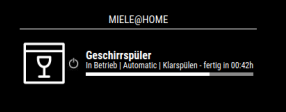
Nun läuft. Danke für das Modul und das aufgreifen der Icons…sieht ja aus wie in der App. Nice.
Klappt wie erwartet auch mit dem Geschirrspüler.
@sdetweil No sorry,
its not possible to edit the dates. Its an offical calendar from Stadtreinigung Hamburg.
And also to download it and change that… lets see, but thanks for your hint into that direction.
Also i have seen that this is an event for the whole day.
Hi,
i have an online-trash shedule. Every entry is set to 0 AM. I want to show 7 Am for this entries.
Is there any possibility to set the timezone just for this calendar or add an extra offset (+7h) for it?
The entries looking like this:
BEGIN:VCALENDAR VERSION:2.0 PRODID:Stadtreinigung Hamburg//Abfuhrkalender//DE NAME:SRH Abfuhren X-WR-CALNAME:SRH Abfuhren DESCRIPTION:Aktuelle Abholtermin in Hamburg X-WR-CALDESC:Aktuelle Abholtermin in Hamburg REFRESH-INTERVAL;VALUE=DURATION:PT720M X-PUBLISHED-TTL:PT720M BEGIN:VTIMEZONE TZID:Europe/Berlin BEGIN:STANDARD DTSTART:20211031T030000 TZOFFSETFROM:+0200 TZOFFSETTO:+0100 END:STANDARD BEGIN:DAYLIGHT DTSTART:20220327T030000 TZOFFSETFROM:+0100 TZOFFSETTO:+0200 END:DAYLIGHT BEGIN:STANDARD DTSTART:20221030T030000 TZOFFSETFROM:+0200 TZOFFSETTO:+0100 END:STANDARD END:VTIMEZONE BEGIN:VEVENT UID:61cb7d06acf53 DTSTAMP;TZID=Europe/Berlin:20211228T220926 SUMMARY:Abfuhr gelbe Wertstofftonne/-sack DESCRIPTION:Die Abholung erfolgt ab 6:00 Uhr LOCATION:Location here TRANSP:TRANSPARENT DTSTART;TZID=Europe/Berlin;VALUE=DATE:20211229 X-SRH-CONTAINER-TYPE:yellow END:VEVENT BEGIN:VEVENT UID:61cb7d06ad707 DTSTAMP;TZID=Europe/Berlin:20211228T220926 SUMMARY:Abfuhr schwarze Restmülltonne DESCRIPTION:Die Abholung erfolgt ab 6:00 Uhr LOCATION:Location hereTRANSP:TRANSPARENT
@digidadbod We dont have any fog inside the bathroom. Only the window gets foggy sometimes.
The bathroom is always warm enoug and so the mirror too. We have floor heating. Maybei thats why…
@kusselin sure. My MMM_page config:
    {
      module: 'MMM-pages',
      disabled: false,
      config: {
        modules: [
          [
            'newsfeed',
            'MMM-OpenWeatherForecast',
            'calendar',
            'calendar_monthly',
            'MMM-WiFiPassword'
          ],
          [
            'compliments',
            'MMM-Globe',
            'MMM-DWD-Pollen',
            'MMM-DWD-WarnWeather',
            'MMM-WeatherChart',
            'MMM-OpenmapWeather',
			'MMM-SystemStats',
            'weatherforecast',
          ]
        ],
        fixed: [
          'updatenotification',
          'MMM-page-indicator',
          'alert',
          'clock',
          'MMM-MotionEye',
		  'MMM-GoogleBirthdaysProvider',
		  'MMM-NewPIR',
		  'MMM-UserPresenceToMQTT',
          'MMM-Remote-Control'
        ],
        animationTime: 2500,
        rotationTime: 60000
      }
    },
@Stoffbeuteluwe Yes. It updates. But i use pages do i have a refresh every 2 minutes. Maybe thats the key
Last year i decided to start the project.
Now its finished. Maybe some extra modules but …its finished.
The goal was i big mirror in the bathroom. It should look like a regular mirror an no PIR e.g. in sight and the outer frame should not be visible. It also should have background lights as well! So lets start.
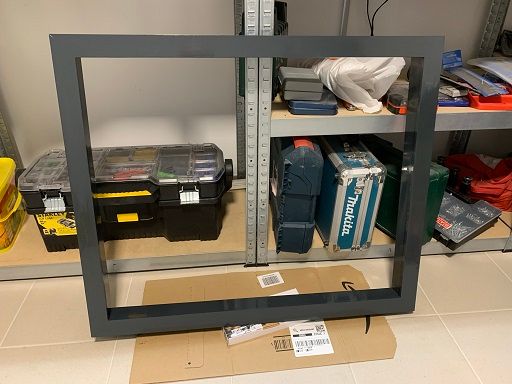
I build a new frame, completly by myself. I did some woodwork in my workshop.!
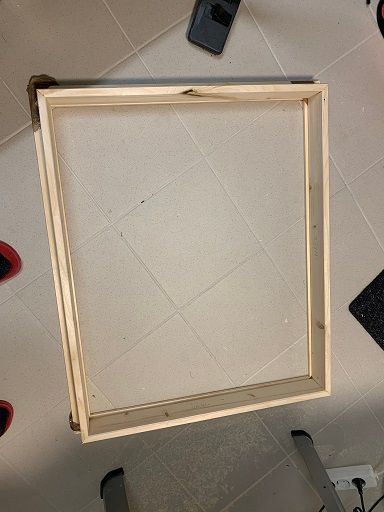

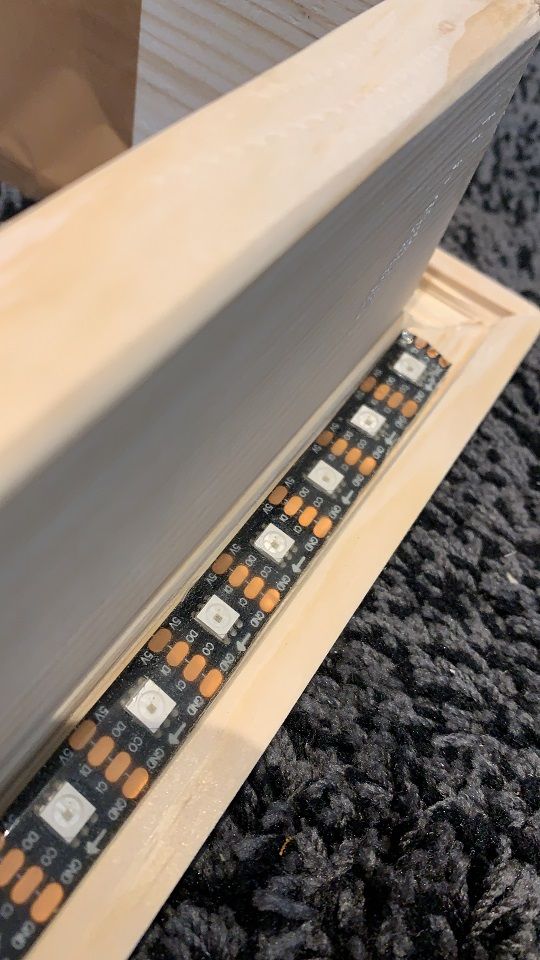
I createt with the saw a bevel to fit the LED-Stripe. I also have some experience with Hyperion… so i tought… okay… its anice idea to use the leftover LEDs for this project (in the end… i had 3 LEDs over ;), 1872 pieces mountet).
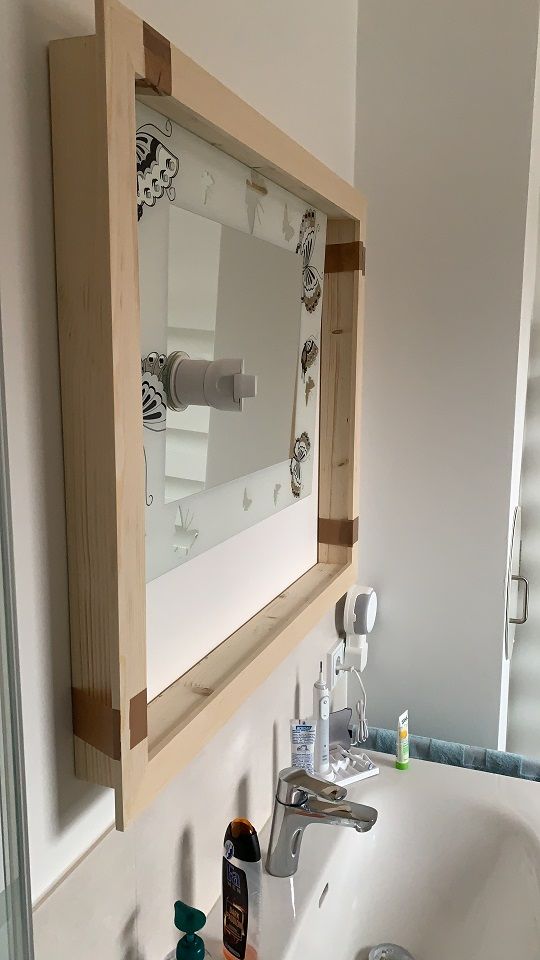
Here you see the old mirror which was there for some time (i had this always in my mind). And do you see the Alexa? I didnt want to see Alexa anymore but want to hera the music.
To mount it i decided to use a french cleat. Pretty easy to build, install and very reliable.
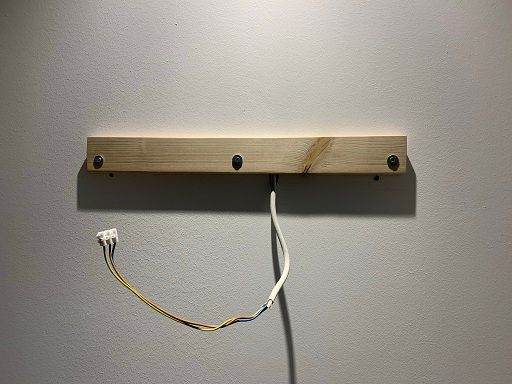
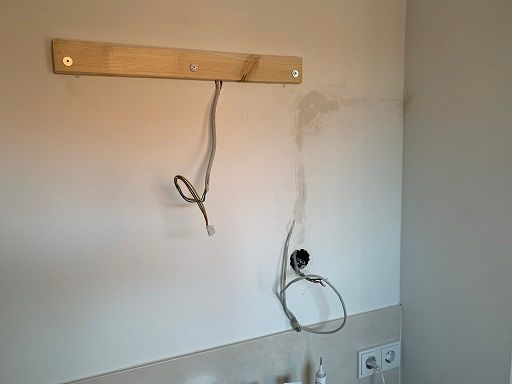
I didnt have nice Wifi… so i decided a few week ago to make some hole in the wall and install a LAN-cable and also a wall plug.
Then go for the paint jobs. I tried different things. Paintbrush, paint roll and spray can. With the brush and roller i had a lot of blobs in the surface, so i used the spray can. Not perfect… i want that glossy surface. But as an amateur- its okay. The color is RAL 7016. Same color like the closet.
I mounted a plywood in it an cut the monitor out. You already see the hanger from the french cleat an the monitor - 27" QHD! On top of the plywood i placed black paperboard.
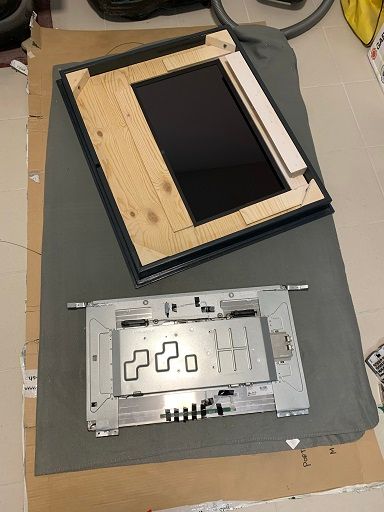
First of all i brought for the mirror the Mirastar Chrome Spy. I was very brown and dark, so i brought an extra one from the forum from @Goldjunge_Chriz . Its okay…but still a bit dark.
Lets see the cables and stuff. Here is the nearly finished version. The cables für the LED-stripes are o the top.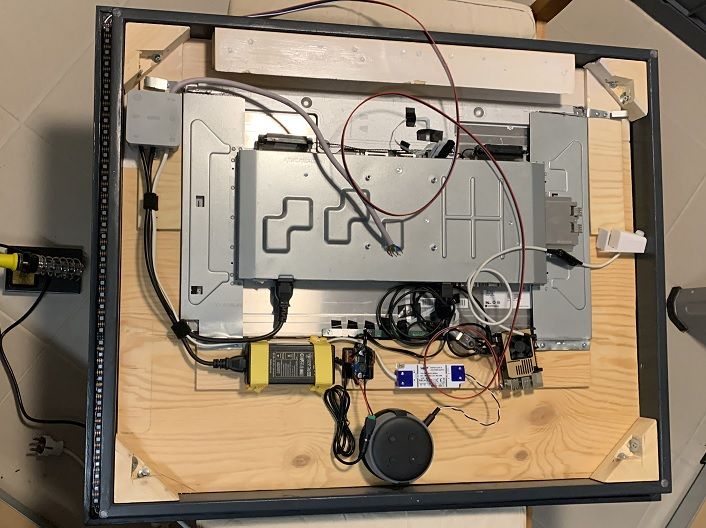
After a time testing with the MagicMirror Alexa i realized that it pretty hard to get the microfone in a good quality and als that its no longer possible to stream music to non Alexa-devices. So i 3Dprinted a mounting for the Echo Dot 3.
The are 2 PSU- One 12V (the white one) for the Echo Dot to have a slim fit in back and also a 5V for the LED stripe and the Raspberry Pi4. I also added a StepUp converter to have stable 5v for the RPI to prevent errors. You also see the PIR-Sensor case. Created and 3D printed by myself.
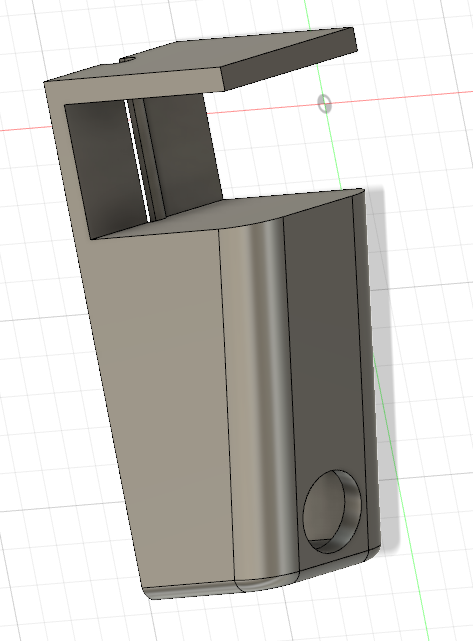
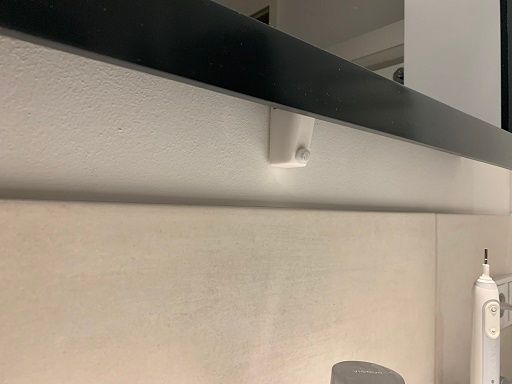
I also created a smal bracket to hold the RPI in place. But noch back-picture yet.
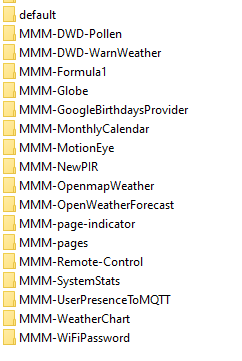
I use the following modules with very small customisations:
Tada! Here is the mirror:
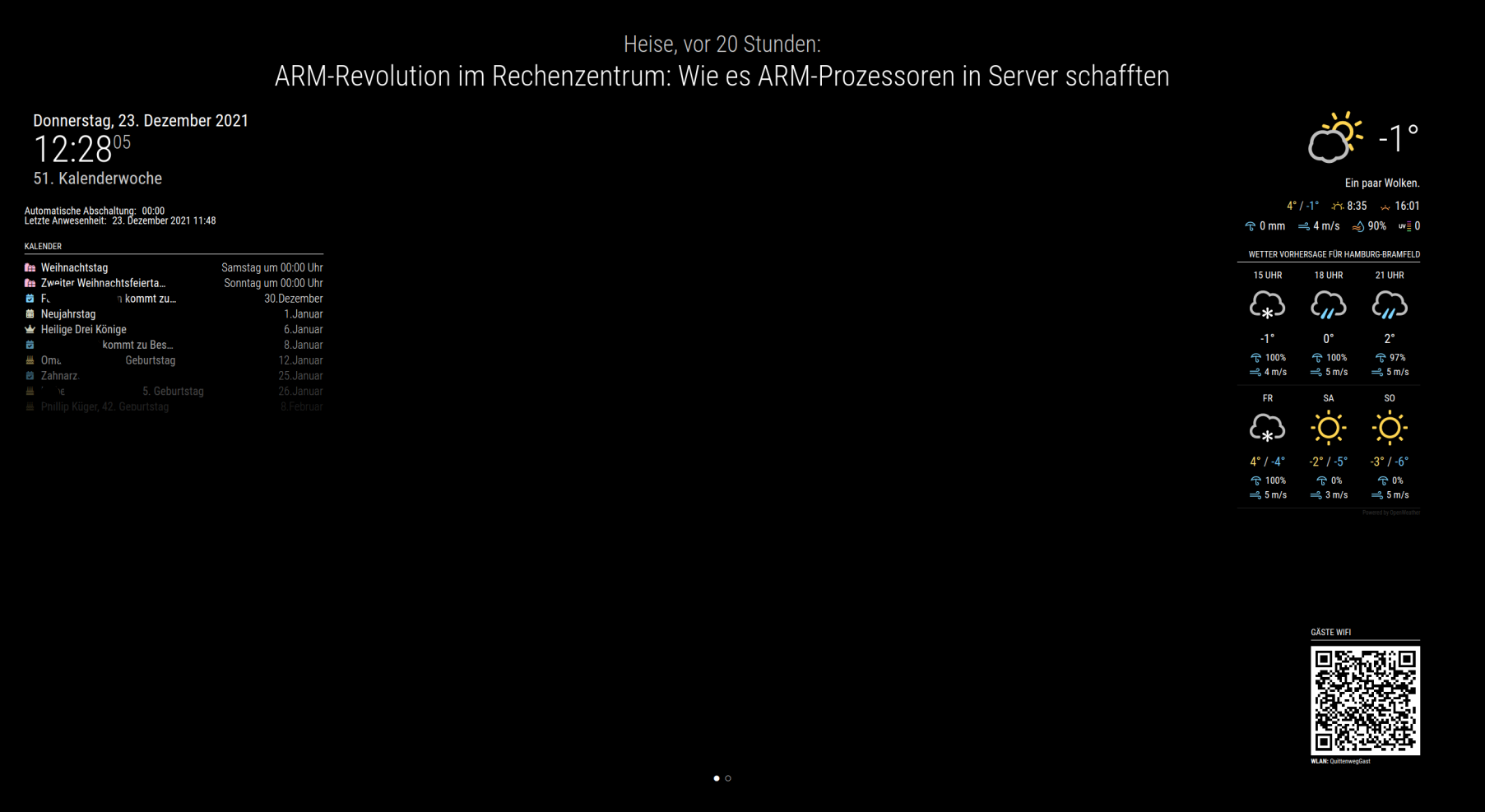
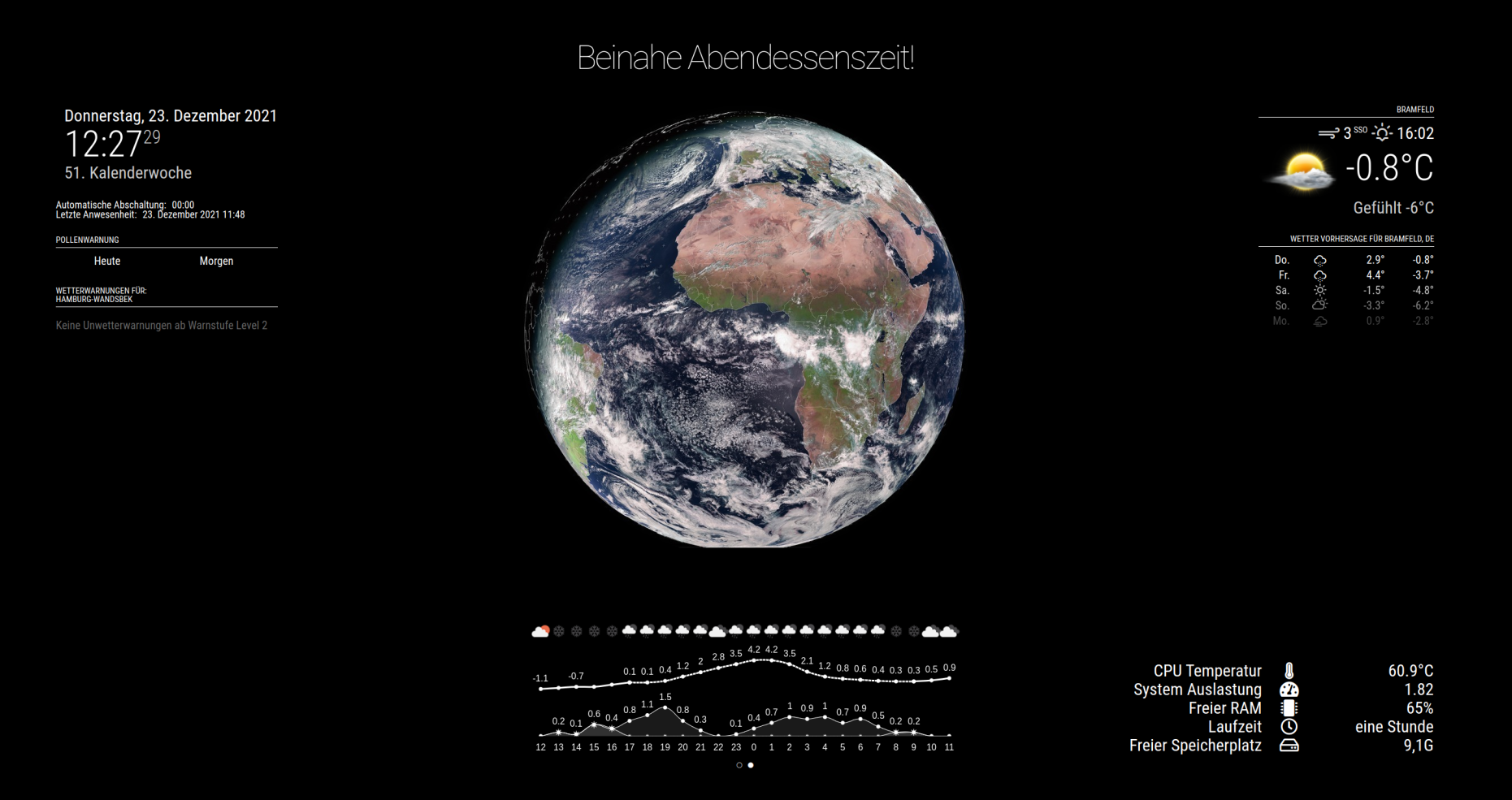
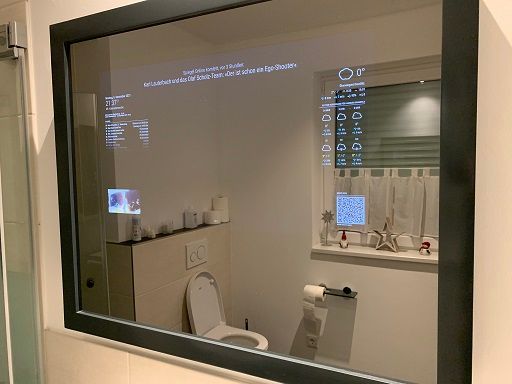
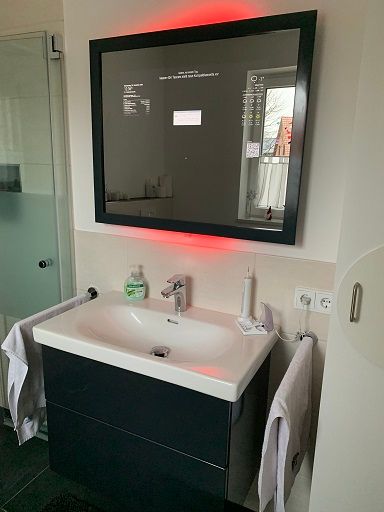
Now to hyperion and smart home:
I also have an ioBroker instace with MQTT. I installed behind the regular double switch in the bathroom a Shelly in detached mode. So i get the information when the switch is pressed. The other switch is for the regular light. So i can switch the mirror on/of (MMM-Remote-Control) with the switch…and also the backlight goes on/off with a small effect.
When the PIR is starting -> MQTT-Message -> Knight rider effect starts for 10 Seconds. Just for fun and because its possible ;)
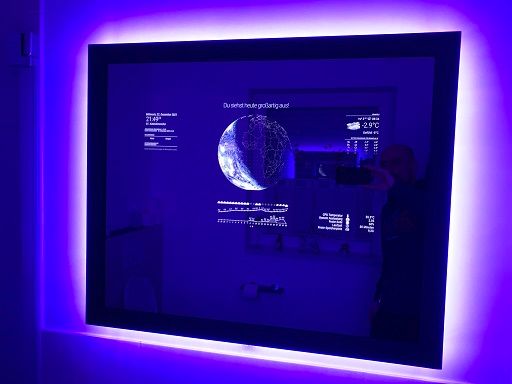
Last but not least- when motion in the camera is detected- the videostream from MMM-Motioneye is displayed automatically for 1 minute (when i brush my teeth… i see before when the doorbell rings.
I hope you like it. Feel free to ask.
@fozi Danke. Ich probiere das mal. Habe den Artikel gestern auch gelesen.
Ferrit Bead - da hat mein Englisch aufgehört ;)
Teil gefunden, installiert… mal gucken.
Danke für deine Aufklärung- dann installiere ich den HC-SR 501 mal nicht.
Moin,
ich nutze nun seit ein paar Tagen einen HW-740 PIR (Am-312).
Hier mal ein Beispiel: HW-740 DC 2,7-12V AM312 PIR Motion Body Human Sensor Mini PIR Infrarot Pyroelektrisches Detektormodul
Ich bin soweit sehr zufrieden mit der Funaktionalität des Moduls. Allerdings musste ich feststellen, dass der Sensor manchmal auslöst und den Bildschirm aktiviert. Ich tippe mal auf Interferenzen o.ä. etc.
Gibt es eine Möglichkeit um den zuverlässiger zu machen? Also Widerstand einlöten etc. oder muss ich einen HC-SR 501 einsetzen? Der ist dann ja regelbar, aber leider riiiesengroß?
@sdetweil Thanks a lot. Found it now. Its ‘pm2ProcessName’.
@sdetweil Ui. I just found a possible solution.
I editet the node_helper.js in the folder /home/pi/MagicMirror/modules/MMM-Remote-Control
Line 959 from:
let processName = query.processName || this.thisConfig.pm2ProcessName || "mm";
to
let processName = query.processName || this.thisConfig.pm2ProcessName || "MagicMirror";
Lets see how dirty this is…and if this destroys other things.
@sdetweil Thanks for your Info.
Sorry for asking… i dnot know what you mean with “RC”
change the rc parm for the pm2 process name
or how tho change the process name…
Hi,
today i reinstalled my MagicMirror.
I installed Buster and used the script from @sdetweil for it. I installed some modules without any problem and also MMM-remote-control.
After the install i recieved “PM2 ist not installed or unlinked”. So i did
cd ~/MagicMirror/modules/MMM-Remote-Control
npm link pm2
This error was gone. Bit now another error inside the module. The log means:
[24.11.2021 22:19.44.993] [LOG]   PM2 process: restart mm
[24.11.2021 22:19.45.041] [LOG]   Error: process or namespace not found
    at /usr/lib/node_modules/pm2/lib/API.js:1524:28
    at /usr/lib/node_modules/pm2/lib/Client.js:735:12
    at /usr/lib/node_modules/pm2/node_modules/pm2-axon-rpc/lib/client.js:45:10
    at Parser.<anonymous> (/usr/lib/node_modules/pm2/node_modules/pm2-axon/lib/sockets/req.js:67:8)
    at Parser.emit (events.js:315:20)
    at Parser._write (/usr/lib/node_modules/pm2/node_modules/amp/lib/stream.js:91:16)
    at writeOrBuffer (internal/streams/writable.js:358:12)
    at Parser.Writable.write (internal/streams/writable.js:303:10)
    at Socket.ondata (internal/streams/readable.js:719:22)
    at Socket.emit (events.js:315:20)
Any ideas how to fix that?