MagicMirror Forum
    • Recent
    • Tags
    • Unsolved
    • Solved
    • MagicMirror² Repository
    • Documentation
    • 3rd-Party-Modules
    • Donate
    • Discord
    • Register
    • Login
    1. Home
    2. OberfragGER
    3. Posts
    A New Chapter for MagicMirror: The Community Takes the Lead
    Read the statement by Michael Teeuw here.
    O
    Offline
    • Profile
    • Following 0
    • Followers 1
    • Topics 17
    • Posts 115
    • Groups 0

    Posts

    Recent Best Controversial
    • RE: PIR sensor to turn on LED strip

      @Egnos Just in case…
      Im using ioBroker @home (thats a free Smart Home Software). WIth that i also have installed MQTT. Any other Smart Home software like Home Assist can do the same.
      I also installed Hyperion on the same Raspyberry i have installed MagicMirror. Inside ioBroker iam using the Hyperion adapter.
      So with any “user_presence” i get the MQTT informartion… and that triggers a scipt inside ioBroker to activate Hyperion.

      If your using any smart home software as well… this should be an easy thing. Feel free to ask…

      posted in General Discussion
      O
      OberfragGER
    • RE: MMM-RemoteControl or vcgencmd Issue

      @Stroke-0 No Problems here. Im using MMM-RemoteControl and a PI4. I also use MMM-NewPir to turn the Monitor off.

      posted in Troubleshooting
      O
      OberfragGER
    • RE: Bathroom mirror: "Frameless, thin, gesture and voice controlled"

      @Robert_K great work! Cool Design.

      2 questions left.
      What are the 3 (same) “devices” below the RPI?

      You forget to mention the light-stripe. Its a regular RGB? how do you control it? Extra device?
      Hint from myself: I used the rest of APA102-5V-Stripes and installed Hyperion in parallel. No extra device needed and animations too. The animations work via Hyperion-App, homebridge and/ or automatisation via ioBroker.

      Very modern (Guest?-) Bathroom too!

      posted in Show your Mirror
      O
      OberfragGER
    • RE: No Mirror = Awesome Daily Assistant Frame

      @TazDev …Looks nice so far.
      Can you provide a front-picture of the assembled Frame?

      What do you want to do with the move cam, Mic-Array and PI-Cam?

      posted in Show your Mirror
      O
      OberfragGER
    • RE: Where to buy Pilkington MirrorView in Germany?

      @z0ki I had the Chrome Spy 4mm and switched to that Mirror in the Forum. Its a bit better because the refections are a bit brighter.

      If you live around Hamburg, you cann ourcase the Chrome Spy from me. ;)
      About 68*80 cm.

      posted in Hardware
      O
      OberfragGER
    • RE: [MMM-DWD-WarnWeather] Ort nicht gefunden

      @Baraka Moin,
      hatte ich auch. Hab dann in der Config statt dem zellnamen die Warncell_ID genommen. Hat sofort wieder funktioniert.

      posted in Troubleshooting
      O
      OberfragGER
    • RE: MMM-Hue CORS Policy Issue

      @sdetweil said in MMM-Hue CORS Policy Issue:

      @oberfragger you might try with address:“192.168.x.y”

      where x and y are from the IP address of the mm machine

      Hey @sdetweil,
      sorry for the late reply. Thanks for your help, again. With that, i have MM running with 2.18 an d MMM-Motionseye is displaying the stream.

      Thanks a lot.

      Edit: For anyone who reads this. After set

      adress: "192.168.X.X"
      

      the module GoogleBirthdaysProvider was not working any longer due the config of that module.
      Just change

      url: 'http://localhost:8080/mmm-googlebirthdaysprovider',
      

      to

      url: 'http://192.168.X.X:8080/mmm-googlebirthdaysprovider',
      
      posted in Troubleshooting
      O
      OberfragGER
    • RE: MMM-Hue CORS Policy Issue

      @sdetweil Thank you for you clarification.
      Thats really not good. So i have to decide to get rid og MMM-Motioneye for another camera module which is working…or not to use MMM-Remotecontrol… or not to Update from 2.17 (i have an old image with a fresh install).

      posted in Troubleshooting
      O
      OberfragGER
    • RE: MMM-Hue CORS Policy Issue

      @karsten13 said in MMM-Hue CORS Policy Issue:

      https://:8080

      No. Thats excactly what im telling you:

      When

        address: "localhost", 
      

      then i dont have any access to https://ip-of-pi:8080 or http://ip-of-pi:8080.

      When

      address: '0.0.0.0',
      

      i have no problem to access Remote-Control-Gui/ Webpage. The ipWhitelist is aready set.

      posted in Troubleshooting
      O
      OberfragGER
    • RE: (solved) MM 2.18 - skipping optional Dependencys

      @sdetweil No. This fix it was not meant by you- it was for me… “but my inner monk says (to myself)… warnings are no good. Please fix it 😉”

      posted in Troubleshooting
      O
      OberfragGER
    • RE: MMM-Hue CORS Policy Issue

      @karsten13 said in MMM-Hue CORS Policy Issue:

      @oberfragger

      you must access the site with https, e.g. https://192.168.0.143:8080/remote.html

      Unfortunatly its not working via https. Still connection refused. I dint think that https://github.com/CatoAntonsen/MMM-MotionEye will update after 5 years.

      posted in Troubleshooting
      O
      OberfragGER
    • RE: MMM-Hue CORS Policy Issue

      @karsten13 Its working now with:

      var config = 
      {
        electronOptions: {
      		webPreferences: {
      			webSecurity: false
      		}
      	},
        useHttps: true,
        httpsPrivateKey: "config/example.key",
        httpsCertificate: "config/example.crt",
        address: "localhost", 
        port: 8080,
      //  address: '0.0.0.0',
        ipWhitelist: ["127.0.0.1", "::ffff:127.0.0.1", "::1", "::ffff:192.168.178.1/120", "192.168.178.100/24"],
        language: 'de',
        modules: [
      

      But with this setting, i have noc access the the RemoteControl-GUI and API also! ;(
      I really use it with my homeautomation to show/ hide modules.

      Is there another possibility?

      posted in Troubleshooting
      O
      OberfragGER
    • RE: MMM-SystemStats shows Free RAM as NaN%

      @digied Hot did you set the colors?

      posted in System
      O
      OberfragGER
    • RE: (solved) MM 2.18 - skipping optional Dependencys

      @sdetweil Youre right,
      but my inner monk says… warnings are no good. Please fix it ;)

      posted in Troubleshooting
      O
      OberfragGER
    • RE: MMM 2.18 - NPM? Electron? Silly lifecycle? no MMM

      @karsten13 Still problems.

      Now the mirror hangs about 2-3 times a day… :(

      |MagicMirror  | Invalid MIT-MAGIC-COOKIE-1 key
      0|MagicMirror  | /home/pi/MagicMirror/node_modules/electron/dist/electron exited with signal SIGTRAP
      0|MagicMirror  | npm
      0|MagicMirror  |  ERR! code ELIFECYCLE
      0|MagicMirror  | npm ERR! errno
      0|MagicMirror  |  1
      0|MagicMirror  | npm ERR!
      0|MagicMirror  |  magicmirror@2.18.0 start: `DISPLAY="${DISPLAY:=:0}" ./node_modules/.bin/electron js/electron.js`
      0|MagicMirror  | npm ERR! Exit status 1
      0|MagicMirror  | npm ERR!
      0|MagicMirror  | npm ERR! Failed at the magicmirror@2.18.0 start script.
      0|MagicMirror  | npm ERR! This is probably not a problem with npm. There is likely additional logging output above.
      0|MagicMirror  | npm ERR! A complete log of this run can be found in:
      0|MagicMirror  | npm ERR!     /home/pi/.npm/_logs/2022-01-14T11_11_15_580Z-debug.log
      0|MagicMirror  | > magicmirror@2.18.0 start /home/pi/MagicMirror
      0|MagicMirror  | > DISPLAY="${DISPLAY:=:0}" ./node_modules/
      

      Thats in the log-File:

      0 info it worked if it ends with ok
      1 verbose cli [ '/usr/bin/node', '/usr/bin/npm', 'start' ]
      2 info using npm@6.14.15
      3 info using node@v14.18.3
      4 verbose run-script [ 'prestart', 'start', 'poststart' ]
      5 info lifecycle magicmirror@2.18.0~prestart: magicmirror@2.18.0
      6 info lifecycle magicmirror@2.18.0~start: magicmirror@2.18.0
      7 verbose lifecycle magicmirror@2.18.0~start: unsafe-perm in lifecycle true
      8 verbose lifecycle magicmirror@2.18.0~start: PATH: /usr/lib/node_modules/npm/node_modules/npm-lifecycle/node-gyp-bin:/home/pi/MagicMirror/node_modules/.bin:/usr/local/sbin:/usr/local/bin:/usr/sbin:/usr/bin:/sbin:/bin:/usr/local/games:/usr/games
      9 verbose lifecycle magicmirror@2.18.0~start: CWD: /home/pi/MagicMirror
      10 silly lifecycle magicmirror@2.18.0~start: Args: [
      10 silly lifecycle   '-c',
      10 silly lifecycle   'DISPLAY="${DISPLAY:=:0}" ./node_modules/.bin/electron js/electron.js'
      10 silly lifecycle ]
      11 silly lifecycle magicmirror@2.18.0~start: Returned: code: 1  signal: null
      12 info lifecycle magicmirror@2.18.0~start: Failed to exec start script
      13 verbose stack Error: magicmirror@2.18.0 start: `DISPLAY="${DISPLAY:=:0}" ./node_modules/.bin/electron js/electron.js`
      13 verbose stack Exit status 1
      13 verbose stack     at EventEmitter.<anonymous> (/usr/lib/node_modules/npm/node_modules/npm-lifecycle/index.js:332:16)
      13 verbose stack     at EventEmitter.emit (events.js:400:28)
      13 verbose stack     at ChildProcess.<anonymous> (/usr/lib/node_modules/npm/node_modules/npm-lifecycle/lib/spawn.js:55:14)
      13 verbose stack     at ChildProcess.emit (events.js:400:28)
      13 verbose stack     at maybeClose (internal/child_process.js:1058:16)
      13 verbose stack     at Process.ChildProcess._handle.onexit (internal/child_process.js:293:5)
      14 verbose pkgid magicmirror@2.18.0
      15 verbose cwd /home/pi/MagicMirror
      16 verbose Linux 5.10.63-v7l+
      17 verbose argv "/usr/bin/node" "/usr/bin/npm" "start"
      18 verbose node v14.18.3
      19 verbose npm  v6.14.15
      20 error code ELIFECYCLE
      21 error errno 1
      22 error magicmirror@2.18.0 start: `DISPLAY="${DISPLAY:=:0}" ./node_modules/.bin/electron js/electron.js`
      22 error Exit status 1
      23 error Failed at the magicmirror@2.18.0 start script.
      23 error This is probably not a problem with npm. There is likely additional logging output above.
      24 verbose exit [ 1, true ]
      
      posted in Troubleshooting
      O
      OberfragGER
    • New weather module (weather forecast)

      I changed the default weatherforecast to weather like described in the official docu. It didnt load the forecast.
      What can i change?
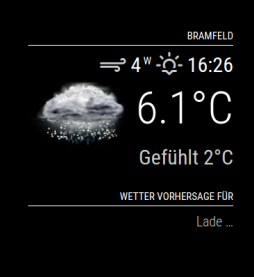
      5984459f-35e9-4a68-8114-d77ccc056f5a-image.png

      My config.js:

          {
            module: 'weather',
            position: 'top_right',
            header: 'Wetter Vorhersage für',
            config: {
      		type: 'forecast',
              location: 'Bramfeld, Hamburg',
              locationID: '2945498',
              appid: '9401ca284xxxxxxxx48a208ac'
            }
          },
      

      This seems to be the error:

      0|MagicMir | [13.01.2022 13:42.39.124] [ERROR] MagicMirror will not quit, but it                                                                                                                                                              might be a good idea to check why this happened. Maybe no internet connection?
      0|MagicMir | [13.01.2022 13:42.39.124] [ERROR] If you think this really is an is                                                                                                                                                             sue, please open an issue on GitHub: https://github.com/MichMich/MagicMirror/iss                                                                                                                                                             ues
      0|MagicMir | [13.01.2022 13:42.39.128] [ERROR] Whoops! There was an uncaught exc                                                                                                                                                             eption...
      0|MagicMir | [13.01.2022 13:42.39.129] [ERROR] TypeError: Cannot read properties                                                                                                                                                              of undefined (reading 'type')
      0|MagicMir |     at Timeout.fetchStandings [as _onTimeout] (/home/pi/MagicMirror                                                                                                                                                             /modules/MMM-Formula1/node_helper.js:48:57)
      0|MagicMir |     at listOnTimeout (node:internal/timers:557:17)
      0|MagicMir |     at processTimers (node:internal/timers:500:7)
      0|MagicMir | [13.01.2022 13:42.39.129] [ERROR] MagicMirror will not quit, but it                                                                                                                                                              might be a good idea to check why this happened. Maybe no internet connection?
      0|MagicMir | [13.01.2022 13:42.39.130] [ERROR] If you think this really is an is                                                                                                                                                             sue, please open an issue on GitHub: https://github.com/MichMich/MagicMirror/iss                                                                                                                                                             ues
      0|MagicMir | [1293:0113/134506.677270:ERROR:command_buffer_proxy_impl.cc(292)] G                                                                                                                                                             PU state invalid after WaitForTokenInRange.
      0|MagicMir | [940:0113/134507.415223:ERROR:gpu_process_host.cc(968)] GPU process                                                                                                                                                              exited unexpectedly: exit_code=139
      0|MagicMir | [1293:0113/135506.957531:ERROR:command_buffer_proxy_impl.cc(292)] G                                                                                                                                                             PU state invalid after WaitForTokenInRange.
      0|MagicMir | [940:0113/135507.713471:ERROR:gpu_process_host.cc(968)] GPU process                                                                                                                                                              exited unexpectedly: exit_code=139
      0|MagicMir | [1293:0113/140025.310512:ERROR:command_buffer_proxy_impl.cc(292)] G                                                                                                                                                             PU state invalid after WaitForTokenInRange.
      0|MagicMir | [940:0113/140028.204170:ERROR:gpu_process_host.cc(968)] GPU process                                                                                                                                                              exited unexpectedly: exit_code=139
      
      
      posted in Utilities
      O
      OberfragGER
    • RE: (solved) MM 2.18 - skipping optional Dependencys

      Ich have found the answer by meyself.

      npm install --no-optional
      npm install typescript
      npm install tsutils
      
      posted in Troubleshooting
      O
      OberfragGER
    • RE: MMM 2.18 - NPM? Electron? Silly lifecycle? no MMM

      @karsten13 I have reinstalled it.
      Lets wait and cross fingers.

      posted in Troubleshooting
      O
      OberfragGER
    • (solved) MM 2.18 - skipping optional Dependencys

      Hi,

      after a regular Update MM2.17 -> 2.18 ich recieved the Warning:

      MagicMirror installation finished successfully!
      
      
      > magicmirror@2.18.0 prepare /home/pi/MagicMirror
      > [ -f node_modules/.bin/husky ] && husky install || echo no husky installed.
      
      husky - Git hooks installed
      npm notice created a lockfile as package-lock.json. You should commit this file.
      npm WARN optional SKIPPING OPTIONAL DEPENDENCY: fsevents@^2.3.2 (node_modules/jest-haste-map/node_modules/fsevents):
      npm WARN notsup SKIPPING OPTIONAL DEPENDENCY: Unsupported platform for fsevents@2.3.2: wanted {"os":"darwin","arch":"any"} (current: {"os":"linux","arch":"arm"})
      npm WARN tsutils@3.21.0 requires a peer of typescript@>=2.8.0 || >= 3.2.0-dev || >= 3.3.0-dev || >= 3.4.0-dev || >= 3.5.0-dev || >= 3.6.0-dev || >= 3.6.0-beta || >= 3.7.0-dev || >= 3.7.0-beta but none is installed. You must install peer dependencies yourself.
      

      Somehow- what do i have to perform to install this dependency…?

      npm install typescript
      npm install tsutils
      

      Both have been sucessful.

      This is hindering me to update NPM to Version 8.x.

      pi@MagicMirror:~/MagicMirror $ npm install fsevents
      npm ERR! code EBADPLATFORM
      npm ERR! notsup Unsupported platform for fsevents@2.3.2: wanted {"os":"darwin","arch":"any"} (current: {"os":"linux","arch":"arm"})
      npm ERR! notsup Valid OS:    darwin
      npm ERR! notsup Valid Arch:  any
      npm ERR! notsup Actual OS:   linux
      npm ERR! notsup Actual Arch: arm
      
      npm ERR! A complete log of this run can be found in:
      npm ERR!     /home/pi/.npm/_logs/2022-01-13T11_54_19_577Z-debug.log
      pi@MagicMirror:~/MagicMirror $
      
      
      posted in Troubleshooting
      O
      OberfragGER
    • 1 / 1