MagicMirror Forum
    • Recent
    • Tags
    • Unsolved
    • Solved
    • MagicMirror² Repository
    • Documentation
    • 3rd-Party-Modules
    • Donate
    • Discord
    • Register
    • Login
    A New Chapter for MagicMirror: The Community Takes the Lead
    Read the statement by Michael Teeuw here.

    PIR sensor to turn on LED strip

    Scheduled Pinned Locked Moved General Discussion
    35 Posts 6 Posters 14.0k Views 6 Watching
    Loading More Posts
    • Oldest to Newest
    • Newest to Oldest
    • Most Votes
    Reply
    • Reply as topic
    Log in to reply
    This topic has been deleted. Only users with topic management privileges can see it.
    • wishmaster270W Offline
      wishmaster270 Module Developer
      last edited by

      Hi,

      I would suggest the solution of @sdetweil as well.

      An other, but much more complicate version would be to use my PythonLedControl and control it with the MMM-MQTTbridge module.

      1 Reply Last reply Reply Quote 0
      • E Offline
        Egnos @sdetweil
        last edited by

        @sdetweil said in PIR sensor to turn on LED strip:

        use my updated fork…
        https://github.com/sdetweil/MMM-PiLights
        it responds to the PIR modules USER_PRESENCE notification (true = turn on, false = turn off)
        if lights are off and on is sent, it will restore the previous sequence set with the normal
        SEQUENCE notification

        Thanks @sdetweil

        Let’s see if I understand:

        • By default the LEDs will be off, until the “MMM-GPIO-Notifications” module detects something.
        • If the PIR detects the movement the “MMM-GPIO-Notifications” module will send the notification USER_PRESENCE = true and the LEDs will turn on
        • After some time without movement the “MMM-GPIO-Notifications” module will send the notification USER_PRESENCE = false and the LEDs will turn off

        Correct?

        I’m not a developer, but I’m still trying to understand your change in the code:

        else if (notification === ' USER_PRESENCE'){
                    if(payload == false){
                        this.leds.allOFF();
                    } else {
                        // user present, restore the last active sequence
                        Promise.resolve(this.runSequence(this.lastSequence.sequence, thi,lastSequence.iterations,this.lastSequence.delay)
                        .catch((err) => {
                            this.log('user present Sequence error: ' + err.message);
                        }));
        

        why can’t I see this notification in the code?

        (notification === ' USER_PRESENCE'){
                    if(payload == true){
                        this.leds.allON();
                    }
        

        Thanks again!

        My Mirror https://forum.magicmirror.builders/topic/17262/the-raspimirror-was-born/7

        M S 3 Replies Last reply Reply Quote 0
        • M Offline
          MMRIZE @Egnos
          last edited by

          @Egnos
          ' USER_PRESENCE' !== 'USER_PRESENCE'

          S 1 Reply Last reply Reply Quote 1
          • S Offline
            sdetweil @Egnos
            last edited by

            @Egnos fixed the typo, git pull for the update

            Sam

            How to add modules

            learning how to use browser developers window for css changes

            1 Reply Last reply Reply Quote 0
            • S Offline
              sdetweil @MMRIZE
              last edited by

              @MMRIZE good catch

              Sam

              How to add modules

              learning how to use browser developers window for css changes

              1 Reply Last reply Reply Quote 0
              • S Offline
                sdetweil @Egnos
                last edited by sdetweil

                @Egnos u don’t need the GPIO_Notifications module. as the PIR modules send the USER_PRESENCE notification

                Sam

                How to add modules

                learning how to use browser developers window for css changes

                E 1 Reply Last reply Reply Quote 0
                • E Offline
                  Egnos @sdetweil
                  last edited by

                  @sdetweil said in PIR sensor to turn on LED strip:

                  u don’t need the GPIO_Notifications module. as the PIR modules send the USER_PRESENCE notification:

                  The module I use for sending notifications when the PIR detects motion is MMM-GPIO-Notifications
                  I believe he is sending the “USER_PRESENCE” notification:

                  notifications: [
                              {
                                notification: 'USER_PRESENCE',
                                payload: true
                              },
                  

                  Thanks for your patience @sdetweil ! ;-)

                  My Mirror https://forum.magicmirror.builders/topic/17262/the-raspimirror-was-born/7

                  S 1 Reply Last reply Reply Quote 0
                  • S Offline
                    sdetweil @Egnos
                    last edited by

                    @Egnos ok got it.

                    what I was saying is that the

                    MMM-PIR-???

                    modules, if you use them, THEY send the USER_PRESENCE notification

                    the GPIO_Notifcations module is more generic and can send notifications for ANY gpio device

                    Sam

                    How to add modules

                    learning how to use browser developers window for css changes

                    E 1 Reply Last reply Reply Quote 0
                    • E Offline
                      Egnos @sdetweil
                      last edited by

                      @sdetweil said in PIR sensor to turn on LED strip:

                      @Egnos ok got it.
                      what I was saying is that the
                      MMM-PIR-???
                      modules, if you use them, THEY send the USER_PRESENCE notification
                      the GPIO_Notifcations module is more generic and can send notifications for ANY gpio device

                      Ok ok, I just wanted to be sure that, in my case, the MMM-GPIO-Notifications module sends the “USER_PRESENCE” notification.
                      I knew that the module I am using is a collector of GPIO devices…

                      Thanks @sdetweil

                      My Mirror https://forum.magicmirror.builders/topic/17262/the-raspimirror-was-born/7

                      O 1 Reply Last reply Reply Quote 0
                      • O Offline
                        OberfragGER @Egnos
                        last edited by

                        @Egnos Just in case…
                        Im using ioBroker @home (thats a free Smart Home Software). WIth that i also have installed MQTT. Any other Smart Home software like Home Assist can do the same.
                        I also installed Hyperion on the same Raspyberry i have installed MagicMirror. Inside ioBroker iam using the Hyperion adapter.
                        So with any “user_presence” i get the MQTT informartion… and that triggers a scipt inside ioBroker to activate Hyperion.

                        If your using any smart home software as well… this should be an easy thing. Feel free to ask…

                        E 1 Reply Last reply Reply Quote 0
                        • E Offline
                          Egnos @OberfragGER
                          last edited by Egnos

                          @OberfragGER thanks for the valuable advice and for your availability, now I’ll read something.

                          In the meantime, can you tell me an LED strip (not necessarily RGB …) that is compatible with this project?

                          Thank you all.

                          My Mirror https://forum.magicmirror.builders/topic/17262/the-raspimirror-was-born/7

                          O 1 Reply Last reply Reply Quote 0
                          • O Offline
                            OberfragGER @Egnos
                            last edited by

                            @Egnos I have to add… i use also the Module https://github.com/olexs/MMM-UserPresenceToMQTT

                            For the LED-Strip… i use a WS2812. Its adessable an u can use it with 5V and it preconfigured in Hyperion.

                            1 Reply Last reply Reply Quote 0
                            • E Offline
                              Egnos
                              last edited by Egnos

                              @OberfragGER said in PIR sensor to turn on LED strip:

                              For the LED-Strip… i use a WS2812. Its adessable an u can use it with 5V and it preconfigured in Hyperion

                              Where did you buy the LED strip? They seem very expensive …

                              I have seen the connection between RPI and LED strip but I do not understand why the external 5V power supply must also be connected to the RPI, is it not enough to connect it to the LED strip?

                              If I really have to connect the power supply to the RPI as well, how do you do if you have both PINs of the 5V GPIO occupied?

                              My Mirror https://forum.magicmirror.builders/topic/17262/the-raspimirror-was-born/7

                              E 1 Reply Last reply Reply Quote 0
                              • E Offline
                                Egnos @Egnos
                                last edited by

                                I found these https://a.aliexpress.com/_EwF3KTV.
                                The WS2813 strip is 5V.
                                Can be fine?

                                My Mirror https://forum.magicmirror.builders/topic/17262/the-raspimirror-was-born/7

                                bheplerB 1 Reply Last reply Reply Quote 0
                                • bheplerB Offline
                                  bhepler Module Developer @Egnos
                                  last edited by bhepler

                                  @Egnos - Those look like they’ll do the job.

                                  I have seen the connection between RPI and LED strip but I do not understand why the external 5V power supply must also be connected to the RPI, is it not enough to connect it to the LED strip?

                                  The reason is that the output of the RPi can drive a handful of LEDs, but the Pi only has so much power flowing through it (specs say 50mA). Powering the LEDs separately will let the Pi handle the logic and the power supply handle the… well, power.

                                  E 1 Reply Last reply Reply Quote 0
                                  • E Offline
                                    Egnos @bhepler
                                    last edited by

                                    @bhepler said in PIR sensor to turn on LED strip:

                                    The reason is that the output of the RPi can drive a handful of LEDs, but the Pi only has so much power flowing through it (specs say 50mA). Powering the LEDs separately will let the Pi handle the logic and the power supply handle the… well, power.

                                    Thanks @bhepler I understood that the LEDs must be powered by an external 5V because the RPI generates a few mA and is not able to turn on an LED strip, but from the photo you can see that the external 5V (+ and -) also goes in parallel on the 5V in exit from the RPI.
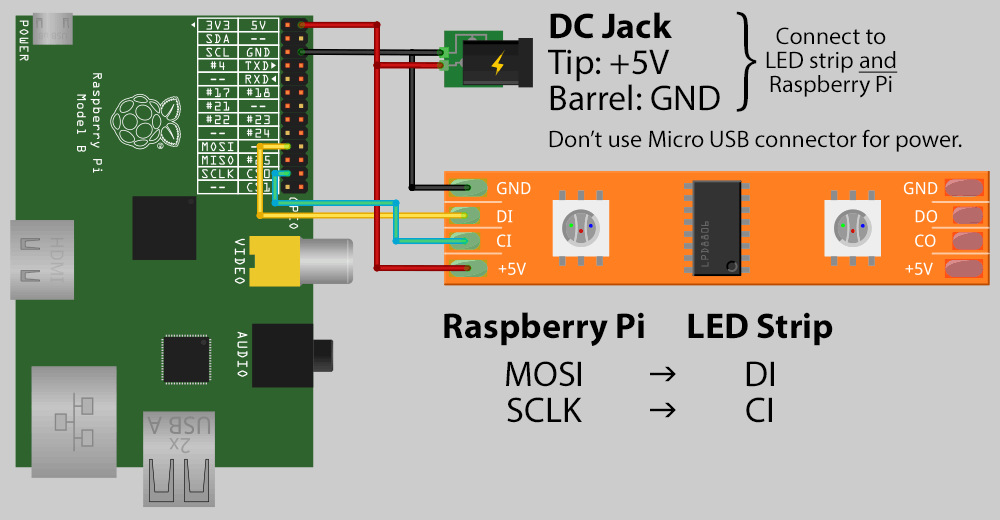
                                    3f775e85-f24b-4337-b00f-8d7fffb9ddc6-image.png

                                    For what reason?
                                    Is this connection necessary (I no longer have 5V available on GPIO …)?

                                    Thank you very much

                                    My Mirror https://forum.magicmirror.builders/topic/17262/the-raspimirror-was-born/7

                                    wishmaster270W S 2 Replies Last reply Reply Quote 0
                                    • wishmaster270W Offline
                                      wishmaster270 Module Developer @Egnos
                                      last edited by

                                      @Egnos Hi, as the picture says they use the 5V power source of the led strip to power the Pi, too.
                                      Instead of powering the pi via USB they use the 5V GPIO pin.
                                      If you want to power the Pi via USB instead be sure to connect the Ground of the strip with ground of the pi.

                                      E 1 Reply Last reply Reply Quote 0
                                      • S Offline
                                        sdetweil @Egnos
                                        last edited by

                                        @Egnos no. they are powering the pi from the 5v gpio pins as well as the LEDs.

                                        the pin is tall.

                                        Sam

                                        How to add modules

                                        learning how to use browser developers window for css changes

                                        1 Reply Last reply Reply Quote 0
                                        • E Offline
                                          Egnos @wishmaster270
                                          last edited by

                                          @wishmaster270 said in PIR sensor to turn on LED strip:

                                          If you want to power the Pi via USB instead be sure to connect the Ground of the strip with ground of the pi.

                                          The GPIO ground or the power ground going into USB-C?

                                          thanks

                                          My Mirror https://forum.magicmirror.builders/topic/17262/the-raspimirror-was-born/7

                                          S 1 Reply Last reply Reply Quote 0
                                          • S Offline
                                            sdetweil @Egnos
                                            last edited by

                                            @Egnos gpio

                                            Sam

                                            How to add modules

                                            learning how to use browser developers window for css changes

                                            E 1 Reply Last reply Reply Quote 0

                                            Hello! It looks like you're interested in this conversation, but you don't have an account yet.

                                            Getting fed up of having to scroll through the same posts each visit? When you register for an account, you'll always come back to exactly where you were before, and choose to be notified of new replies (either via email, or push notification). You'll also be able to save bookmarks and upvote posts to show your appreciation to other community members.

                                            With your input, this post could be even better 💗

                                            Register Login

                                            • 1
                                            • 2
                                            • 2 / 2
                                            • First post
                                              Last post
                                            Enjoying MagicMirror? Please consider a donation!
                                            MagicMirror created by Michael Teeuw.
                                            Forum managed by Sam, technical setup by Karsten.
                                            This forum is using NodeBB as its core | Contributors
                                            Contact | Privacy Policy
