MagicMirror Forum
    • Recent
    • Tags
    • Unsolved
    • Solved
    • MagicMirror² Repository
    • Documentation
    • 3rd-Party-Modules
    • Donate
    • Discord
    • Register
    • Login
    1. Home
    2. piedaniel
    3. Posts
    A New Chapter for MagicMirror: The Community Takes the Lead
    Read the statement by Michael Teeuw here.
    Offline
    • Profile
    • Following 0
    • Followers 0
    • Topics 6
    • Posts 13
    • Groups 0

    Posts

    Recent Best Controversial
    • iframe problem

      Hi,

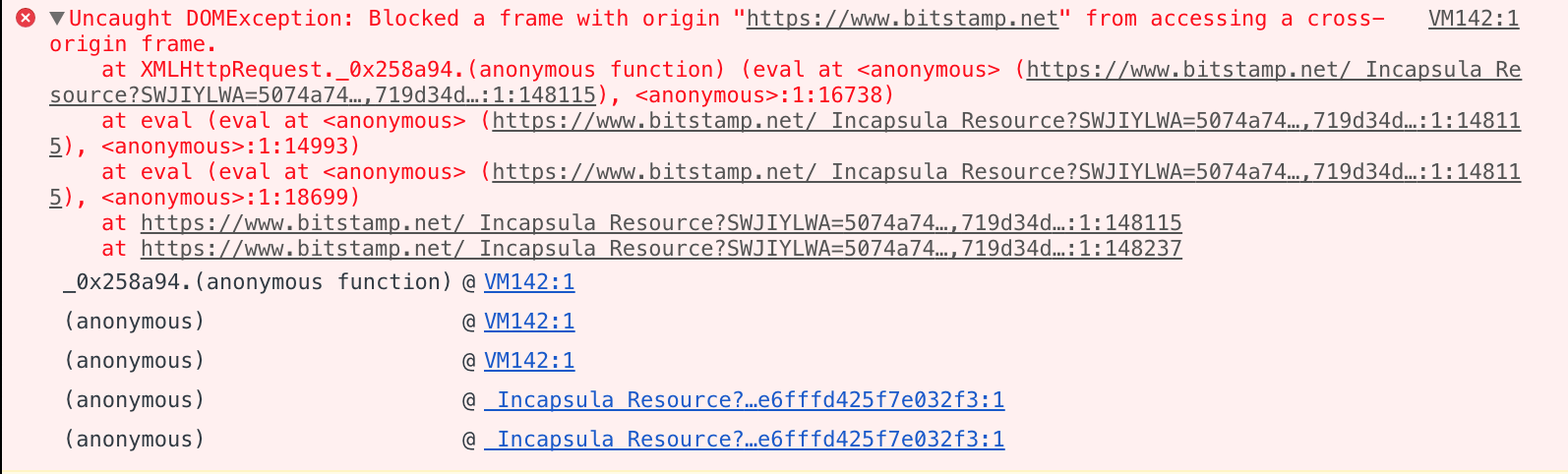
      I´m trying to add a webpage with an iframe bur cannot. the webpage is https://www.bitstamp.net/market/tradeview/ and the error is: 0_1549321235074_Captura de pantalla 2019-02-04 a la(s) 18.00.02.png

      I just want to add the down part of the web page to my mirror:
      0_1549321269212_Captura de pantalla 2019-02-04 a la(s) 17.54.33.png

      If its impossible, can someone help me to use the api to make something similar?

      thanks
      DP

      posted in Utilities
      piedanielP
      piedaniel
    • RE: Cant run npm start or npm install on my macbook air please help

      Need to install X-Code on your mac. If not, you will not able to run the app.

      posted in Troubleshooting
      piedanielP
      piedaniel
    • MMM-MyCalendar - Problem with ICON, not changing

      Re: MMM-MyCalendar

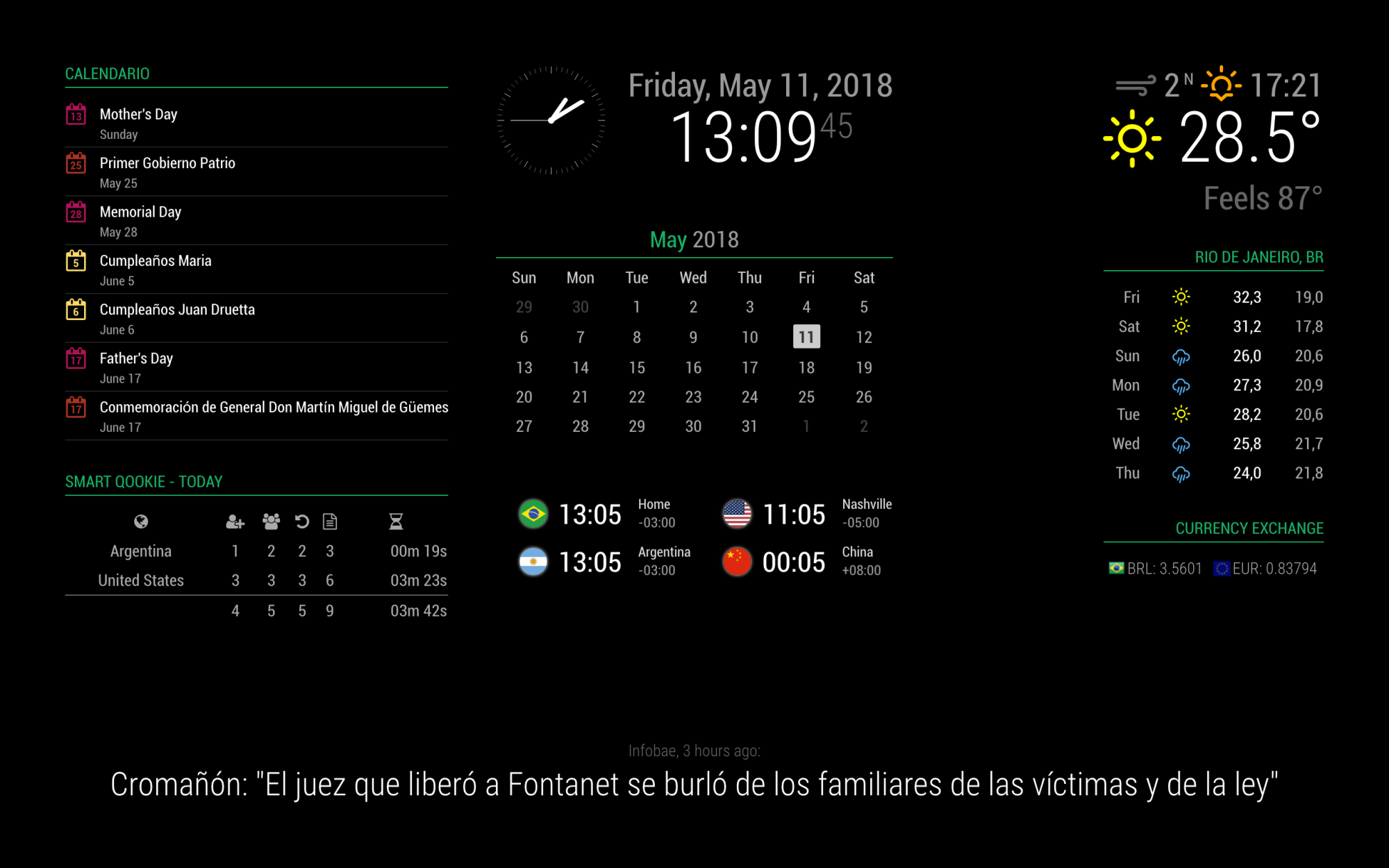
      Hi, I trying to figure how to change the icon of the calendar with the correct fontawesome name. But I think that the Variable “symbol” is not working. I try to change calendar by calendar, change the “defaultSymbol” but alway push the Calendar symbol and not other. How can I change the icon for each calendar?

      Regards,
      DP

      0_1526058315927_Captura de pantalla 2018-05-11 a la(s) 13.09.46.png

      posted in Utilities
      piedanielP
      piedaniel
    • Help QuickBooks module for MM

      Hi everyone,

      I don’t know to much about programing and I need to display some information of QuickBooks in the MagicMirror.

      www.quickbooks.com

      I see a lot of api developed to connect and search the information on GitHub, but don’t know what is the better way to do.

      Just need to display: Invoices, Bank Balance, Expenses and Sales.

      Someone can help me?

      Regards,
      DP

      posted in Development
      piedanielP
      piedaniel
    • RE: Facial Recognition - customize your mirror for every user!

      Hi everyone. I try to make work the face recognition but always tell me that I´m strange, but when I do test with the facialreconition.py test alway recognize me. Someone know why I have this problem? How can I solve the problem? Thanks

      posted in Troubleshooting
      piedanielP
      piedaniel
    • RE: Facial Recognition - customize your mirror for every user!

      yes, I configure in true useUSBCam.

      posted in Troubleshooting
      piedanielP
      piedaniel
    • RE: Facial Recognition - customize your mirror for every user!

      Someone know if this module could work with a USB webcam? I try but don´t recognize me. I have the training.xml document on the folder, then start the MagicMirror and Raspberry start the module, but then nothing. I need to do something else? Need to configure in a different way? Or not be possible?

      Log:

      > magicmirror@2.0.0 start /home/pi/MagicMirror
      > electron js/electron.js
      
      Loading config ...
      Loading module helpers ...
      No helper found for module: alert.
      No helper found for module: clock.
      Initializing new module helper ...
      No helper found for module: compliments.
      No helper found for module: currentweather.
      No helper found for module: weatherforecast.
      Initializing new module helper ...
      Initializing new module helper ...
      All module helpers loaded.
      Starting server op port 8080 ... 
      Server started ...
      Connecting socket for: calendar
      Starting node helper for: calendar
      Connecting socket for: newsfeed
      Starting module: newsfeed
      Connecting socket for: MMM-Facial-Recognition
      Staring module helper: MMM-Facial-Recognition
      Sockets connected & modules started ...
      Launching application.
      Create new calendar fetcher for url: https://calendar.google.com/calendar/ical/es.ar%23holiday%40group.v.calendar.google.com/public/basic.ics - Interval: 300000
      Create new news fetcher for url: http://www.ole.com.ar/rss/ultimas-noticias/ - Interval: 300000
      
      Can't parse feed item:
      
      Title: undefined
      Description: 
      Pubdate: undefined
      [MMM-Facial-Recognition] Facerecognition started...
      [MMM-Facial-Recognition] Loading training data...
      [MMM-Facial-Recognition] ALGORITHM: LBPH
      [MMM-Facial-Recognition] Training data loaded!
      [MMM-Facial-Recognition] --------------------
      [MMM-Facial-Recognition] Webcam ausgewählt...
      

      Note from admin: Please use Markdown on code snippets!

      posted in Troubleshooting
      piedanielP
      piedaniel
    • RE: New modules, don´t load

      Here you have my log. I don´t know why is not loading the Meteoblue with a error server. I´m with MacOs.
      ~~
      logger.js:20 Load script: modules/default/newsfeed//newsfeed.js
      logger.js:20 Module registered: newsfeed
      logger.js:17 Bootstrapping module: newsfeed
      logger.js:20 File already loaded: moment.js
      logger.js:20 Scripts loaded for: newsfeed
      logger.js:20 Styles loaded for: newsfeed
      logger.js:20 Translations loaded for: newsfeed
      logger.js:20 Load script: modules/MMM-meteoblueCurrent//MMM-meteoblueCurrent.js
      http://localhost:8080/modules/MMM-meteoblueCurrent//MMM-meteoblueCurrent.js Failed to load resource: the server responded with a status of 404 (Not Found)
      ~~

      posted in Troubleshooting
      piedanielP
      piedaniel
    • New modules, don´t load

      Hello everyone,

      When I insert new modules into the config.js, the MagicMirror don´t load nothing, just black screen. When I took out this new code, everything work fine.

      Ex: Copy the MMM-meteoblueCurrent repository into modules folder. Then on config.js insert the new code like this:

      ~~modules: [
      {
      module: ‘alert’,
      },
      {
      module: ‘clock’,
      position: ‘top_left’
      },
      {
      module: ‘calendar’,
      header: ‘US Holidays’,
      position: ‘top_left’,
      config: {
      calendars: [
      {
      symbol: 'calendar-check-o ',
      url: ‘webcal://www.calendarlabs.com/templates/ical/US-Holidays.ics’
      }
      ]
      }
      },
      {
      module: ‘compliments’,
      position: ‘lower_third’
      },
      {
      module: ‘currentweather’,
      position: ‘top_right’,
      config: {
      location: ‘New York’,
      locationID: ‘’, //ID from bulk.openweather.org/sample/
      appid: ‘YOUR_OPENWEATHER_API_KEY’
      }
      },
      {
      module: ‘weatherforecast’,
      position: ‘top_right’,
      header: ‘Weather Forecast’,
      config: {
      location: ‘New York’,
      locationID: ‘5128581’, //ID from bulk.openweather.org/sample/
      appid: ‘YOUR_OPENWEATHER_API_KEY’
      }
      },

      	{
      		module: 'newsfeed',
      		position: 'bottom_bar',
      		config: {
      			feeds: [
      				{
      					title: "New York Times",
      					url: "http://www.nytimes.com/services/xml/rss/nyt/HomePage.xml"
      				}
      			],
      			showSourceTitle: true,
      			showPublishDate: true
      		}
      	},
      	{
      		module: 'MMM-meteoblueCurrent',
      		position: 'bottom_left',
      		config: {
      			apikey: '123456789', // private; don't share!
      			city: 'Oberrieden',
      			lat: '47.2744',
      			lon: '8.5784',
      			asl: '464'
      		}
      	},
      ]
      

      ~~

      Result black screen without nothing. Take out the metroblue module code, everything work fine.

      ~~

        {
      	module: 'MMM-meteoblueCurrent',
      		position: 'bottom_left',
      		config: {
      			apikey: '123456789', // private; don't share!
      			city: 'Oberrieden',
      			lat: '47.2744',
      			lon: '8.5784',
      			asl: '464'
      		}
      	},
      

      ~~

      What I are missing??

      posted in Troubleshooting
      piedanielP
      piedaniel
    • RE: OpenCV problem

      Close - I can find the solution. Was a Numpy problem.

      posted in Development
      piedanielP
      piedaniel
    • OpenCV problem

      Hi everyone,

      I trying to install python3 and OpenCV3.1.0 in MacOs.

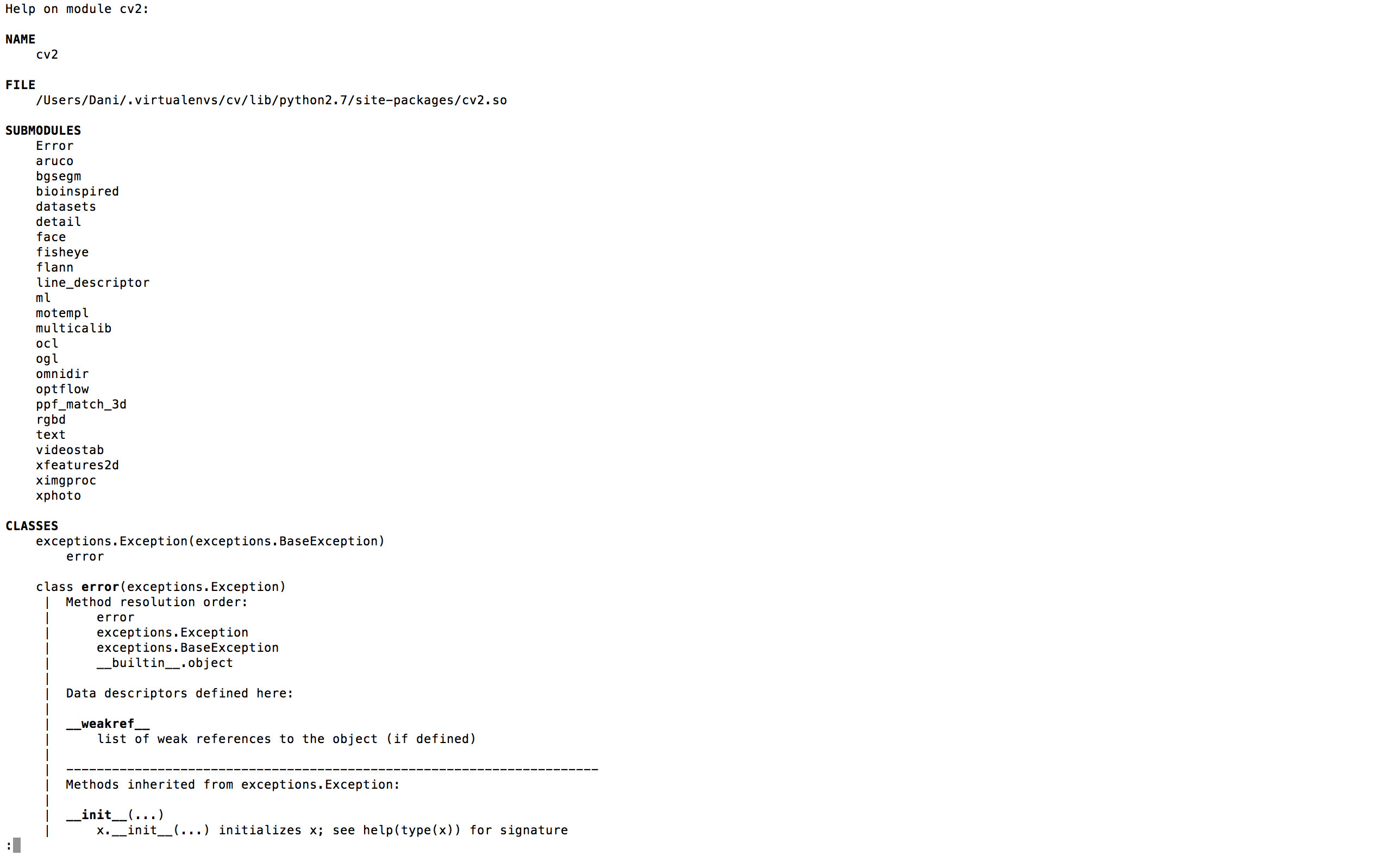
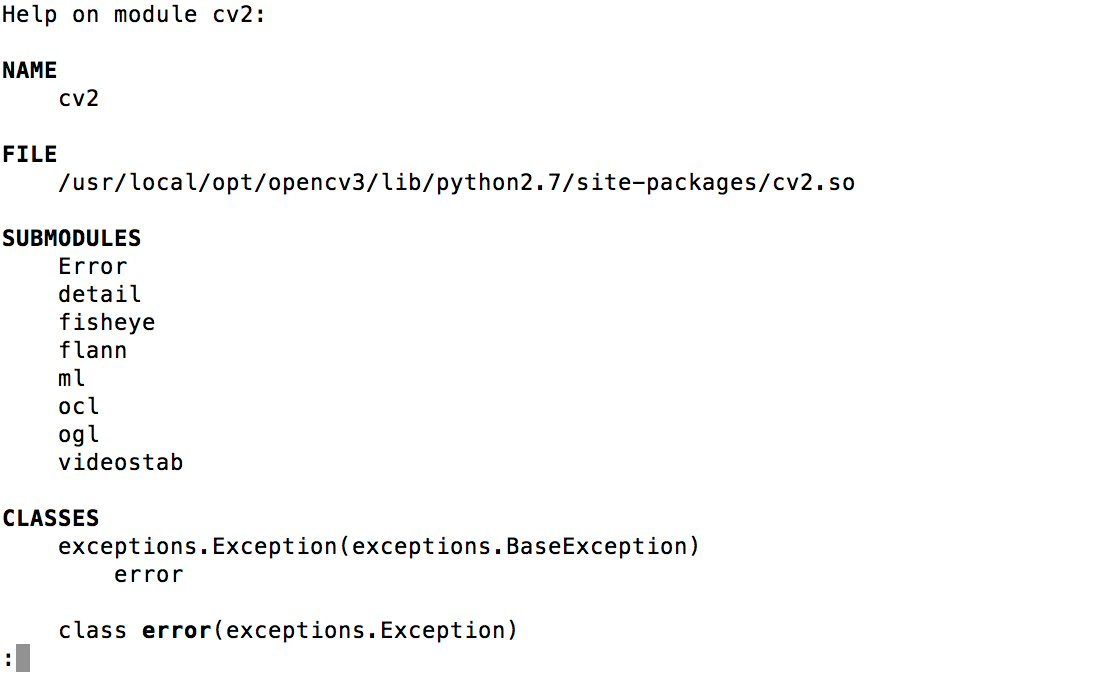
      When I just finish the installation and put help(os) I get install all the modules (include face module), but a few seconds after this modules disappear and I can’t use the face module to complete train.py . Someone know what could happen? I reinstall everything many times but doesn’t work. At the end I post 2 images of the modules at the installation, and few seconds after.

      I use this web to know how to install: http://www.pyimagesearch.com/2015/06/15/install-opencv-3-0-and-python-2-7-on-osx/

      Img_all_modules
      img_problem_module
      Regards,

      posted in Development
      piedanielP
      piedaniel
    • RE: "phyton capture.py" error

      Hi, tranks for help in my problem. Yes, the Camara is enable on the raspi-config.

      I’m using an USB camara, was detected by the Raspberry and take pictures if I use “fswebcam image.jpg” command.

      Another problem is if use images that have to compilate the face-detection-trainer, it generate the negative of pics but not generate the xml file. What could be happens?

      Regards,
      DP

      posted in Troubleshooting
      piedanielP
      piedaniel
    • "phyton capture.py" error

      When I try to run “phyton capture.py” I have the next error:

      pi@raspberrypi:~/MagicMirror/modules/MMM-Facial-Recognition-Tools-master/facetrainer $ python capture.py
      What do you want to do?
      [1] Capture training images from webcam
      [2] Convert ‘*.jpg’ pictures from other cameras to training images
      –> 1

      Enter the name of the person you want to capture or convert images for.
      –> c
      Images will be placed in ./training_data/c


      Starting process…

      Capturing positive training images.
      Type c (and press enter) to capture an image.
      Press Ctrl-C to quit.
      c
      Capturing image…
      mmal: mmal_vc_component_create: failed to create component ‘vc.ril.camera’ (1:ENOMEM)
      mmal: mmal_component_create_core: could not create component ‘vc.ril.camera’ (1)
      Traceback (most recent call last):
      File “capture.py”, line 35, in
      capture.capture()
      File “/home/pi/MagicMirror/modules/MMM-Facial-Recognition-Tools-master/facetrainer/lib/capture.py”, line 55, in capture
      image = camera.read()
      File “/home/pi/MagicMirror/modules/MMM-Facial-Recognition-Tools-master/facetrainer/lib/picam.py”, line 23, in read
      with picamera.PiCamera() as camera:
      File “/usr/lib/python2.7/dist-packages/picamera/camera.py”, line 488, in init
      self.STEREO_MODES[stereo_mode], stereo_decimate)
      File “/usr/lib/python2.7/dist-packages/picamera/camera.py”, line 526, in _init_camera
      "Camera is not enabled. Try running ‘sudo raspi-config’ "
      picamera.exc.PiCameraError: Camera is not enabled. Try running ‘sudo raspi-config’ and ensure that the camera has been enabled.

      But when I use the comand “fswebcam image.jpg” i can use without problem. Someone know what is happend?

      posted in Troubleshooting
      piedanielP
      piedaniel
    • 1 / 1