@bminer1 Made the fontsize smaller in css.Please try it.
You can try to tweak this is it still behaves oddly.
.MMM-WunderGround .smaller {
    font-size: 60%;
}
@bminer1 Made the fontsize smaller in css.Please try it.
You can try to tweak this is it still behaves oddly.
.MMM-WunderGround .smaller {
font-size: 60%;
}
@bminer1 Pull the new version ;)
@ostfilinchen There’s a new version. I left my test in which just used metric. Imperial users wouldn’t be happy. I’ve also added trim to the wordwrap function so here aren’t any trailing spaces
Doesn’t seem to happen on my setup…
Is your issue that the % sign is on a seperate line?
@Mykle1 Hi,
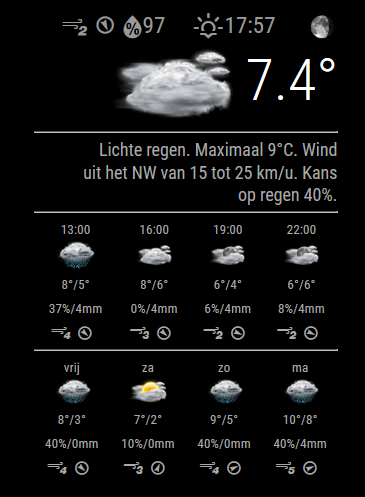
Thank you for your kind words. I’ve now pushed a version that will dynamically scale the fontsize/line length of the forecast text. Give it a go! :D
@Bobby Whoops, thats a Dutch abbreveation of ‘instead of’… Should really make that a config item… :S
Hi Bobby,
Your config should be something like this:
	{
		module: "MMM-TrafficCal",
		position: "top_left",
		classes: "dimmed medium",
		config: {
			api_key: "API KEY to the calendar holding your trip planning, could optionally be a seperate one",
			origin: "Damrak 1, Amsterdam", // Your default trip origin. Must be an unambiguous google resolvable adress
			tripkey: "MYTRIPS", // A keyword to identify a TrafficCal calendar entry
			chinangeColor: true,
			limitYellow: 25,
			limitRed: 50,
			traffic_model: "pessimistic",
			interval: 120000
		}
	},


    An example of an entry:
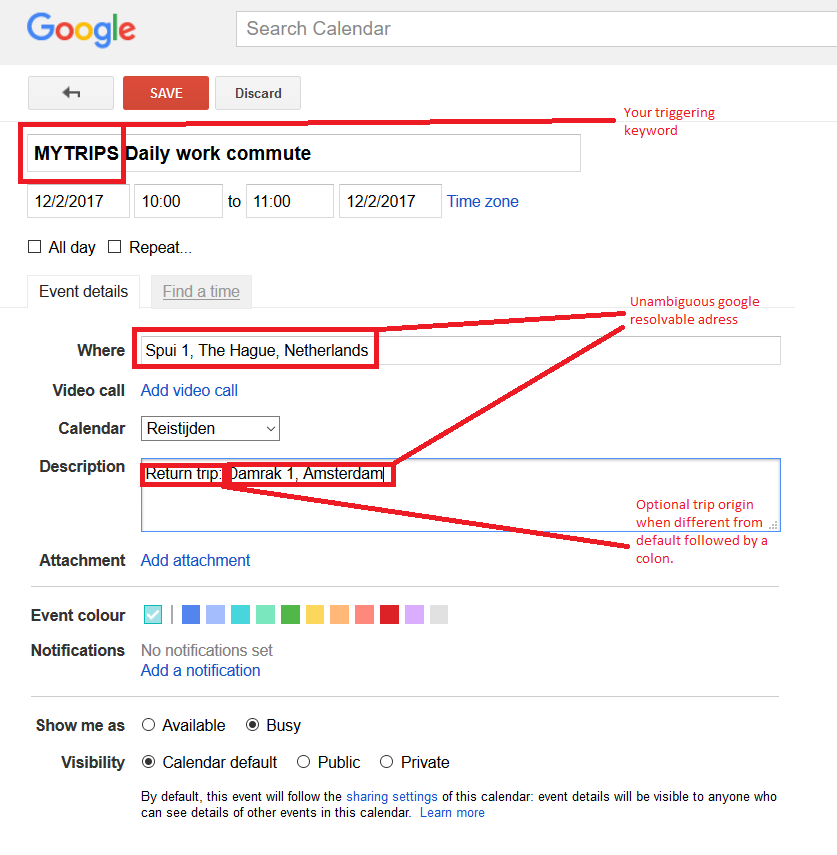
You’ll have to run a calendar module with the MYTRIPS calendar entries in it. You can optionally hide it using the remote control module.
	{
		module: "calendar",
		header: "Trips",
		position: "top_left",
		fetchInterval: 60000,
		config: {
			maximumNumberOfDays: 1,
			calendars: [
				{
					symbol: "calendar-check-o ",
					url: "https://calendar.google.com/calendar/ical/YOUR URL TO THE TRIPS CALENDAR",
					maximumNumberOfDays: 1
				}
			],
			titleReplace: {
				"De verjaardag van ": "",
				"'s birthday": ""
			}
		}
	},
Good luck!
Just pushed a new version which fixes all this. Give it a try!
@lolobyte I’m sorry to hear you’re not happy with the layout. Could you be a bit more precide on the nature of your issue? Are the icons too large, too much information… A screenshot with arrows would be nice.
Thanks!
@ChrisLaurie Just pushed a new version with this feature. Have a look :)
@ostfilinchen Now i have, and thanks to @anatius for this!
@PointPubMedia Not really… typo in the code. Fixed now… (hopefully)
@PointPubMedia You can now disable the popup by adding show_popup: 0 to your config.
@dialdn This is now implemented… just pull the latest master :)
@ostfilinchen Could you pm me the url directly from the pm2 logs so i can investigate this further?
Now that the scheduling of teh updates takes place in node_helper.js (server side) and not in the browser it hasn’t missed a beat in a couple days now.
What did however started showing up are estimated’ forecasts due to “These are estimated conditions. There are no weather stations nearby.” conditions. These estimations seem to be made by consulting a potato because (for me) they’re wildly off (more than 10 degrees C).
I’ve just pushed a commit which ignores these estimated forecasts. Also there’s a dramatic level of logging being generated now to pin down any issues you may run in to.
Changed around some things in the way information is retrieved from weatherunderground. It’s on github, please test.