
MagicMirror Forum
    • Recent
    • Tags
    • Unsolved
    • Solved
    • MagicMirror² Repository
    • Documentation
    • 3rd-Party-Modules
    • Donate
    • Discord
    • Register
    • Login
    1. Home
    2. Sam 0
    3. Posts
    A New Chapter for MagicMirror: The Community Takes the Lead
    Read the statement by Michael Teeuw here.
    S
    Offline
    • Profile
    • Following 0
    • Followers 0
    • Topics 7
    • Posts 40
    • Groups 0

    Posts

    Recent Best Controversial
    • RE: MMM-HolidayLights beautiful CSS for a slightly calmer light

      @thartley said in MMM-HolidayLights beautiful CSS for a slightly calmer light:

      @Sam-0 Thank you for this module and the css code.
      I like that the lights are partially covering the information that is already being displayed in the upper area, but the “twinkle” effect lets the information show through when the bulbs go into their dim phase. It is kind of a 3D effect.
      I usually struggle with trying to modify css to tweak settings. Your comments/notes in your HolidayTemplate.css file explained things nicely for what the various parts do and how they control parts of the light string.
      Using that information, I added a couple more colors (blue and orange) to a copy of the Christmas.css file. With all the examples you provided, I was able to copy code snippets from your other examples and paste them into my Christmas test copy, edit their position numbers, and add two more instances in the “.strand li:nth-child…” section of the css file. One thing that wasn’t notated in your documentation was what color name (ex: blue or red) each section creates, but you did tell us to go to https://www.colorhexa.com/ where we can get the information. From there it’s an easy task to get the color names and add a color name comment for each light in the css file.
      I grabbed the code for the blue and orange from your Pride.css file. Blue is light #2, orange is light #5 from that css file.
      One last comment - my normal MM setup is pretty basic. I can run my Le Potato with just a heat sink and the CPU temperature stays at 46C. With the Holiday Lights module running, it gets up to 67C so I reinstalled the 10cm fan that came with the case and it’s down to 49C.

      Thanks for your comment. To be clear, I am not the creator of this module. But I enjoyed adjusting the colors and sharing this css. What you also indicated and I now see the connection is that my CPU heat also increased. I have installed heat sinks for this.

      posted in Entertainment
      S
      Sam 0
    • MMM-HolidayLights beautiful CSS for a slightly calmer light

      76af8537-6252-43f3-b44f-52c5cff46a12-image.png
      I share this beautiful CSS for a slightly calmer light.
      This is the module:
      https://github.com/justjim1220/MMM-HolidayLights.

      Show what yours looks like or your adjustments.

      /* to modify, follow the commented directions
       * please report any problems or issues, I'm always glad to help! */
      
      .MMM-HolidayLights {
          width: 100%;
          align-self: center;
      }
      .strand {
      	text-align: center;
      	white-space: nowrap;
      	overflow: hidden;
      	position: absolute;
      	z-index: 1;
      	margin: -15px 0 0 0;
      	padding: 0;
      	pointer-events: none;
      }
      
      .strand li {
      	position: relative;
      	-webkit-animation-fill-mode: both;
      	animation-fill-mode: both;
      	-webkit-animation-iteration-count: infinite;
      	animation-iteration-count: infinite;
      	list-style: none;
      	margin: 0;
      	padding: 0;
      	display: block;
      	width: 36px;
      	height: 75px;
      	border-radius: 50%;
      	margin: 20px;
      	display: inline-block;
      	-webkit-animation-name: flash-1;
      	animation-name: flash-1;
      	-webkit-animation-duration: 1.7s;
      	animation-duration: 1.7s;
      }


      .strand li:nth-child(2n+1) {
      	-webkit-animation-name: flash-2;
      	animation-name: flash-2;
      	-webkit-animation-duration: 2s;
      	animation-duration: 2s;
      }
      
      .strand li:nth-child(3n+2){
      	-webkit-animation-name: flash-3;
      	animation-name: flash-3;
      	-webkit-animation-duration: 1.4s;
      	animation-duration: 1.4s;
      }
      
      .strand li:nth-child(4n+3) {
      	-webkit-animation-name: flash-4;
      	animation-name: flash-4;
      	-webkit-animation-duration: 1.1s;
      	animation-duration: 1.1s;
      }
      
      .strand li:before {
      	content: "";
      	position: absolute;
      	background: #090;
      	width: 32px;
      	height: 9.33333px;
      	border-radius: 3px;
      	top: -6.66667px;
      	left: 1px;
      }
      
      .strand li:after {
      	content: "";
      	top: -20px;
      	left: 28px;
      	position: absolute;
      	width: 52px;
      	height: 18.66667px;
      	border-bottom: solid #090 2px;
      	border-radius: 50%;
      }
      
      .strand li:last-child:after {
      	content: "";
      }
      
      /* the following sections are for the flashing animations
      * each light has 2 sections with correspong frames, IE: @-webkit-keyframes flash-1 & @keyframes flash-1
      * both sections must match in color
      * the 0%, 100% section is the light ON, the 50% sction is the light OFF
      * the box-shadow lines MUST br in rgba format to get the 50% of the color
      * to find the rgb of a hex color code, go here: https://www.colorhexa.com/
      * you may find it easier to use rgb format for the background (0%, 100%) color as well
      * the rgb format must have 3 numbers IE: rgba(255, 66, 0)
      * to get the 50% effect add an a to the rgb and 0.5 at the end of the rgb
      * the rgba format must have 4 numbers IE: rgba(255, 66, 0, 0.5)
      * this template is set for 6 different colored lights
      * to have less, delete or comment out the last one(s)
      * IE: to have only 3 lights, remove the fourth, fifth, & sixth sections */
      
      /* color of 1st light in the string */
      @-webkit-keyframes flash-1 {
      	0%, 100% {
      		background: #daa520; /* change color here */
      		box-shadow: 0px 4.66667px 48px 3px #daa520; /* change color here */
      	}
      	50% {
      		background: rgba(255, 215, 0); /* change color here */
      		box-shadow: 0px 4.66667px 48px 3px rgba(255, 215, 0); /* change color here */
      	}
      }
      
      @keyframes flash-1 {
      	0%, 100% {
              background: #daa520; /* change color here */
              box-shadow: 0px 4.66667px 48px 3px #daa5200; /* change color here */
          }
          50% {
              background: rgba(255, 215, 0); /* change color here */
              box-shadow: 0px 4.66667px 48px 3px rgba(255, 215, 0); /* change color here */
          }
      }
      
      /* color of 2nd light in the string */
      @-webkit-keyframes flash-2 {
      	0%,	100% {
      		background: #daa520; /* change color here */
      		box-shadow: 0px 4.66667px 48px 3px #daa520; /* change color here */
      	}
      	50% {
      		background: rgba(255, 215, 0); /* change color here */
      		box-shadow: 0px 4.66667px 48px 3px rgba(255, 215, 0)); /* change color here */
      	}
      }
      
      @keyframes flash-2 {
      	0%, 100% {
              background: #daa520; /* change color here */
              box-shadow: 0px 4.66667px 48px 3px #daa520; /* change color here */
          }
          50% {
              background: rgba(255, 215, 0); /* change color here */
              box-shadow: 0px 4.66667px 48px 3px rgba(255, 215, 0); /* change color here */
          }
      }
      
      /* color of 3rd light in the string */
      @-webkit-keyframes flash-3 {
      	0%,	100% {
      		background: #daa520; /* change color here */
      		box-shadow: 0px 4.66667px 48px 3px #daa520; /* change color here */
      	}
      	50% {
      		background: rgba(255, 215, 0); /* change color here */
      		box-shadow: 0px 4.66667px 48px 3px rgba(255, 215, 0); /* change color here */
          }
      }
      
      @keyframes flash-3 {
      	0%, 100% {
              background: #daa520; /* change color here */
              box-shadow: 0px 4.66667px 48px 3px #daa520; /* change color here */
          }
          50% {
              background: rgba(255, 215, 0); /* change color here */
              box-shadow: 0px 4.66667px 48px 3px rgba(255, 215, 0); /* change color here */
          }
      }
      
      /* color of 4th light in the string */
      @-webkit-keyframes flash-4 {
          0%,	100%{
              background: #daa520; /* change color here */
              box-shadow: 0px 4.6667px 48px 3px #daa520; /* change color here */
          }
          50%{
              background: rgba(255, 215, 0); /* change color here */
              box-shadow: 0px 4.66667px 48px 3px (66, 0, 0, 0.5); /* change color here */
          }
      }
          
      @keyframes flash-4 {
          0%,	100% {
              background: #daa520; /* change color here */
              box-shadow: 0px 4.66667px 48px 3px #daa520; /* change color here */
          }
          50% {
              background: rgba(255, 215, 0); /* change color here */
              box-shadow: 0px 4.66667px 48px 3px rgba(255, 215, 0); /* change color here */
          }
      }
      
      /* color of 5th light in the string */
      @-webkit-keyframes flash-5 {
          0%,	100%{
              background: #daa520; /* change color here */
              box-shadow: 0px 4.6667px 48px 3px #daa520;
          }
          50%{
              background: rgba(255, 215, 0); /* change color here */
              box-shadow: 0px 4.66667px 48px 3px rgba(255, 215, 0); /* change color here */
          }
      }
          
      @keyframes flash-5 {
          0%,	100% {
              background: #daa520; /* change color here */
              box-shadow: 0px 4.66667px 48px 3px #daa520; /* change color here */
          }
          50% {
              background: rgba(255, 215, 0); /* change color here */
              box-shadow: 0px 4.66667px 48px 3px rgba(255, 215, 0); /* change color here */
          }
      }
      
      /* color of 6th light in the string */
      @-webkit-keyframes flash-6 {
          0%,	100%{
              background: #daa520; /* change color here */
              box-shadow: 0px 4.6667px 48px 3px #daa520; /* change color here */
          }
          50%{
              background: rgba(255, 215, 0); /* change color here */
              box-shadow: 0px 4.66667px 48px 3px rgba(255, 215, 0); /* change color here */
          }
      }
          
      @keyframes flash-6 {
          0%,	100% {
              background: #daa520; /* change color here */
              box-shadow: 0px 4.66667px 48px 3px #daa520; /* change color here */
          }
          50% {
              background: rgba(255, 215, 0); /* change color here */
              box-shadow: 0px 4.66667px 48px 3px rgba(255, 215, 0); /* change color here */
          }
      }


      posted in Entertainment
      S
      Sam 0
    • RE: MMM-CalendarExt3 how do you create multiple events with color css?

      @MMRIZE said in MMM-CalendarExt3 how do you create multiple events with color css?:

      First,
      You can assign colour or class per each calendar. So check if your events are separated by different calendars. Check it first.

      I only have one calendar. I’ve already looked at an example but it doesn’t seem to work.

      I found this example on this forum.

      with customer.css
      .CX3 .Ben {
      color: brown;
      }
      
      eventTransformer: function(ev) {
        if (ev.title.search(“Ben”) > -1)  ev.className = “Ben”;
        return ev
      }
      

      This doesn’t seem to do much, the color just remains white.
      But is this possible?

      posted in Utilities
      S
      Sam 0
    • RE: MMM-CalendarExt3 how do you create multiple events with color css?

      @MMRIZE

      I also tested your code and it works fine too.

      posted in Utilities
      S
      Sam 0
    • RE: MMM-CalendarExt3 how do you create multiple events with color css?

      @MMRIZE

      Thank you very much for your effort. I try to describe as best as I can what is working now so that others can learn from it.

      Okay, I did some further research based on the term symbol and saw that the symbols had to be added in the general calendar. I also saw them in MMM-CalendarExt3 as below.
      Will show my config code here:

      {
      			module: "calendar",
      			header: "Familie agenda",
      			position: "top_left",
      			config: {
      				calendars: [
      					{
      						
      						fetchInterval: 7 * 24 * 60 * 60 * 1000,
      						symbol: "calendar-check",
      						url: "outlook url"
      }	
      ],					
      customEvents: [
          	{keyword: "zwemmen", symbol: "person-swimming fas fa-fw fa-person-swimming"},
          	{keyword: "padel", symbol: "running fas fa-fw fa-running"},
      	{keyword: "zingen", symbol: "music fas fa-fw fa-music"},
      	{keyword: "verjaardag", symbol: "cake-candles fas fa-fw fa-cake-candles"},
          	{keyword: "volleybal", symbol: "volleyball fas fa-fw fa-volleyball"}
      ],
      					
      				
      			}
      		},
      
      
      {
        module: "MMM-CalendarExt3",
        position: "lower_third",
        title: "",
        config: {
      eventTransformer: (ev) => {
         if (ev.title.search('Uitje') > -1) ev.color = 'blue'
         if (ev.title.search('Verjaardag') > -1) ev.color = '#FF69B4'


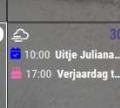
      5ff82a89-e316-441b-8f3d-996c6f1074eb-image.png

      I will also try your previous code.

      I would also like to control the color via CSS in the config file.
      How are you doing this? I already tried something but this doesn’t seem to work.

      posted in Utilities
      S
      Sam 0
    • RE: MMM-CalendarExt3 how do you create multiple events with color css?

      @MMRIZE

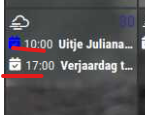
      So I see that Outing has turned blue, but I don’t see any other symbol for birthday.

      ef0ab2b0-d451-47a5-852e-8a219a76a910-image.png

      posted in Utilities
      S
      Sam 0
    • RE: MMM-CalendarExt3 how do you create multiple events with color css?

      @MMRIZE
      I have removed the custom CSS so it is standard, but I do not see the icon but I do see the blue color.

      posted in Utilities
      S
      Sam 0
    • RE: MMM-CalendarExt3 how do you create multiple events with color css?

      @MMRIZE

      Thanks for your help, it went wrong at first because a bracket was missing.) I adjusted this but unfortunately it doesn’t work. Could this be related to the fact that I have already adjusted the CSS?

      {
        module: "MMM-CalendarExt3",
        position: "lower_third",
        title: "",
        config: {
             eventTransformer: (ev) => {
                    if (ev.title.search('Uitje') > -1) ev.color = 'blue'
                    if (ev.title.search('Verjaardag') > -1) ev.icon = 'birthday-cake'
                    return ev	
             },
         }
      }
      

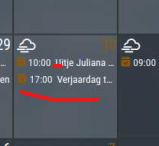
      c63fb0e4-c96c-4db6-81fa-194143cf7d57-image.png

      posted in Utilities
      S
      Sam 0
    • RE: MMM-CalendarExt3 how do you create multiple events with color css?

      @MMRIZE said in MMM-CalendarExt3 how do you create multiple events with color css?:

      if (ev.title.search(‘verjaardag’ > -1) ev.icon = ‘birthday-cake’

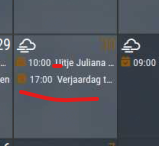
      Thanks for your help, it went wrong at first because a bracket was missing.) I adjusted this but unfortunately it doesn’t work. Could this be related to the fact that I have already adjusted the CSS?

      {
      module: “MMM-CalendarExt3”,
      position: “lower_third”,
      title: “”,
      config: {
      eventTransformer: (ev) => {
      if (ev.title.search(‘Uitje’) > -1) ev.color = ‘blue’
      if (ev.title.search(‘Verjaardag’) > -1) ev.icon = ‘birthday-cake’
      return ev
      },
      544eb320-2f9e-4d33-8d22-b7f31600e92b-image.png

      posted in Utilities
      S
      Sam 0
    • MMM-CalendarExt3 how do you create multiple events with color css?

      Hi,

      How do you create multiple events with color css?
      Is there an example of what this looks like?
      I now have the following and it works, but I don’t know how I want to add a second event, so in addition to outings, for example birthdays

      {
      module: “MMM-CalendarExt3”,
      position: “lower_third”,
      title: “”,
      config: {
      eventTransformer: (ev) => {
      if (ev.title.search(‘Uitje’) > -1) ev.color = ‘blue’
      return ev
      },

      I also wonder how I can get a nice icon in an event, for example a birthday cake icon, does anyone have an example that I can look at?

      posted in Utilities
      S
      Sam 0
    • 1
    • 2
    • 3
    • 4
    • 4 / 4